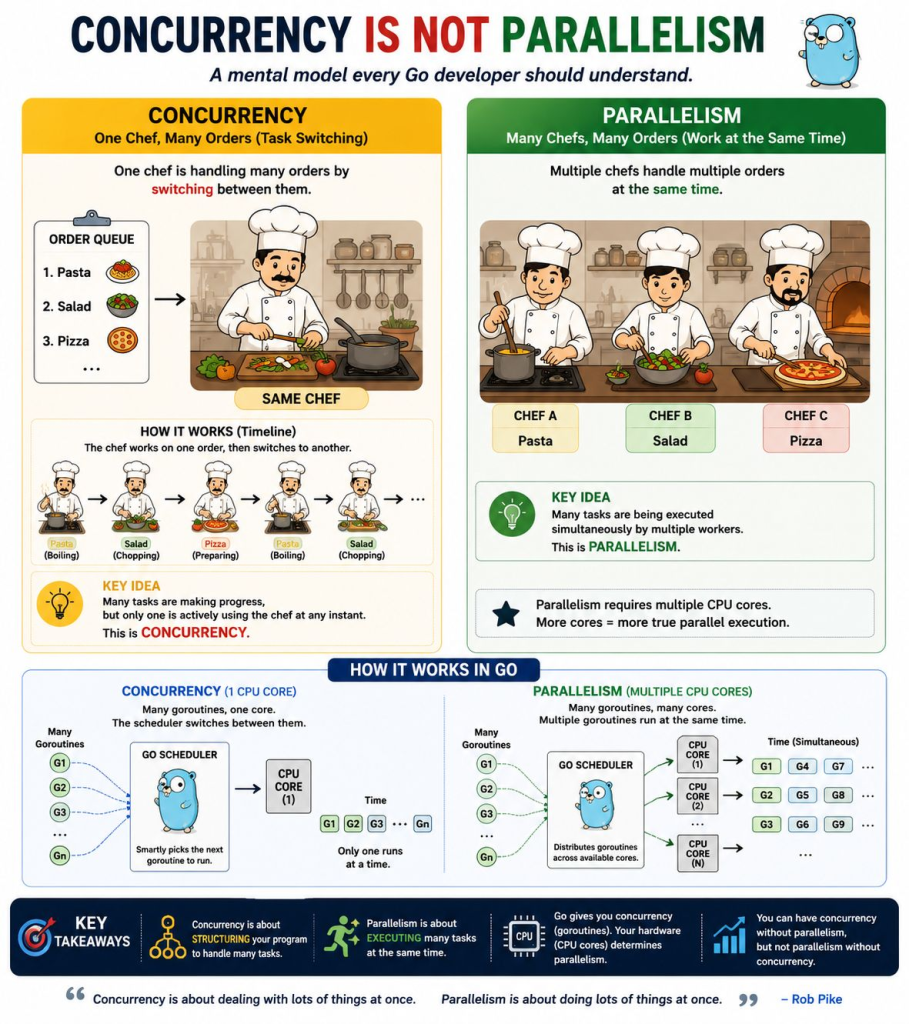
Yes. Here is a simple Mermaid diagram showing both Concurrency and Parallelism in Go.
Concurrency — 1 CPU Core
flowchart TD
    G1["G1: Task 1"]
    G2["G2: Task 2"]
    G3["G3: Task 3"]

    S["Go Scheduler"]
    C1["CPU Core 1"]

    G1 --> S
    G2 --> S
    G3 --> S

    S --> C1

    C1 --> T["G1 → G2 → G1 → G3 → G2 → G3"]
Meaning: The Go scheduler switches between goroutines because only one CPU core is available.
Parallelism — Multiple CPU Cores
flowchart TD
    G1["G1: Task 1"]
    G2["G2: Task 2"]
    G3["G3: Task 3"]

    S["Go Scheduler"]

    C1["CPU Core 1"]
    C2["CPU Core 2"]
    C3["CPU Core 3"]

    G1 --> S
    G2 --> S
    G3 --> S

    S --> C1
    S --> C2
    S --> C3

    C1 --> R1["G1"]
    C2 --> R2["G2"]
    C3 --> R3["G3"]
Simplest way to remember
Concurrency
G1 ┐
G2 ├── Go Scheduler ──> 1 CPU Core
G3 ┘
                         ↓
                  Taking turns


Parallelism
G1 ┐                      ┌─> Core 1 → G1
G2 ├── Go Scheduler ──────┼─> Core 2 → G2
G3 ┘                      └─> Core 3 → G3

                     Same time
Concurrency = goroutines take turns.
Parallelism = goroutines can run at the same time on different CPU cores.
Go concurrency becomes much easier when you separate these ideas:
Concurrency
    ↓
Goroutines = workers doing work concurrently
    ↓
Channels = communication path between goroutines
    ↓
Messages = values sent through channels
    ↓
WaitGroup = waits until goroutines finish
A useful mental model is a restaurant kitchen:
| Go concept | Simple analogy |
|---|---|
| Concurrency | Several orders being handled at the same time |
| Goroutine | One cook |
| Worker | A cook assigned to process jobs |
| Channel | Counter/conveyor where jobs are placed |
| Message | The actual order placed on the counter |
| WaitGroup | Manager waiting for all cooks to finish |
1. Concurrency
What is concurrency?
Concurrency means:
Multiple tasks can make progress during the same period of time.
In Go, concurrency is mainly implemented using goroutines.
Suppose you have three jobs:
Job 1 → 2 seconds
Job 2 → 2 seconds
Job 3 → 2 seconds
Without concurrency:
Job1 → Job2 → Job3

2 sec + 2 sec + 2 sec = ~6 seconds
With concurrency:
Job1 ─────┐
Job2 ─────┼── running together
Job3 ─────┘

≈ 2 seconds
Why?
Concurrency is useful when your program spends time waiting for things such as:
- APIs
- databases
- files
- network requests
- timers
- user requests
When?
Use concurrency when multiple independent operations can happen at the same time.
How?
Most commonly:
go someFunction()Where?
Very common in:
Web Servers
APIs
Microservices
Network applications
Background processing
Worker systems
File processing
Complete Example — Concurrency
Save as:
main.gopackage main
import (
"fmt"
"time"
)
func task(name string) {
fmt.Println(name, "started")
// Simulate some work
time.Sleep(2 * time.Second)
fmt.Println(name, "finished")
}
func main() {
// Start three tasks concurrently.
go task("Task 1")
go task("Task 2")
go task("Task 3")
// Keep main alive long enough for this simple demo.
time.Sleep(3 * time.Second)
fmt.Println("Program finished")
}Run:
go run main.goPossible output:
Task 3 started
Task 1 started
Task 2 started
Task 2 finished
Task 1 finished
Task 3 finished
Program finished
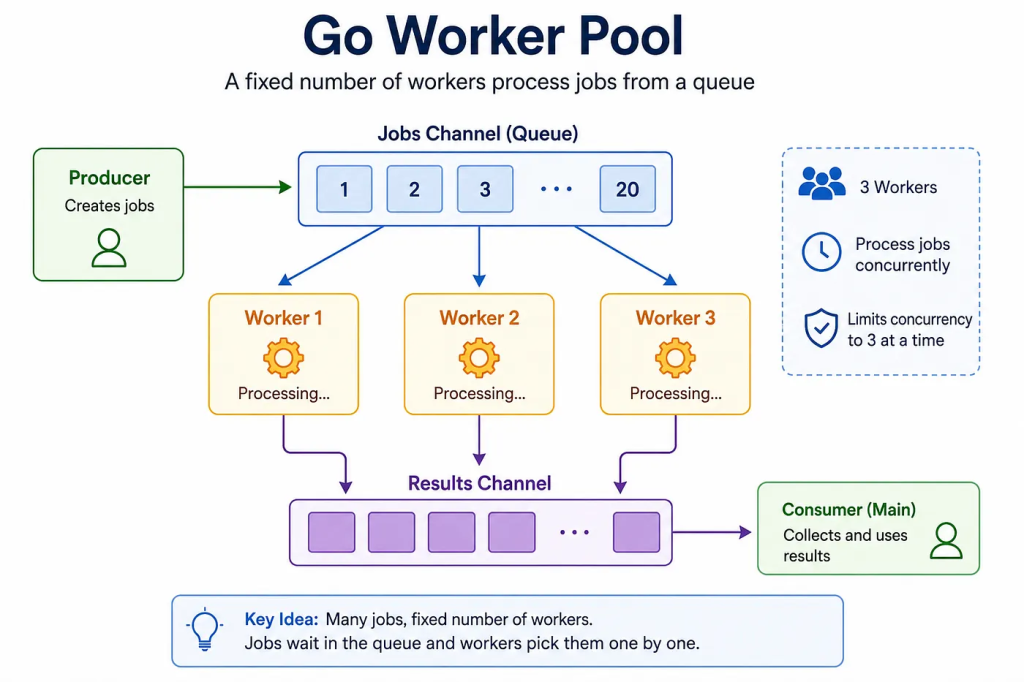
Notice that the order is not guaranteed.
That is normal in concurrent programming.
Important
This:
task("Task 1")means:
Run the function normally and wait for it to finish.
This:
go task("Task 1")means:
Start
task()as a goroutine and continue without waiting for it.
2. Goroutine — Concurrent Worker
A goroutine is a lightweight concurrent function managed by Go.
You can think:
function + go keyword = goroutineFor example:
worker()Normal function call.
But:
go worker()starts it concurrently.
What?
A goroutine is a function running independently/concurrently with other goroutines.
Why?
It lets multiple pieces of work progress without forcing one to completely finish before another starts.
When?
Use it when tasks are independent.
Examples:
Call API A
Call API B
Call API C
Instead of waiting:
A → B → Cthey could run:
A ──────────
B ──────────
C ──────────
How?
Simply add:
gobefore a function call.
Where?
Common places include:
- HTTP servers
- API calls
- database operations
- background jobs
- queues
- worker pools
Complete Example — Goroutine Worker
package main

import (
	"fmt"
	"time"
)

// worker represents some work we want done.
func worker(id int) {

	fmt.Println("Worker", id, "started")

	time.Sleep(2 * time.Second)

	fmt.Println("Worker", id, "finished")
}

func main() {

	// Each worker runs as its own goroutine.
	go worker(1)
	go worker(2)
	go worker(3)

	// Only for this basic example.
	time.Sleep(3 * time.Second)

	fmt.Println("All done")
}
The important lines are:
go worker(1)
go worker(2)
go worker(3)
They create three goroutines.
Conceptually:
flowchart TD
    A["main()"] --> B["go worker(1)"]
    A --> C["go worker(2)"]
    A --> D["go worker(3)"]

    B --> E["Worker 1"]
    C --> F["Worker 2"]
    D --> G["Worker 3"]
Function vs Goroutine
| Normal function | Goroutine |
|---|---|
worker() | go worker() |
| Caller waits | Caller continues |
| Sequential | Concurrent |
| One completes before next statement | Work can overlap |
| Simple execution | Concurrent execution |
For example:
worker(1)
worker(2)
worker(3)
means:
Worker 1
   ↓
Worker 2
   ↓
Worker 3
But:
go worker(1)
go worker(2)
go worker(3)
means approximately:
Worker 1 ──────────
Worker 2 ──────────
Worker 3 ──────────
3. Worker + Channel + Message
This is one of the most important Go concurrency patterns.
There are three pieces:
Worker
Channel
Message
Think about it like this:
Message = work that needs to be done

Channel = path used to send the work

Worker = goroutine receiving and processing the work
For example:
Jobs
  ↓
Channel
  ↓
Worker
What is a worker?
A worker is usually a goroutine that waits for jobs.
Example:
func worker(jobs chan string)What is a channel?
A channel lets goroutines safely communicate.
Create one:
jobs := make(chan string)Send data:
jobs <- "Job 1"Receive data:
job := <-jobsThe arrow tells you the direction the value travels.
What is a message?
A message is simply the data flowing through the channel.
It could be:
string
int
struct
error
For example:
jobs <- "Process customer 1001"Here:
Channel = jobs
Message = "Process customer 1001"
Complete Example — Worker + Channel + Message
package main

import (
	"fmt"
	"time"
)

// Worker receives messages from the jobs channel.
func worker(jobs chan string) {

	// Keep receiving messages until the channel is closed.
	for job := range jobs {

		fmt.Println("Worker received:", job)

		time.Sleep(1 * time.Second)

		fmt.Println("Worker completed:", job)
	}
}

func main() {

	// Create a channel that carries strings.
	jobs := make(chan string)

	// Start worker as a goroutine.
	go worker(jobs)

	// Send messages into the channel.
	jobs <- "Job 1"
	jobs <- "Job 2"
	jobs <- "Job 3"

	// No more jobs will be sent.
	close(jobs)

	// Only for this basic example.
	time.Sleep(4 * time.Second)
}
The important part:
jobs := make(chan string)creates the channel.
Then:
jobs <- "Job 1"sends a message.
And:
for job := range jobsreceives messages.
Visualization
flowchart LR
    A["main()"] -->|"Job 1"| C["jobs channel"]
    A -->|"Job 2"| C
    A -->|"Job 3"| C

    C --> W["Worker Goroutine"]

    W --> R["Process Job"]
Think:
main
 │
 │ sends jobs
 ▼
+-------------+
|   channel   |
+-------------+
      │
      │ receives
      ▼
+-------------+
|   worker    |
+-------------+
Channel Syntax Cheat Sheet
| Operation | Code |
|---|---|
| Create channel | make(chan string) |
| Send | ch <- value |
| Receive | value := <-ch |
| Close | close(ch) |
| Read until closed | for value := range ch |
The easiest way to remember:
value goes toward the arrowSend:
jobs <- "hello"jobs ← "hello"Receive:
message := <-jobsmessage ← jobs4. Without Goroutine vs With Goroutine — Performance
This is probably the best experiment for understanding why goroutines exist.
We will execute 5 tasks.
Every task takes:
1 secondSequential execution should therefore take roughly:
5 × 1 second
=
5 seconds
Concurrent execution should take roughly:
1 secondbecause the simulated waiting overlaps.
Complete Example — Performance Comparison
Copy-paste this entire program:
package main

import (
	"fmt"
	"sync"
	"time"
)

func work(id int) {

	fmt.Println("Working on job", id)

	// Simulate slow work such as API/database/network calls.
	time.Sleep(1 * time.Second)
}

func main() {

	// --------------------------------
	// WITHOUT GOROUTINES
	// --------------------------------

	fmt.Println("WITHOUT GOROUTINES")

	start := time.Now()

	for i := 1; i <= 5; i++ {
		work(i)
	}

	fmt.Println(
		"Sequential time:",
		time.Since(start),
	)

	// --------------------------------
	// WITH GOROUTINES
	// --------------------------------

	fmt.Println("\nWITH GOROUTINES")

	start = time.Now()

	var wg sync.WaitGroup

	for i := 1; i <= 5; i++ {

		wg.Add(1)

		go func(id int) {

			defer wg.Done()

			work(id)

		}(i)
	}

	// Wait until all goroutines finish.
	wg.Wait()

	fmt.Println(
		"Concurrent time:",
		time.Since(start),
	)
}
Typical output:
WITHOUT GOROUTINES

Working on job 1
Working on job 2
Working on job 3
Working on job 4
Working on job 5

Sequential time: 5.00s


WITH GOROUTINES

Working on job 5
Working on job 2
Working on job 1
Working on job 4
Working on job 3

Concurrent time: 1.00s
Why?
Sequential:
flowchart LR
    A["Job 1<br/>1 sec"] --> B["Job 2<br/>1 sec"]
    B --> C["Job 3<br/>1 sec"]
    C --> D["Job 4<br/>1 sec"]
    D --> E["Job 5<br/>1 sec"]
Total:
1 + 1 + 1 + 1 + 1
≈ 5 seconds
Concurrent:
flowchart LR
    A["main()"] --> B["Job 1"]
    A --> C["Job 2"]
    A --> D["Job 3"]
    A --> E["Job 4"]
    A --> F["Job 5"]
All five wait concurrently:
Job 1 ───────── 1 sec
Job 2 ───────── 1 sec
Job 3 ───────── 1 sec
Job 4 ───────── 1 sec
Job 5 ───────── 1 sec

Total ≈ 1 second
Very Important: Goroutine Doesn’t Automatically Mean Faster
Our example uses:
time.Sleep()to simulate operations such as:
API call
Database request
Network request
Disk operation
These are excellent candidates for concurrency because much of the time is spent waiting.
But:
goroutine = fasteris not always true.
For tiny CPU operations, creating lots of goroutines can actually add overhead.
So think:
Use concurrency when work can meaningfully overlap, not merely because goroutines exist.
5. WaitGroup
You probably noticed a problem with our earlier examples.
We did this:
time.Sleep(3 * time.Second)That is not a good way for a real program to wait for workers.
How do we know that 3 seconds is enough?
Maybe the worker needs:
1 second
5 seconds
20 seconds
We shouldn’t guess.
That is why Go provides:
sync.WaitGroupWhat?
A WaitGroup waits for a group of goroutines to finish.
Why?
Because main() does not automatically wait for other goroutines.
Consider:
func main() {

	go worker()

	fmt.Println("Done")
}
main() might finish before worker() completes.
When main() ends:
program endsand remaining goroutines disappear.
When?
Use WaitGroup when:
You start multiple goroutines and need to wait for all of them to complete.
How?
Three main operations:
wg.Add(1)
wg.Done()
wg.Wait()
Think:
Add()  = one worker started
Done() = one worker finished
Wait() = wait until counter becomes zero
Complete Example — WaitGroup
package main

import (
	"fmt"
	"sync"
	"time"
)

func worker(id int, wg *sync.WaitGroup) {

	// Tell WaitGroup this worker is finished
	// when this function returns.
	defer wg.Done()

	fmt.Println("Worker", id, "started")

	time.Sleep(2 * time.Second)

	fmt.Println("Worker", id, "finished")
}

func main() {

	var wg sync.WaitGroup

	for i := 1; i <= 3; i++ {

		// One more goroutine will start.
		wg.Add(1)

		go worker(i, &wg)
	}

	fmt.Println("Waiting for workers...")

	// Block here until all workers call Done().
	wg.Wait()

	fmt.Println("All workers completed")
}
Possible output:
Waiting for workers...
Worker 3 started
Worker 1 started
Worker 2 started
Worker 2 finished
Worker 1 finished
Worker 3 finished
All workers completed
Understand WaitGroup Counter
Initially:
counter = 0Then:
wg.Add(1)
wg.Add(1)
wg.Add(1)
Counter becomes:
3Worker 1:
wg.Done()3 → 2Worker 2:
2 → 1Worker 3:
1 → 0Then:
wg.Wait()can continue.
flowchart TD
    A["WaitGroup = 0"] --> B["Add(1)<br/>counter = 1"]
    B --> C["Add(1)<br/>counter = 2"]
    C --> D["Add(1)<br/>counter = 3"]

    D --> E["Worker 1 Done<br/>counter = 2"]
    E --> F["Worker 2 Done<br/>counter = 1"]
    F --> G["Worker 3 Done<br/>counter = 0"]

    G --> H["Wait() released"]
Why defer wg.Done()?
You will very commonly see:
defer wg.Done()instead of:
wg.Done()at the bottom.
defer means:
Run this when the function is about to return.
So:
func worker() {

	defer wg.Done()

	// work...
}
means:
worker starts
    ↓
do work
    ↓
function finishes
    ↓
wg.Done()
It makes it much harder to accidentally forget to mark the worker finished.
Putting Everything Together
Now let’s connect every concept.
Imagine this program:
10 image-processing jobsWe create:
3 workersThe architecture could be:
flowchart LR
    M["main()"]

    M -->|"Job 1"| C["jobs channel"]
    M -->|"Job 2"| C
    M -->|"Job 3"| C
    M -->|"..."| C

    C --> W1["Worker 1<br/>goroutine"]
    C --> W2["Worker 2<br/>goroutine"]
    C --> W3["Worker 3<br/>goroutine"]

    W1 --> WG["WaitGroup"]
    W2 --> WG
    W3 --> WG

    WG --> END["Program finishes"]
This is the core idea behind many Go systems.
Complete Worker Pool Example
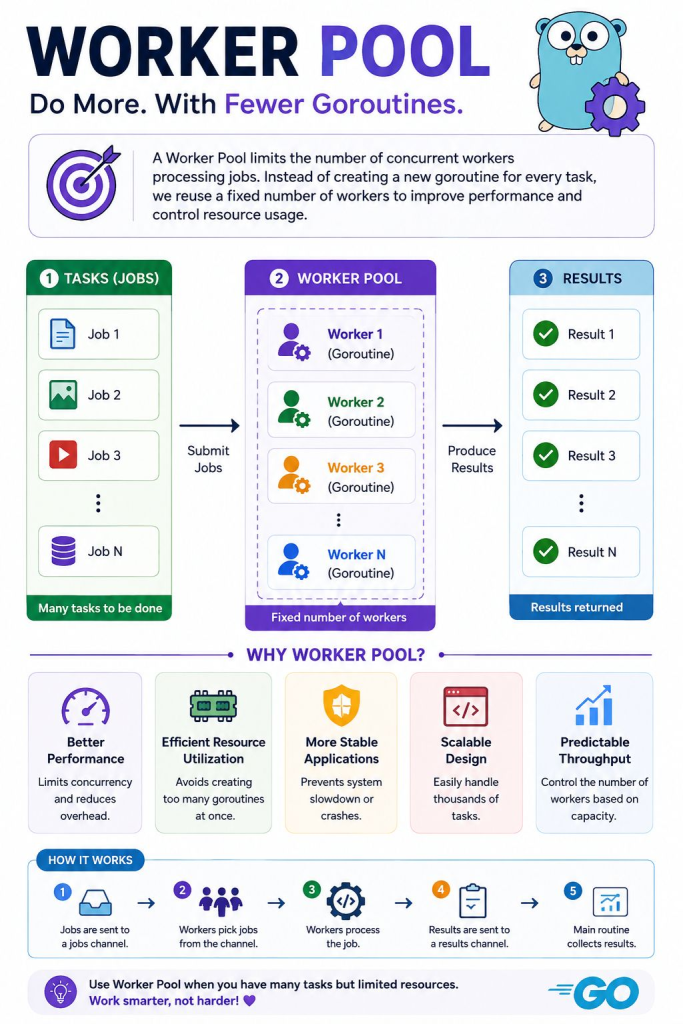
This section combines everything into one practical example.
package main

import (
	"fmt"
	"sync"
	"time"
)

// worker receives jobs from the jobs channel.
func worker(
	id int,
	jobs <-chan int,
	wg *sync.WaitGroup,
) {

	defer wg.Done()

	// Continue until jobs channel is closed.
	for job := range jobs {

		fmt.Println(
			"Worker", id,
			"processing job", job,
		)

		time.Sleep(1 * time.Second)
	}

	fmt.Println("Worker", id, "finished")
}

func main() {

	// Channel containing jobs/messages.
	jobs := make(chan int)

	var wg sync.WaitGroup

	// Start 3 workers.
	for i := 1; i <= 3; i++ {

		wg.Add(1)

		go worker(i, jobs, &wg)
	}

	// Send 6 jobs.
	for job := 1; job <= 6; job++ {
		jobs <- job
	}

	// Tell workers there are no more jobs.
	close(jobs)

	// Wait for workers to finish.
	wg.Wait()

	fmt.Println("All jobs completed")
}
Possible output:
Worker 3 processing job 1
Worker 1 processing job 2
Worker 2 processing job 3

Worker 2 processing job 4
Worker 3 processing job 5
Worker 1 processing job 6

Worker 1 finished
Worker 2 finished
Worker 3 finished

All jobs completed
This example is extremely important because it represents a real worker pool.
What Exactly Happened?
First:
jobs := make(chan int)creates the job channel.
Then:
go worker(1, jobs, &wg)
go worker(2, jobs, &wg)
go worker(3, jobs, &wg)
conceptually creates three workers.
They are all waiting here:
for job := range jobsThen main() sends:
jobs <- 1
jobs <- 2
jobs <- 3
Workers receive them.
Conceptually:
                    jobs channel

Job 1 ────────────→ Worker 1
Job 2 ────────────→ Worker 2
Job 3 ────────────→ Worker 3
Job 4 ────────────→ whichever worker becomes free
Job 5 ────────────→ whichever worker becomes free
Job 6 ────────────→ whichever worker becomes free
Finally:
close(jobs)means:
No more jobs are coming.
And:
wg.Wait()means:
Don’t finish
main()until every worker finishes.
Worker vs Goroutine
These terms are related but are not exactly the same thing.
A goroutine is a Go language/runtime mechanism.
A worker is a programming design concept.
For example:
go worker()Here:
worker()
    =
function containing worker logic

go worker()
    =
worker running inside a goroutine
So:
A worker is usually implemented using a goroutine.
But every goroutine is not necessarily called a worker.
Example:
go logSomething()That’s a goroutine, but you probably wouldn’t describe it as a worker pool worker.
Worker vs Channel vs Message vs WaitGroup
This is the comparison worth remembering.
| Concept | What is it? | Main purpose | Example |
|---|---|---|---|
| Concurrency | Overall programming model | Multiple tasks progress together | Many API calls |
| Goroutine | Lightweight concurrent execution | Run a function concurrently | go worker() |
| Worker | Function/goroutine processing jobs | Perform work | worker(1) |
| Channel | Communication pipe | Transfer data between goroutines | jobs := make(chan int) |
| Message | Data sent through channel | Represent job/event/data | jobs <- 10 |
| WaitGroup | Synchronization mechanism | Wait for goroutines | wg.Wait() |
Exact Relationship
flowchart TD

    C["Concurrency"]

    C --> G["Goroutines"]

    G --> W1["Worker 1"]
    G --> W2["Worker 2"]
    G --> W3["Worker 3"]

    CH["Channel"] -->|"Messages / Jobs"| W1
    CH -->|"Messages / Jobs"| W2
    CH -->|"Messages / Jobs"| W3

    W1 --> WG["WaitGroup"]
    W2 --> WG
    W3 --> WG

    WG --> M["main() continues"]
The Five Things You Should Remember
If everything else feels confusing, remember these five lines:
// 1. Start something concurrently
go worker()
// 2. Create communication pipe
jobs := make(chan int)// 3. Send message
jobs <- 100// 4. Receive message
job := <-jobs// 5. Wait for goroutines
wg.Wait()That is most of the foundation.
One Mental Model for Everything
Think about an Amazon warehouse.
Orders
   ↓
+-------------------+
|   Conveyor Belt   |  ← Channel
+-------------------+
   ↓      ↓      ↓
Worker  Worker  Worker
   1       2       3
   ↓       ↓       ↓
Process Process Process
 Orders  Orders  Orders
   ↓       ↓       ↓
      WaitGroup
          ↓
     All finished
Mapping:
| Warehouse | Go |
|---|---|
| Warehouse operation | Concurrency |
| Employee | Worker |
| Employee working independently | Goroutine |
| Conveyor belt | Channel |
| Package/order | Message |
| Supervisor waiting for everyone | WaitGroup |
If this picture is clear, Go concurrency becomes much easier.
Sequential vs Concurrent vs Worker Pool
Finally, distinguish these three architectures.
Sequential
Job 1 → Job 2 → Job 3 → Job 4Code:
worker(1)
worker(2)
worker(3)
worker(4)
One after another.
Goroutine per job
Job 1 ─────────
Job 2 ─────────
Job 3 ─────────
Job 4 ─────────
Code:
go worker(1)
go worker(2)
go worker(3)
go worker(4)
Potentially many concurrent goroutines.
Worker pool
                    ┌── Worker 1
Jobs → Channel ─────┼── Worker 2
                    └── Worker 3
Even if there are:
10,000 jobsyou might deliberately have only:
10 workersThis lets you control concurrency.
Final Comparison
| Question | Sequential | Goroutines | Worker Pool |
|---|---|---|---|
| Concurrent? | ❌ | ✅ | ✅ |
Uses go? | ❌ | ✅ | ✅ |
| Uses channel? | Usually no | Not required | Usually yes |
| Number of workers controlled? | 1 | Often one/job | ✅ Yes |
| Good for few independent jobs? | Sometimes | ✅ Excellent | Possible |
| Good for thousands of jobs? | Slow | Can create too much concurrency | ✅ Excellent |
| Complexity | Lowest | Low | Medium |
The learning order I recommend is:
1. Normal function
       ↓
2. Goroutine
       ↓
3. WaitGroup
       ↓
4. Channel
       ↓
5. Worker + Channel
       ↓
6. Worker Pool
The single most important sentence is:
A goroutine performs concurrent work, a channel communicates between goroutines, a message is the data traveling through that channel, and a WaitGroup waits for goroutines to finish.

