1. Why secret management matters in Kubernetes
Most applications need sensitive values:
DB username
DB password
API keys
JWT signing keys
TLS certificates
OAuth client secrets
Redis password
Kafka credentials
Third-party SaaS tokens
In Kubernetes, the native object for this is a Secret.
Example:
apiVersion: v1
kind: Secret
metadata:
  name: database-secret
  namespace: payments
type: Opaque
data:
  username: YWRtaW4=
  password: cGFzc3dvcmQxMjM=
At first glance, this looks “secure” because the values are encoded. But this is only base64 encoding, not encryption. Kubernetes documentation explicitly says Secret values are base64 encoded and stored unencrypted by default unless encryption at rest is configured. It also recommends least-privilege access to Secrets through RBAC. (Kubernetes)
So the problem is not just “how do we create Secrets?” The real problems are:
How do we avoid storing secrets in Git?
How do we rotate secrets safely?
How do we centralize secret ownership?
How do we avoid manually copying secrets into every namespace?
How do we let apps consume secrets without giving every app cloud-secret-manager access?
How do we audit and govern secret access?
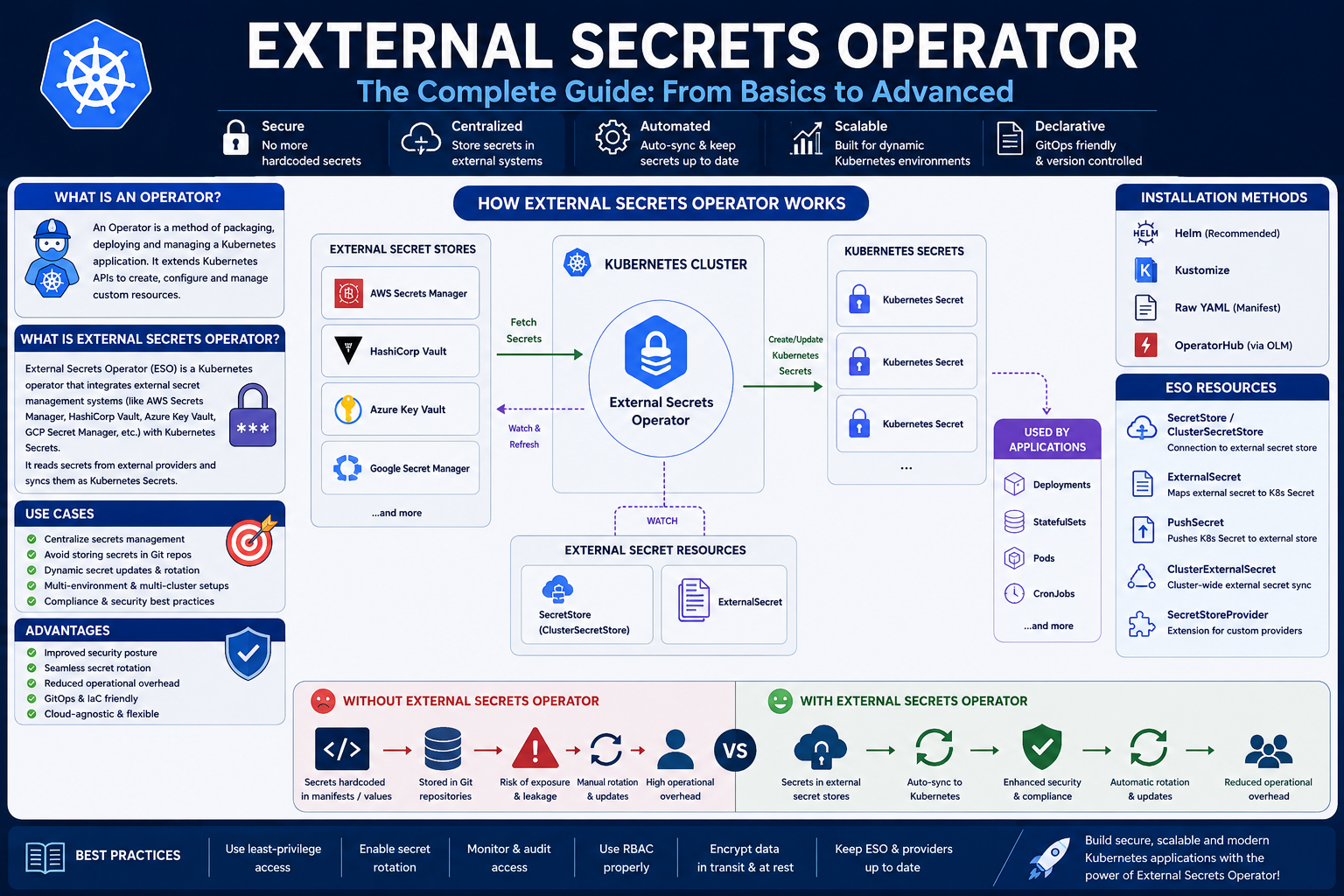
That is where External Secrets Operator, commonly called ESO, becomes useful.
2. What is an Operator in Kubernetes?
A Kubernetes Operator is software that extends Kubernetes behavior using custom resources and controllers. Kubernetes describes Operators as extensions that use custom resources to manage applications and their components, following the Kubernetes control-loop principle. (Kubernetes)
Simple explanation:
You define the desired state.
The Operator watches that desired state.
The Operator compares desired state vs actual state.
The Operator takes action to make reality match the desired state.
This is the same idea Kubernetes already uses internally.
For example, with a normal Deployment:
spec:
  replicas: 3
You are saying:
I want 3 pods.
The Kubernetes Deployment controller keeps checking:
Do 3 pods exist?
If no, create more.
If too many, remove some.
If a pod dies, replace it.
An Operator does the same idea, but for custom application logic.
2.1 Operator pattern in simple words
Imagine a human DevOps engineer manually doing this:
Check AWS Secrets Manager.
Read the DB password.
Create a Kubernetes Secret.
Update the Secret when the value changes.
Keep doing this every hour.
Instead of a human doing that repeatedly, an Operator automates it.
So with ESO:
You create ExternalSecret YAML.
ESO watches that YAML.
ESO reads AWS Secrets Manager / Vault / Azure Key Vault / etc.
ESO creates or updates a Kubernetes Secret.
Your application consumes that Kubernetes Secret.
That is the Operator pattern.
3. What is External Secrets Operator?
External Secrets Operator is a Kubernetes Operator that integrates Kubernetes with external secret management systems such as AWS Secrets Manager, HashiCorp Vault, Google Secret Manager, Azure Key Vault, IBM Cloud Secrets Manager, CyberArk, Pulumi ESC, and others. The operator reads values from external APIs and injects them into Kubernetes Secrets. (external-secrets.io)
The official goal of ESO is:
Synchronize secrets from external APIs into Kubernetes.
ESO provides custom Kubernetes resources such as:
ExternalSecret
SecretStore
ClusterSecretStore
ClusterExternalSecret
PushSecret
ClusterPushSecret
Generators
ClusterGenerator
The core resources allow you to describe:
Where the external secret manager is
How to authenticate to it
Which secret values to fetch
What Kubernetes Secret should be created
How often it should refresh
How the final Kubernetes Secret should look
4. ESO in one diagram
+-------------------------+
| External Secret Manager |
| AWS Secrets Manager     |
| Vault                   |
| Azure Key Vault         |
| Google Secret Manager   |
+-----------+-------------+
            |
            | fetch secret values
            v
+-------------------------+
| External Secrets        |
| Operator Controller     |
+-----------+-------------+
            |
            | creates / updates
            v
+-------------------------+
| Kubernetes Secret       |
| db-credentials          |
+-----------+-------------+
            |
            | mounted/env var
            v
+-------------------------+
| Application Pod         |
+-------------------------+
flowchart LR

    subgraph AWS["AWS Cloud"]
        A["AWS Secrets Manager"]
    end

    subgraph K8S["Kubernetes Cluster"]
        B["ExternalSecret / SecretStore"]
        C["External Secrets Operator"]
        D["Kubernetes Secret"]
        E["Application Pod"]
    end

    B -->|Configuration| C
    A -->|Secret value| C
    C -->|Creates / Updates| D
    D -->|Consumed by| E
5. With ESO vs Without ESO
5.1 Without External Secrets Operator
In a basic Kubernetes setup, you create a Secret manually.
apiVersion: v1
kind: Secret
metadata:
  name: app-db-secret
  namespace: payments
type: Opaque
data:
  username: YWRtaW4=
  password: cGFzc3dvcmQxMjM=
Then your Deployment consumes it:
apiVersion: apps/v1
kind: Deployment
metadata:
  name: payment-api
  namespace: payments
spec:
  replicas: 2
  selector:
    matchLabels:
      app: payment-api
  template:
    metadata:
      labels:
        app: payment-api
    spec:
      containers:
        - name: payment-api
          image: myrepo/payment-api:1.0.0
          env:
            - name: DB_USERNAME
              valueFrom:
                secretKeyRef:
                  name: app-db-secret
                  key: username
            - name: DB_PASSWORD
              valueFrom:
                secretKeyRef:
                  name: app-db-secret
                  key: password
This works, but it has problems:
Secret values may end up in Git.
Base64 is not encryption.
Rotation is manual.
Secret duplication across namespaces is painful.
Auditability is weak.
Different clusters may drift.
CI/CD pipelines may need direct access to secret values.
5.2 With External Secrets Operator
With ESO, the actual secret value lives in an external secret manager.
Example in AWS Secrets Manager:
{
  "username": "admin",
  "password": "SuperSecretPassword123"
}
In Kubernetes, you commit safe YAML like this:
apiVersion: external-secrets.io/v1
kind: ExternalSecret
metadata:
  name: payment-db-secret
  namespace: payments
spec:
  refreshInterval: 1h
  secretStoreRef:
    name: aws-secrets-store
    kind: SecretStore
  target:
    name: app-db-secret
    creationPolicy: Owner
  data:
    - secretKey: username
      remoteRef:
        key: prod/payments/db
        property: username
    - secretKey: password
      remoteRef:
        key: prod/payments/db
        property: password
ESO reads:
prod/payments/db from AWS Secrets Manager
Then it creates:
Kubernetes Secret: app-db-secret
Your application still consumes the normal Kubernetes Secret.
env:
  - name: DB_PASSWORD
    valueFrom:
      secretKeyRef:
        name: app-db-secret
        key: password
The big difference:
The real password is not stored in Git.
Kubernetes only receives the synced Secret.
Rotation can be automated.
The external secret manager becomes the source of truth.
6. Why use External Secrets Operator?
6.1 Main use cases
1. Avoid storing secrets in Git
Instead of committing this:
kind: Secret
data:
  password: cGFzc3dvcmQxMjM=
You commit this:
kind: ExternalSecret
spec:
  remoteRef:
    key: prod/payments/db
That is much safer for GitOps.
2. Centralized secret management
Secrets stay in systems designed for secrets:
AWS Secrets Manager
AWS Parameter Store
HashiCorp Vault
Azure Key Vault
Google Secret Manager
1Password
CyberArk
Pulumi ESC
IBM Cloud Secrets Manager
ESO supports many providers and the official docs list a large provider catalog. (external-secrets.io)
3. Automatic sync and rotation
If the value changes in the external secret manager, ESO can refresh the Kubernetes Secret based on refreshInterval.
Example:
spec:
  refreshInterval: 1h
ESO’s ExternalSecret supports refresh behavior such as Periodic, CreatedOnce, and OnChange. The default is Periodic. (external-secrets.io)
4. Better separation of responsibility
Security/platform team manages:
AWS Secrets Manager
Vault policies
IAM roles
KMS keys
Secret rotation
Application teams manage:
ExternalSecret manifests
Deployment YAML
Application consumption
This gives cleaner ownership.
5. Better GitOps workflow
With Argo CD or Flux, you can safely store these in Git:
SecretStore
ExternalSecret
ClusterExternalSecret
Deployment
Service
But you do not store actual passwords.
6. Multi-cluster consistency
Multiple clusters can pull the same secret source:
prod EKS cluster
DR cluster
blue cluster
green cluster
regional clusters
This reduces manual copying.
7. Namespace-level secret design
You can define:
one SecretStore per namespace
or one ClusterSecretStore for many namespaces
This helps with multi-team and multi-tenant Kubernetes design.
8. Reduced CI/CD secret exposure
Without ESO, CI/CD often needs to inject secrets into Kubernetes.
With ESO, CI/CD only applies YAML. The secret value is fetched by the ESO controller inside the cluster.
7. Important warning: ESO does not remove Kubernetes Secrets
This is a very important production point.
ESO normally creates a regular Kubernetes Secret.
That means you still need:
RBAC restrictions
Encryption at rest
Namespace isolation
Limited access to `get`, `list`, and `watch` secrets
Secret lifecycle policies
Network controls
Audit logging
Kubernetes good-practice docs recommend encryption at rest for Secret data and least-privilege access to Secrets. (Kubernetes)
So the correct mental model is:
ESO improves secret sourcing, syncing, rotation, and governance.
ESO does not magically make Kubernetes Secrets unreadable to anyone with Secret access.
8. External Secrets Operator architecture
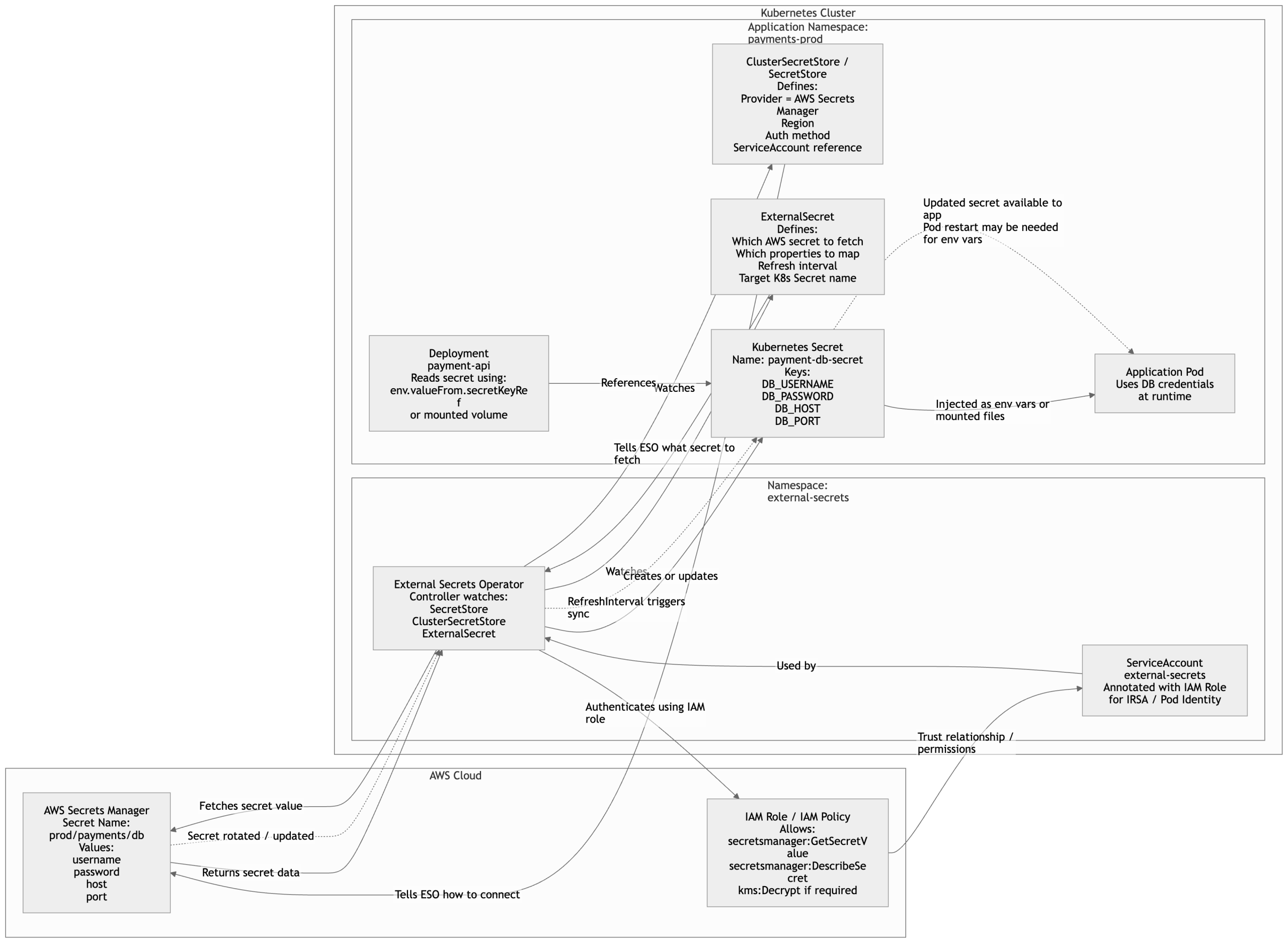
ESO has three major components:
Core Controller
Webhook
Cert Controller
The official docs say External Secrets comes with a Core Controller, Webhook, and Cert Controller. The webhook supports conversion and validation for custom resources, while the cert-controller generates TLS credentials for the webhook and injects certificates into CRDs and webhook configuration. (external-secrets.io)
8.1 Core Controller
The core controller watches ESO custom resources such as:
ExternalSecret
SecretStore
ClusterSecretStore
ClusterExternalSecret
PushSecret
ClusterPushSecret
It reconciles them into actual Kubernetes Secrets or external provider changes.
8.2 Webhook
The webhook validates ESO custom resources before they are accepted by the Kubernetes API server.
Example:
You apply a wrong ExternalSecret.
Webhook validates it.
If invalid, Kubernetes rejects the manifest.
This reduces bad configuration.
8.3 Cert Controller
The webhook needs TLS certificates. The cert-controller manages those certificates for ESO’s webhook.
9. Core ESO resources
The current ESO API documentation includes packages such as:
external-secrets.io/v1
external-secrets.io/v1alpha1
external-secrets.io/v1beta1
generators.external-secrets.io/v1alpha1
The current stable-looking examples in the latest docs commonly use external-secrets.io/v1 for core resources, while some advanced resources, especially generator-related ones, may still use v1alpha1. Always check your installed CRDs with kubectl api-resources and kubectl explain. (external-secrets.io)
Main resources:
SecretStore
ClusterSecretStore
ExternalSecret
ClusterExternalSecret
PushSecret
ClusterPushSecret
Generator resources
ClusterGenerator
Let’s go one by one.
10. SecretStore
10.1 What is SecretStore?
A SecretStore tells ESO how to connect to an external secret provider.
It is namespace-scoped.
That means:
A SecretStore created in namespace payments is normally used by ExternalSecrets in namespace payments.
The official docs define SecretStore as a namespaced resource that specifies how to access an external API, and note that it cannot reference resources across namespaces by design. For cross-namespace use, ESO provides ClusterSecretStore. (external-secrets.io)
10.2 SecretStore example using AWS Secrets Manager with static AWS keys
This is simple, but not the best production pattern.
First, create a Kubernetes Secret containing AWS credentials:
apiVersion: v1
kind: Secret
metadata:
  name: aws-credentials
  namespace: payments
type: Opaque
stringData:
  access-key: AKIAxxxxxxxxxxxx
  secret-access-key: xxxxxxxxxxxxxxxxxxxxxxxxx
Then create the SecretStore:
apiVersion: external-secrets.io/v1
kind: SecretStore
metadata:
  name: aws-secrets-store
  namespace: payments
spec:
  provider:
    aws:
      service: SecretsManager
      region: ap-south-1
      auth:
        secretRef:
          accessKeyIDSecretRef:
            name: aws-credentials
            key: access-key
          secretAccessKeySecretRef:
            name: aws-credentials
            key: secret-access-key
Explanation:
apiVersion: external-secrets.io/v1
Uses the ESO API group.
kind: SecretStore
Creates a namespace-scoped secret provider configuration.
metadata.namespace: payments
This store belongs to the payments namespace.
provider.aws.service: SecretsManager
Tells ESO to use AWS Secrets Manager.
region: ap-south-1
AWS region where secrets exist.
auth.secretRef
Uses AWS access key and secret key stored in a Kubernetes Secret.
This works, but for EKS production, IRSA / Pod Identity style authentication is usually better than static cloud credentials.
10.3 SecretStore example using AWS IAM Role
ESO’s AWS provider docs recommend defining IAM roles with fine-grained access to individual secrets and passing the role through spec.provider.aws.role, so users of the store can access only the necessary secrets. (external-secrets.io)
apiVersion: external-secrets.io/v1
kind: SecretStore
metadata:
  name: aws-secrets-store
  namespace: payments
spec:
  provider:
    aws:
      service: SecretsManager
      region: ap-south-1
      role: arn:aws:iam::123456789012:role/payments-external-secrets-role
      auth:
        jwt:
          serviceAccountRef:
            name: payments-eso-sa
Explanation:
role
IAM role ESO should assume.
auth.jwt.serviceAccountRef
Uses a Kubernetes ServiceAccount token for AWS authentication, commonly used with IRSA on EKS.
11. ClusterSecretStore
11.1 What is ClusterSecretStore?
ClusterSecretStore is like SecretStore, but cluster-scoped.
That means it can be referenced by ExternalSecret resources from multiple namespaces.
The official docs describe ClusterSecretStore as a cluster-scoped SecretStore that can be referenced by all ExternalSecrets from all namespaces, useful as a central gateway to the secret backend. (external-secrets.io)
11.2 When to use SecretStore vs ClusterSecretStore
Use SecretStore when:
Each namespace should have its own secret access boundary.
Each team owns its own namespace and secret access.
You want strict tenant separation.
Use ClusterSecretStore when:
Platform team manages central secret provider access.
Multiple namespaces need the same backend configuration.
You want less duplicated YAML.
You are comfortable controlling access through IAM/RBAC/provider policy.
11.3 ClusterSecretStore example for AWS Secrets Manager
apiVersion: external-secrets.io/v1
kind: ClusterSecretStore
metadata:
  name: aws-cluster-secrets-store
spec:
  provider:
    aws:
      service: SecretsManager
      region: ap-south-1
      role: arn:aws:iam::123456789012:role/eso-cluster-secret-reader
      auth:
        jwt:
          serviceAccountRef:
            name: external-secrets
            namespace: external-secrets
Explanation:
kind: ClusterSecretStore
This is cluster-wide.
metadata has no namespace
Cluster-scoped resources do not belong to one namespace.
serviceAccountRef.namespace
For a cluster-scoped store, specify where the ServiceAccount lives.
11.4 ExternalSecret using ClusterSecretStore
apiVersion: external-secrets.io/v1
kind: ExternalSecret
metadata:
  name: payment-db-secret
  namespace: payments
spec:
  refreshInterval: 1h
  secretStoreRef:
    name: aws-cluster-secrets-store
    kind: ClusterSecretStore
  target:
    name: app-db-secret
    creationPolicy: Owner
  data:
    - secretKey: username
      remoteRef:
        key: prod/payments/db
        property: username
    - secretKey: password
      remoteRef:
        key: prod/payments/db
        property: password
Key point:
secretStoreRef:
  kind: ClusterSecretStore
This tells ESO to use the cluster-wide store.
12. ExternalSecret
12.1 What is ExternalSecret?
ExternalSecret is the resource you will use most often.
It defines:
Which external secret to fetch
Which keys/properties to read
Which Kubernetes Secret to create
How often to refresh
How to template/transform the output
The official docs say ExternalSecret describes what data should be fetched, how it should be transformed, and how it should be saved as a Kubernetes Secret. It supports spec.data for individual keys and spec.dataFrom for fetching multiple values. (external-secrets.io)
12.2 Basic ExternalSecret example
External secret in AWS Secrets Manager:
{
  "username": "admin",
  "password": "SuperSecretPassword123"
}
ExternalSecret:
apiVersion: external-secrets.io/v1
kind: ExternalSecret
metadata:
  name: payment-db-secret
  namespace: payments
spec:
  refreshInterval: 1h
  secretStoreRef:
    name: aws-secrets-store
    kind: SecretStore
  target:
    name: app-db-secret
    creationPolicy: Owner
  data:
    - secretKey: username
      remoteRef:
        key: prod/payments/db
        property: username
    - secretKey: password
      remoteRef:
        key: prod/payments/db
        property: password
This creates a Kubernetes Secret:
apiVersion: v1
kind: Secret
metadata:
  name: app-db-secret
  namespace: payments
type: Opaque
data:
  username: <base64-value>
  password: <base64-value>
12.3 Important fields in ExternalSecret
refreshInterval
refreshInterval: 1h
How often ESO checks the external provider and updates the Kubernetes Secret.
Common values:
15m
30m
1h
24h
secretStoreRef
secretStoreRef:
  name: aws-secrets-store
  kind: SecretStore
Tells ESO which provider configuration to use.
Could be:
kind: SecretStore
or:
kind: ClusterSecretStore
target.name
target:
  name: app-db-secret
Name of the Kubernetes Secret that ESO should create/update.
target.creationPolicy
creationPolicy: Owner
Common options include:
Owner
Merge
None
Typical use:
Owner: ESO owns the Secret lifecycle.
Merge: ESO merges values into an existing Secret.
None: ESO does not create the Secret.
For most beginner use cases:
creationPolicy: Owner
is the cleanest.
data
data:
  - secretKey: password
    remoteRef:
      key: prod/payments/db
      property: password
This maps:
external secret property -> Kubernetes Secret key
Meaning:
Read `password` from external secret `prod/payments/db`
Store it as key `password` inside Kubernetes Secret
dataFrom
Use dataFrom when you want to import all keys from an external secret.
apiVersion: external-secrets.io/v1
kind: ExternalSecret
metadata:
  name: payment-db-secret
  namespace: payments
spec:
  refreshInterval: 1h
  secretStoreRef:
    name: aws-secrets-store
    kind: SecretStore
  target:
    name: app-db-secret
    creationPolicy: Owner
  dataFrom:
    - extract:
        key: prod/payments/db
If the external secret is:
{
  "username": "admin",
  "password": "SuperSecretPassword123",
  "host": "payments-db.xxxxxx.ap-south-1.rds.amazonaws.com",
  "port": "5432"
}
The Kubernetes Secret will contain:
username
password
host
port
13. ExternalSecret refresh policies
ESO supports different refresh behaviors. The docs describe CreatedOnce, Periodic, and OnChange; if refresh policy is not specified, the default behavior is Periodic. (external-secrets.io)
13.1 Periodic refresh
apiVersion: external-secrets.io/v1
kind: ExternalSecret
metadata:
  name: periodic-secret
  namespace: payments
spec:
  refreshPolicy: Periodic
  refreshInterval: 1h
  secretStoreRef:
    name: aws-secrets-store
    kind: SecretStore
  target:
    name: periodic-secret
  data:
    - secretKey: password
      remoteRef:
        key: prod/payments/db
        property: password
Use this when:
Secrets may rotate.
You want Kubernetes Secret to stay updated.
13.2 CreatedOnce
apiVersion: external-secrets.io/v1
kind: ExternalSecret
metadata:
  name: created-once-secret
  namespace: payments
spec:
  refreshPolicy: CreatedOnce
  secretStoreRef:
    name: aws-secrets-store
    kind: SecretStore
  target:
    name: created-once-secret
  data:
    - secretKey: password
      remoteRef:
        key: prod/payments/db
        property: password
Use this when:
You want ESO to create the Secret once.
You do not want automatic updates after provider changes.
You prefer manual update control.
13.3 OnChange
apiVersion: external-secrets.io/v1
kind: ExternalSecret
metadata:
  name: onchange-secret
  namespace: payments
spec:
  refreshPolicy: OnChange
  secretStoreRef:
    name: aws-secrets-store
    kind: SecretStore
  target:
    name: onchange-secret
  data:
    - secretKey: password
      remoteRef:
        key: prod/payments/db
        property: password
Use this when:
You only want refresh when the ExternalSecret manifest changes.
14. ExternalSecret templating
Templating is useful when your application expects a specific config file format.
Example app expects:
DATABASE_URL=postgres://admin:password@host:5432/payments
External secret in AWS:
{
  "username": "admin",
  "password": "SuperSecretPassword123",
  "host": "payments-db.xxxxxx.ap-south-1.rds.amazonaws.com",
  "port": "5432",
  "database": "payments"
}
ExternalSecret with template:
apiVersion: external-secrets.io/v1
kind: ExternalSecret
metadata:
  name: payment-database-url
  namespace: payments
spec:
  refreshInterval: 1h
  secretStoreRef:
    name: aws-secrets-store
    kind: SecretStore
  target:
    name: payment-database-url
    creationPolicy: Owner
    template:
      type: Opaque
      data:
        DATABASE_URL: "postgres://{{ .username }}:{{ .password }}@{{ .host }}:{{ .port }}/{{ .database }}"
  data:
    - secretKey: username
      remoteRef:
        key: prod/payments/db
        property: username
    - secretKey: password
      remoteRef:
        key: prod/payments/db
        property: password
    - secretKey: host
      remoteRef:
        key: prod/payments/db
        property: host
    - secretKey: port
      remoteRef:
        key: prod/payments/db
        property: port
    - secretKey: database
      remoteRef:
        key: prod/payments/db
        property: database
ESO will create a Kubernetes Secret containing:
DATABASE_URL
This is useful when your app wants one connection string instead of many variables.
15. Consuming ESO-created Secrets in Deployments
ESO creates normal Kubernetes Secrets, so applications consume them exactly the same way.
15.1 Consume as environment variables
apiVersion: apps/v1
kind: Deployment
metadata:
  name: payment-api
  namespace: payments
spec:
  replicas: 2
  selector:
    matchLabels:
      app: payment-api
  template:
    metadata:
      labels:
        app: payment-api
    spec:
      containers:
        - name: payment-api
          image: myrepo/payment-api:1.0.0
          env:
            - name: DB_USERNAME
              valueFrom:
                secretKeyRef:
                  name: app-db-secret
                  key: username
            - name: DB_PASSWORD
              valueFrom:
                secretKeyRef:
                  name: app-db-secret
                  key: password
Important:
If a Secret is consumed as environment variables, most apps need a pod restart to pick up changed values.
15.2 Consume as mounted files
apiVersion: apps/v1
kind: Deployment
metadata:
  name: payment-api
  namespace: payments
spec:
  replicas: 2
  selector:
    matchLabels:
      app: payment-api
  template:
    metadata:
      labels:
        app: payment-api
    spec:
      containers:
        - name: payment-api
          image: myrepo/payment-api:1.0.0
          volumeMounts:
            - name: db-secret-volume
              mountPath: /etc/secrets/db
              readOnly: true
      volumes:
        - name: db-secret-volume
          secret:
            secretName: app-db-secret
This creates files like:
/etc/secrets/db/username
/etc/secrets/db/password
Mounted Secret volumes can update on disk, but your application must reload them or be restarted depending on how it reads configuration.
16. ClusterExternalSecret
16.1 What is ClusterExternalSecret?
ClusterExternalSecret lets you create ExternalSecret resources across multiple namespaces.
Example use case:
You have many namespaces.
Each namespace needs the same Docker registry credentials.
You do not want to manually create ExternalSecret in every namespace.
ClusterExternalSecret can match namespaces by labels and create ExternalSecrets in them.
The official docs note that a ClusterExternalSecret creates one ExternalSecret per matched namespace, and each of those ExternalSecrets polls the upstream provider on its own refresh interval. For many namespaces, provider calls scale linearly, so the docs recommend a fan-out pattern for large namespace sets. (external-secrets.io)
16.2 Label target namespaces
apiVersion: v1
kind: Namespace
metadata:
  name: payments
  labels:
    shared-secrets: enabled
---
apiVersion: v1
kind: Namespace
metadata:
  name: orders
  labels:
    shared-secrets: enabled
---
apiVersion: v1
kind: Namespace
metadata:
  name: shipping
  labels:
    shared-secrets: enabled
16.3 Create ClusterExternalSecret
apiVersion: external-secrets.io/v1
kind: ClusterExternalSecret
metadata:
  name: shared-registry-secret
spec:
  externalSecretName: registry-secret
  namespaceSelectors:
    - matchLabels:
        shared-secrets: enabled
  refreshTime: 1h
  externalSecretSpec:
    refreshInterval: 1h
    secretStoreRef:
      name: aws-cluster-secrets-store
      kind: ClusterSecretStore
    target:
      name: registry-secret
      creationPolicy: Owner
    dataFrom:
      - extract:
          key: prod/shared/docker-registry
This creates an ExternalSecret named:
registry-secret
in each namespace matching:
shared-secrets: enabled
16.4 When to use ClusterExternalSecret
Use it for:
Shared registry credentials
Shared monitoring credentials
Shared TLS trust bundles
Shared application license keys
Shared SaaS API keys
Avoid it when:
Each service should have different credentials.
Each namespace needs strict tenant isolation.
Provider API rate limits are a concern across many namespaces.
17. PushSecret
17.1 What is PushSecret?
Most ESO usage is pull-based:
External provider -> Kubernetes Secret
PushSecret is the reverse idea:
Kubernetes Secret -> external provider
This is useful when:
A secret is generated inside Kubernetes.
You want to push it to AWS Secrets Manager / Vault / another provider.
A controller creates credentials and you want them stored externally.
The current docs describe PushSecret with dataTo entries that specify which SecretStore to push to; each dataTo entry requires a storeRef to prevent accidental “push to all stores” behavior. (external-secrets.io)
17.2 Example source Kubernetes Secret
apiVersion: v1
kind: Secret
metadata:
  name: generated-db-password
  namespace: payments
type: Opaque
stringData:
  db-password: "GeneratedPassword123"
17.3 PushSecret example
apiVersion: external-secrets.io/v1alpha1
kind: PushSecret
metadata:
  name: push-payment-db-password
  namespace: payments
spec:
  refreshInterval: 1h
  secretStoreRefs:
    - name: aws-secrets-store
      kind: SecretStore
  selector:
    secret:
      name: generated-db-password
  data:
    - match:
        secretKey: db-password
        remoteRef:
          remoteKey: prod/payments/generated-db-password
          property: password
Conceptually:
Read Kubernetes Secret `generated-db-password`
Take key `db-password`
Push it to external secret `prod/payments/generated-db-password`
Store it as property `password`
Because PushSecret API details are still more advanced and may use alpha API versions depending on your ESO installation, always confirm with:
kubectl explain pushsecret.spec
18. ClusterPushSecret
18.1 What is ClusterPushSecret?
ClusterPushSecret is the cluster-level version of PushSecret.
Use case:
Multiple namespaces generate secrets.
You want cluster-level automation to push selected secrets to an external provider.
Example pattern:
apiVersion: external-secrets.io/v1alpha1
kind: ClusterPushSecret
metadata:
  name: push-generated-secrets
spec:
  namespaceSelectors:
    - matchLabels:
        push-secrets: enabled
  pushSecretSpec:
    refreshInterval: 1h
    secretStoreRefs:
      - name: aws-cluster-secrets-store
        kind: ClusterSecretStore
    selector:
      secret:
        name: generated-app-secret
    data:
      - match:
          secretKey: token
          remoteRef:
            remoteKey: prod/generated/app-token
            property: token
This is advanced and should be used carefully because it writes data outward to your secret manager.
19. Generators
19.1 What are ESO Generators?
Generators allow ESO to generate or fetch dynamic values and expose them through ExternalSecrets.
Examples include:
Password generator
UUID generator
AWS ECR authorization token
AWS STS session token
Vault dynamic secret
GitHub access token
Webhook generator
SSH key generator
The current ESO docs list generator APIs under generators.external-secrets.io/v1alpha1, and the ClusterGenerator docs describe ClusterGenerator as a cluster-wide wrapper so users do not have to redefine a generator in every namespace. (external-secrets.io)
19.2 Password generator example
apiVersion: generators.external-secrets.io/v1alpha1
kind: Password
metadata:
  name: app-password-generator
  namespace: payments
spec:
  length: 32
  digits: 5
  symbols: 5
  symbolCharacters: "-_$@"
  noUpper: false
  allowRepeat: true
Then use it from an ExternalSecret:
apiVersion: external-secrets.io/v1
kind: ExternalSecret
metadata:
  name: generated-password-secret
  namespace: payments
spec:
  refreshInterval: 24h
  target:
    name: generated-password-secret
    creationPolicy: Owner
  dataFrom:
    - sourceRef:
        generatorRef:
          apiVersion: generators.external-secrets.io/v1alpha1
          kind: Password
          name: app-password-generator
This creates a Kubernetes Secret with a generated password.
19.3 ClusterGenerator example
apiVersion: generators.external-secrets.io/v1alpha1
kind: ClusterGenerator
metadata:
  name: cluster-password-generator
spec:
  kind: Password
  generator:
    passwordSpec:
      length: 42
      digits: 5
      symbols: 5
      symbolCharacters: "-_$@"
      noUpper: false
      allowRepeat: true
Use it from an ExternalSecret:
apiVersion: external-secrets.io/v1
kind: ExternalSecret
metadata:
  name: cluster-generated-secret
  namespace: payments
spec:
  refreshInterval: 24h
  target:
    name: cluster-generated-secret
    creationPolicy: Owner
  dataFrom:
    - sourceRef:
        generatorRef:
          apiVersion: generators.external-secrets.io/v1alpha1
          kind: ClusterGenerator
          name: cluster-password-generator
This avoids redefining the generator in every namespace.
20. Installing External Secrets Operator
20.1 Prerequisites
You need:
A Kubernetes cluster
kubectl configured
Helm installed
Access to a secret backend, such as AWS Secrets Manager or Vault
Permissions to install CRDs
ESO runs in the cluster as Kubernetes workloads and uses CRDs such as ExternalSecret, SecretStore, and ClusterSecretStore. The getting-started docs say ESO runs as a deployment and uses CRDs to configure secret-provider access and manage Kubernetes Secret resources. (external-secrets.io)
20.2 Method 1: Install with Helm from chart repository
This is the most common method.
helm repo add external-secrets https://charts.external-secrets.io
helm repo update

helm upgrade --install external-secrets external-secrets/external-secrets \
  --namespace external-secrets \
  --create-namespace \
  --set installCRDs=true
The official getting-started docs show Helm installation from the chart repository and note that default install options install and manage CRDs as part of the Helm release; if you do not want Helm to manage CRDs, set installCRDs=false. (external-secrets.io)
Verify:
kubectl get pods -n external-secrets
Expected:
external-secrets
external-secrets-webhook
external-secrets-cert-controller
Verify CRDs:
kubectl get crds | grep external-secrets
Check API resources:
kubectl api-resources | grep external
20.3 Method 2: Install CRDs separately, then Helm chart
This is common in production because some teams prefer managing CRDs separately from Helm releases.
Step 1: Apply CRDs.
kubectl apply -f https://raw.githubusercontent.com/external-secrets/external-secrets/<VERSION>/deploy/crds/bundle.yaml --server-side
Step 2: Install ESO without Helm managing CRDs.
helm upgrade --install external-secrets external-secrets/external-secrets \
  --namespace external-secrets \
  --create-namespace \
  --set installCRDs=false
Why use this method?
Safer CRD upgrades
Better GitOps control
Avoid accidental CRD removal
Platform team manages CRDs centrally
Application teams consume the API
20.4 Method 3: GitOps with Argo CD or Flux
For GitOps, store a HelmRelease / Application manifest.
Example Argo CD Application:
apiVersion: argoproj.io/v1alpha1
kind: Application
metadata:
  name: external-secrets
  namespace: argocd
spec:
  project: platform
  source:
    repoURL: https://charts.external-secrets.io
    chart: external-secrets
    targetRevision: 0.0.0
    helm:
      values: |
        installCRDs: true
  destination:
    server: https://kubernetes.default.svc
    namespace: external-secrets
  syncPolicy:
    automated:
      prune: true
      selfHeal: true
    syncOptions:
      - CreateNamespace=true
Replace targetRevision with your approved chart version.
Production tip:
Pin chart versions.
Do not deploy uncontrolled latest versions in production.
20.5 Method 4: OperatorHub / OLM
Some environments, especially OpenShift-style platforms, use Operator Lifecycle Manager.
OperatorHub describes an External Secrets Operator package that configures the official external-secrets Helm chart and can be installed through OLM. (operatorhub.io)
Use this method when:
Your platform standard is OLM.
You are on OpenShift.
Your organization manages operators through OperatorHub.
21. Production install example for EKS with IRSA
This is a common production pattern:
ESO runs in namespace external-secrets.
ESO ServiceAccount is mapped to an IAM Role.
IAM Role can read only approved secrets.
ExternalSecret objects pull from AWS Secrets Manager.
Applications consume Kubernetes Secrets.
21.1 IAM policy example
Example policy allowing read access to selected secrets:
{
  "Version": "2012-10-17",
  "Statement": [
    {
      "Effect": "Allow",
      "Action": [
        "secretsmanager:GetSecretValue",
        "secretsmanager:DescribeSecret"
      ],
      "Resource": [
        "arn:aws:secretsmanager:ap-south-1:123456789012:secret:prod/payments/*"
      ]
    }
  ]
}
Optional if using KMS-encrypted secrets:
{
  "Effect": "Allow",
  "Action": [
    "kms:Decrypt"
  ],
  "Resource": [
    "arn:aws:kms:ap-south-1:123456789012:key/YOUR-KMS-KEY-ID"
  ]
}
21.2 Install ESO with ServiceAccount annotation
helm upgrade --install external-secrets external-secrets/external-secrets \
  --namespace external-secrets \
  --create-namespace \
  --set installCRDs=true \
  --set serviceAccount.annotations."eks\.amazonaws\.com/role-arn"="arn:aws:iam::123456789012:role/eso-prod-role"
Verify ServiceAccount:
kubectl get sa -n external-secrets
kubectl describe sa external-secrets -n external-secrets
21.3 ClusterSecretStore using IRSA
apiVersion: external-secrets.io/v1
kind: ClusterSecretStore
metadata:
  name: aws-prod-secrets
spec:
  provider:
    aws:
      service: SecretsManager
      region: ap-south-1
      auth:
        jwt:
          serviceAccountRef:
            name: external-secrets
            namespace: external-secrets
Explanation:
ESO uses its own ServiceAccount.
That ServiceAccount is mapped to an IAM Role.
The IAM Role controls what AWS Secrets Manager secrets ESO can read.
22. Full end-to-end example: AWS Secrets Manager to Kubernetes Pod
22.1 Create namespace
apiVersion: v1
kind: Namespace
metadata:
  name: payments
  labels:
    name: payments
Apply:
kubectl apply -f namespace.yaml
22.2 Store secret in AWS Secrets Manager
Example secret name:
prod/payments/db
Secret value:
{
  "username": "payments_user",
  "password": "StrongPassword123",
  "host": "payments-db.xxxxxx.ap-south-1.rds.amazonaws.com",
  "port": "5432",
  "database": "payments"
}
22.3 Create ClusterSecretStore
apiVersion: external-secrets.io/v1
kind: ClusterSecretStore
metadata:
  name: aws-prod-secrets
spec:
  provider:
    aws:
      service: SecretsManager
      region: ap-south-1
      auth:
        jwt:
          serviceAccountRef:
            name: external-secrets
            namespace: external-secrets
Apply:
kubectl apply -f cluster-secret-store.yaml
Check status:
kubectl get clustersecretstore
kubectl describe clustersecretstore aws-prod-secrets
22.4 Create ExternalSecret
apiVersion: external-secrets.io/v1
kind: ExternalSecret
metadata:
  name: payment-db-secret
  namespace: payments
spec:
  refreshInterval: 1h
  secretStoreRef:
    name: aws-prod-secrets
    kind: ClusterSecretStore
  target:
    name: payment-db-secret
    creationPolicy: Owner
  data:
    - secretKey: DB_USERNAME
      remoteRef:
        key: prod/payments/db
        property: username
    - secretKey: DB_PASSWORD
      remoteRef:
        key: prod/payments/db
        property: password
    - secretKey: DB_HOST
      remoteRef:
        key: prod/payments/db
        property: host
    - secretKey: DB_PORT
      remoteRef:
        key: prod/payments/db
        property: port
    - secretKey: DB_NAME
      remoteRef:
        key: prod/payments/db
        property: database
Apply:
kubectl apply -f external-secret.yaml
Check:
kubectl get externalsecret -n payments
kubectl describe externalsecret payment-db-secret -n payments
kubectl get secret payment-db-secret -n payments
22.5 Create Deployment consuming the Secret
apiVersion: apps/v1
kind: Deployment
metadata:
  name: payment-api
  namespace: payments
spec:
  replicas: 2
  selector:
    matchLabels:
      app: payment-api
  template:
    metadata:
      labels:
        app: payment-api
    spec:
      containers:
        - name: payment-api
          image: nginx:1.27
          env:
            - name: DB_USERNAME
              valueFrom:
                secretKeyRef:
                  name: payment-db-secret
                  key: DB_USERNAME
            - name: DB_PASSWORD
              valueFrom:
                secretKeyRef:
                  name: payment-db-secret
                  key: DB_PASSWORD
            - name: DB_HOST
              valueFrom:
                secretKeyRef:
                  name: payment-db-secret
                  key: DB_HOST
            - name: DB_PORT
              valueFrom:
                secretKeyRef:
                  name: payment-db-secret
                  key: DB_PORT
            - name: DB_NAME
              valueFrom:
                secretKeyRef:
                  name: payment-db-secret
                  key: DB_NAME
Apply:
kubectl apply -f deployment.yaml
Verify pod:
kubectl get pods -n payments
kubectl describe pod -n payments -l app=payment-api
23. Full example using Vault
23.1 SecretStore for Vault
apiVersion: external-secrets.io/v1
kind: SecretStore
metadata:
  name: vault-secret-store
  namespace: payments
spec:
  provider:
    vault:
      server: "https://vault.example.com"
      path: "secret"
      version: "v2"
      auth:
        tokenSecretRef:
          name: vault-token
          key: token
Kubernetes Secret containing Vault token:
apiVersion: v1
kind: Secret
metadata:
  name: vault-token
  namespace: payments
type: Opaque
stringData:
  token: "s.xxxxxxxx"
ExternalSecret:
apiVersion: external-secrets.io/v1
kind: ExternalSecret
metadata:
  name: payment-db-secret
  namespace: payments
spec:
  refreshInterval: 1h
  secretStoreRef:
    name: vault-secret-store
    kind: SecretStore
  target:
    name: payment-db-secret
    creationPolicy: Owner
  data:
    - secretKey: DB_PASSWORD
      remoteRef:
        key: payments/db
        property: password
Production note:
Static Vault token in Kubernetes is easy for demos, but not ideal for production.
Prefer Kubernetes auth, JWT auth, or cloud identity integration where possible.
24. ESO resource list summary
| Resource | Scope | Purpose |
|---|---|---|
SecretStore | Namespace | Defines how to connect to an external provider for one namespace |
ClusterSecretStore | Cluster | Defines provider access reusable across namespaces |
ExternalSecret | Namespace | Pulls external secret data into a Kubernetes Secret |
ClusterExternalSecret | Cluster | Creates ExternalSecrets across matching namespaces |
PushSecret | Namespace | Pushes Kubernetes Secret data to external provider |
ClusterPushSecret | Cluster | Pushes selected secrets from multiple namespaces |
Password, UUID, etc. | Namespace | Generates dynamic secret values |
ClusterGenerator | Cluster | Reusable cluster-wide generator wrapper |
Secret | Namespace | Final Kubernetes Secret consumed by apps |
ServiceAccount | Namespace | Identity used by ESO to authenticate to providers |
Role/ClusterRole | Namespace/Cluster | RBAC for ESO and secret access |
ValidatingWebhookConfiguration | Cluster | Validates ESO custom resources |
CustomResourceDefinition | Cluster | Installs ESO API types |
25. Common commands for day-to-day ESO operations
25.1 List stores
kubectl get secretstore -A
kubectl get clustersecretstore
25.2 List ExternalSecrets
kubectl get externalsecret -A
25.3 Describe ExternalSecret
kubectl describe externalsecret payment-db-secret -n payments
25.4 Check created Kubernetes Secret
kubectl get secret payment-db-secret -n payments
25.5 Decode Secret for testing only
kubectl get secret payment-db-secret -n payments \
  -o jsonpath='{.data.DB_PASSWORD}' | base64 -d
Use this only for testing/debugging. Do not casually decode production secrets.
25.6 Check ESO controller logs
kubectl logs -n external-secrets deploy/external-secrets
25.7 Check webhook logs
kubectl logs -n external-secrets deploy/external-secrets-webhook
25.8 Check cert-controller logs
kubectl logs -n external-secrets deploy/external-secrets-cert-controller
25.9 Explain fields
kubectl explain externalsecret.spec
kubectl explain externalsecret.spec.data
kubectl explain secretstore.spec
kubectl explain clustersecretstore.spec
26. ESO and namespace design
This connects directly to your earlier namespace discussion.
ESO works best when namespace boundaries are clean.
Example production layout:
external-secrets       -> ESO controller
payments-prod          -> payment service secrets
orders-prod            -> order service secrets
shipping-prod          -> shipping service secrets
frontend-prod          -> frontend app secrets
monitoring-prod        -> monitoring credentials
Then each namespace can have:
its own ExternalSecret
its own ServiceAccount
its own NetworkPolicy
its own ResourceQuota
its own LimitRange
its own RBAC boundary
26.1 One namespace for all services
Possible, but less clean.
prod
  payment-api
  order-api
  shipping-api
  auth-api
  notification-api
  reporting-api
  frontend
Problems:
All ExternalSecrets live together.
All Kubernetes Secrets live together.
RBAC becomes broader.
Secret naming must be very careful.
ResourceQuota applies to the combined namespace.
One mistake can impact all services.
26.2 One namespace per service
Cleaner for production:
payments-prod
orders-prod
shipping-prod
auth-prod
notification-prod
reporting-prod
frontend-prod
Benefits:
Per-service ExternalSecret
Per-service RBAC
Per-service quota
Per-service NetworkPolicy
Cleaner ownership
Smaller blast radius
Better auditability
Example:
apiVersion: external-secrets.io/v1
kind: ExternalSecret
metadata:
  name: db-secret
  namespace: payments-prod
spec:
  refreshInterval: 1h
  secretStoreRef:
    name: aws-prod-secrets
    kind: ClusterSecretStore
  target:
    name: db-secret
  dataFrom:
    - extract:
        key: prod/payments/db
And for orders:
apiVersion: external-secrets.io/v1
kind: ExternalSecret
metadata:
  name: db-secret
  namespace: orders-prod
spec:
  refreshInterval: 1h
  secretStoreRef:
    name: aws-prod-secrets
    kind: ClusterSecretStore
  target:
    name: db-secret
  dataFrom:
    - extract:
        key: prod/orders/db
Same Secret name, different namespaces.
That is clean.
27. ESO RBAC best practices
27.1 Limit human access to Kubernetes Secrets
Do not give broad access like:
resources:
  - secrets
verbs:
  - get
  - list
  - watch
to everyone.
This is risky because anyone with get secret can decode values.
27.2 Application teams usually need ExternalSecret access, not Secret access
Better:
Developers can create/update ExternalSecret.
Only platform/security can read actual Kubernetes Secret values.
Applications can mount/use Secrets.
Example Role:
apiVersion: rbac.authorization.k8s.io/v1
kind: Role
metadata:
  name: external-secret-manager
  namespace: payments-prod
rules:
  - apiGroups:
      - external-secrets.io
    resources:
      - externalsecrets
    verbs:
      - get
      - list
      - watch
      - create
      - update
      - patch
      - delete
Avoid giving this unless required:
apiGroups:
  - ""
resources:
  - secrets
verbs:
  - get
  - list
  - watch
28. SecretStore vs ClusterSecretStore security design
Pattern A: Central ClusterSecretStore
One ClusterSecretStore for prod.
All namespaces use it.
IAM policy restricts access by secret path.
Pros:
Less duplicated YAML
Simple platform management
Easy onboarding
Cons:
Must be careful with IAM permissions
A bad ExternalSecret may try to access wrong path
Requires strong provider-side restrictions
Pattern B: One SecretStore per namespace
payments-prod has payments SecretStore.
orders-prod has orders SecretStore.
Each uses a separate IAM Role or provider auth.
Pros:
Strong tenant isolation
Least privilege is clearer
Good for sensitive services
Cons:
More YAML
More IAM roles
More operational overhead
Pattern C: Hybrid
Recommended for many production systems:
ClusterSecretStore for shared low-risk secrets
Namespace SecretStore for sensitive service-specific secrets
Example:
ClusterSecretStore:
  shared docker registry credentials
  shared monitoring token

SecretStore:
  payments database password
  auth signing key
  customer PII encryption key
This is often the best balance.
29. ESO and NetworkPolicy
ESO needs network access to:
Kubernetes API server
External secret provider endpoint
DNS
Cloud metadata / STS endpoint depending on auth model
Example NetworkPolicy allowing ESO egress broadly:
apiVersion: networking.k8s.io/v1
kind: NetworkPolicy
metadata:
  name: external-secrets-egress
  namespace: external-secrets
spec:
  podSelector:
    matchLabels:
      app.kubernetes.io/name: external-secrets
  policyTypes:
    - Egress
  egress:
    - {}
That is permissive.
A stricter policy would allow:
DNS
AWS Secrets Manager endpoint
AWS STS endpoint
Kubernetes API server
Exact egress rules depend on your CNI, cloud provider, and whether you use private endpoints.
30. ESO and ResourceQuota / LimitRange
ESO itself should run in its own namespace:
external-secrets
Add requests/limits using Helm values.
Example conceptual values:
resources:
  requests:
    cpu: 100m
    memory: 128Mi
  limits:
    cpu: 500m
    memory: 512Mi

webhook:
  resources:
    requests:
      cpu: 50m
      memory: 64Mi
    limits:
      cpu: 200m
      memory: 256Mi

certController:
  resources:
    requests:
      cpu: 50m
      memory: 64Mi
    limits:
      cpu: 200m
      memory: 256Mi
Then install:
helm upgrade --install external-secrets external-secrets/external-secrets \
  --namespace external-secrets \
  --create-namespace \
  --values values.yaml
31. ESO production best practices
31.1 Run ESO in a dedicated namespace
Recommended:
external-secrets
Avoid:
default
kube-system
application namespaces
Reason:
Cleaner RBAC
Cleaner monitoring
Better blast-radius control
Separate lifecycle
31.2 Use cloud-native identity instead of static credentials
For EKS:
Use IRSA or EKS Pod Identity.
Avoid long-lived AWS access keys.
For AKS:
Use Azure Workload Identity.
For GKE:
Use Workload Identity.
For Vault:
Use Kubernetes auth or JWT auth instead of static root tokens.
31.3 Use least privilege in external secret manager
Bad IAM policy:
{
  "Effect": "Allow",
  "Action": "secretsmanager:*",
  "Resource": "*"
}
Better:
{
  "Effect": "Allow",
  "Action": [
    "secretsmanager:GetSecretValue",
    "secretsmanager:DescribeSecret"
  ],
  "Resource": [
    "arn:aws:secretsmanager:ap-south-1:123456789012:secret:prod/payments/*"
  ]
}
31.4 Use naming conventions
Good external secret paths:
prod/payments/db
prod/payments/redis
prod/payments/stripe
prod/orders/db
prod/orders/kafka
prod/shared/docker-registry
Avoid vague names:
db
password
secret1
app-secret
test
31.5 Avoid one giant shared secret
Not ideal:
{
  "payments_db_password": "...",
  "orders_db_password": "...",
  "auth_jwt_key": "...",
  "stripe_key": "...",
  "redis_password": "..."
}
Better:
prod/payments/db
prod/orders/db
prod/auth/jwt
prod/payments/stripe
prod/shared/redis
This makes access control easier.
31.6 Use separate ExternalSecrets per logical secret
Good:
payment-db-secret
payment-stripe-secret
payment-redis-secret
Avoid:
all-payment-secrets
Smaller Secrets are easier to rotate and audit.
31.7 Protect Kubernetes Secrets with RBAC
Do not give wide access to:
kubectl get secrets -A
That is essentially secret-admin access.
31.8 Enable encryption at rest
ESO syncs values into Kubernetes Secrets, so Kubernetes Secret protection still matters.
Enable encryption at rest for Secret data in etcd. Kubernetes recommends this for Secret objects. (Kubernetes)
31.9 Monitor ESO
Monitor:
ExternalSecret sync status
Controller errors
Provider API rate limits
Webhook failures
SecretStore readiness
ClusterSecretStore readiness
Useful commands:
kubectl get externalsecret -A
kubectl describe externalsecret <name> -n <namespace>
kubectl logs -n external-secrets deploy/external-secrets
31.10 Pin chart and image versions
Avoid uncontrolled upgrades.
Use:
targetRevision: 0.x.x
or:
helm upgrade --install ... --version 0.x.x
Test upgrades in non-prod first.
32. Common troubleshooting scenarios
32.1 ExternalSecret not creating Kubernetes Secret
Check:
kubectl get externalsecret -n payments
kubectl describe externalsecret payment-db-secret -n payments
Look for events like:
SecretStore not found
Access denied
Remote secret not found
Invalid property
Provider authentication failed
32.2 SecretStore not ready
Check:
kubectl describe secretstore aws-secrets-store -n payments
or:
kubectl describe clustersecretstore aws-prod-secrets
Common reasons:
Wrong AWS region
Wrong IAM role
Missing service account annotation
Missing KMS decrypt permission
Invalid credentials
Provider endpoint unreachable
32.3 AccessDenied from AWS
Check IAM permissions:
secretsmanager:GetSecretValue
secretsmanager:DescribeSecret
kms:Decrypt if using customer-managed KMS key
sts:AssumeRole if using role assumption
Also check the secret ARN pattern.
32.4 Secret exists but app still has old password
Possible reasons:
App consumed Secret as environment variable.
Pod has not restarted.
App does not reload mounted files.
ExternalSecret refresh interval has not passed.
External provider value changed but same Kubernetes Secret value remained.
Restart Deployment:
kubectl rollout restart deployment payment-api -n payments
32.5 Wrong property name
External AWS secret:
{
  "password": "abc"
}
ExternalSecret:
property: db_password
This will fail because db_password does not exist.
Correct:
property: password
32.6 ClusterExternalSecret creates too many provider calls
The docs warn that ClusterExternalSecret creates an ExternalSecret per matched namespace, and each ExternalSecret polls independently. For large namespace sets, provider API calls can grow linearly, and the docs recommend a fan-out pattern using one source ExternalSecret plus the Kubernetes provider. (external-secrets.io)
33. Practical production folder structure
For GitOps:
platform/
  external-secrets/
    namespace.yaml
    helm-release.yaml
    cluster-secret-store.yaml

apps/
  payments/
    namespace.yaml
    external-secret-db.yaml
    external-secret-redis.yaml
    deployment.yaml
    service.yaml
  orders/
    namespace.yaml
    external-secret-db.yaml
    deployment.yaml
    service.yaml
Example:
apps/payments/external-secret-db.yaml
apiVersion: external-secrets.io/v1
kind: ExternalSecret
metadata:
  name: db-secret
  namespace: payments-prod
spec:
  refreshInterval: 1h
  secretStoreRef:
    name: aws-prod-secrets
    kind: ClusterSecretStore
  target:
    name: db-secret
    creationPolicy: Owner
  dataFrom:
    - extract:
        key: prod/payments/db
34. Recommended design for your 7 production services
Since you were discussing whether all 7 services should run in one namespace, ESO gives another reason to separate services.
A good production design:
external-secrets
service-a-prod
service-b-prod
service-c-prod
service-d-prod
service-e-prod
service-f-prod
service-g-prod
Each service namespace gets:
ExternalSecret objects
Kubernetes Secrets
ServiceAccount
Deployment
NetworkPolicy
ResourceQuota
LimitRange
RBAC
Benefits:
One service cannot accidentally consume another service’s Secret.
Secret names can be simple, like db-secret, redis-secret.
RBAC can be scoped per service namespace.
ExternalSecret ownership is clearer.
ResourceQuota and LimitRange can protect each service separately.
NetworkPolicy can be simpler.
Blast radius is smaller.
Example:
payments-prod/db-secret
orders-prod/db-secret
shipping-prod/db-secret
Same Secret name, different namespace, clean separation.
35. End-to-end recommended production pattern
1. Install ESO in external-secrets namespace.
2. Use IRSA / workload identity for ESO.
3. Create IAM roles with least privilege.
4. Create ClusterSecretStore for shared low-risk secrets.
5. Create per-namespace SecretStore for sensitive service-specific secrets.
6. Create ExternalSecret per logical secret.
7. Apps consume generated Kubernetes Secrets.
8. Protect Kubernetes Secrets with RBAC.
9. Enable encryption at rest.
10. Monitor ESO status and logs.
11. Use namespace separation for prod services.
12. Keep real secret values out of Git.
36. Complete sample manifest set
Below is a mini complete setup.
36.1 Namespace
apiVersion: v1
kind: Namespace
metadata:
  name: payments-prod
  labels:
    app: payments
    environment: prod
36.2 ClusterSecretStore
apiVersion: external-secrets.io/v1
kind: ClusterSecretStore
metadata:
  name: aws-prod-secrets
spec:
  provider:
    aws:
      service: SecretsManager
      region: ap-south-1
      auth:
        jwt:
          serviceAccountRef:
            name: external-secrets
            namespace: external-secrets
36.3 ExternalSecret for DB
apiVersion: external-secrets.io/v1
kind: ExternalSecret
metadata:
  name: db-secret
  namespace: payments-prod
spec:
  refreshPolicy: Periodic
  refreshInterval: 1h
  secretStoreRef:
    name: aws-prod-secrets
    kind: ClusterSecretStore
  target:
    name: db-secret
    creationPolicy: Owner
  data:
    - secretKey: DB_USERNAME
      remoteRef:
        key: prod/payments/db
        property: username
    - secretKey: DB_PASSWORD
      remoteRef:
        key: prod/payments/db
        property: password
    - secretKey: DB_HOST
      remoteRef:
        key: prod/payments/db
        property: host
    - secretKey: DB_PORT
      remoteRef:
        key: prod/payments/db
        property: port
    - secretKey: DB_NAME
      remoteRef:
        key: prod/payments/db
        property: database
36.4 ExternalSecret for Redis
apiVersion: external-secrets.io/v1
kind: ExternalSecret
metadata:
  name: redis-secret
  namespace: payments-prod
spec:
  refreshInterval: 1h
  secretStoreRef:
    name: aws-prod-secrets
    kind: ClusterSecretStore
  target:
    name: redis-secret
    creationPolicy: Owner
  data:
    - secretKey: REDIS_PASSWORD
      remoteRef:
        key: prod/payments/redis
        property: password
36.5 Deployment
apiVersion: apps/v1
kind: Deployment
metadata:
  name: payments-api
  namespace: payments-prod
spec:
  replicas: 2
  selector:
    matchLabels:
      app: payments-api
  template:
    metadata:
      labels:
        app: payments-api
    spec:
      containers:
        - name: payments-api
          image: myrepo/payments-api:1.0.0
          env:
            - name: DB_USERNAME
              valueFrom:
                secretKeyRef:
                  name: db-secret
                  key: DB_USERNAME
            - name: DB_PASSWORD
              valueFrom:
                secretKeyRef:
                  name: db-secret
                  key: DB_PASSWORD
            - name: DB_HOST
              valueFrom:
                secretKeyRef:
                  name: db-secret
                  key: DB_HOST
            - name: DB_PORT
              valueFrom:
                secretKeyRef:
                  name: db-secret
                  key: DB_PORT
            - name: DB_NAME
              valueFrom:
                secretKeyRef:
                  name: db-secret
                  key: DB_NAME
            - name: REDIS_PASSWORD
              valueFrom:
                secretKeyRef:
                  name: redis-secret
                  key: REDIS_PASSWORD
36.6 Verification commands
kubectl get clustersecretstore
kubectl describe clustersecretstore aws-prod-secrets

kubectl get externalsecret -n payments-prod
kubectl describe externalsecret db-secret -n payments-prod

kubectl get secret -n payments-prod
kubectl get secret db-secret -n payments-prod

kubectl get pods -n payments-prod
kubectl describe deployment payments-api -n payments-prod
37. Final mental model
Think of ESO like this:
SecretStore / ClusterSecretStore = Where and how to connect
ExternalSecret = What to fetch and what Kubernetes Secret to create
Kubernetes Secret = What the application consumes
ESO Controller = The automation that keeps them in sync
Without ESO:
Human / CI/CD creates Kubernetes Secrets manually.
Secrets may leak into Git or pipelines.
Rotation is painful.
With ESO:
External secret manager is source of truth.
Kubernetes receives synced Secrets.
Git stores only references, not secret values.
Rotation and governance become much cleaner.
For production, the best setup is usually:
Dedicated ESO namespace
Workload identity / IRSA
Least-privilege IAM/provider policies
Per-service namespaces
Per-service ExternalSecrets
RBAC restrictions on Kubernetes Secrets
Encryption at rest
Monitoring and alerting for sync failures
That gives you a secure, scalable, and clean secret-management pattern for Kubernetes.

