This tutorial covers:
sync.WaitGroupsync.Mutex- Goroutine leaks
context.Context- Cancellation
- Timeouts
- Graceful shutdown
The goal is:
One concept → one purpose → one complete runnable example.
Every example is independent.
Save any example as:
main.goand run:
go run main.go0. First Understand the Big Picture
These concepts solve different concurrency problems.
| Problem | Go tool/concept |
|---|---|
| Wait until goroutines finish | WaitGroup |
| Protect shared data | Mutex |
| Stop forgotten/stuck goroutines | Leak prevention |
| Carry cancellation/deadline information | context.Context |
| Tell running work to stop | Cancellation |
| Stop work after a time limit | Timeout |
| Stop the whole application cleanly | Graceful shutdown |
Mental model:
flowchart TD
    A[Concurrent Application]

    A --> B[WaitGroup]
    A --> C[Mutex]
    A --> D[Context]

    B --> B1[Wait for goroutines]

    C --> C1[Protect shared data]

    D --> D1[Cancellation]
    D --> D2[Timeout]

    D1 --> E[Stop goroutines safely]
    D2 --> E

    E --> F[Graceful Shutdown]

    A --> G[Prevent Goroutine Leaks]
The most important thing to remember:
WaitGroup waits. Mutex protects. Context communicates when work should stop.
1. sync.WaitGroup
What?
A WaitGroup lets one goroutine wait until other goroutines have finished.
Think of it like a counter.
3 workers started

counter = 3

worker finishes → counter = 2
worker finishes → counter = 1
worker finishes → counter = 0

main can continue
Why?
Suppose main() starts three goroutines.
Without waiting, main() might finish before the goroutines finish.
A WaitGroup solves this.
When?
Use WaitGroup when:
- starting several goroutines
- you need to wait for all of them
- the program must not continue until they finish
Common examples:
- processing several files
- running background jobs
- making several API requests
- starting multiple workers
How?
Three important operations:
wg.Add(1)means:
One goroutine is starting.
Then:
wg.Done()means:
One goroutine finished.
Finally:
wg.Wait()means:
Wait until everybody is finished.
Where?
Usually:
main
  ↓
start goroutines
  ↓
WaitGroup
  ↓
wait
  ↓
continue
Complete Example
package main

import (
	"fmt"
	"sync"
	"time"
)

func worker(id int, wg *sync.WaitGroup) {

	// Done() decreases the WaitGroup counter by 1.
	// defer makes sure it runs when worker finishes.
	defer wg.Done()

	fmt.Println("Worker", id, "started")

	// Simulate some work.
	time.Sleep(500 * time.Millisecond)

	fmt.Println("Worker", id, "finished")
}

func main() {

	var wg sync.WaitGroup

	// Start 3 workers.
	for i := 1; i <= 3; i++ {

		// Tell WaitGroup:
		// one more goroutine is starting.
		wg.Add(1)

		go worker(i, &wg)
	}

	fmt.Println("Main is waiting...")

	// Wait until all workers call Done().
	wg.Wait()

	fmt.Println("All workers finished")
}
Possible output:
Main is waiting...
Worker 1 started
Worker 3 started
Worker 2 started
Worker 1 finished
Worker 2 finished
Worker 3 finished
All workers finished
The worker order may change.
That is normal.
Mental Model
flowchart LR
    M[main] --> W1[Worker 1]
    M --> W2[Worker 2]
    M --> W3[Worker 3]

    W1 --> WG[WaitGroup]
    W2 --> WG
    W3 --> WG

    WG --> C[main continues]
Remember
WaitGroup:
Waits for goroutines.
It does not protect shared data.
That is the job of a Mutex.
2. sync.Mutex
What?
A mutex protects shared data so that only one goroutine changes it at a time.
Mutex means:
Mutual exclusion
Think of a bathroom with one key.
Goroutine 1 gets key
        ↓
changes shared data
        ↓
returns key

Goroutine 2 gets key
        ↓
changes shared data
Only one enters the protected section at a time.
Why?
Imagine two goroutines execute:
counter++at the same time.
counter++ is not really one operation.
Conceptually it involves:
read counter
add 1
write counter
Two goroutines can interfere with each other.
This creates a:
race condition
A mutex prevents that.
When?
Use a mutex when multiple goroutines access shared mutable data.
Examples:
- counters
- maps
- shared structs
- caches
- balances
- in-memory state
How?
Lock:
mu.Lock()Modify protected data:
counter++Unlock:
mu.Unlock()Common pattern:
mu.Lock()
defer mu.Unlock()
Where?
Put the mutex around the smallest section that accesses shared data.
Complete Example
package main

import (
	"fmt"
	"sync"
)

func main() {

	var wg sync.WaitGroup
	var mu sync.Mutex

	counter := 0

	// Start 1000 goroutines.
	for i := 0; i < 1000; i++ {

		wg.Add(1)

		go func() {

			defer wg.Done()

			// Only one goroutine can enter
			// this section at a time.
			mu.Lock()

			counter++

			mu.Unlock()
		}()
	}

	// Wait for every goroutine.
	wg.Wait()

	fmt.Println("Final counter:", counter)
}
Output:
Final counter: 1000What Happened?
All 1000 goroutines want to modify:
counterThe mutex changes this:
Goroutine 1 ──┐
Goroutine 2 ──┼──> counter
Goroutine 3 ──┘
into:
Goroutine 1 → counter
               ↓
Goroutine 2 → counter
               ↓
Goroutine 3 → counter
One at a time.
WaitGroup vs Mutex
This is extremely important.
| WaitGroup | Mutex |
|---|---|
| Waits for goroutines | Protects shared data |
| Coordination | Synchronization |
wg.Wait() | mu.Lock() |
| Does not prevent races | Prevents races on protected data |
| Used when goroutines must finish | Used when goroutines share mutable state |
Think:
WaitGroup = Are the workers finished?

Mutex = Who is allowed to touch this data?
3. Goroutine Leaks
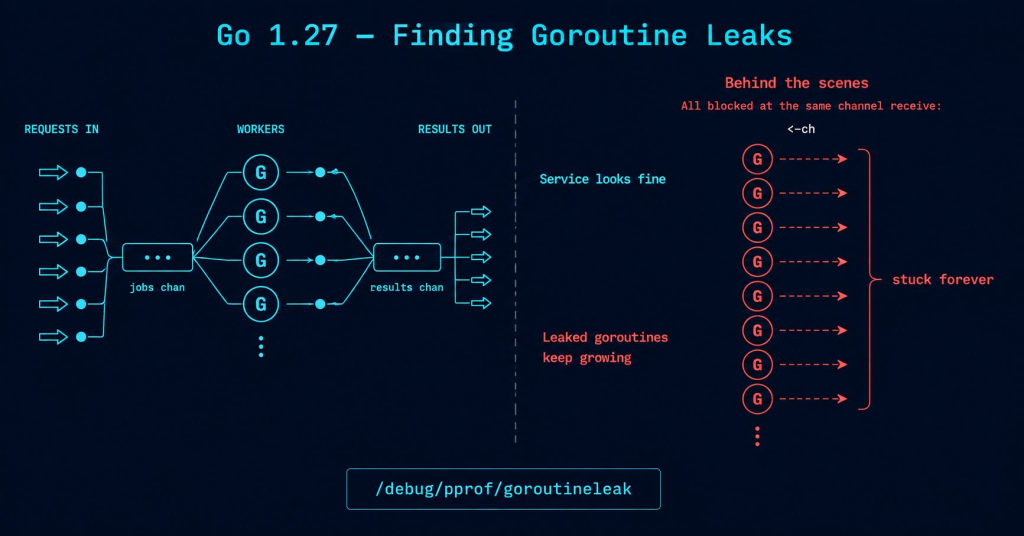
What?
A goroutine leak happens when a goroutine keeps running or waiting even though nobody needs it anymore.
The goroutine becomes stuck.
For example:
main no longer needs worker

BUT

worker is still waiting forever
Why Is This Bad?
Every goroutine uses resources.
A few leaked goroutines may not matter.
But imagine a server leaking one goroutine per request:
1 request     → 1 leaked goroutine
1,000 requests → 1,000 leaked goroutines
1,000,000      → big problem
Over time this can consume memory and other resources.
When Do Leaks Happen?
Common situations:
- waiting forever on a channel
- trying to send when nobody receives
- infinite loops without a stop condition
- background goroutines that cannot be cancelled
How Do We Prevent Them?
Give long-running goroutines a way to stop.
For example:
done channelor, more commonly in real applications:
context.ContextWhere?
Leak prevention matters especially in:
- servers
- workers
- background processing
- network applications
- long-running services
Complete Example
Here we create a producer that could run forever.
We give it a done channel so it knows when to stop.
package main

import (
	"fmt"
	"sync"
)

func producer(done <-chan struct{}, numbers chan<- int, wg *sync.WaitGroup) {

	defer wg.Done()
	defer close(numbers)

	number := 1

	for {

		select {

		// Try to send another number.
		case numbers <- number:

			number++

		// Stop when main tells us
		// that the result is no longer needed.
		case <-done:

			fmt.Println("Producer stopped")
			return
		}
	}
}

func main() {

	done := make(chan struct{})
	numbers := make(chan int)

	var wg sync.WaitGroup

	wg.Add(1)

	go producer(done, numbers, &wg)

	// We only need 3 numbers.
	for i := 0; i < 3; i++ {

		fmt.Println("Received:", <-numbers)
	}

	// Tell producer:
	// we don't need any more values.
	close(done)

	// Make sure producer actually exits.
	wg.Wait()

	fmt.Println("Program finished cleanly")
}
Output:
Received: 1
Received: 2
Received: 3
Producer stopped
Program finished cleanly
Why Could This Leak?
Imagine the producer only did:
for {
	numbers <- number
}
But main() stopped receiving.
The producer could become stuck trying to send.
Instead we gave it:
case <-done:
	return
Now it has an exit path.
Golden Rule
Every long-running goroutine should answer this question:
How will this goroutine stop?
If you cannot answer that question, examine the code carefully for a possible goroutine leak.
4. context.Context
context is one of the most important ideas in production Go.
The name makes it sound more complicated than it is.
What?
A context.Context is an object passed through your functions that can carry:
- cancellation signals
- deadlines
- timeouts
- small pieces of request-scoped information
Think:
Request
   ↓
Context
   ↓
Function A
   ↓
Function B
   ↓
Function C
The same context travels through the operation.
Why?
Imagine:
HTTP request
    ↓
service function
    ↓
database function
If the user cancels the HTTP request, the database operation may no longer be needed.
Context lets that cancellation information flow downward.
When?
Use context for operations that belong to a request or task.
Common examples:
- HTTP requests
- database calls
- API calls
- background jobs
- cancellation
- deadlines
How?
Usually the first parameter is:
ctx context.ContextExample:
func process(ctx context.Context) {
}
Then pass it down:
process(ctx)Where?
Context usually flows:
caller
  ↓
service
  ↓
repository
  ↓
database/API
Complete Example
This example uses context to pass request-scoped information through multiple functions.
package main

import (
	"context"
	"fmt"
)

// Define our own key type.
// This helps avoid key collisions.
type contextKey string

const requestIDKey contextKey = "requestID"

func databaseCall(ctx context.Context) {

	// Read request information from context.
	requestID := ctx.Value(requestIDKey)

	fmt.Println("Database received request ID:", requestID)
}

func processRequest(ctx context.Context) {

	fmt.Println("Processing request")

	// Pass the same context down.
	databaseCall(ctx)
}

func main() {

	// Start with a base context.
	ctx := context.Background()

	// Add request-scoped information.
	ctx = context.WithValue(
		ctx,
		requestIDKey,
		"REQ-123",
	)

	// Pass context into our application.
	processRequest(ctx)
}
Output:
Processing request
Database received request ID: REQ-123
Mental Model
flowchart TD
    A[main creates Context]
    A --> B[processRequest]
    B --> C[databaseCall]

    D[Request ID] --> A
The context follows the operation.
Important
Do not use context as a replacement for normal function parameters.
Bad idea:
username
password
price
product ID
should normally be regular parameters.
Context values are mainly useful for request-scoped metadata such as:
request ID
trace ID
The most important uses of context are actually:
cancellation and timeouts
which we cover next.
5. Cancellation
What?
Cancellation means:
Tell running work that it should stop.
For example:
main
 ↓
worker running
 ↓
main says CANCEL
 ↓
worker stops
Why?
Sometimes work becomes unnecessary.
Examples:
- user cancelled request
- application is shutting down
- another operation already succeeded
- task is no longer needed
We don’t want goroutines continuing useless work.
When?
Use cancellation for:
- background workers
- HTTP requests
- database operations
- API calls
- long-running loops
- concurrent pipelines
How?
Create a cancellable context:
ctx, cancel := context.WithCancel(context.Background())Later:
cancel()The worker watches:
ctx.Done()Where?
Usually:
parent creates context
        ↓
starts worker
        ↓
worker receives context
        ↓
parent calls cancel()
        ↓
worker exits
Complete Example
package main

import (
	"context"
	"fmt"
	"time"
)

func worker(ctx context.Context) {

	for {

		select {

		// Simulate doing work repeatedly.
		case <-time.After(500 * time.Millisecond):

			fmt.Println("Worker is working...")

		// Stop when context is cancelled.
		case <-ctx.Done():

			fmt.Println("Worker received cancellation")
			return
		}
	}
}

func main() {

	// Create a context that can be cancelled.
	ctx, cancel := context.WithCancel(
		context.Background(),
	)

	// Start worker.
	go worker(ctx)

	// Let it work for a short time.
	time.Sleep(1600 * time.Millisecond)

	fmt.Println("Main: cancel the worker")

	// Send cancellation signal.
	cancel()

	// Give worker time to print its final message.
	time.Sleep(200 * time.Millisecond)

	fmt.Println("Main finished")
}
Possible output:
Worker is working...
Worker is working...
Worker is working...
Main: cancel the worker
Worker received cancellation
Main finished
The Important Part
Creation:
ctx, cancel := context.WithCancel(...)Send cancellation:
cancel()Receive cancellation:
case <-ctx.Done():Mental model:
cancel()
   |
   v
ctx.Done()
   |
   v
worker stops
6. Timeouts
What?
A timeout automatically cancels work after a certain amount of time.
Instead of manually saying:
STOPwe say:
You have 2 seconds.

If not finished:
STOP.
Why?
External operations can become slow or stuck.
For example:
- database server is slow
- API is not responding
- network request hangs
- background operation takes too long
Without a timeout, your program may wait far longer than you intended.
When?
Use timeouts around operations that should have a maximum duration.
Especially:
- API calls
- database calls
- network calls
- external services
How?
Use:
context.WithTimeout()Example:
ctx, cancel := context.WithTimeout(
	context.Background(),
	2*time.Second,
)
Always call:
defer cancel()to release context resources when you are done.
Where?
Timeouts usually belong at the boundary where you know:
This operation should not take longer than X.
Complete Example
package main

import (
	"context"
	"fmt"
	"time"
)

func slowOperation(ctx context.Context) {

	select {

	// Pretend the operation takes 5 seconds.
	case <-time.After(5 * time.Second):

		fmt.Println("Operation completed")

	// Context finishes first.
	case <-ctx.Done():

		fmt.Println("Operation stopped:", ctx.Err())
	}
}

func main() {

	// Allow the operation only 2 seconds.
	ctx, cancel := context.WithTimeout(
		context.Background(),
		2*time.Second,
	)

	// Always release context resources.
	defer cancel()

	slowOperation(ctx)

	fmt.Println("Main finished")
}
After about two seconds:
Operation stopped: context deadline exceeded
Main finished
What Happened?
The operation wanted:
5 secondsBut the context allowed:
2 secondsSo:
0 sec
 |
1 sec
 |
2 sec ---- TIMEOUT
 |
X operation stopped
Cancellation vs Timeout
These are closely related.
Cancellation
You decide when to stop:
cancel()Timeout
Go automatically stops after a duration:
context.WithTimeout(...)Think:
Cancellation = Stop when I say so.

Timeout = Stop when the clock says so.
7. Graceful Shutdown
Now all the previous ideas come together.
What?
Graceful shutdown means:
Stop accepting/starting work, tell running goroutines to stop, wait for them, and then exit cleanly.
Instead of:
KILL PROGRAMwe want:
Shutdown requested
       ↓
Tell workers to stop
       ↓
Workers clean up
       ↓
Wait for workers
       ↓
Exit
Why?
Imagine your application is:
- writing a file
- processing a message
- updating data
- handling a request
If the process immediately disappears, work may be interrupted.
Graceful shutdown gives your application a chance to clean up.
When?
Use graceful shutdown for long-running applications such as:
- web servers
- API servers
- workers
- queue consumers
- background services
- microservices
How?
A common Go pattern combines:
OS signal
+
context
+
WaitGroup
Flow:
flowchart TD
    A[Application Running]
    A --> B[Ctrl+C / OS Signal]
    B --> C[Cancel Context]
    C --> D[Workers see ctx.Done]
    D --> E[Workers Stop]
    E --> F[WaitGroup Finishes]
    F --> G[Application Exits]
Where?
Usually inside your application’s main() function.
Complete Example
Copy and run this program.
Then press:
Ctrl+Cto stop it.
package main

import (
	"context"
	"fmt"
	"os"
	"os/signal"
	"sync"
	"time"
)

func worker(ctx context.Context, wg *sync.WaitGroup) {

	defer wg.Done()

	ticker := time.NewTicker(1 * time.Second)

	// Always stop ticker when worker exits.
	defer ticker.Stop()

	for {

		select {

		// Do some regular background work.
		case <-ticker.C:

			fmt.Println("Worker: processing...")

		// Shutdown requested.
		case <-ctx.Done():

			fmt.Println("Worker: cleaning up...")
			time.Sleep(500 * time.Millisecond)

			fmt.Println("Worker: stopped")
			return
		}
	}
}

func main() {

	// Create a context that is cancelled
	// when Ctrl+C is pressed.
	ctx, stop := signal.NotifyContext(
		context.Background(),
		os.Interrupt,
	)

	defer stop()

	var wg sync.WaitGroup

	wg.Add(1)

	go worker(ctx, &wg)

	fmt.Println("Application running")
	fmt.Println("Press Ctrl+C to stop")

	// Wait until Ctrl+C cancels the context.
	<-ctx.Done()

	fmt.Println("Main: shutdown requested")

	// Wait for worker cleanup.
	wg.Wait()

	fmt.Println("Application stopped cleanly")
}
Example:
Application running
Press Ctrl+C to stop
Worker: processing...
Worker: processing...
Worker: processing...
^C
Main: shutdown requested
Worker: cleaning up...
Worker: stopped
Application stopped cleanly
How Graceful Shutdown Works
The key line:
ctx, stop := signal.NotifyContext(
	context.Background(),
	os.Interrupt,
)
means:
Cancel this context when the application receives Ctrl+C.
Our worker already understands:
case <-ctx.Done():So the sequence becomes:
Ctrl+C
   ↓
context cancelled
   ↓
ctx.Done()
   ↓
worker cleans up
   ↓
worker returns
   ↓
wg.Done()
   ↓
wg.Wait() finishes
   ↓
program exits
This is why Context + WaitGroup work very well together.
Compare All Seven Concepts
| Concept | Main Job | Typical Question It Answers | Important API |
|---|---|---|---|
WaitGroup | Wait for goroutines | Have all workers finished? | Add, Done, Wait |
Mutex | Protect shared data | Who can modify this data now? | Lock, Unlock |
| Goroutine leak prevention | Make goroutines able to exit | Can this goroutine ever get stuck forever? | done, context |
Context | Carry task lifecycle information | Does this operation still matter? | context.Context |
| Cancellation | Stop work manually | Should this work stop now? | WithCancel, cancel() |
| Timeout | Stop work after a duration | Has this taken too long? | WithTimeout |
| Graceful shutdown | Stop the application safely | How do we shut everything down cleanly? | signal + context + WaitGroup |
What Each One Does NOT Do
This table is very useful for avoiding confusion.
| Concept | Does | Does NOT |
|---|---|---|
| WaitGroup | Wait for goroutines | Protect variables |
| Mutex | Protect shared variables | Stop goroutines |
| Leak prevention | Ensure goroutines can exit | Automatically protect shared data |
| Context | Carries lifecycle signals | Automatically kill goroutines |
| Cancellation | Signals work to stop | Force goroutines to stop |
| Timeout | Signals cancellation after time | Guarantee a function obeys it |
| Graceful shutdown | Coordinates application shutdown | Instantly terminate everything |
Notice something important:
Context does not physically kill a goroutine.
The goroutine must cooperate.
For example:
select {
case <-ctx.Done():
	return
}
The worker chooses to exit when it receives the signal.
WaitGroup vs Mutex
Probably the most common beginner confusion:
WaitGroupand:
Mutexhave completely different jobs.
| WaitGroup | Mutex | |
|---|---|---|
| Purpose | Wait | Protect |
| Concern | Goroutine completion | Shared data |
| Main call | Wait() | Lock() |
Used with Done() | Yes | No |
| Prevents race conditions | No | Yes |
| Stops goroutines | No | No |
Remember:
WaitGroup manages completion. Mutex manages access.
Context vs Cancellation vs Timeout
These three are closely connected.
Think of Context as the communication system.
Cancellation and timeout are things communicated through that system.
flowchart TD
    C[Context]

    C --> A[Manual Cancellation]
    C --> B[Timeout]

    A --> D[ctx.Done closes]
    B --> D

    D --> E[Worker detects signal]
    E --> F[Worker stops]
Comparison:
| Context | Cancellation | Timeout |
|---|---|---|
| The mechanism | Manual stop signal | Automatic stop signal |
| Passed between functions | Yes | Uses context |
| Time based | Not necessarily | No |
| Typical API | context.Context | WithCancel |
Cancellation vs Goroutine Leak Prevention
Cancellation is one of the main ways to prevent leaks.
Without cancellation:
worker
  ↓
loops forever
  ↓
nobody needs it
  ↓
still running
With cancellation:
worker
  ↓
ctx.Done()
  ↓
return
So:
Cancellation provides an exit door for a goroutine.
WaitGroup + Context
These two are often used together.
Context says:
Stop working.
WaitGroup says:
I will wait until you have actually stopped.
Example flow:
cancel()
   ↓
Worker A stops ─┐
Worker B stops ─┼──> WaitGroup
Worker C stops ─┘
                    ↓
               main continues
That’s an extremely common production Go pattern.
Mutex + WaitGroup
These two are also often used together.
Suppose 100 goroutines modify a counter.
Mutex:
protects counterWaitGroup:
waits for all 100 goroutinesThey solve different parts of the same problem.
Graceful Shutdown Uses Everything Together
In a real service you may eventually have:
Application
      |
      +------ Worker 1
      |
      +------ Worker 2
      |
      +------ Worker 3
Then shutdown happens:
Ctrl+C
   ↓
Context cancelled
   ↓
Workers receive cancellation
   ↓
Workers finish current cleanup
   ↓
WaitGroup waits
   ↓
Application exits
A mutex may additionally protect any shared state those workers use.
The Best Learning Order
Learn these concepts in this order:
1. WaitGroup
      ↓
2. Mutex
      ↓
3. Goroutine leaks
      ↓
4. Context
      ↓
5. Cancellation
      ↓
6. Timeout
      ↓
7. Graceful shutdown
Why this order?
Because the concepts build naturally.
Step 1 — WaitGroup
Learn:
wg.Add(1)

go func() {
	defer wg.Done()
}()

wg.Wait()
Meaning:
Start
↓
Work
↓
Finish
↓
Wait
Step 2 — Mutex
Learn:
mu.Lock()

sharedData++

mu.Unlock()
Meaning:
only one goroutine hereStep 3 — Goroutine Leak Prevention
Learn to ask:
How does this goroutine exit?
Long-running goroutines should normally have something like:
case <-done:
	return
or:
case <-ctx.Done():
	return
Step 4 — Context
Learn:
func work(ctx context.Context)and pass it downward:
main
 ↓
service(ctx)
 ↓
database(ctx)
Step 5 — Cancellation
Learn:
ctx, cancel := context.WithCancel(
	context.Background(),
)

cancel()
Worker:
case <-ctx.Done():
	return
Step 6 — Timeout
Learn:
ctx, cancel := context.WithTimeout(
	context.Background(),
	2*time.Second,
)

defer cancel()
Meaning:
You have 2 seconds.Step 7 — Graceful Shutdown
Combine:
OS Signal
   +
Context
   +
WaitGroup
to cleanly stop your application.
Final Cheat Sheet
| If you want to… | Use |
|---|---|
| Wait for goroutines | sync.WaitGroup |
| Protect shared state | sync.Mutex |
| Prevent stuck background goroutines | Cancellation / exit signal |
| Pass cancellation through your program | context.Context |
| Stop something manually | context.WithCancel |
| Stop something after N seconds | context.WithTimeout |
| Stop your whole service cleanly | Signal + Context + WaitGroup |
The Seven Concepts in One Sentence Each
WaitGroup
Wait until a group of goroutines has finished.
wg.Wait()Mutex
Allow only one goroutine at a time to access protected shared data.
mu.Lock()
mu.Unlock()
Goroutine Leak
A goroutine that continues waiting or running when it should have stopped.
Always ask:
How does this goroutine exit?Context
Carries cancellation, deadline, and request lifecycle information through your program.
func work(ctx context.Context)Cancellation
Manually tell running work that it should stop.
cancel()Timeout
Automatically tell work to stop when it takes too long.
context.WithTimeout(...)Graceful Shutdown
Tell the application to stop, allow workers to clean up, wait for them, and then exit.
Signal
  ↓
Cancel
  ↓
Cleanup
  ↓
Wait
  ↓
Exit
The Most Important Mental Model
If you remember only this section, remember:
WaitGroup
    =
"Wait until everyone is done."


Mutex
    =
"Only one person can touch this."


Goroutine leak prevention
    =
"Every worker needs an exit door."


Context
    =
"Pass lifecycle information through the work."


Cancellation
    =
"Stop when I tell you."


Timeout
    =
"Stop when time runs out."


Graceful shutdown
    =
"Tell everyone to stop, wait for them, then exit."
And the most useful overall relationship is:
Context tells goroutines WHEN to stop.

Goroutines must cooperate and actually stop.

WaitGroup tells main WHEN they have stopped.

Mutex protects shared data WHILE they are running.
Once this relationship becomes clear, Go concurrency management becomes much easier to reason about.

