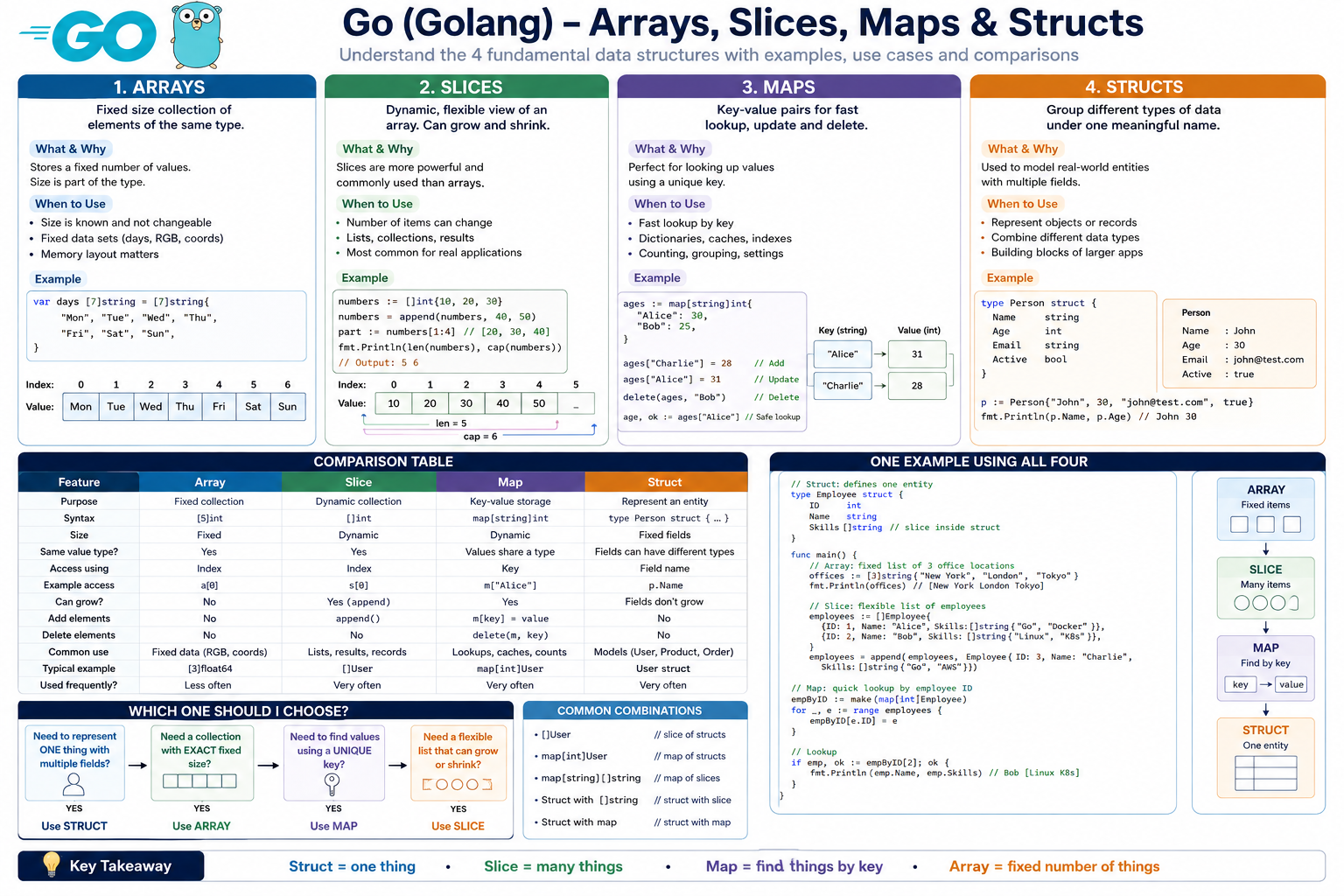
These four concepts are fundamental Go data structures.
A simple way to remember them:
- Array → fixed number of values.
- Slice → flexible list of values.
- Map → key → value lookup.
- Struct → group different fields into one meaningful object.
1. Arrays
What is an Array?
An array stores multiple values of the same data type.
The important point is:
An array has a fixed size.
Example:
var marks [5]intThis creates an array capable of storing exactly 5 integers.
Conceptually:
Index:   0   1   2   3   4
       +---+---+---+---+---+
Value: |10 |20 |30 |40 |50 |
       +---+---+---+---+---+
Indexes start from 0.
How to create an Array
numbers := [5]int{10, 20, 30, 40, 50}Go can also calculate the size:
numbers := [...]int{10, 20, 30, 40, 50}Here ... means:
“Go, count the elements and determine the array size.”
The result is still:
[5]intAccessing Array Elements
fmt.Println(numbers[0])Output:
10Change a value:
numbers[2] = 100Now:
[10 20 100 40 50]Loop through an Array
for index, value := range numbers {
    fmt.Println(index, value)
}
Output:
0 10
1 20
2 30
3 40
4 50
Why use Arrays?
Arrays are useful when the number of elements is known and fixed.
For example:
days := [7]string{
    "Monday",
    "Tuesday",
    "Wednesday",
    "Thursday",
    "Friday",
    "Saturday",
    "Sunday",
}
There will always be exactly 7 days in this particular representation.
When should I use an Array?
Use an array when:
- size is known
- size will not change
- fixed-size data is meaningful
- memory layout matters
- you specifically need
[N]T
Examples:
RGB values
coordinates
matrix dimensions
fixed sensor readings
cryptographic data
fixed buffers
Example:
rgb := [3]int{255, 100, 50}2. Slices
What is a Slice?
A slice is similar to an array but much more flexible.
A slice:
stores multiple values of the same type but can grow and shrink logically.
Example:
names := []string{"John", "David", "Mary"}Notice the difference.
Array:
[3]stringSlice:
[]stringNo number inside [].
Array vs Slice syntax
Array:
numbers := [3]int{10, 20, 30}Slice:
numbers := []int{10, 20, 30}That small syntax difference is very important.
Why do Slices exist?
Imagine you’re storing users.
Initially:
Alice
Bob
John
Tomorrow another user registers:
MaryWith a fixed-size array, this can become inconvenient.
With a slice:
users := []string{"Alice", "Bob", "John"}

users = append(users, "Mary")
Now:
[Alice Bob John Mary]This is why slices are used far more frequently than arrays in normal Go programs.
append()
append() adds an element to a slice.
numbers := []int{10, 20}

numbers = append(numbers, 30)
Result:
[10 20 30]Add multiple values:
numbers = append(numbers, 40, 50, 60)Result:
[10 20 30 40 50 60]len() and cap()
Slices have two important properties:
len(slice)
cap(slice)
len
Number of elements currently inside the slice.
cap
Amount of space available in the underlying storage before Go may need to allocate more space.
Example:
numbers := make([]int, 3, 10)

fmt.Println(len(numbers))
fmt.Println(cap(numbers))
Output:
3
10
Think of it like a parking lot:
Capacity = 10 parking spaces
Length   = 3 cars currently parked

+---+---+---+---+---+---+---+---+---+---+
| X | X | X |   |   |   |   |   |   |   |
+---+---+---+---+---+---+---+---+---+---+

len = 3
cap = 10
make() with Slices
Another common way to create slices is:
numbers := make([]int, 5)This creates:
[0 0 0 0 0]Because the zero value of int is 0.
You can specify capacity too:
numbers := make([]int, 5, 10)Meaning:
length   = 5
capacity = 10
Slicing a Slice
Suppose:
numbers := []int{10, 20, 30, 40, 50}You can take part of it:
part := numbers[1:4]Result:
[20 30 40]Why?
Go slicing follows:
[start : end]Start is included.
End is excluded.
So:
numbers[1:4]

index 1 -> included
index 2 -> included
index 3 -> included
index 4 -> excluded
When should I use a Slice?
Use slices when:
- number of values can change
- processing lists of records
- returning multiple items
- working with database results
- working with API results
- storing users/products/orders
- filtering data
- sorting data
Example:
users := []string{"Alice", "Bob"}

users = append(users, "Charlie")
In everyday Go development:
Slices are usually preferred over arrays.
3. Maps
What is a Map?
A map stores data as:
key -> valueFor example:
name -> John
age  -> 30
But all keys must have one type and all values must have one type for a given map.
Example:
ages := map[string]int{
    "John":  30,
    "Alice": 25,
    "Bob":   35,
}
Here:
Key type   = string
Value type = int
So:
map[string]intmeans:
Map where the key is a string and the value is an integer.
Easy real-world example
Think of a phone book.
Name        Phone Number

John   ->   5551000
Alice  ->   5552000
Bob    ->   5553000
In Go:
phones := map[string]string{
    "John":  "5551000",
    "Alice": "5552000",
    "Bob":   "5553000",
}
Access a Map Value
fmt.Println(phones["John"])Output:
5551000Add a Map Value
phones["David"] = "5554000"Now the map contains David.
Update a Map Value
phones["John"] = "9999999"The old value is replaced.
Delete from a Map
Use:
delete(phones, "John")Now John’s entry is removed.
Very Important: Checking if a Key Exists
Suppose:
ages := map[string]int{
    "John": 30,
}
You could write:
age := ages["David"]But David doesn’t exist.
Go returns the zero value:
0That creates ambiguity.
Maybe David exists and his age is actually 0.
So Go provides this syntax:
age, exists := ages["David"]Then:
if exists {
    fmt.Println("Age:", age)
} else {
    fmt.Println("User not found")
}
This pattern is extremely common in Go.
Loop through a Map
for name, age := range ages {
    fmt.Println(name, age)
}
Important:
Do not rely on normal map iteration being in a particular order.
Creating a Map with make()
You can also write:
ages := make(map[string]int)Then:
ages["John"] = 30
ages["Alice"] = 25
When should I use a Map?
Maps are useful when you need fast lookup using some identifier.
For example:
username -> User
userID   -> User
country  -> capital
productID -> Product
setting -> value
word -> count
Example:
countries := map[string]string{
    "IN": "India",
    "US": "United States",
    "JP": "Japan",
}
Then:
fmt.Println(countries["IN"])Output:
India4. Structs
What is a Struct?
A struct groups several related pieces of data together.
Unlike an array or slice, the fields can have different data types.
For example, a person has:
Name
Age
Email
Active
These aren’t necessarily the same type.
We can define:
type Person struct {
    Name   string
    Age    int
    Email  string
    Active bool
}
Now Person becomes our own custom type.
Think of Struct as a Form
Imagine a registration form:
-----------------------
Name:   John
Age:    30
Email:  john@test.com
Active: true
-----------------------
That could be represented as:
type User struct {
    Name   string
    Age    int
    Email  string
    Active bool
}
Creating a Struct
user := User{
    Name:   "John",
    Age:    30,
    Email:  "john@example.com",
    Active: true,
}
Accessing Struct Fields
Use a dot:
fmt.Println(user.Name)
fmt.Println(user.Email)
Output:
John
john@example.com
Updating Struct Fields
user.Age = 31Now:
Age = 31Why use Structs?
Without a struct, you might have separate variables:
name := "John"
age := 30
email := "john@example.com"
active := true
Imagine having 100 users.
That quickly becomes difficult.
Instead:
type User struct {
    Name   string
    Age    int
    Email  string
    Active bool
}
Then you can create:
user1 := User{...}
user2 := User{...}
user3 := User{...}
Or even better:
users := []User{
    {...},
    {...},
    {...},
}
This combines slices + structs.
This is extremely common in Go applications.
When should I use a Struct?
Use structs to represent real things/concepts such as:
User
Employee
Product
Order
Vehicle
Customer
Server
Configuration
API response
Database record
Example:
type Product struct {
    ID       int
    Name     string
    Price    float64
    InStock  bool
}
Big Comparison Table
| Feature | Array | Slice | Map | Struct |
|---|---|---|---|---|
| Purpose | Fixed collection | Flexible collection | Key-value storage | Represent an object/entity |
| Syntax | [5]int | []int | map[string]int | struct {...} |
| Size | Fixed | Dynamic | Dynamic | Fixed fields by type definition |
| Same value type? | Yes | Yes | Values share a type | Fields can have different types |
| Access using | Index | Index | Key | Field name |
| Example access | a[0] | s[0] | m["John"] | u.Name |
| Can grow? | No | Yes | Yes | Fields don’t dynamically grow |
append() | No | Yes | No | No |
delete() | No | No | Yes | No |
| Common use | Fixed data | Lists | Lookups | Objects/entities |
| Typical example | RGB [3]int | []User | map[int]User | User |
| Used frequently? | Less often | Very often | Very often | Very often |
Think About Them This Way
| Structure | Real-world analogy |
|---|---|
| Array | Row of exactly 5 lockers |
| Slice | Expandable shopping list |
| Map | Dictionary / phone book |
| Struct | Registration form |
One Complete Example Using All Four
Imagine we’re creating a small employee application.
package main

import "fmt"

// Employee is a STRUCT.
//
// A struct groups related information into one type.
//
// Every employee has:
// - ID
// - Name
// - Department
// - Skills
type Employee struct {
	ID         int
	Name       string
	Department string
	Skills     []string // A struct field can itself contain a slice.
}

func main() {

	// ---------------------------------------------------
	// 1. ARRAY
	// ---------------------------------------------------

	// An array has a FIXED size.
	//
	// Here we are saying:
	// "Store exactly 3 office locations."
	//
	// [3]string
	//  ^   ^
	//  |   |
	// size data type

	offices := [3]string{
		"New York",
		"London",
		"Tokyo",
	}

	fmt.Println("Offices:")

	for _, office := range offices {
		fmt.Println(office)
	}


	// ---------------------------------------------------
	// 2. SLICE
	// ---------------------------------------------------

	// A slice is a flexible collection.
	//
	// Unlike the array above, we don't specify a size.
	//
	// []Employee means:
	// "A slice containing Employee structs."

	employees := []Employee{
		{
			ID:         1,
			Name:       "Alice",
			Department: "Engineering",
			Skills:     []string{"Go", "Docker"},
		},
		{
			ID:         2,
			Name:       "Bob",
			Department: "DevOps",
			Skills:     []string{"Linux", "Kubernetes"},
		},
	}


	// append() allows the slice to grow.
	//
	// We add another Employee to the existing slice.

	employees = append(employees, Employee{
		ID:         3,
		Name:       "Charlie",
		Department: "Engineering",
		Skills:     []string{"Go", "AWS"},
	})


	// ---------------------------------------------------
	// 3. MAP
	// ---------------------------------------------------

	// We create a map for quick employee lookup.
	//
	// Key:
	//      int
	//
	// Value:
	//      Employee
	//
	// Therefore:
	//
	// map[int]Employee

	employeeByID := make(map[int]Employee)


	// Loop through employees and put each one into the map.

	for _, employee := range employees {

		// employee.ID becomes the key.
		//
		// Example:
		//
		// 1 -> Alice
		// 2 -> Bob
		// 3 -> Charlie

		employeeByID[employee.ID] = employee
	}


	// ---------------------------------------------------
	// MAP LOOKUP
	// ---------------------------------------------------

	// Search for employee ID 2.

	employee, exists := employeeByID[2]

	// exists tells us whether the key was found.

	if exists {
		fmt.Println("\nEmployee found:")
		fmt.Println("Name:", employee.Name)
		fmt.Println("Department:", employee.Department)
		fmt.Println("Skills:", employee.Skills)
	}


	// ---------------------------------------------------
	// LOOP THROUGH SLICE OF STRUCTS
	// ---------------------------------------------------

	fmt.Println("\nAll Employees:")

	for _, employee := range employees {

		// employee is an Employee STRUCT.
		//
		// Therefore we access fields using:
		//
		// employee.Name
		// employee.Department

		fmt.Println(
			employee.ID,
			employee.Name,
			employee.Department,
		)
	}
}
Possible output:
Offices:
New York
London
Tokyo

Employee found:
Name: Bob
Department: DevOps
Skills: [Linux Kubernetes]

All Employees:
1 Alice Engineering
2 Bob DevOps
3 Charlie Engineering
What Happened in This Program?
The program demonstrates how these data structures often work together, rather than separately.
Array
offices := [3]string{
    "New York",
    "London",
    "Tokyo",
}
We know there are exactly three office locations for this example.
Array

[New York] [London] [Tokyo]
     0         1        2
Struct
We define what an employee looks like:
type Employee struct {
    ID         int
    Name       string
    Department string
    Skills     []string
}
One employee might be:
Employee
+-------------------------+
| ID         = 1          |
| Name       = Alice      |
| Department = Engineering|
| Skills     = Go,Docker  |
+-------------------------+
Slice
Then we need many employees:
employees := []Employee{
    ...
}
Conceptually:
employees slice

        |
        v

+-----------+
| Employee  |
| Alice     |
+-----------+
      |
+-----------+
| Employee  |
| Bob       |
+-----------+
      |
+-----------+
| Employee  |
| Charlie   |
+-----------+
A slice of structs is extremely common:
[]EmployeeOther examples:
[]User
[]Product
[]Order
[]Vehicle
[]Server
Map
Then suppose we want to quickly find an employee using their ID.
We create:
map[int]EmployeeConceptually:
Employee ID         Employee

    1       ---->     Alice

    2       ---->     Bob

    3       ---->     Charlie
Then:
employeeByID[2]gives us Bob.
Which One Should I Choose?
A very useful decision process is:
Do I need to represent ONE thing
with different properties?

        YES
         |
         v
       Struct
Example:
type User struct {
    Name string
    Age  int
}
If you’re storing many things:
Do I know the EXACT fixed number
and it should remain fixed?

        YES
         |
         v
       Array
Example:
coordinates := [3]float64{x, y, z}Otherwise:
Need an ordered/flexible list?

        YES
         |
         v
       Slice
Example:
users := []User{}If instead:
Need to find something
using a KEY?

        YES
         |
         v
        Map
Example:
usersByID := map[int]User{}Practical Application Example
Imagine you’re building an e-commerce system.
Product Struct
One product:
type Product struct {
    ID    int
    Name  string
    Price float64
}
Slice of Products
All products:
products := []Product{
    {ID: 1, Name: "Laptop", Price: 1200},
    {ID: 2, Name: "Mouse", Price: 25},
    {ID: 3, Name: "Keyboard", Price: 70},
}
Think:
Product
Product
Product
Product
Product
...
Map of Products
Need fast lookup by product ID:
productsByID := map[int]Product{
    1: {ID: 1, Name: "Laptop", Price: 1200},
    2: {ID: 2, Name: "Mouse", Price: 25},
}
Then:
product := productsByID[2]Array
Maybe your application has exactly 3 pricing tiers:
pricingTiers := [3]string{
    "Basic",
    "Professional",
    "Enterprise",
}
Very Important Combination Patterns
In real Go applications, you’ll frequently encounter combinations.
Slice of Structs
[]UserMeaning:
Many users.
Example:
users := []User{
    {Name: "Alice"},
    {Name: "Bob"},
}
Probably the most common pattern.
Map of Structs
map[int]UserMeaning:
Find a user using an integer ID.
Example:
users := map[int]User{
    1: {Name: "Alice"},
    2: {Name: "Bob"},
}
Map of Slices
map[string][]stringMeaning:
Each key points to a list.
Example:
skills := map[string][]string{
    "Alice": {"Go", "Docker", "AWS"},
    "Bob":   {"Java", "Spring"},
}
Conceptually:
Alice ----> Go
            Docker
            AWS

Bob ------> Java
            Spring
Struct containing Slices
type User struct {
    Name   string
    Skills []string
}
Meaning:
Each user can have many skills.
Struct containing a Map
type User struct {
    Name     string
    Settings map[string]string
}
Example:
user := User{
    Name: "Alice",
    Settings: map[string]string{
        "theme":    "dark",
        "language": "English",
    },
}
Important Difference: Array vs Slice
This is one of the most important things beginners should understand.
These are different types:
[3]intand
[4]intFor example:
a := [3]int{1, 2, 3}

b := [4]int{1, 2, 3, 4}
a and b have different types.
But:
a := []int{1, 2, 3}

b := []int{1, 2, 3, 4}
Both are:
[]intThat is another reason slices are more convenient for general application development.
Quick Syntax Cheat Sheet
Array
numbers := [3]int{10, 20, 30}Think:
Exactly 3 integersSlice
numbers := []int{10, 20, 30}Think:
Flexible list of integersAdd:
numbers = append(numbers, 40)Map
ages := map[string]int{
    "Alice": 30,
    "Bob":   40,
}
Think:
string -> intLookup:
age := ages["Alice"]Safe lookup:
age, exists := ages["Alice"]Struct
type User struct {
    Name string
    Age  int
}
Create:
user := User{
    Name: "Alice",
    Age:  30,
}
Access:
fmt.Println(user.Name)Final Mental Model
The easiest way to remember everything is:
ARRAY
"I need exactly N values."

[3]int
   ↓
[10, 20, 30]
SLICE
"I need a flexible list."
[]int
↓
[10, 20, 30, ...]MAP
"I want to find a value using a key."
map[string]int
Alice ----> 30
Bob ----> 40
John ----> 25STRUCT
"I want to describe one thing."
User
|
+-- Name
+-- Age
+-- Email
+-- ActiveAnd in a typical Go application, these often become:
Struct = defines ONE object

          ↓

type User struct {
    ID   int
    Name string
}

          ↓

Slice = stores MANY objects

[]User

          ↓

Map = quickly FINDS objects

map[int]User
So a particularly useful rule to remember is:
Struct = one thing. Slice = many things. Map = find things by key. Array = fixed number of things.

