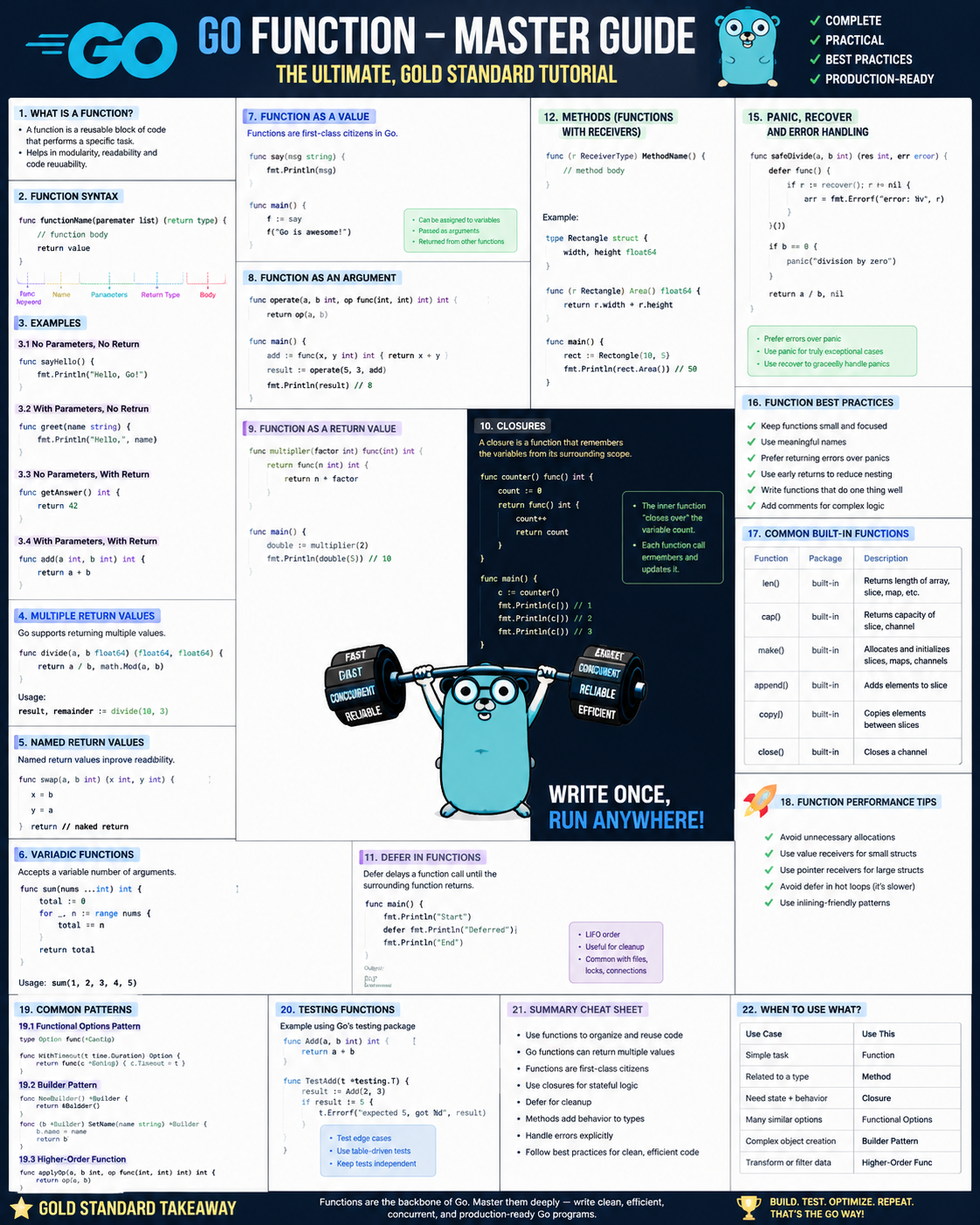
A function is one of the most important building blocks in Go.
If you understand functions properly, concepts such as methods, interfaces, goroutines, error handling, defer, callbacks, HTTP handlers, and concurrency become much easier.
The best mental model is:
INPUT
  ↓
FUNCTION
  ↓
WORK
  ↓
OUTPUT
For example:
func add(a int, b int) int {
    return a + b
}
a = 10 ─┐
├──► add() ───► 30
b = 20 ─┘1. What is a Function?
A function is a named block of reusable code that performs a task.
Instead of writing:
fmt.Println(10 + 20)
fmt.Println(30 + 40)
fmt.Println(50 + 60)
you can create:
func add(a int, b int) int {
    return a + b
}
and reuse it:
add(10, 20)
add(30, 40)
add(50, 60)
Why use functions?
Functions help you:
- avoid duplicate code
- divide large programs into small pieces
- reuse logic
- test code more easily
- make code easier to understand
2. Basic Function
Let’s start with the simplest possible function.
package main

import "fmt"

func greet() {
    fmt.Println("Hello!")
}

func main() {
    greet()
}
Output:
Hello!Understand it
func greet() {means:
func
 │
 └── create a function

greet
 │
 └── function name

()
 │
 └── no input parameters
The body is:
{
    fmt.Println("Hello!")
}
And:
greet()means:
Execute the
greetfunction.
3. Function With One Parameter
Functions can receive information.
package main

import "fmt"

func greet(name string) {
    fmt.Println("Hello", name)
}

func main() {
    greet("Rajesh")
}
Output:
Hello RajeshHere:
func greet(name string)means:
name     string
 │         │
 │         └── data type
 │
 └── parameter name
When you call:
greet("Rajesh")then:
name = "Rajesh"4. Parameter vs Argument
This terminology is useful.
Function definition:
func greet(name string)name is a parameter.
Function call:
greet("Rajesh")"Rajesh" is an argument.
Think:
Parameter = variable declared by function
Argument  = actual value sent to function
5. Multiple Parameters
A function can receive multiple values.
package main

import "fmt"

func add(a int, b int) {
    fmt.Println(a + b)
}

func main() {
    add(10, 20)
}
Output:
30The values are mapped by position:
add(10, 20)

     │   │
     │   └── b = 20
     │
     └────── a = 10
6. Short Parameter Syntax
Instead of:
func add(a int, b int)Go allows:
func add(a, b int)because both parameters have the same type.
Example:
package main

import "fmt"

func add(a, b int) {
    fmt.Println(a + b)
}

func main() {
    add(10, 20)
}
Both versions mean exactly the same thing.
7. Function Returning a Value
Functions can return results.
package main

import "fmt"

func add(a, b int) int {
    return a + b
}

func main() {

    result := add(10, 20)

    fmt.Println(result)
}
Output:
30Look at:
func add(a, b int) intThe final:
intmeans:
This function returns an integer.
And:
return a + bsends the result back.
Flow:
10 ──┐
     ├──► add() ───► 30
20 ──┘
8. Return Value Directly
You don’t always need another variable.
Instead of:
result := add(10, 20)

fmt.Println(result)
you can write:
fmt.Println(add(10, 20))Complete example:
package main

import "fmt"

func add(a, b int) int {
    return a + b
}

func main() {
    fmt.Println(add(10, 20))
}
9. Multiple Return Values
Go functions can return multiple values.
This is extremely common in Go.
package main

import "fmt"

func calculate(a, b int) (int, int) {

    sum := a + b
    product := a * b

    return sum, product
}

func main() {

    sum, product := calculate(10, 20)

    fmt.Println("Sum:", sum)
    fmt.Println("Product:", product)
}
Output:
Sum: 30
Product: 200
This:
(int, int)means:
first result  → int
second result → int
And:
return sum, productreturns both.
10. Ignoring a Return Value With _
Suppose:
func calculate(a, b int) (int, int)returns:
sum
product
but you only want the sum.
Use _.
package main

import "fmt"

func calculate(a, b int) (int, int) {
    return a + b, a * b
}

func main() {

    sum, _ := calculate(10, 20)

    fmt.Println(sum)
}
Output:
30_ is called the blank identifier.
It means:
I received this value but don’t need it.
11. Named Return Values
Go allows return variables to be named.
For example:
func calculate(a, b int) (sum int, product int) {

    sum = a + b
    product = a * b

    return
}
Complete example:
package main

import "fmt"

func calculate(a, b int) (sum int, product int) {

    sum = a + b
    product = a * b

    return
}

func main() {

    sum, product := calculate(10, 20)

    fmt.Println(sum)
    fmt.Println(product)
}
Output:
30
200
Notice:
returnhas no values.
That’s because sum and product were already declared as return variables.
Should you use named returns?
They can be useful in small functions, but don’t overuse them.
This is usually clearer:
return sum, productthan:
returnespecially in larger functions.
12. Functions and Pass-by-Value
This is extremely important.
Go passes function arguments by value.
Example:
package main

import "fmt"

func changeNumber(number int) {

    number = 100

    fmt.Println("Inside:", number)
}

func main() {

    number := 10

    changeNumber(number)

    fmt.Println("Outside:", number)
}
Output:
Inside: 100
Outside: 10
Why?
Because Go creates a copy.
Conceptually:
main()

number = 10
    │
    │ copy
    ▼

changeNumber()

number = 10

number = 100
The original variable is untouched.
So:
Original
number = 10

Copy inside function
number = 100
This is one of the fundamental rules of Go:
Go passes arguments by value.
13. Pointer Parameters
What if the function really needs to change the original variable?
Use a pointer.
package main

import "fmt"

func changeNumber(number *int) {

    *number = 100
}

func main() {

    number := 10

    changeNumber(&number)

    fmt.Println(number)
}
Output:
100Two important operators are involved:
| Operator | Meaning |
|---|---|
& | get address |
* | access value at address |
So:
&numbermeans:
Give me the memory address of
number.
And:
*numberinside the function means:
Access the value stored at that address.
Conceptually:
main

number = 10
   │
   │ address
   ▼
0x1000


changeNumber()

number
   │
   └────────► 0x1000
                  │
                  ▼
               original
               number
Then:
*number = 100changes the original.
14. Incrementing Through a Pointer
Your earlier example contained:
(*callCount)++Example:
package main

import "fmt"

func increment(count *int) {
    (*count)++
}

func main() {

    calls := 0

    increment(&calls)

    fmt.Println(calls)
}
Output:
1Breaking it down:
&callsmeans:
Address of
calls.
countstores that address.
*countmeans:
Value stored at the address.
Then:
(*count)++means:
Increase that original value by 1.
15. Variadic Functions — ...
A function sometimes needs an unknown number of arguments.
Go provides variadic functions.
package main

import "fmt"

func total(numbers ...int) int {

    sum := 0

    for _, number := range numbers {
        sum += number
    }

    return sum
}

func main() {

    fmt.Println(total(10))
    fmt.Println(total(10, 20))
    fmt.Println(total(10, 20, 30))
}
Output:
10
30
60
This:
numbers ...intmeans:
Accept zero or more integers.
Inside the function, numbers behaves like a slice:
[10, 20, 30]16. Variadic Parameter Must Be Last
This is valid:
func calculate(name string, numbers ...int)This is invalid:
func calculate(numbers ...int, name string)Rule:
A variadic parameter must always be the final parameter.
17. Passing a Slice to a Variadic Function
Suppose:
numbers := []int{10, 20, 30}You can pass the slice using:
numbers...Example:
package main

import "fmt"

func total(numbers ...int) int {

    sum := 0

    for _, number := range numbers {
        sum += number
    }

    return sum
}

func main() {

    numbers := []int{10, 20, 30}

    result := total(numbers...)

    fmt.Println(result)
}
Output:
60Notice the difference:
numbersis a slice.
numbers...means:
Expand the slice into individual arguments.
Conceptually:
total(numbers...)becomes:
total(10, 20, 30)18. Your summarize() Function
Now your original function becomes much easier to understand.
func summarize(
    label string,
    callCount *int,
    scores ...int,
) (string, int) {

    (*callCount)++

    total := 0

    for _, score := range scores {
        total += score
    }

    return strings.ToUpper(label), total
}
It contains:
                 summarize
                     │
      ┌──────────────┼──────────────┐
      │              │              │
      ▼              ▼              ▼
 normal param    pointer param   variadic param

label string    callCount *int   scores ...int
And returns:
(string, int)Complete flow:
summarize(
    "team score",
    &calls,
    10, 20, 30,
)

        │
        ▼

label
"team score"

callCount
points to calls

scores
[10,20,30]

        │
        ▼

calls++
calls = 1

        │
        ▼

10 + 20 + 30
total = 60

        │
        ▼

strings.ToUpper("team score")
"TEAM SCORE"

        │
        ▼

return

"TEAM SCORE", 60
19. Functions Can Call Other Functions
Functions aren’t isolated.
One function can call another.
package main

import "fmt"

func add(a, b int) int {
    return a + b
}

func printResult(a, b int) {

    result := add(a, b)

    fmt.Println(result)
}

func main() {
    printResult(10, 20)
}
Flow:
main()
   │
   ▼
printResult()
   │
   ▼
add()
   │
   ▼
30
This is how real applications are built: many small functions working together.
20. Functions Are Values in Go
This is an important feature.
A function can be stored inside a variable.
package main

import "fmt"

func add(a, b int) int {
    return a + b
}

func main() {

    operation := add

    result := operation(10, 20)

    fmt.Println(result)
}
Output:
30Here:
operation := adddoesn’t execute add.
It stores the function.
Then:
operation(10, 20)executes it.
21. Function Type
Functions themselves have types.
For this function:
func add(a int, b int) intthe function type is:
func(int, int) intExample:
package main

import "fmt"

func add(a, b int) int {
    return a + b
}

func main() {

    var operation func(int, int) int

    operation = add

    fmt.Println(operation(10, 20))
}
Output:
3022. Passing a Function Into Another Function
Because functions are values, you can pass them into other functions.
This is called a higher-order function.
package main

import "fmt"

func add(a, b int) int {
    return a + b
}

func calculate(
    a int,
    b int,
    operation func(int, int) int,
) int {

    return operation(a, b)
}

func main() {

    result := calculate(10, 20, add)

    fmt.Println(result)
}
Output:
30Flow:
calculate
   │
   ├── 10
   ├── 20
   │
   └── add function
          │
          ▼
      add(10,20)
          │
          ▼
         30
This pattern is used heavily for:
- callbacks
- HTTP handlers
- middleware
- sorting
- concurrency
- event processing
23. Anonymous Functions
A function doesn’t always need a name.
This is called an anonymous function.
package main

import "fmt"

func main() {

    add := func(a, b int) int {
        return a + b
    }

    result := add(10, 20)

    fmt.Println(result)
}
Output:
30Here:
func(a, b int) int {
    return a + b
}
has no name.
It is assigned to:
add24. Immediately Executed Anonymous Function
You can also execute an anonymous function immediately.
package main

import "fmt"

func main() {

    func() {
        fmt.Println("Hello")
    }()
}
Notice:
}()The final () executes the function immediately.
25. Closures
A closure is an anonymous function that remembers variables outside itself.
Example:
package main

import "fmt"

func main() {

    count := 0

    increment := func() {

        count++

        fmt.Println(count)
    }

    increment()
    increment()
    increment()
}
Output:
1
2
3
The function can access:
counteven though count was created outside the function.
Conceptually:
count = 0
   ▲
   │
increment()
   │
   ├── count++
   └── remembers count
Closures are commonly used in:
- callbacks
- middleware
- configuration
- state management
- goroutines
26. Function Returning Another Function
A function can even return another function.
package main

import "fmt"

func createMultiplier(multiplier int) func(int) int {

    return func(number int) int {
        return number * multiplier
    }
}

func main() {

    double := createMultiplier(2)

    fmt.Println(double(10))
    fmt.Println(double(20))
}
Output:
20
40
double remembers:
multiplier = 2This is another closure example.
27. Callback Functions
A callback is simply:
A function passed to another function so it can be called later.
Example:
package main

import "fmt"

func process(number int, callback func(int)) {

    result := number * 2

    callback(result)
}

func printResult(result int) {

    fmt.Println("Result:", result)
}

func main() {

    process(10, printResult)
}
Output:
Result: 20Flow:
main
 │
 ▼
process(10, printResult)
 │
 ├── 10 × 2
 │
 ▼
20
 │
 ▼
printResult(20)
28. Returning Errors From Functions
This is perhaps the most common Go function pattern.
Instead of exceptions, Go commonly returns:
value + errorExample:
package main

import (
    "errors"
    "fmt"
)

func divide(a, b float64) (float64, error) {

    if b == 0 {
        return 0, errors.New("cannot divide by zero")
    }

    return a / b, nil
}

func main() {

    result, err := divide(10, 2)

    if err != nil {
        fmt.Println("Error:", err)
        return
    }

    fmt.Println(result)
}
Output:
5Function:
func divide(a, b float64) (float64, error)returns:
result
error
This pattern appears everywhere in Go:
value, err := someFunction()29. Early Return
Go code commonly uses early returns.
Instead of:
if something {
    // lots of logic
}
you often see:
if invalid {
    return
}
Example:
package main

import "fmt"

func checkAge(age int) {

    if age < 18 {
        fmt.Println("Not allowed")
        return
    }

    fmt.Println("Allowed")
}

func main() {

    checkAge(20)
}
Output:
AllowedThis style keeps Go code simple and flat.
30. defer Inside Functions
defer means:
Execute this function when the current function is about to finish.
Example:
package main

import "fmt"

func demo() {

    defer fmt.Println("Goodbye")

    fmt.Println("Hello")
}

func main() {
    demo()
}
Output:
Hello
Goodbye
Although:
defer fmt.Println("Goodbye")appears first, it runs when demo() finishes.
Flow:
demo()
 │
 ├── register deferred function
 │
 ├── print Hello
 │
 └── finishing
        │
        ▼
     print Goodbye
defer is commonly used for cleanup:
file.Close()rows.Close()mutex.Unlock()31. Multiple defer Calls
Deferred functions run in reverse order.
package main

import "fmt"

func main() {

    defer fmt.Println("One")
    defer fmt.Println("Two")
    defer fmt.Println("Three")
}
Output:
Three
Two
One
Think of a stack:
defer One
defer Two
defer Three

finish function

Three
Two
One
32. Recursive Functions
A recursive function calls itself.
Example:
package main

import "fmt"

func countdown(number int) {

    if number == 0 {
        return
    }

    fmt.Println(number)

    countdown(number - 1)
}

func main() {

    countdown(5)
}
Output:
5
4
3
2
1
Flow:
countdown(5)
    ↓
countdown(4)
    ↓
countdown(3)
    ↓
countdown(2)
    ↓
countdown(1)
    ↓
countdown(0)
    ↓
return
This condition:
if number == 0 {
    return
}
is called the base case.
Without a base case, recursion would continue until the program fails.
33. Methods vs Functions
This distinction is extremely important.
Normal function:
func greet(name string) {
}
Method:
func (user User) greet() {
}
A method belongs to a type.
Example:
package main

import "fmt"

type User struct {
    Name string
}

func (user User) Greet() {

    fmt.Println("Hello", user.Name)
}

func main() {

    user := User{
        Name: "Rajesh",
    }

    user.Greet()
}
Output:
Hello RajeshThe special part is:
(user User)This is called the receiver.
Think:
FUNCTION

greet(user)


METHOD

user.Greet()
34. Pointer Receiver Methods
A method that needs to change the original struct usually uses a pointer receiver.
package main

import "fmt"

type User struct {
    Name string
}

func (user *User) ChangeName(name string) {

    user.Name = name
}

func main() {

    user := User{
        Name: "Rajesh",
    }

    user.ChangeName("Kumar")

    fmt.Println(user.Name)
}
Output:
KumarPointer receiver:
func (user *User)allows modification of the original User.
35. Function vs Method
| Feature | Function | Method |
|---|---|---|
| Belongs to type | No | Yes |
| Has receiver | No | Yes |
| Called as | add() | user.Greet() |
| Can receive parameters | Yes | Yes |
| Can return values | Yes | Yes |
| Can be variadic | Yes | Yes |
| Can return errors | Yes | Yes |
| Can use pointers | Yes | Yes |
Example:
add(10, 20)versus:
user.Greet()36. Generic Functions
Modern Go supports generics.
Suppose you want an add function that works with both integers and floats.
You can write:
package main

import "fmt"

func add[T int | float64](a, b T) T {

    return a + b
}

func main() {

    fmt.Println(add(10, 20))

    fmt.Println(add(10.5, 20.5))
}
Output:
30
31
Here:
[T int | float64]means:
Tmay be anintorfloat64.
Then:
a, b Tmeans both parameters use that type.
Generics are useful, but I recommend learning ordinary functions thoroughly before going deep into them.
37. main() Is Also a Function
Your Go program starts with:
func main()Example:
package main

import "fmt"

func main() {

    fmt.Println("Hello")
}
main() is special because in a runnable Go program:
Operating System
      │
      ▼
Go program
      │
      ▼
main()
The program starts executing from main() in package main.
38. init() Function
Go also has a special function named:
init()Example:
package main

import "fmt"

func init() {

    fmt.Println("init")
}

func main() {

    fmt.Println("main")
}
Output:
init
main
init() executes before main().
Usually it is used sparingly for package initialization.
39. Functions Cannot Be Overloaded in Go
Languages such as Java support:
add(int, int)

add(float, float)
with the same function name.
Go does not support traditional function overloading.
You cannot write:
func add(a int, b int) {
}

func add(a float64, b float64) {
}
because both functions are named add.
Usually you:
- use different function names
- use interfaces
- use generics
depending on the situation.
40. Go Has No Default Function Parameters
Some languages allow:
greet(name="Rajesh")Go doesn’t support default parameters directly.
You normally make them explicit.
For example:
func greet(name string) {
}
and call:
greet("Rajesh")41. Go Has No Optional Parameters Directly
Go doesn’t have standard optional arguments like Python.
But variadic arguments sometimes provide similar behavior:
func log(messages ...string)You can call:
log()or:
log("hello")or:
log("hello", "world")For complex configuration, Go often uses structs or the functional options pattern.
That’s an advanced topic for later.
42. Function Scope
Variables created inside a function normally exist only inside that function.
Example:
package main

import "fmt"

func test() {

    message := "Hello"

    fmt.Println(message)
}

func main() {

    test()
}
You cannot access:
messagedirectly from main().
Because its scope belongs to:
test()Conceptually:
main scope
│
│
└── test scope
      │
      └── message
43. Local vs Package-Level Variables
Variable outside a function:
var count = 10is package-level.
Example:
package main

import "fmt"

var count = 10

func show() {

    fmt.Println(count)
}

func main() {

    show()
}
Output:
10Functions inside the package can access count.
But generally, prefer passing data to functions rather than relying heavily on global/package variables.
44. Exported Functions
In Go, capitalization controls package visibility.
Lowercase:
func calculate()means:
Only accessible within the same package.
Uppercase:
func Calculate()means:
Exported and accessible from other packages.
Example:
calculator.Add()Here Add needs to start with a capital letter if another package uses it.
This Go rule applies to:
- functions
- methods
- structs
- fields
- interfaces
- variables
- constants
45. Function Signature
You will often hear the term function signature.
Example:
func add(a int, b int) intImportant parts are essentially:
function name
parameters
parameter types
return types
Example:
add(int, int) → intAnother:
func summarize(
    label string,
    callCount *int,
    scores ...int,
) (string, int)
You can mentally read its signature as:
summarize(
    string,
    pointer-to-int,
    many-int
)
→
(string, int)
46. Function Anatomy — Master View
Consider:
func summarize(label string, callCount *int, scores ...int) (string, int) {
    // body
}
The anatomy is:
func summarize(label string, callCount *int, scores ...int) (string, int)
 │       │          │             │              │             │
 │       │          │             │              │             │
 │       │          │             │              │             └ return types
 │       │          │             │              │
 │       │          │             │              └ variadic parameter
 │       │          │             │
 │       │          │             └ pointer parameter
 │       │          │
 │       │          └ normal parameter
 │       │
 │       └ function name
 │
 └ function declaration
47. The Most Important Function Patterns
You will see these constantly.
No input, no output
func hello() {
}
Input, no output
func hello(name string) {
}
Input and output
func add(a, b int) int {
    return a + b
}
Multiple outputs
func calculate(a, b int) (int, int) {
    return a + b, a * b
}
Value + error
func load() (string, error) {
}
Pointer parameter
func update(value *int) {
}
Variadic
func total(values ...int) int {
}
Function parameter
func calculate(
    operation func(int, int) int,
) {
}
Method
func (user User) Greet() {
}
Pointer receiver method
func (user *User) Update() {
}
48. Master Comparison Table
| Concept | Syntax | Purpose |
|---|---|---|
| Basic function | func hello() | reusable code |
| Parameter | name string | send data |
| Multiple parameters | a, b int | send multiple values |
| Return | func f() int | return result |
| Multiple return | (int, string) | return multiple values |
| Named return | (result int) | name result variable |
| Blank identifier | _ | ignore value |
| Pointer parameter | value *int | modify indirectly |
| Address | &value | get memory address |
| Dereference | *ptr | access pointed value |
| Variadic | values ...int | any number of arguments |
| Slice expansion | values... | pass slice as arguments |
| Anonymous function | func() {} | unnamed function |
| Closure | anonymous function + outer variable | preserve/access state |
| Function variable | f := add | store function |
| Function parameter | func(int) int | callback |
| Higher-order function | function receives/returns function | flexible behavior |
| Recursion | function calls itself | recursive problems |
defer | defer cleanup() | run when function exits |
| Method | func (x T) F() | function associated with type |
| Pointer receiver | func (x *T) F() | mutate receiver |
| Generic function | func F[T ...] | work with multiple types |
| Exported function | func Add() | accessible from packages |
main() | func main() | program entry |
init() | func init() | package initialization |
49. What You Should Learn First
Don’t try to master everything simultaneously.
Learn functions in this order:
LEVEL 1
│
├── Basic function
├── Parameters
├── Return values
└── Multiple returns
       │
       ▼
LEVEL 2
│
├── Pass by value
├── Pointers
├── Blank identifier
└── Variadic parameters
       │
       ▼
LEVEL 3
│
├── Anonymous functions
├── Function variables
├── Callbacks
└── Closures
       │
       ▼
LEVEL 4
│
├── defer
├── recursion
├── errors
└── function types
       │
       ▼
LEVEL 5
│
├── Methods
├── Pointer receivers
├── Interfaces
└── Generics
50. The 10 Rules I Would Memorize
If you’re learning Go, these ten rules cover most function confusion:
- A function is created using:
func- Parameters go inside:
()- Return type comes after the parameters:
func add(a, b int) int- Multiple values can be returned:
func f() (int, string)_means:
ignore this value- Go passes arguments by value.
&xmeans:
address of x*ptrmeans:
value at that address...intmeans:
zero or more integers- A method is basically a function with a receiver:
func (user User) Greet()51. One Final Example Combining the Important Concepts
Now revisit your example:
package main

import (
    "fmt"
    "strings"
)

func summarize(
    label string,
    callCount *int,
    scores ...int,
) (string, int) {

    // Modify the original calls variable
    (*callCount)++

    // Create total
    total := 0

    // Loop through all scores
    for _, score := range scores {

        // Add each score
        total += score
    }

    // Return two values
    return strings.ToUpper(label), total
}

func main() {

    calls := 0

    label, total := summarize(
        "team score",
        &calls,
        10,
        20,
        30,
    )

    fmt.Println(label)
    fmt.Println("Total:", total)
    fmt.Println("Function calls:", calls)
}
Output:
TEAM SCORE
Total: 60
Function calls: 1
This tiny program demonstrates:
✓ function declaration

✓ normal parameter
    label string

✓ pointer parameter
    callCount *int

✓ variadic parameter
    scores ...int

✓ multiple return values
    (string, int)

✓ pointer dereferencing
    (*callCount)++

✓ local variable
    total := 0

✓ range loop
    range scores

✓ blank identifier
    _

✓ return
    return ...

✓ calling another package's function
    strings.ToUpper()

✓ receiving multiple values
    label, total := ...

✓ address operator
    &calls
The master mental model
Whenever you see a Go function, don’t try to understand the entire line at once.
Read it in this order:
1. What is the function called?

2. What goes IN?

3. Does anything use a pointer?

4. Is anything variadic?

5. What happens inside?

6. What comes OUT?
For example:
func summarize(
    label string,
    callCount *int,
    scores ...int,
) (string, int)
read it as:
NAME
│
└── summarize

INPUT
│
├── label      → string
├── callCount  → pointer to int
└── scores     → many integers

OUTPUT
│
├── string
└── int
Once you develop this habit, even complicated Go function declarations become much easier to read.

