
What is the Web Server?
Web server is a computer where the web content is stored. Basically web server is used to host the web sites but there exist other web servers also such as gaming, storage, FTP, email etc. A web server stores and delivers the content for a website – such as text, images, video, and application data – to clients that request it. A web server communicates with a web browser using the Hypertext Transfer Protocol(HTTP). The content of most web pages is encoded in Hyper Text Markup Language (HTML). The content can be static or dynamic. To deliver dynamic content, most web servers support server‑side scripting languages to encode business logic into the communication. Commonly supported languages include Active Server Pages (ASP), Javascript, PHP, Python, and Ruby.
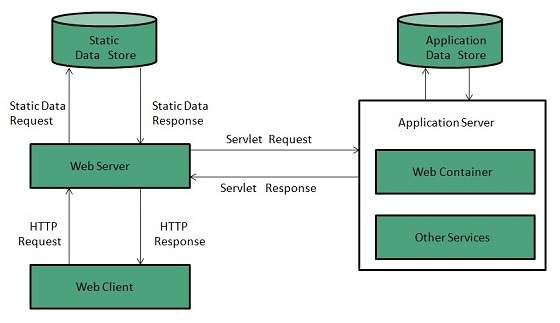
Web server working:-
Web server respond to the client request in either of the following two ways:
- Sending the file to the client associated with the requested URL.
- Generating response by invoking a script and communicating with database.
Functions of web servers:
1. Stores and secures website data:
The web server stores all website data and secures it from unauthorized users when it is properly configured.
2. Provides web database access:
A web server’s responsibility is to provide access to websites that are hosted. Web hosting service providers own some web servers that are used in variable ways to provide different web hosting services, such as backend database servers.
3. Serve the end user requests:
Web servers accept requests from different users connected over the internet and serve them accordingly.
4. Bandwidth controlling to regulate network traffic:
It is a feature available in web server to minimize excess network traffic. Web Hosts can set bandwidth values to regulate the rate of data transmission over the internet. This feature avoids the down time caused by high web traffic.
5. Virtual hosting:
Virtual Hosting is a type of web hosting service in which a web server is used to host other software based virtual web-servers web sites, data, applications and other services. Virtualized Web servers do possess this feature to provide virtual hosting.
6. Server side web scripting:
This feature of web server enables the user to create dynamic web pages. The popular server side scripting languages include Perl, Ruby, Python, PHPandASP etc.
List of top 5 Web Server:-
- Apache Web Server:-

2. Internet Information Services:-

3. Lighttpd:-

4. Sun Java System Web Server:-
This web server from Sun Microsystems is suited for medium and large web sites. Though the server is free it is not open source. It however, runs on Windows, Linux and UNIX platforms. The Sun Java System web server supports various languages, scripts and technologies required for Web 2.0 such as JSP, Java Servlets, PHP, Perl, Python, and Ruby on Rails, ASP and Coldfusion etc.
5. Apache Tomcat:-

Tomcat is a free web server, specialized in Java Servlets. In other words, it’s a Java container. Apache Tomcat was initially developed by Sun Microsystems, and then it was transferred to the Apache Software Foundation in 1999. By the way, Tomcat usually works under port 8080 and supports PHP, ASP.net, Perl, Python, etc.

Find Trusted Cardiac Hospitals
Compare heart hospitals by city and services — all in one place.
Explore Hospitals
