
Step 1 – Create a Volume
Step 2 – Attach a Volume to EC2 Instance
Step 3 – Verify if Volume is attached or not
Verify if Volume is attached or not by running linux command in Ec2-instance
$ lsblk
Step 4 – Check if the volume has any data using the following command.
If the above command output shows “/dev/xvdf: data“, it means your volume is empty.
$ sudo file -s /dev/xvdf

ubuntu@ip-172-31-3-136:~$ lsblk
NAME         MAJ:MIN RM  SIZE RO TYPE MOUNTPOINTS
loop0          7:0    0   74M  1 loop /snap/core22/2411
loop1          7:1    0 28.2M  1 loop /snap/amazon-ssm-agent/13009
loop2          7:2    0 28.4M  1 loop /snap/amazon-ssm-agent/13349
loop3          7:3    0 49.3M  1 loop /snap/snapd/26865
nvme0n1      259:0    0    8G  0 disk
├─nvme0n1p1  259:1    0  6.9G  0 part /
├─nvme0n1p13 259:2    0 1023M  0 part /boot
├─nvme0n1p14 259:3    0    4M  0 part
└─nvme0n1p15 259:4    0  106M  0 part /boot/efi
nvme1n1      259:5    0    5G  0 disk
ubuntu@ip-172-31-3-136:~$ sudo file -s /dev/nvme1n1
/dev/nvme1n1: data
ubuntu@ip-172-31-3-136:~$
Step 5: Format the volume to the ext4 filesystem using the following command.
Alternatively, you can also use the xfs format. You have to use either ext4 or xfs.
$ sudo mkfs -t ext4 /dev/xvdf
$ sudo mkfs -t xfs /dev/xvdf
Step 6: Create a directory of your choice to mount our new ext4 volume. I am using the name “newvolume“. You can name it something meaningful to you.
$ sudo mkdir /newvolume
Step 7: Mount the volume to “newvolume” directory using the following command.
$ sudo mount /dev/xvdf /newvolume/
Step 8: cd into newvolume directory and check the disk space to validate the volume mount.
$ cd /newvolume
$ df -h .
The above command should show the free space in the newvolume directory.
To unmount the volume, use the unmount command as shown below..
umount /dev/xvdf
Mount one EBS volume to Multiple EC2 Instances
If you have any use case to mount an EBS volume to multiple ec2 instances, you can do it via EBS multi-attach functionality.
This option only serves specific use-cases where multiple machines need to read/write to the same storage location concurrently.
EBS multi attach option is available only for Provisioned IOPS (PIOPS) EBS volume types.
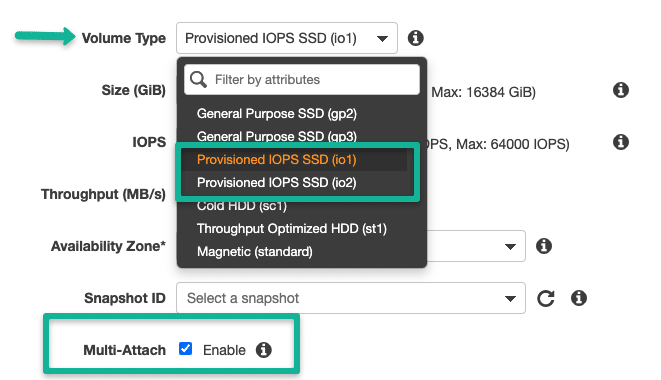
Note: EBS multi-attach does not support
XFS,EXT2,EXT4, andNTFSfile systems. It supports only cluster-aware file systems.

I’m Rajesh Kumar, a DevOps, SRE, DevSecOps, Cloud, and Platform Engineering expert passionate about sharing practical knowledge, real-world experiences, and industry best practices. I have worked at Cotocus and regularly write about technology, travel, investing, health, product reviews, and digital marketing through my various platforms.
I publish technical articles at DevOps School, travel stories at Holiday Landmark, stock market insights at Stocks Mantra, health and fitness guidance at My Medic Plus, product reviews at TrueReviewNow, and SEO and digital marketing strategies at Wizbrand.
Find Trusted Cardiac Hospitals
Compare heart hospitals by city and services — all in one place.
Explore Hospitals