
Find the Best Cosmetic Hospitals

Explore trusted cosmetic hospitals and make a confident choice for your transformation.

“Invest in yourself — your confidence is always worth it.”

Explore Cosmetic Hospitals

Start your journey today — compare options in one place.

Kubernetes: Pull an Image from a Private Registry using Yaml and Helm File

Method 1 – Change docker config default registry

To change the default registry for Docker to a private registry that requires authentication, you can follow these steps:

  1. Create or edit the /etc/docker/daemon.json file on your Docker host machine.
  2. Add the following lines to the file, replacing your-registry with the URL of your private registry and your-username and your-password with your registry credentials:
{
  "auths": {
    "your-registry": {
      "auth": "your-username:your-password"
    }
  },
  "registry-mirrors": ["https://your-registry"]
}

Note that the auths key is used to specify the credentials for your private registry, and the registry-mirrors key is used to specify the URL of the registry.

  1. Save the file and exit.
  2. Restart the Docker daemon to apply the changes:
$ sudo systemctl restart docker
  1. Verify that the configuration has been applied by running the docker info command. You should see the URL of your registry listed under “Registry Mirrors”.
$ docker info
...
Registry Mirrors:
  https://your-registry/
...

With this configuration, Docker will use your private registry as the default registry for pulling images and will authenticate with your registry credentials.

Method 2 – Create a Secret based on existing credentials using in Pod Spec

Method 3 – Create a Secret based on existing credentials using Helm chart
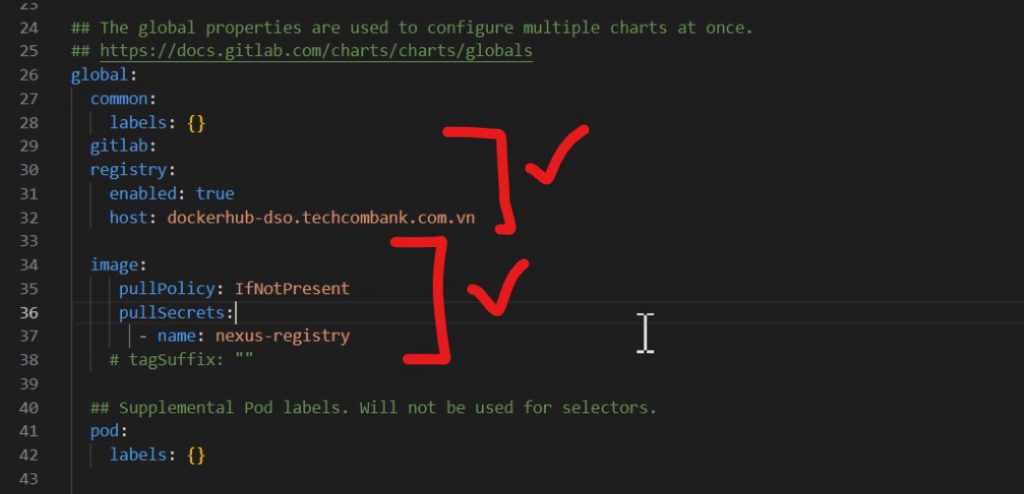
  • https://stackoverflow.com/questions/49669077/helm-chart-deployment-and-private-docker-repository

Find Trusted Cardiac Hospitals

Compare heart hospitals by city and services — all in one place.

Explore Hospitals
I’m a DevOps/SRE/DevSecOps/Cloud Expert passionate about sharing knowledge and experiences. I have worked at <a href="https://www.cotocus.com/">Cotocus</a>. I share tech blog at <a href="https://www.devopsschool.com/">DevOps School</a>, travel stories at <a href="https://www.holidaylandmark.com/">Holiday Landmark</a>, stock market tips at <a href="https://www.stocksmantra.in/">Stocks Mantra</a>, health and fitness guidance at <a href="https://www.mymedicplus.com/">My Medic Plus</a>, product reviews at <a href="https://www.truereviewnow.com/">TrueReviewNow</a> , and SEO strategies at <a href="https://www.wizbrand.com/">Wizbrand.</a> Do you want to learn <a href="https://www.quantumuting.com/">Quantum Computing</a>? <strong>Please find my social handles as below;</strong> <a href="https://www.rajeshkumar.xyz/">Rajesh Kumar Personal Website</a> <a href="https://www.youtube.com/TheDevOpsSchool">Rajesh Kumar at YOUTUBE</a> <a href="https://www.instagram.com/rajeshkumarin">Rajesh Kumar at INSTAGRAM</a> <a href="https://x.com/RajeshKumarIn">Rajesh Kumar at X</a> <a href="https://www.facebook.com/RajeshKumarLog">Rajesh Kumar at FACEBOOK</a> <a href="https://www.linkedin.com/in/rajeshkumarin/">Rajesh Kumar at LINKEDIN</a> <a href="https://www.wizbrand.com/rajeshkumar">Rajesh Kumar at WIZBRAND</a> <a href="https://www.rajeshkumar.xyz/dailylogs">Rajesh Kumar DailyLogs</a>

Related Posts

List of containerized storage orchestration in Kubernetes

List of Containerized Storage Orchestration Solutions in Kubernetes (2026 Edition) Kubernetes has become excellent at orchestrating stateless applications, but stateful workloads still need a proper storage layer….

Read More

Understanding Authentication & Authorization in kubernetes

Authentication – How User’s access should be allowed? The process or action of verifying the identity of a user or process.Authorization – What Access and till what…

Read More

Kubernetes 1.23.6 Cluster Setup Master and Worker in Ubuntu 20.04

Latest doc – https://github.com/certifications-tutorials/kubernetes-cluster-setup Following commands would help you to create 1 Master and 1 Node in same VM. Run Following commands in Master Node Run following…

Read More

Kubernetes PersistentVolume, PersistentVolumeClaim, volume using hostPath

pv.yaml $ kubectl create -f pv.yaml $ kubectl get pv pvc.yaml $ kubectl create -f pvc.yaml $ kubectl get pvc pod.yaml Rajesh Kumar I’m a DevOps/SRE/DevSecOps/Cloud Expert…

Read More

Kubernetes: Working with ReplicationController

A ReplicationController is a Kubernetes controller that ensures that a specified number of pod replicas are running at any one time. In other words, a ReplicationController makes…

Read More

Kubernetes Tutorials: Pod Load balancing using Service

In Kubernetes, a Service is an abstraction that defines a logical set of pods and a policy by which to access them. It provides a stable network…

Read More
Subscribe
Notify of
guest
2 Comments
Newest
Oldest Most Voted
Inline Feedbacks
View all comments
Jeroen
Jeroen
2 years ago

Good advice!

drad
drad
2 years ago

Your first method (using the daemon.json) is interesting but does not seem to work as docker crashes after a restart. Are you certain that the auths section is correct?

2
0
Would love your thoughts, please comment.x
()
x