The Perforce Broker (P4Broker) enables you to restrict the commands that can be executed, or redirect specific commands to alternate (replica or edge) Perforce servers.
The Perforce Broker is a server process that mediates between Perforce client applications and Perforce servers, including proxy servers.
Use Case Of Perforce Broker aka Helix Broker
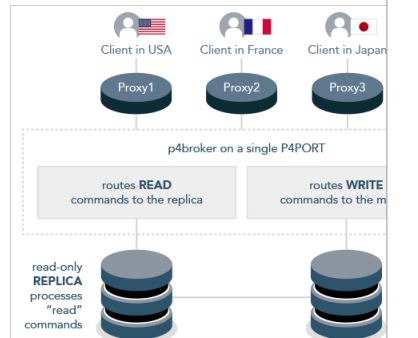
- Separate Helix Server aks Perforce server replica for Read and Write operations –
Perforce client applications can connect to a proxy server that connects to the broker, which then connects to a Perforce server. Or, Perforce client applications can connect to a broker configured to redirect reporting-related commands to a read-only replica server, while passing other commands through to a master server. - Load-balancing – You can use a Perforce Broker aka Helix Broker to solve load-balancing as well
- To implement Security – You can use a Perforce Broker aka Helix Broker to solve security related issues as well. To reject the some of the p4 command request which is not allowed.
- To Resrict the size of the Changelist – You can use a Perforce Broker aka Helix Broker to reject the changelist if size is huge.
How to Install the Perforce Broker aka Helix Broker?
Download the p4broker executable from the Perforce website,
Copy it to a suitable directory on the host (such as /usr/local/bin), and ensure that the binary is executable:
[code]$ chmod +x p4broker[/code]
How to run the Perforce Broker aka Helix Broker
[code]$ p4broker -c config_file(p4broker.conf)[/code]
[code]</pre>
<strong>How to verify the Perforce Broker aka Helix Broker</strong>
<pre>[code]$ p4 info
$ p4 broker[/code]
The general syntax of a command handler specification is outlined in the sample broker.conf:
[code]command: commandpattern
{
# Conditions for the command to meet; (optional)
flags = required flags;
user = required user;
workspace = required client workspace;
prog = required Perforce client application;
version = required version of client application;
# What to do with matching commands (required)
action = pass | reject | redirect | filter | respond ;
# How to go about it
destination = altserver; # Required for action = redirect
execute = filter program; # Required for action = filter
message = message; # Required for action = reject and
# action = respond. Otherwise optional
}[/code]
For example, if you’d like to prevent users from using the 2018.2 P4V to access the server, you can use the following:
[code]command: .*
{
prog = P4V\/.*\/2018\.2\/.*;
version = v77;
action = reject;
message = “The 2018.2 P4V is not allowed to connect to this server.”;
}[/code]
Using P4Broker to redirect read-only commands.
https://community.perforce.com/s/article/1253
Reference
https://www.perforce.com/perforce/r16.2/manuals/p4dist/chapter.broker.html
https://www.perforce.com/perforce/doc.current/manuals/p4dist/Content/P4Dist/chapter.broker.html

I’m Rajesh Kumar, a DevOps, SRE, DevSecOps, Cloud, and Platform Engineering expert passionate about sharing practical knowledge, real-world experiences, and industry best practices. I have worked at Cotocus and regularly write about technology, travel, investing, health, product reviews, and digital marketing through my various platforms.
I publish technical articles at DevOps School, travel stories at Holiday Landmark, stock market insights at Stocks Mantra, health and fitness guidance at My Medic Plus, product reviews at TrueReviewNow, and SEO and digital marketing strategies at Wizbrand.
Find Trusted Cardiac Hospitals
Compare heart hospitals by city and services — all in one place.
Explore Hospitals