
Introduction
AI Classroom Behavior Analytics tools help schools, colleges, and training organizations understand student engagement, participation, attention patterns, classroom activity, digital learning behavior, and intervention needs. In simple terms, these platforms use learning data, classroom signals, device activity, participation records, and sometimes video or attendance inputs to help educators identify where students may need support.
This category matters because classrooms are becoming more digital, hybrid, and data-driven. Teachers need faster ways to identify disengagement, absenteeism, off-task behavior, digital distraction, and learning risk without manually tracking every signal. At the same time, privacy, consent, bias, and student safety are critical concerns. In the EU, AI systems that infer emotions in educational settings are restricted except for specific medical or safety contexts, so buyers should avoid emotion-inference claims and focus on transparent engagement, participation, attendance, and learning analytics instead.
Common use cases include digital classroom monitoring, participation tracking, attendance insights, off-task detection, student support alerts, intervention planning, online class engagement analysis, and classroom management reporting.
Best for: K–12 schools, higher education, online academies, tutoring companies, training providers, student success teams, and district administrators that need early-warning signals and classroom visibility.
Not ideal for: schools without a clear privacy policy, teams looking for facial emotion recognition, or classrooms where human judgment and teacher-led observation are sufficient.
What’s Changed in AI Classroom Behavior Analytics
- Schools are moving from simple attendance tracking to broader engagement and intervention analytics.
- AI-assisted classroom monitoring now focuses more on attention patterns, participation, device activity, and learning risk.
- Emotion recognition in education is becoming legally and ethically risky, especially in regions influenced by the EU AI Act.
- Buyer expectations now include consent, explainability, auditability, and clear data retention controls.
- Digital classroom tools increasingly track browser tabs, app usage, screen activity, and online learning engagement.
- Student safety platforms are blending behavior signals with wellbeing alerts and digital safeguarding workflows.
- Teachers want actionable recommendations, not just dashboards.
- Administrators need district-level reporting across classrooms, campuses, and devices.
- AI analytics is shifting toward intervention support rather than student surveillance.
- Guardrails are becoming important to prevent biased labeling of students.
- Integration with LMS, SIS, Google Classroom, Microsoft tools, and device management platforms is now a major selection factor.
- Schools are demanding human-in-the-loop workflows before any behavioral or disciplinary action.
Quick Buyer Checklist
- Does the tool clearly define what behavior signals it measures?
- Does it avoid biometric emotion inference unless legally and ethically justified?
- Does it support consent, transparency, and parental communication?
- Can teachers review and override AI-generated insights?
- Does it integrate with your LMS, SIS, or classroom device ecosystem?
- Does it provide role-based access for teachers, counselors, and administrators?
- Are alerts explainable and actionable?
- Does it support attendance, engagement, digital activity, and intervention workflows?
- Are audit logs, data retention settings, and admin controls available?
- Can reports be exported for student support planning?
- Does it reduce teacher workload instead of adding another dashboard?
- Is pricing suitable for classroom, school, or district-wide rollout?
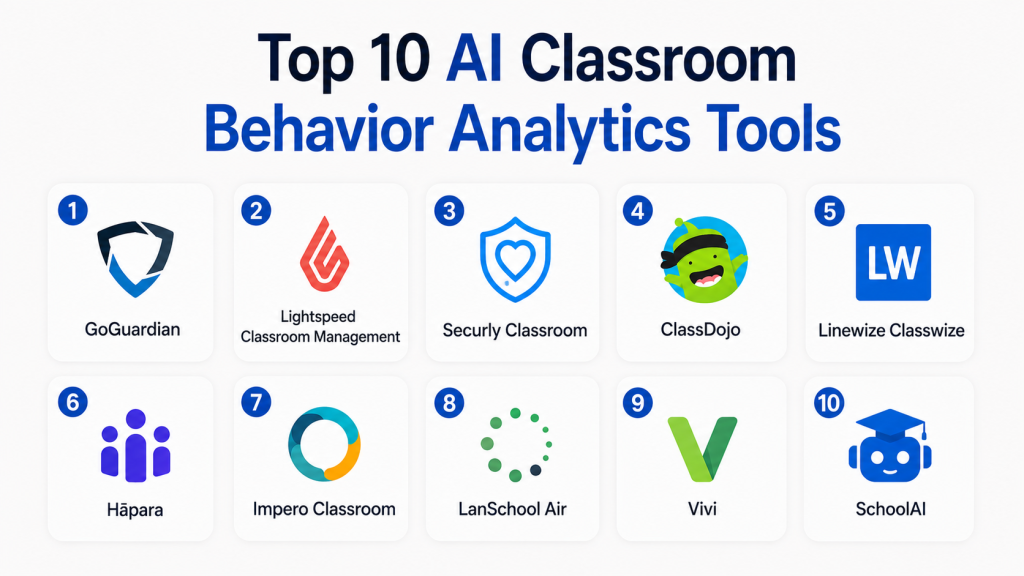
Top 10 AI Classroom Behavior Analytics Tools
#1 — GoGuardian
One-line verdict: Best for schools needing student safety, classroom visibility, and digital behavior monitoring.
Short description:
GoGuardian provides classroom management, student safety, filtering, and digital learning visibility tools. It helps educators understand student device activity, manage classroom screens, and identify potential risks in digital learning environments.
Standout Capabilities
- Student device activity visibility
- Classroom screen monitoring
- Web filtering and digital safety workflows
- Teacher-led classroom management
- Student safety alerting
- Usage and engagement reporting
- Useful for Chromebook and digital learning environments
- District-level administration support
AI-Specific Depth
- Model support: Proprietary AI / Varies by product
- RAG / knowledge integration: N/A
- Evaluation: Digital activity and safety signal review
- Guardrails: Human review workflows and admin policy controls
- Observability: Activity reports and administrative dashboards
Pros
- Strong digital classroom visibility
- Useful for student safety and engagement monitoring
- Mature school-focused ecosystem
Cons
- Requires careful privacy governance
- Can feel intrusive if policies are unclear
- Best value depends on device ecosystem maturity
Security & Compliance
SSO, admin controls, access management, and policy controls may be available depending on plan and deployment. Certifications and exact compliance details are not publicly stated here.
Deployment & Platforms
- Web
- ChromeOS focused
- Cloud-based
- Works across school-managed device environments
Integrations & Ecosystem
GoGuardian fits into broader school technology environments focused on digital learning and safety.
- Google Classroom ecosystem support
- Device management workflows
- Web filtering tools
- Student safety alerts
- Administrative reporting
- Classroom management features
Pricing Model
Subscription-based, usually school or district-oriented. Exact pricing varies.
Best-Fit Scenarios
- K–12 digital classroom monitoring
- Student safety and safeguarding workflows
- District-wide classroom device visibility
#2 — Lightspeed Classroom Management
One-line verdict: Best for schools managing digital learning behavior across student devices.
Short description:
Lightspeed Classroom Management helps teachers monitor student screens, guide browsing, limit distractions, and understand digital classroom behavior. It is designed for schools that rely heavily on devices during instruction.
Standout Capabilities
- Student screen visibility
- Classroom session management
- Website and app control
- Off-task behavior detection support
- Teacher dashboard
- Digital learning activity insights
- Works with broader Lightspeed ecosystem
- Useful for school IT and teachers
AI-Specific Depth
- Model support: Proprietary / Varies by product
- RAG / knowledge integration: N/A
- Evaluation: Digital engagement and activity review
- Guardrails: Policy-based controls
- Observability: Device activity reports and dashboards
Pros
- Good for reducing digital distractions
- Teacher-friendly classroom workflows
- Strong fit for managed school devices
Cons
- Mainly focused on digital behavior, not whole-child analytics
- Requires clear student monitoring policy
- Advanced AI specifics may vary
Security & Compliance
Role-based access and administrative controls may be available. Exact certifications and retention controls are not publicly stated here.
Deployment & Platforms
- Web
- Cloud-based
- Managed student devices
- Chromebook and browser-based environments may be supported
Integrations & Ecosystem
Lightspeed fits well for schools already using digital safety and filtering tools.
- Classroom management
- Web filtering ecosystem
- Student device monitoring
- Admin dashboards
- School IT workflows
Pricing Model
Subscription-based, commonly school or district licensed. Exact pricing varies.
Best-Fit Scenarios
- Device-heavy classrooms
- Digital distraction management
- Teacher-led screen monitoring
#3 — Securly Classroom
One-line verdict: Best for schools combining classroom management with student safety workflows.
Short description:
Securly Classroom helps teachers keep students focused during digital learning. It supports screen visibility, site control, classroom session management, and broader student safety workflows through the Securly ecosystem.
Standout Capabilities
- Classroom screen monitoring
- Student browsing control
- Focused learning sessions
- Digital distraction reduction
- Safety ecosystem compatibility
- Teacher dashboard
- Admin-level management
- Useful for K–12 environments
AI-Specific Depth
- Model support: Proprietary / Varies by product
- RAG / knowledge integration: N/A
- Evaluation: Digital activity insights
- Guardrails: Teacher and admin controls
- Observability: Classroom activity dashboards
Pros
- Strong classroom focus tools
- Useful for safeguarding-oriented schools
- Helps teachers manage digital attention
Cons
- Not a full behavioral psychology platform
- Privacy communication is essential
- AI detail may vary by product module
Security & Compliance
Access controls and school administration features may be available. Exact certifications are not publicly stated here.
Deployment & Platforms
- Web
- Cloud-based
- Managed classroom devices
- Browser and school device ecosystems
Integrations & Ecosystem
Securly works as part of a broader student safety and classroom management environment.
- Classroom management
- Web filtering
- Student safety tools
- Admin reporting
- Device monitoring workflows
Pricing Model
Subscription-based. Exact pricing varies by school or district scope.
Best-Fit Scenarios
- K–12 classroom management
- Student safety workflows
- Reducing off-task digital behavior
#4 — ClassDojo
One-line verdict: Best for positive behavior reinforcement and parent-teacher classroom communication.
Short description:
ClassDojo supports classroom behavior tracking, student encouragement, family communication, and classroom community building. It is especially useful for elementary and middle-school environments where positive reinforcement matters.
Standout Capabilities
- Positive behavior points
- Teacher-parent communication
- Student portfolios
- Classroom community tools
- Behavior trend visibility
- Easy teacher adoption
- Student motivation workflows
- Simple mobile experience
AI-Specific Depth
- Model support: Varies / N/A
- RAG / knowledge integration: N/A
- Evaluation: Behavior participation and teacher-entered feedback
- Guardrails: Teacher-controlled behavior categories
- Observability: Classroom and student progress views
Pros
- Very easy to use
- Strong parent communication
- Encourages positive reinforcement
Cons
- Not advanced AI analytics
- Risk of overusing behavior points
- Better for younger learners than higher education
Security & Compliance
Not publicly stated. Schools should review student privacy, family communication settings, and data handling terms.
Deployment & Platforms
- Web
- iOS
- Android
- Cloud-based
Integrations & Ecosystem
ClassDojo works as a classroom communication and behavior ecosystem.
- Parent messaging
- Student portfolios
- Classroom points
- Teacher dashboard
- Mobile apps
- School community tools
Pricing Model
Freemium and optional paid features may apply. Exact pricing varies.
Best-Fit Scenarios
- Elementary classroom behavior support
- Parent-teacher communication
- Positive reinforcement programs
#5 — Linewize Classwize
One-line verdict: Best for schools needing classroom screen visibility and digital learning focus controls.
Short description:
Linewize Classwize helps teachers guide student device use during lessons. It supports screen visibility, focus controls, classroom monitoring, and online activity management.
Standout Capabilities
- Student screen monitoring
- Website and tab visibility
- Teacher-led focus controls
- Classroom activity dashboard
- Digital distraction management
- School filtering ecosystem alignment
- Useful for managed devices
- Real-time lesson visibility
AI-Specific Depth
- Model support: Proprietary / Varies by product
- RAG / knowledge integration: N/A
- Evaluation: Digital classroom activity review
- Guardrails: Policy and teacher controls
- Observability: Classroom activity dashboard
Pros
- Strong for digital focus management
- Teacher-friendly visibility tools
- Useful for schools with managed devices
Cons
- Not a full student behavior analytics suite
- Requires clear monitoring expectations
- AI transparency varies
Security & Compliance
Not publicly stated. Buyers should review access controls, retention settings, and district administration features.
Deployment & Platforms
- Web
- Cloud-based
- Managed device environments
Integrations & Ecosystem
Classwize is part of the broader Linewize school safety and filtering ecosystem.
- Classroom monitoring
- School filtering
- Device visibility
- Admin reporting
- Teacher controls
Pricing Model
Subscription-based. Exact pricing varies.
Best-Fit Scenarios
- Digital classroom focus
- Managed student devices
- Teacher-controlled lesson sessions
#6 — Hāpara
One-line verdict: Best for Google Workspace schools needing student work visibility and guided learning.
Short description:
Hāpara helps teachers manage student learning activity in Google Workspace environments. It provides visibility into student work, collaboration, browsing, and classroom progress.
Standout Capabilities
- Google Workspace classroom visibility
- Student work monitoring
- Guided browsing
- Teacher dashboards
- Differentiated learning support
- Digital citizenship workflows
- Student activity insights
- Classroom workflow management
AI-Specific Depth
- Model support: Varies / N/A
- RAG / knowledge integration: N/A
- Evaluation: Student work and classroom activity visibility
- Guardrails: Teacher-guided workflows
- Observability: Learning activity dashboards
Pros
- Strong fit for Google Workspace schools
- Helps teachers see student progress
- Supports guided digital learning
Cons
- Best suited to Google-based environments
- Not primarily AI behavior scoring
- Requires thoughtful classroom setup
Security & Compliance
Not publicly stated. Schools should verify SSO, admin roles, and student data controls.
Deployment & Platforms
- Web
- Cloud-based
- Google Workspace aligned
Integrations & Ecosystem
Hāpara is closely tied to digital classroom workflows.
- Google Workspace
- Google Classroom workflows
- Student document visibility
- Teacher dashboard
- Guided browsing
- Learning management support
Pricing Model
Subscription-based. Exact pricing varies.
Best-Fit Scenarios
- Google Workspace schools
- Student work monitoring
- Digital classroom guidance
#7 — Impero Classroom
One-line verdict: Best for schools needing classroom control, monitoring, and safeguarding visibility.
Short description:
Impero Classroom supports classroom monitoring, device visibility, and student focus management. It is useful for schools that want teachers to manage digital behavior while also supporting broader safeguarding goals.
Standout Capabilities
- Classroom device monitoring
- Student screen visibility
- Internet and application control
- Teacher-led classroom tools
- Safeguarding ecosystem alignment
- Admin oversight
- Digital behavior visibility
- Focus management workflows
AI-Specific Depth
- Model support: Proprietary / Varies by product
- RAG / knowledge integration: N/A
- Evaluation: Digital activity and behavior review
- Guardrails: Teacher and admin controls
- Observability: Activity reports and monitoring dashboards
Pros
- Strong classroom control features
- Useful for safeguarding-focused schools
- Helps reduce off-task device use
Cons
- Needs careful privacy communication
- Not a standalone student success analytics platform
- AI specifics may vary
Security & Compliance
Not publicly stated. Buyers should verify role permissions, audit controls, and student data handling terms.
Deployment & Platforms
- Web
- Cloud-based
- Managed device environments
- Platform support varies
Integrations & Ecosystem
Impero fits into classroom management and safeguarding workflows.
- Device monitoring
- Classroom control
- Safeguarding tools
- Admin reporting
- Teacher dashboards
Pricing Model
Subscription-based. Exact pricing varies.
Best-Fit Scenarios
- School device monitoring
- Classroom focus management
- Safeguarding-aware digital learning
#8 — LanSchool Air
One-line verdict: Best for teachers needing simple cloud-based classroom device monitoring.
Short description:
LanSchool Air helps teachers manage digital classrooms by viewing student screens, limiting distractions, and guiding online learning. It is especially useful for cloud-managed school environments.
Standout Capabilities
- Student screen monitoring
- Web limiting and focus controls
- Teacher dashboard
- Classroom communication tools
- Cloud-based deployment
- Digital activity visibility
- Simple classroom workflows
- Device management support
AI-Specific Depth
- Model support: Varies / N/A
- RAG / knowledge integration: N/A
- Evaluation: Digital classroom behavior visibility
- Guardrails: Teacher-controlled monitoring
- Observability: Session and classroom activity visibility
Pros
- Simple teacher experience
- Good for cloud-managed classrooms
- Helps reduce digital distraction
Cons
- Limited AI-specific analytics
- Not focused on predictive behavior insights
- Best for device-based classrooms
Security & Compliance
Not publicly stated. Buyers should verify admin controls and data handling policies.
Deployment & Platforms
- Web
- Cloud-based
- School-managed devices
- Platform support varies
Integrations & Ecosystem
LanSchool Air supports digital classroom management workflows.
- Screen monitoring
- Web limiting
- Teacher tools
- Device management alignment
- Classroom communication
Pricing Model
Subscription-based. Exact pricing varies.
Best-Fit Scenarios
- Cloud-managed classrooms
- Teacher-led digital monitoring
- Student focus management
#9 — Vivi
One-line verdict: Best for schools connecting classroom engagement analytics with wireless classroom interaction.
Short description:
Vivi is known for classroom communication, screen sharing, digital signage, and student engagement workflows. It can support engagement visibility by helping teachers interact with students in digitally enabled classrooms.
Standout Capabilities
- Wireless screen sharing
- Classroom communication
- Student feedback workflows
- Digital signage
- Engagement tools
- Teacher-led interaction
- School-wide communication support
- Useful for hybrid classroom environments
AI-Specific Depth
- Model support: Varies / N/A
- RAG / knowledge integration: N/A
- Evaluation: Engagement and classroom interaction analytics may vary
- Guardrails: Teacher-controlled workflows
- Observability: Classroom usage and interaction reports may vary
Pros
- Strong classroom interaction layer
- Useful for modern connected classrooms
- Helps improve participation workflows
Cons
- Not a dedicated behavior analytics platform
- May require hardware or classroom setup
- AI depth may vary
Security & Compliance
Not publicly stated. Buyers should review admin controls and student data policies.
Deployment & Platforms
- Cloud-based
- Classroom display environments
- Web and device support varies
Integrations & Ecosystem
Vivi works best as part of a connected classroom environment.
- Screen sharing
- Digital signage
- Classroom communication
- Student feedback
- School-wide messaging
- Classroom display workflows
Pricing Model
Subscription or school-based licensing may vary.
Best-Fit Scenarios
- Connected classrooms
- Student participation workflows
- Hybrid classroom communication
#10 — SchoolAI
One-line verdict: Best for teachers exploring AI-assisted classroom support and student engagement workflows.
Short description:
SchoolAI provides AI tools for teachers and students, including classroom support workflows that can help educators manage student engagement and personalized learning support. It is more of an AI classroom assistant ecosystem than a pure behavior analytics platform.
Standout Capabilities
- AI classroom assistant workflows
- Student support tools
- Teacher productivity features
- Engagement support
- Personalized learning experiences
- Classroom activity guidance
- AI-assisted planning
- Useful for teacher-led interventions
AI-Specific Depth
- Model support: Proprietary AI / Varies by product
- RAG / knowledge integration: Varies / N/A
- Evaluation: Teacher-reviewed AI outputs
- Guardrails: Education-focused controls may vary
- Observability: Classroom and student activity visibility may vary
Pros
- AI-native classroom support
- Helpful for teacher workload reduction
- Supports personalized student engagement
Cons
- Not a traditional behavior analytics platform
- Requires teacher review of AI suggestions
- Feature depth may vary by school use case
Security & Compliance
Not publicly stated. Buyers should verify student data privacy, retention, admin controls, and school policy alignment.
Deployment & Platforms
- Web
- Cloud-based
- Classroom AI workflows
Integrations & Ecosystem
SchoolAI supports AI-assisted teaching and learning workflows.
- Teacher AI tools
- Student support spaces
- Classroom engagement workflows
- Planning support
- AI-assisted feedback
- Learning activity support
Pricing Model
Freemium, subscription, or school-based plans may vary.
Best-Fit Scenarios
- AI-assisted classroom support
- Teacher productivity
- Student engagement workflows
Comparison Table
| Tool Name | Best For | Deployment | Model Flexibility | Strength | Watch-Out | Public Rating |
|---|---|---|---|---|---|---|
| GoGuardian | Student safety and device visibility | Cloud | Hosted | Digital behavior monitoring | Privacy governance needed | N/A |
| Lightspeed Classroom Management | Digital classroom focus | Cloud | Hosted | Screen and activity control | Device-dependent value | N/A |
| Securly Classroom | Safeguarding and classroom control | Cloud | Hosted | Safety ecosystem | AI details vary | N/A |
| ClassDojo | Positive behavior reinforcement | Cloud | Varies / N/A | Parent-teacher engagement | Not advanced AI analytics | N/A |
| Linewize Classwize | Managed device classrooms | Cloud | Hosted | Real-time focus controls | Monitoring concerns | N/A |
| Hāpara | Google Workspace schools | Cloud | Varies / N/A | Student work visibility | Google-centric fit | N/A |
| Impero Classroom | Classroom control and safeguarding | Cloud | Hosted | Device monitoring | Requires policy clarity | N/A |
| LanSchool Air | Simple cloud classroom monitoring | Cloud | Varies / N/A | Easy teacher controls | Limited predictive analytics | N/A |
| Vivi | Connected classroom engagement | Cloud | Varies / N/A | Classroom interaction | Not pure behavior analytics | N/A |
| SchoolAI | AI-assisted teacher support | Cloud | Hosted | AI-native classroom workflows | Needs human review | N/A |
Scoring & Evaluation
This scoring is comparative, not absolute. It helps buyers shortlist tools based on classroom behavior visibility, engagement analytics, digital learning management, privacy readiness, ecosystem fit, and practical usability. Since many products in this category combine classroom management, safety, and engagement rather than pure behavior analytics, scores should be validated through a pilot. Public ratings are not included unless confidently known. Schools should review privacy, consent, bias risk, and local regulations before any rollout.
| Tool | Core | Reliability/Eval | Guardrails | Integrations | Ease | Perf/Cost | Security/Admin | Support | Weighted Total |
|---|---|---|---|---|---|---|---|---|---|
| GoGuardian | 9 | 8 | 8 | 8 | 8 | 7 | 8 | 8 | 8.1 |
| Lightspeed Classroom Management | 8 | 7 | 8 | 8 | 8 | 7 | 8 | 8 | 7.7 |
| Securly Classroom | 8 | 7 | 8 | 7 | 8 | 7 | 8 | 7 | 7.5 |
| ClassDojo | 7 | 6 | 7 | 6 | 9 | 8 | 6 | 8 | 7.0 |
| Linewize Classwize | 8 | 7 | 8 | 7 | 8 | 7 | 8 | 7 | 7.5 |
| Hāpara | 8 | 7 | 7 | 8 | 8 | 7 | 7 | 7 | 7.4 |
| Impero Classroom | 8 | 7 | 8 | 7 | 7 | 7 | 8 | 7 | 7.4 |
| LanSchool Air | 7 | 6 | 7 | 7 | 8 | 8 | 7 | 7 | 7.1 |
| Vivi | 7 | 6 | 7 | 7 | 8 | 7 | 7 | 7 | 7.0 |
| SchoolAI | 7 | 7 | 7 | 6 | 9 | 8 | 6 | 7 | 7.2 |
Top 3 for Enterprise
- GoGuardian
- Lightspeed Classroom Management
- Securly Classroom
Top 3 for SMB
- ClassDojo
- LanSchool Air
- SchoolAI
Top 3 for Developers
- SchoolAI
- Hāpara
- Vivi
Which AI Classroom Behavior Analytics Tool Is Right for You?
Solo / Freelancer
Independent tutors and small online educators should avoid heavy surveillance-style platforms. SchoolAI, ClassDojo, or simple engagement tools may be better for lightweight student support, communication, and participation tracking.
SMB
Small schools and coaching institutes should choose tools that are easy to deploy and explain to parents. ClassDojo works well for positive behavior reinforcement, while LanSchool Air and SchoolAI can support digital classroom visibility and AI-assisted workflows.
Mid-Market
Mid-sized schools should prioritize classroom device visibility, student safety, and reporting. Lightspeed Classroom Management, Securly Classroom, Hāpara, and Linewize Classwize are strong candidates depending on the existing device and LMS ecosystem.
Enterprise
Districts and large institutions need admin controls, role-based access, auditability, reporting, policy enforcement, and integration with existing IT systems. GoGuardian, Lightspeed, and Securly are usually stronger fits for broad deployments.
Regulated Industries
Public sector schools, healthcare education programs, and institutions working with minors should be especially careful. Avoid emotion inference, biometric profiling, or automated disciplinary decisions. Require clear consent, human review, retention controls, and audit logs.
Budget vs Premium
Budget-conscious classrooms can start with ClassDojo or limited classroom management tools. Premium buyers should focus on full digital learning visibility, safeguarding workflows, admin reporting, and integration with school IT systems.
Build vs Buy
Most schools should buy rather than build. Building behavior analytics requires data governance, child privacy expertise, device integrations, bias testing, alert design, admin controls, and long-term compliance support. Build only when a district has strong internal IT, legal, and data science capacity.
Implementation Playbook
30 Days: Pilot and Success Metrics
- Define the problem clearly: off-task behavior, attendance, participation, digital distraction, or student support.
- Select a small pilot group of teachers and classrooms.
- Inform students, parents, and staff about what data is collected.
- Avoid emotion inference or unclear AI scoring.
- Establish baseline metrics such as attendance, task completion, and participation.
- Configure teacher roles and admin permissions.
- Train teachers on ethical use.
- Collect feedback weekly.
60 Days: Security, Evaluation, and Rollout
- Review privacy, retention, consent, and data deletion policies.
- Validate alerts with human teacher judgment.
- Create escalation rules for student support.
- Audit whether the tool creates biased or unfair labels.
- Integrate with LMS, SIS, Google Classroom, or device management tools.
- Create a clear student data access policy.
- Train counselors or student support teams.
- Expand to more classrooms only after pilot validation.
90 Days: Optimize and Scale
- Compare outcomes against baseline metrics.
- Remove unused dashboards or noisy alerts.
- Adjust thresholds to reduce false positives.
- Review cost per active classroom.
- Document governance and acceptable-use policies.
- Create periodic audit reviews.
- Build teacher feedback loops.
- Scale only when results improve learning support and reduce teacher workload.
Common Mistakes & How to Avoid Them
- Treating classroom behavior analytics as surveillance instead of student support
- Using emotion recognition without legal and ethical review
- Automating disciplinary action without human review
- Collecting more student data than needed
- Ignoring parent and student transparency
- Deploying tools without teacher training
- Measuring “screen focus” as a complete learning signal
- Ignoring bias across age, disability, culture, and language background
- Using behavior scores without context
- Not reviewing data retention settings
- Buying tools that do not integrate with existing school systems
- Creating alert fatigue for teachers
- Forgetting to measure whether the tool improves outcomes
- Assuming AI insights are always accurate
FAQs
1. What is AI Classroom Behavior Analytics?
It is software that uses classroom, device, attendance, participation, or learning data to help educators identify engagement patterns and support needs.
2. Is AI behavior analytics the same as student surveillance?
It can become surveillance if used poorly. Ethical tools should focus on support, transparency, human review, and minimal data collection.
3. Should schools use facial emotion recognition?
Schools should be very cautious. In some regions, AI emotion inference in education is prohibited or heavily restricted.
4. Can these tools detect off-task behavior?
Some classroom management tools can show browsing, screen activity, or app usage, which may help teachers identify off-task digital behavior.
5. Can AI predict student behavior problems?
Some systems may identify risk patterns, but predictions should never replace teacher judgment, counselor review, or student context.
6. What data do these tools collect?
Data may include device activity, attendance, participation, classroom interactions, screen activity, or teacher-entered behavior notes.
7. Are these tools safe for minors?
They can be used responsibly only with strong privacy controls, transparency, consent, limited data collection, and human oversight.
8. Do these tools integrate with Google Classroom?
Some tools support Google Workspace or Google Classroom workflows, but integration depth varies by vendor.
9. Can behavior analytics improve learning outcomes?
They may help when used for early support and intervention, but schools should measure outcomes through pilots rather than assuming impact.
10. What should schools avoid?
Avoid black-box scoring, biometric emotion inference, hidden monitoring, automatic punishment, and tools without clear privacy terms.
11. What is the most important buying criterion?
Privacy and educational purpose should come first. A tool should clearly improve teaching or student support without excessive data collection.
12. Are these platforms useful for online classes?
Yes. Digital classroom tools can help track engagement, participation, screen focus, and attendance in online or hybrid learning environments.
13. Can teachers override AI insights?
They should be able to. Human-in-the-loop review is essential for fairness and accuracy.
14. What is a good pilot metric?
Useful metrics include reduced off-task browsing, improved attendance, faster intervention, better teacher visibility, and lower admin workload.
Conclusion
AI Classroom Behavior Analytics can help educators identify disengagement, digital distraction, attendance issues, and student support needs faster than manual observation alone. However, this category must be handled with care because student privacy, consent, bias, and trust matter as much as analytics accuracy. The strongest tools focus on transparent engagement signals, teacher-led review, classroom support, and responsible intervention rather than hidden surveillance or emotion inference. For large schools and districts, GoGuardian, Lightspeed, and Securly are strong classroom visibility options. For positive behavior and communication, ClassDojo is practical. For Google-focused environments, Hāpara is a strong fit. For AI-native classroom assistance, SchoolAI is worth evaluating carefully. Start by shortlisting tools, run a small pilot, verify privacy and evaluation quality, then scale only when the platform improves learning support and teacher effectiveness.

Find Trusted Cardiac Hospitals
Compare heart hospitals by city and services — all in one place.
Explore Hospitals
A useful extension of this topic is how classroom behavior analytics can be turned into actionable teaching improvements instead of just passive monitoring reports. Capturing signals like engagement, participation, or focus levels only creates real value when educators can respond with timely interventions or adjust their teaching approach based on clear insights. It would also be important to address concerns around student privacy, the reliability of behavior detection in varied classroom conditions, and the risk of over-depending on automated scoring systems, ensuring these tools remain supportive of teachers rather than replacing their professional judgment.
A useful extension of this topic is how classroom behavior analytics can be translated into meaningful educational interventions rather than just monitoring dashboards. Tracking attention, participation, or engagement patterns is only valuable if educators can act on those insights in real time or through structured follow-ups that genuinely improve learning outcomes. It would also be important to consider concerns around student privacy, data accuracy in diverse classroom environments, and the risk of over-reliance on automated behavior scoring, ensuring that these systems support teachers’ judgment instead of replacing it.