Azure Data Factory Course
Build your Skills with DevOpsSchool Certification Training Course Online, Azure Cloud Architect Technologies & helps you become an Azure expert ➔ Learn how to manage Azure resources, and configure and deploy virtual machines. ✔️Enroll now!!
Last updated
Self-paced video
Billed yearly at ₹9,996. Includes complete LMS access for one year, access across the DevOpsSchool course library, 20+ additional courses and 50+ tools. Where a course family has four levels, all levels are included by default.
Live & Interactive
Instructor-led live session, max 8 to 10 hours, with demos, labs, Q&A, practical review and certificate support.
1:1 Live training
The same agenda, taught one-to-one by the trainer. Start immediately, without waiting for the next batch. Max 8 to 10 hours, one-to-one.
- Practical demonstrations and guided examples
- Complete LMS access for one year
- Certificate and learning record support
- Corporate customization available
Practical Azure Data Factory Course learning for professionals and teams.
Build your Skills with DevOpsSchool Certification Training Course Online, Azure Cloud Architect Technologies & helps you become an Azure expert ➔ Learn how to manage Azure resources, and configure and deploy virtual machines. ✔️Enroll now!!
What this program covers
This page is structured for learners who need a focused course, certification topic, platform module, product feature, security area or role-specific skill that may not map directly to Foundation, Essential, Intermediate or Advanced levels.
The learning experience still follows DevOpsSchool standards: concept clarity, practical use cases, demonstrations, hands-on tasks, assessment guidance, certification support and post-session LMS access.
Private Azure Data Factory Course training for teams and organizations.
DevOpsSchool can align this program to team maturity, current tools, role expectations, compliance requirements, delivery workflow and implementation goals.
- Private online or classroom batch options
- Role-based coverage for engineers, administrators, leads and managers
- Examples can be mapped to internal platforms and use cases
- Useful for onboarding, migration, governance, certification readiness and adoption
Why DevOpsSchool
DevOpsSchool combines practitioner-led explanation, live demonstrations, assignments, LMS access, certificate support and guidance for both individual professionals and corporate teams.
Request corporate proposalThe same course architecture, adapted to this focused topic.
Specialized pages keep the same decision structure as standard level pages, but the content is adjusted to the course objective.
Concepts
Terminology, purpose, architecture, scope and fit inside modern delivery workflows.
Implementation
Configuration, usage patterns, workflows, operating practices and common mistakes.
Integration
Automation, integration touchpoints, delivery process and production readiness.
Validation
Labs, assignments, review questions, certificate support and next-step learning guidance.
Live, self-paced and corporate delivery options.
Fees are intentionally shown only in the hero and once again after the agenda. This section focuses on delivery fit.
| Mode | Duration / access | Best fit |
|---|---|---|
| Self-paced video | One year LMS access | Learners who want flexible pace and broad catalog access. |
| Live & Interactive | Max 8 to 10 hours | Learners who want demos, guided discussion, labs and Q&A. |
| 1:1 Live training | Max 8 to 10 hours, one-to-one | Learners who want to start immediately, at their own pace, with the full attention of the trainer. |
| Corporate | Private team batch | Teams needing customized examples, adoption guidance and rollout support. |
Why this course, what you will achieve, and who should attend.
Use these sections to decide whether the program matches your role, current experience and expected responsibilities.
Why this matters
Azure Data Factory Course helps learners build practical confidence in a focused technical, certification or platform topic instead of only reading generic documentation.
Objectives
- Understand the core concepts and usage model.
- Apply practical workflows through examples and guided tasks.
- Prepare for implementation, certification or team adoption needs.
Pre-requisites
Basic computer literacy and awareness of software, operations, cloud, DevOps or security workflows is helpful. Deep programming experience is not mandatory unless the topic specifically requires it.
Who should attend
Developers, DevOps engineers, administrators, SREs, security engineers, platform teams, release teams, technical leads and corporate teams working with this topic.
Small-batch live training and flexible self-paced access.
Choose live guidance when discussion and lab review matter, or use self-paced access when schedule flexibility matters more.
Live cohort
Instructor-led sessions with demos, guided examples and Q&A for practical adoption.
Ask for next batchSelf-paced route
Use LMS access for flexible learning, revision and continued access to DevOpsSchool course materials.
Review access modelFocused agenda for Azure Data Factory Course.
Course-specific agenda topics are preserved and organized for the current program objective while staying in the same page architecture.
Day 1Stage 1
- Azure SQL Databases
- Introduction to Azure SQL Database
- Why chose SQL Server in Azure
- IAAS Vs PAAS Databases offerings
- IAAS vs managed instances for databases
- Deploying SQL Database in Azure
- Best practices for Azure SQL performance optimization
- Securing data at rest in SQL databases.
- Encryption with keys in key vault
- Disaster recovery options in Azure SQL database
- Authentication and Integrating with Azure Active Directory
- Data discovery, masking, classification and Vulnerability assessment in Azure SQL Databases.
- Available database Migrations options and tools
- Azure Data lake
- Azure Data lake vs Hadoop
- Evolution of Azure data lake Gen2
- Azure Blob storage vs Data lake differences
- Hierarchical namespaces
- Data ingestion tools
- Migrate data using Azcopy , Azure storage explorer and Data Factory.
- Migrating data from Azure SQL to Data lake Gen2 using Data factory
- Data flow around Data lake
- Data lake and transient clusters
- Data Processing using HD insights.
- Explore, analyze, clean and transform.
- Security layers in Data lake.
- Usage of Security keys and Shared access signatures
- Integrating with Azure Active Directory and RBAC
- Filtering traffic using Azure Firewalls and virtual networks.
- Encryption of data at transit and at rest
- Threat protection and Vulnerability assessment
- Monitoring data lake (Activity log, Metrics, Insights, alerts and diagnostic settings) and optimization
Day 2Stage 2
- Azure Data bricks
- Spark Basics
- Evolution of data bricks and difficulty level of Spark
- Azure Data bricks provisioning, clusters and workbooks
- Mount Data lake to DBFS (Data Bricks)
- Explore, Analyze, Clean, transform and load to Azure Data bricks
- Azure Databricks clusters and its important components.
- Monitoring Azure Data bricks
- Best Practices for Using Azure data bricks in production.
- Azure Data factory
- Understand Azure Data Factory
- Describe data integration patterns
- Explain the data factory process
- Understand Azure Data Factory components
- Azure Data Factory security
- Set up Azure Data Factory
- Create linked services
- Create datasets
- Create data factory activities and pipelines
- Manage integration runtime
- List the data factory ingestion methods
- Describe data factory connectors
- Use the data factory copy activity
- Deploy a release pipeline
- Visually monitor pipeline runs
- Integrate with Azure Monitor
- Set up alerts
- Rerun pipeline runs
- Learn about Azure Data Factory security
- Azure Data Share and transforming with Azure Data Factory
- Receive data using Azure Data Share
- Ingest data into Azure Data Lake Gen 2 using Azure Data Factory
- Join and transform data with Mapping Flow in Azure Data Factory
- Publish a pipeline run in Azure Data Factory
Day 3Stage 3
- Azure Monitoring services
- Configure and view metrics in Azure Monitor.
- Visualize and save data in dashboards.
- Set alerts / Notifications and Action groups
- Use log queries to interact with data.
- Azure HD Insights
- The need for distributed computing
- Hadoop vs RDBMS
- Hadoop and HD insights comparison
- How HDInsight’s makes Hadoop easy
- Important aspects of HD Insight / Cluster types
- HDinsight Cluster Architecture
- Create interactive query cluster.
- Ambari overview and overview of UI
- Ingest dataset into Data Lake storage.
- Data Extraction with hive
- Data transformation with hive
- Data export using Snoop.
- Secure operations in HD insights
- Integrating HD Insights with on premise Active Directory
- Integrating HD Insights with Azure Active Directory
- Securing Connections with LDAPS / Communications over port 636
- Best practices for optimizing performance on HDInsight's.
Choose self-paced library access or live interactive delivery.
This is the second and final pricing block on the page, placed after the agenda so learners can review scope before making a decision.
Self-paced video
Billed yearly at ₹9,996. Includes complete LMS access for one year, access across the DevOpsSchool course library, 20+ additional courses and 50+ tools. Where a course family has four levels, all levels are included by default.
Live & Interactive
Instructor-led live session, max 8 to 10 hours, with demos, labs, Q&A, practical review and certificate support.
1:1 Live training
The same agenda, taught one-to-one by the trainer. Start immediately, without waiting for the next batch. Max 8 to 10 hours, one-to-one.
- Start immediately: no waiting for the monthly batch.
- One learner, one trainer: full attention on your questions.
- Sessions planned around your working hours.
- Your pace, with examples from your own projects and tools.
Method of training and assessment.
The program emphasizes practical demonstration, guided examples and assignment-based validation instead of passive lecture-only learning.
| SL | Method | Weightage |
|---|---|---|
| 1 | Problem-space understanding | 10% |
| 2 | Concept discussion | 15% |
| 3 | Live demo and walkthrough | 25% |
| 4 | Lab and hands-on exercises | 40% |
| 5 | Review and readiness discussion | 10% |
Hands-on learning remains part of the program story.
The exact exercises depend on the topic, but every program should make practical execution visible.
Setup walkthrough
Understand access, environment, navigation and first-use expectations.
Core workflow
Practice the central workflow or certification scenario for this topic.
Troubleshooting
Review common issues, validation signals and safe operating practices.
Assessment prep
Use assignments, review prompts and Q&A to confirm readiness.
Azure Data Factory Course is taught in the context of real delivery work.
You learn how the topic connects with engineering, operations, security, cloud, release or platform workflows.
Core foundations
Terminology, concepts, architecture and operating model.
Workflow traceability
Map practical work to tasks, approvals, documentation and delivery visibility.
Automation and integration
Use the topic with validation checks, automation hooks and delivery workflows.
Governance controls
Operate with permissions, approvals, policy checks and production-safe workflows.
How your practical work is assessed.
Your certificate is backed by labs, assignments, review and completion evidence.
Assignments
Assignments verify concepts, configuration, workflow quality and operating discipline.
Hands-on validation
Learners complete practical usage, implementation and troubleshooting exercises.
Completion record
Certificate issuance is tied to participation, practical completion and course coverage.
Completion record and certification support.
Learners receive DevOpsSchool completion support, course participation evidence and guidance aligned to the program objective. Certification-oriented pages also support exam readiness discussion.
Certificate verificationCertificate of Completion
Azure Data Factory Course
Unique credential ID, verifiable online
Led by Rajesh Kumar and the DevOpsSchool practitioner network.
Training is grounded in practical DevOps, SRE, cloud, security, release and platform engineering experience.
What learners say about training with Rajesh Kumar.
“Rajesh is very good trainer. Rajesh was able to resolve our queries and question effectively. We really liked the hands-on examples covered during this training program.”
“Very well organized training, helped a lot to understand the AWS concept and detailed related to various tools. Very helpful”
“The training was very useful and interactive. Rajesh helped develop the confidence of all.”
Rated 4.6 on Google · All testimonials · Video reviews on YouTube
Quoted as published, from learners in Rajesh Kumar's live trainings across DevOpsSchool courses.
Why this DevOpsSchool program is different.
The value is not only one course page. The subscription unlocks the wider learning ecosystem for one year.
| Feature | DevOpsSchool | Typical short course |
|---|---|---|
| Access model | LMS access with 20+ courses and 50+ tools | Usually one course only |
| Live training | Demos, labs, Q&A and practical review | Often lecture-heavy |
| Corporate fit | Can align to roles, workflows and rollout goals | Limited customization |
| Certificate support | Completion record and readiness guidance | Varies by provider |
Questions learners usually ask before joining.
Is this course part of a level path?
Not always. Some courses focus on one topic, exam, product, role or service. They follow a focused agenda instead of Foundation to Advanced levels.
What is included in self-paced access?
One year of complete LMS access, 20+ additional courses and 50+ tools. Course families with multiple levels include available levels by default.
Can corporate teams customize this?
Yes. The program can be aligned to team roles, internal tools, delivery workflows and adoption goals.
How long is live training?
The Live & Interactive option is max 8 to 10 hours with demos, labs, Q&A and practical review.
Talk to DevOpsSchool before choosing the batch.
Use this support section for batch questions, corporate planning, LMS access clarifications, or guidance on whether this program fits your team.
India / Worldwide: +91 99057 40781
USA: +1 (469) 756-6329
Email: contact@DevOpsSchool.com
Chat on WhatsAppExtend the course with articles, explainers and workflow guidance.
Continue learning with supporting articles that connect this topic to DevOps, automation, governance and delivery workflows.
Training snapshots and certificate preview.
A look at the completion certificate and the course.
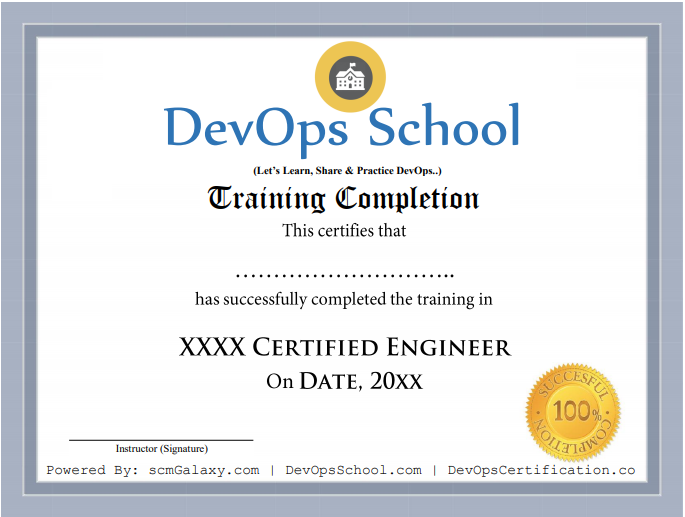
Certificate preview
See what course completion evidence looks like.
Focused training
Course visuals reinforce the subject area and learning context.
Live batch experience
Training supports live online, private team and workshop-style delivery.
Request Azure Data Factory Course details.
Ask for syllabus, batch schedule, self-paced LMS access, live training options or corporate proposal.