Best Devops Course Online
DevOps training course will help you learn DevOps online, and master various aspects of software development, operations, continuous integration, continuous delivery, automated build, test, and deployment. In this best DevOps certification, you will learn DevOps tools like Git, Puppet, Jenkins, SVN, Maven, Docker, Ansible, Nagios
Last updated
Self-paced video
Billed yearly at ₹9,996. Includes complete LMS access for one year, access across the DevOpsSchool course library, 20+ additional courses and 50+ tools. Where a course family has four levels, all levels are included by default.
Live & Interactive
Instructor-led live session, max 8 to 10 hours, with demos, labs, Q&A, practical review and certificate support.
1:1 Live training
The same agenda, taught one-to-one by the trainer. Start immediately, without waiting for the next batch. Max 8 to 10 hours, one-to-one.
- Practical demonstrations and guided examples
- Complete LMS access for one year
- Certificate and learning record support
- Corporate customization available
Practical Best Devops Course Online learning for professionals and teams.
DevOps training course will help you learn DevOps online, and master various aspects of software development, operations, continuous integration, continuous delivery, automated build, test, and deployment. In this best DevOps certification, you will learn DevOps tools like Git, Puppet, Jenkins, SVN, Maven, Docker, Ansible, Nagios
What this program covers
This page is structured for learners who need a focused course, certification topic, platform module, product feature, security area or role-specific skill that may not map directly to Foundation, Essential, Intermediate or Advanced levels.
The learning experience still follows DevOpsSchool standards: concept clarity, practical use cases, demonstrations, hands-on tasks, assessment guidance, certification support and post-session LMS access.
Private Best Devops Course Online training for teams and organizations.
DevOpsSchool can align this program to team maturity, current tools, role expectations, compliance requirements, delivery workflow and implementation goals.
- Private online or classroom batch options
- Role-based coverage for engineers, administrators, leads and managers
- Examples can be mapped to internal platforms and use cases
- Useful for onboarding, migration, governance, certification readiness and adoption
Why DevOpsSchool
DevOpsSchool combines practitioner-led explanation, live demonstrations, assignments, LMS access, certificate support and guidance for both individual professionals and corporate teams.
Request corporate proposalThe same course architecture, adapted to this focused topic.
Specialized pages keep the same decision structure as standard level pages, but the content is adjusted to the course objective.
Concepts
Terminology, purpose, architecture, scope and fit inside modern delivery workflows.
Implementation
Configuration, usage patterns, workflows, operating practices and common mistakes.
Integration
Automation, integration touchpoints, delivery process and production readiness.
Validation
Labs, assignments, review questions, certificate support and next-step learning guidance.
Live, self-paced and corporate delivery options.
Fees are intentionally shown only in the hero and once again after the agenda. This section focuses on delivery fit.
| Mode | Duration / access | Best fit |
|---|---|---|
| Self-paced video | One year LMS access | Learners who want flexible pace and broad catalog access. |
| Live & Interactive | Max 8 to 10 hours | Learners who want demos, guided discussion, labs and Q&A. |
| 1:1 Live training | Max 8 to 10 hours, one-to-one | Learners who want to start immediately, at their own pace, with the full attention of the trainer. |
| Corporate | Private team batch | Teams needing customized examples, adoption guidance and rollout support. |
Why this course, what you will achieve, and who should attend.
Use these sections to decide whether the program matches your role, current experience and expected responsibilities.
Why this matters
Best Devops Course Online helps learners build practical confidence in a focused technical, certification or platform topic instead of only reading generic documentation.
Objectives
- Understand the core concepts and usage model.
- Apply practical workflows through examples and guided tasks.
- Prepare for implementation, certification or team adoption needs.
Pre-requisites
Basic computer literacy and awareness of software, operations, cloud, DevOps or security workflows is helpful. Deep programming experience is not mandatory unless the topic specifically requires it.
Who should attend
Developers, DevOps engineers, administrators, SREs, security engineers, platform teams, release teams, technical leads and corporate teams working with this topic.
Small-batch live training and flexible self-paced access.
Choose live guidance when discussion and lab review matter, or use self-paced access when schedule flexibility matters more.
Live cohort
Instructor-led sessions with demos, guided examples and Q&A for practical adoption.
Ask for next batchSelf-paced route
Use LMS access for flexible learning, revision and continued access to DevOpsSchool course materials.
Review access modelFocused agenda for Best Devops Course Online.
Course-specific agenda topics are preserved and organized for the current program objective while staying in the same page architecture.
Core curriculumPart 1
- SDLC Models & Architecture with Agile, DevOps, SRE & DevSecOps, SOA & Micro services - Concept
- Let’s Understand about Software Development Model
- Overview of Waterfall Development Model
- Challenges of Waterfall Development Model
- Overview of Agile Development Model
- Challenges of Agile Development Model
- Requirement of New Software Development Model
- Understanding an existing Pain and Waste in Current Software Development Model
- What is DevOps?
- Transition in Software development model
- Waterfall -> Agile -> CI/CD -> DevOps -> DevSecOps
- Understand DevOps values and principles
- Culture and organizational considerations
Core curriculum continued 2Part 2
- Communication and collaboration practices
- Improve your effectiveness and productivity
- DevOps Automation practices and technology considerations
- DevOps Adoption considerations in an enterprise environment
- Challenges, risks and critical success factors
- What is DevSecOps?
- Let’s Understand DevSecOps Practices and Toolsets.
- What is SRE?
- Let’s Understand SRE Practices and Toolsets.
- List of Tools to become Full Stack Developer/QA/SRE/DevOps/DevSecOps
- Microservices Fundamentals
- Microservices Patterns
- Choreographing Services
- Presentation components
Core curriculum continued 3Part 3
- Business Logic
- Database access logic
- Application Integration
- Modelling Microservices
- Integrating multiple Microservices
- Keeping it simple
- Avoiding Breaking Changes
- Choosing the right protocols
- Sync & Async
- Dealing with legacy systems
- Testing
- What and When to test
- Preparing for deployment
- Monitoring Microservice Performance
Core curriculum continued 4Part 4
- Tools used for Microservices Demo using container
- Platform - Operating Systems - Centos/Ubuntu & VirtualBox & Vagrant
- Ubuntu
- Installing CentOS7 and Ubuntu
- Accessing Servers with SSH
- Working at the Command Line
- Reading Files
- Using the vi Text Editor
- Piping and Redirection
- Archiving Files
- Accessing Command Line Help
- Understanding File Permissions
- Accessing the Root Account
- Using Screen and Script
Core curriculum continued 5Part 5
- Overview of Hypervisor
- Introduction of VirtualBox
- Install VirtualBox and Creating CentOS7 and Ubuntu Vms
- Vagrant
- Understanding Vagrant
- Basic Vagrant Workflow
- Advance Vagrant Workflow
- Working with Vagrant VMs
- The Vagrantfile
- Installing Nginx
- Provisioning
- Networking
- Sharing and Versioning Web Site Files
- Vagrant Share
Core curriculum continued 6Part 6
- Vagrant Status
- Sharing and Versioning Nginx Config Files
- Configuring Synced Folders
- Platform - Cloud - AWS
- Introduction of AWS
- Understanding AWS infrastructure
- Understanding AWS Free Tier
- IAM: Understanding IAM Concepts
- IAM: A Walkthrough IAM
- IAM: Demo & Lab
- Computing:EC2: Understanding EC2 Concepts
- Computing:EC2: A Walkthrough EC2
- Computing:EC2: Demo & Lab
- Storage:EBS: Understanding EBS Concepts
Core curriculum continued 7Part 7
- Storage:EBS: A Walkthrough EBS
- Storage:EBS: Demo & Lab
- Storage:S3: Understanding S3 Concepts
- Storage:S3: A Walkthrough S3
- Storage:S3: Demo & Lab
- Storage:EFS: Understanding EFS Concepts
- Storage:EFS: A Walkthrough EFS
- Storage:EFS: Demo & Lab
- Database:RDS: Understanding RDS MySql Concepts
- Database:RDS: A Walkthrough RDS MySql
- Database:RDS: Demo & Lab
- ELB: Elastic Load Balancer Concepts
- ELB: Elastic Load Balancer Implementation
- ELB: Elastic Load Balancer: Demo & Lab
Core curriculum continued 8Part 8
- Networking:VPC: Understanding VPC Concepts
- Networking:VPC: Understanding VPC components
- Networking:VPC: Demo & Lab
- Platform - Containers - Docker
- What is Containerization?
- Why Containerization?
- How Docker is good fit for Containerization?
- How Docker works?
- Docker Architecture
- Docker Installations & Configurations
- Docker Components
- Docker Engine
- Docker Image
- Docker Containers
Core curriculum continued 9Part 9
- Docker Registry
- Docker Basic Workflow
- Managing Docker Containers
- Creating our First Image
- Understading Docker Images
- Creating Images using Dockerfile
- Managing Docker Images
- Using Docker Hub registry
- Docker Networking
- Docker Volumes
- Deepdive into Docker Images
- Deepdive into Dockerfile
- Deepdive into Docker Containers
- Deepdive into Docker Networks
Core curriculum continued 10Part 10
- Deepdive into Docker Volumes
- Deepdive into Docker Volume
- Deepdive into Docker CPU and RAM allocations
- Deepdive into Docker Config
- Docker Compose Overview
- Install & Configure Compose
- Understanding Docker Compose Workflow
- Understanding Docker Compose Services
- Writing Docker Compose Yaml file
- Using Docker Compose Commands
- Docker Compose with Java Stake
- Docker Compose with Rails Stake
- Docker Compose with PHP Stake
- Docker Compose with Nodejs Stake
Core curriculum continued 11Part 11
- Planning and Designing - Jira & Confulence
- Overview of Jira
- Use cases of Jira
- Architecture of Jira
- Installation and Configuraration of Jira in Linux
- Installation and Configuraration of Jira in Windows
- Jira Terminologies
- Understanding Types of Jira Projects
- Working with Projects
- Working with Jira Issues
- Adding Project Components and Versions
- Use Subtasks to Better Manage and Structure Your Issues
- Link Issues to Other Resources
- Working in an Agile project
Core curriculum continued 12Part 12
- Working with Issues Types by Adding/Editing/Deleting
- Working with Custom Fields by Adding/Editing/Deleting
- Working with Screens by Adding/Editing/Deleting
- Searching and Filtering Issues
- Working with Workflow basic
- Introduction of Jira Plugins and Addons.
- Jira Integration with Github
- Exploring Confluence benefits and resources
- Configuring Confluence
- Navigating the dashboard, spaces, and pages
- Creating users and groups
- Creating pages from templates and blueprints
- Importing, updating, and removing content
- Giving content feedback
Core curriculum continued 13Part 13
- Watching pages, spaces, and blogs
- Managing tasks and notifications
- Backing up and restoring a site
- Admin tasks
- Add/Edit/Delete new users
- Adding group and setting permissions
- Managing user permissions
- Managing addons or plugins
- Customizing confluence site
- Installing Confluence
- Evaluation options for Confluence
- Supported platforms
- Installing Confluence on Windows
- Activating Confluence trial license
Core curriculum continued 14Part 14
- Finalizing Confluence Installation
- Backend Programming Language 2 - App Dev with Python/Flask with mysql DB
- Planning - Discuss some of the Small Project Requirement which include
- Login/Registertration with Some Students records CRUD operations.
- Design a Method --> Classes -> Interface using Core Python
- Fundamental of Core Python with Hello-world Program with Method --> Classes
- Coding in Flask using HTMl - CSS - JS - MySql
- Fundamental of Flask Tutorial of Hello-World APP
- UT - 2 Sample unit Testing using Pythontest
- Package a Python App
- AT - 2 Sample unit Testing using Selenium
- Technology Demonstration
- Software Planning and Designing using JAVA
- Core Python
Core curriculum continued 15Part 15
- Flask
- mySql
- pytest
- Selenium
- HTMl
- CSS
- Js.
- Source Code Versioning - Git using Github
- Introduction of Git
- Installing Git
- Configuring Git
- Git Concepts and Architecture
- How Git works?
- The Git workflow
Core curriculum continued 16Part 16
- Working with Files in Git
- Adding files
- Editing files
- Viewing changes with diff
- Viewing only staged changes
- Deleting files
- Moving and renaming files
- Making Changes to Files
- Undoing Changes
- Reset
- Revert
- Amending commits
- Ignoring Files
- Branching and Merging using Git
Core curriculum continued 17Part 17
- Working with Conflict Resolution
- Comparing commits, branches and workspace
- Working with Remote Git repo using Github
- Push - Pull - Fetch using Github
- Tagging with Git
- Code Analysis & Securing Code (SAST) - SonarQube & OWASP SonarQube
- What is SonarQube?
- Benefits of SonarQube?
- Alternative of SonarQube
- Understanding Various License of SonarQube
- Architecture of SonarQube
- How SonarQube works?
- Components of SonarQube
- SonarQube runtime requirements
Core curriculum continued 18Part 18
- Installing and configuring SonarQube in Linux
- Basic Workflow in SonarQube using Command line
- Working with Issues in SonarQube
- Working with Rules in SonarQube
- Working with Quality Profiles in SonarQube
- Working with Quality Gates in SonarQube
- Deep Dive into SonarQube Dashboard
- Understanding Seven Axis of SonarQube Quality
- Workflow in SonarQube with Maven Project
- Workflow in SonarQube with Gradle Project
- OWASP Top 10 with SonarQube
- Build Management - Maven and Gradle
- Maven
- Introduction to Apache Maven
Core curriculum continued 19Part 19
- Advantage of Apache Maven over other build tools
- Understanding the Maven Lifecycle and Phase
- Understanding the Maven Goals
- Understanding the Maven Plugins
- Understanding the Maven Repository
- Understanding and Maven Release and Version
- Prerequisite and Installing Apache Maven
- Understanding and using Maven Archetypes
- Understanding Pom.xml and Setting.xml
- Playing with multiples Maven Goals
- Introducing Maven Dependencies
- Introducing Maven Properties
- Introducing Maven Modules
- Introducing Maven Profile
Core curriculum continued 20Part 20
- Introducing Maven Plugins
- How can Maven benefit my development process?
- How do I setup Maven?
- How do I make my first Maven project?
- How do I compile my application sources?
- How do I compile my test sources and run my unit tests?
- How do I create a JAR and install it in my local repository?
- How do I use plugins?
- How do I add resources to my JAR?
- How do I filter resource files?
- How do I use external dependencies?
- How do I deploy my jar in my remote repository?
- How do I create documentation?
- How do I build other types of projects?
Core curriculum continued 21Part 21
- How do I build more than one project at once?
- Gradle
- What is Gradle?
- Why Gradle?
- Installing and Configuring Gradle
- Build Java Project with Gradle
- Build C++ Project with Gradle
- Build Python Project with Gradle
- Dependency Management in Gradle
- Project Structure in Gradle
- Gradle Tasks
- Gradle Profile and Cloud
- Gradle Properties
- Gradle Plugins
Core curriculum continued 22Part 22
- Package Management - Packer & Artifactory
- Artifactory
- Artifactory Overview
- Understanding a role of Artifactory in DevOps
- System Requirements
- Installing Artifactory in Linux
- Using Artifactory
- Getting Started
- General Information
- Artifactory Terminology
- Artifactory Repository Types
- Artifactory Authentication
- Deploying Artifacts using Maven
- Download Artifacts using Maven
Core curriculum continued 23Part 23
- Browsing Artifactory
- Viewing Packages
- Searching for Artifacts
- Manipulating Artifacts
- Packer
- Junit
- What is Unit Testing?
- Tools for Unit Testing
- What is Junit?
- How to configure Junit?
- Writing Basic Junit Test cases
- Running Basic Junit Test cases
- Junit Test Results
- Introduction to Selenium
Core curriculum continued 24Part 24
- Components of Selenium
- Selenium IDE
- Selenium Web driver
- Selenium Grid
- Installing and Configuring Selenium
- Working with Selenium IDE
- Working With Selenium Web driver with Java Test Case Setup and Working with Selenium Grid
- Setup and Working with Selenium Grid
- Jacoco
- Overview of Code coverage process
- Introduction of Jacoco
- How Jacoco works!
- How to install Jaoco?
- Setup testing Environment with Jacoco
Core curriculum continued 25Part 25
- Create test data files using Jacoco and Maven
- Create a Report using Jacoco
- Demo - Complete workflow of Jacoco with Maven and Java Project
- Configuration & Deployment Management - Ansible
- Overflow of Configuration Management
- Introduction of Ansible
- Ansible Architecture
- Let’s get startted with Ansible
- Ansible Authentication & Authorization
- Let’s start with Ansible Adhoc commands
- Let’s write Ansible Inventory
- Let’s write Ansible Playbook
- Working with Popular Modules in Ansible
- Deep Dive into Ansible Playbooks
Core curriculum continued 26Part 26
- Working with Ansible Variables
- Working with Ansible Template
- Working with Ansible Handlers
- Roles in Ansible
- Ansible Galaxy
- Container Orchestration - Kubernetes & Helm Introduction
- Understanding the Need of Kubernetes
- Understanding Kubernetes Architecture
- Understanding Kubernetes Concepts
- Kubernetes and Microservices
- Understanding Kubernetes Masters and its Component
- kube-apiserver
- etcd
- kube-scheduler
Core curriculum continued 27Part 27
- kube-controller-manager
- Understanding Kubernetes Nodes and its Component
- kubelet
- kube-proxy
- Container Runtime
- Understanding Kubernetes Addons
- DNS
- Web UI (Dashboard)
- Container Resource Monitoring
- Cluster-level Logging
- Understand Kubernetes Terminology
- Kubernetes Pod Overview
- Kubernetes Replication Controller Overview
- Kubernetes Deployment Overview
Core curriculum continued 28Part 28
- Kubernetes Service Overview
- Understanding Kubernetes running environment options
- Working with first Pods
- Working with first Replication Controller
- Working with first Deployment
- Working with first Services
- Introducing Helm
- Basic working with Helm
- Infrastructure Coding - Terraform
- Deploying Your First Terraform Configuration
- Introduction
- What's the Scenario?
- Terraform Components
- Updating Your Configuration with More Resources
Core curriculum continued 29Part 29
- Terraform State and Update
- Data Type and Security Groups
- Configuring Resources After Creation
- Terraform Provisioners
- Terraform Syntax
- Adding a New Provider to Your Configuration
- Terraform Providers
- Terraform Functions
- Intro and Variable
- Resource Creation
- Deployment and Terraform Console
- Updated Deployment and Terraform Commands
- Continuous Integration - Jenkins
- Lets understand Continuous Integration
Core curriculum continued 30Part 30
- What is Continuous Integration
- Benefits of Continuous Integration
- What is Continuous Delivery
- What is Continuous Deployment
- Continuous Integration Tools
- Prometheus
- Introduction to Prometheus
- Prometheus installation
- Grafana with Prometheus Installation
- Installation
- Installing on Ubuntu / Debian
- Installing on Centos / Redhat
- Installing on Windows
- Installing on Mac
Core curriculum continued 31Part 31
- Installing using Docker
- Building from source
- Upgrading
- Administration Configuration Authentication Permissions Grafana CLI Internal metrics Provisioning Troubleshooting Log Monitoring Tool 1 - Splunk
- What Is Splunk?
- Overview
- Machine Data
- Splunk Architecture
- Careers in Splunk
- Introduction and Overview of NewRelic
- What is Application Performance Management?
- Understanding a need of APM
- Understanding transaction traces
- What is Application Performance?
Core curriculum continued 32Part 32
- APM Benefits
- APM Selection Criteria
- Why NewRelic is best for APM?
- What is NewRelic APM?
- How does NewRelic APM work?
- NewRelic Architecture
- NewRelic Terminology
- Installing and Configuring NewRelic APM Agents for Application
- Register a Newrelic Trial account
- Installing a JAVA Agent to Monitor your Java Application
- Installing a PHP Agent to Monitor your PHP Application
- Installing New Relic Agent for .NET Framework Application
- Installing a Docker based Agent to Monitor your Docker based Application
- Understanding of NewRelic Configration settings of newrelic.yml
Core curriculum continued 33Part 33
- Understanding of NewRelic Agent Configration settings
- Working with NewRelic Dashboard
- Understanding a transactions
- Understanding Apdex and Calculating and Setting Apdex Threshold
- Understanding Circuit break
- Understanding Throughput
- Newrelic default graphs
- Understanding and Configuring Service Maps
- Understanding and Configuring JVM
- Understanding Error Analytics
- Understanding Violations
- Understanding and Configuring Deployments
- Understanding and Configuring Thread Profiler
- Depp Dive into Transaction Traces
Core curriculum continued 34Part 34
- Profiling with New Relic
- Creating and managing Alerts
- Working with Incidents
- Sending NewRelic Alerts to Slack
- Assessing the quality of application deployments
- Monitoring using Newrelic
- View your applications index
- APM Overview page
- New Relic APM data in Infrastructure
- Transactions page
- Databases and slow queries
- Viewing slow query details
- External services page
- Agent-specific UI
Core curriculum continued 35Part 35
- Viewing the transaction map
- Deep Dive into Newrelic Advance
- Newrelic transaction alerts
- Configure abnd Troubleshoot and Cross Application Traces
- NewRelic Service Level Agreements
- Troubleshooting NewRelic
- Understanding and Configuring NewRelic X-Ray Sessions
- Deep Dive into NewRelic Agent Configuration
- Adding Custom Data with the APM Agent
- Extending Newrelic using Plugins
- Finding and Fixing Application Performance Issues with New Relic APM
- Setting up database montioring using Newrelic APM
- Setting up and Configuring Newrelic Alerts
- Working with NewRelic Performance Reports
Core curriculum continued 36Part 36
- Availability report
- Background jobs analysis report
- Capacity analysis report
- Database analysis report
- Host usage report
- Scalability analysis report
- Web transactions analysis report
- Weekly performance report
Choose self-paced library access or live interactive delivery.
This is the second and final pricing block on the page, placed after the agenda so learners can review scope before making a decision.
Self-paced video
Billed yearly at ₹9,996. Includes complete LMS access for one year, access across the DevOpsSchool course library, 20+ additional courses and 50+ tools. Where a course family has four levels, all levels are included by default.
Live & Interactive
Instructor-led live session, max 8 to 10 hours, with demos, labs, Q&A, practical review and certificate support.
1:1 Live training
The same agenda, taught one-to-one by the trainer. Start immediately, without waiting for the next batch. Max 8 to 10 hours, one-to-one.
- Start immediately: no waiting for the monthly batch.
- One learner, one trainer: full attention on your questions.
- Sessions planned around your working hours.
- Your pace, with examples from your own projects and tools.
Method of training and assessment.
The program emphasizes practical demonstration, guided examples and assignment-based validation instead of passive lecture-only learning.
| SL | Method | Weightage |
|---|---|---|
| 1 | Problem-space understanding | 10% |
| 2 | Concept discussion | 15% |
| 3 | Live demo and walkthrough | 25% |
| 4 | Lab and hands-on exercises | 40% |
| 5 | Review and readiness discussion | 10% |
Hands-on learning remains part of the program story.
The exact exercises depend on the topic, but every program should make practical execution visible.
Setup walkthrough
Understand access, environment, navigation and first-use expectations.
Core workflow
Practice the central workflow or certification scenario for this topic.
Troubleshooting
Review common issues, validation signals and safe operating practices.
Assessment prep
Use assignments, review prompts and Q&A to confirm readiness.
Best Devops Course Online is taught in the context of real delivery work.
You learn how the topic connects with engineering, operations, security, cloud, release or platform workflows.
Core foundations
Terminology, concepts, architecture and operating model.
Workflow traceability
Map practical work to tasks, approvals, documentation and delivery visibility.
Automation and integration
Use the topic with validation checks, automation hooks and delivery workflows.
Governance controls
Operate with permissions, approvals, policy checks and production-safe workflows.
How your practical work is assessed.
Your certificate is backed by labs, assignments, review and completion evidence.
Assignments
Assignments verify concepts, configuration, workflow quality and operating discipline.
Hands-on validation
Learners complete practical usage, implementation and troubleshooting exercises.
Completion record
Certificate issuance is tied to participation, practical completion and course coverage.
Completion record and certification support.
Learners receive DevOpsSchool completion support, course participation evidence and guidance aligned to the program objective. Certification-oriented pages also support exam readiness discussion.
Certificate verificationCertificate of Completion
Best Devops Course Online
Unique credential ID, verifiable online
Led by Rajesh Kumar and the DevOpsSchool practitioner network.
Training is grounded in practical DevOps, SRE, cloud, security, release and platform engineering experience.
What learners say about training with Rajesh Kumar.
“Rajesh is very good trainer. Rajesh was able to resolve our queries and question effectively. We really liked the hands-on examples covered during this training program.”
“Very well organized training, helped a lot to understand the AWS concept and detailed related to various tools. Very helpful”
“The training was very useful and interactive. Rajesh helped develop the confidence of all.”
Rated 4.6 on Google · All testimonials · Video reviews on YouTube
Quoted as published, from learners in Rajesh Kumar's live trainings across DevOpsSchool courses.
Why this DevOpsSchool program is different.
The value is not only one course page. The subscription unlocks the wider learning ecosystem for one year.
| Feature | DevOpsSchool | Typical short course |
|---|---|---|
| Access model | LMS access with 20+ courses and 50+ tools | Usually one course only |
| Live training | Demos, labs, Q&A and practical review | Often lecture-heavy |
| Corporate fit | Can align to roles, workflows and rollout goals | Limited customization |
| Certificate support | Completion record and readiness guidance | Varies by provider |
Questions learners usually ask before joining.
Is this course part of a level path?
Not always. Some courses focus on one topic, exam, product, role or service. They follow a focused agenda instead of Foundation to Advanced levels.
What is included in self-paced access?
One year of complete LMS access, 20+ additional courses and 50+ tools. Course families with multiple levels include available levels by default.
Can corporate teams customize this?
Yes. The program can be aligned to team roles, internal tools, delivery workflows and adoption goals.
How long is live training?
The Live & Interactive option is max 8 to 10 hours with demos, labs, Q&A and practical review.
Talk to DevOpsSchool before choosing the batch.
Use this support section for batch questions, corporate planning, LMS access clarifications, or guidance on whether this program fits your team.
India / Worldwide: +91 99057 40781
USA: +1 (469) 756-6329
Email: contact@DevOpsSchool.com
Chat on WhatsAppExtend the course with articles, explainers and workflow guidance.
Continue learning with supporting articles that connect this topic to DevOps, automation, governance and delivery workflows.
Training snapshots and certificate preview.
A look at the completion certificate and the course.
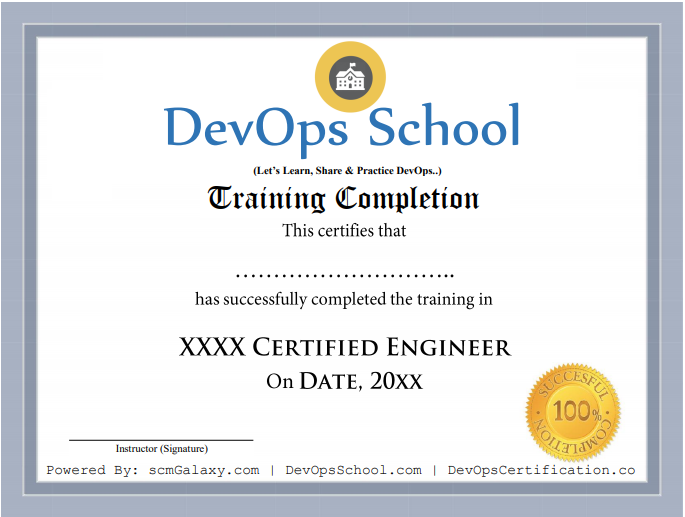
Certificate preview
See what course completion evidence looks like.
Focused training
Course visuals reinforce the subject area and learning context.
Live batch experience
Training supports live online, private team and workshop-style delivery.
Request Best Devops Course Online details.
Ask for syllabus, batch schedule, self-paced LMS access, live training options or corporate proposal.