LAB · BUILD
Cut the image in half
Take a working but bloated image and reduce it with multi-stage builds, measuring each step.
> Containers · DevOpsSchool Training
Weekend and weekday batches, live online or in our Bangalore classroom — every session a live demo in a real lab, not slides.
★ 4.8 / 5 from 2,300+ ratings18,000+ engineers certifiedTrained teams at JPMorgan Chase, Verizon, Nokia, World Bank
# upcoming batches
Times shown in IST (UTC+5:30). New cohorts start on the 1st of every month.
| Starts | Days & time | Timezone | Mode | Duration | Seats | Enrol |
|---|---|---|---|---|---|---|
| —Most popular | Weekend · Sat · Sun 10:00 AM – 1:00 PM | IST (UTC+5:30) | Live online · Classroom · Corporate onsite | 5 weekends | — of 10 left | Reserve |
| — | Weekday · Mon · Wed · Fri 8:00 – 10:00 PM | IST (UTC+5:30) | Live online · Classroom · Corporate onsite | 5 weeks | — of 10 left | Reserve |
Batches are capped at 10 learners by design.Need a date that isn't listed? Talk to us about a private batch →
# how you attend
Individuals, anywhere
Scheduled instructor-led batch. Every session is a live demo in a real lab, and every session is recorded.
Reserve my seatLearners who prefer in-person
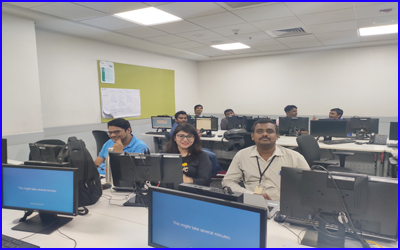
Vervenest Technologies Pvt Ltd, 3478J HAL 2nd Stage, Chirush Mansion, 2nd & 3rd Floors, 13th Main Road, HAL 2nd Stage, Indiranagar, Bengaluru, Karnataka 560008. Classroom batches run when six or more learners in the city book the same cohort.
Check classroom availabilityTeams of 8–30
Custom agenda built from your stack, delivered at your office or online, in your timezone. NDA-friendly, invoiced against a PO.
Request a quoteSelf-starters
The full recorded curriculum plus a year of the entire LMS — 20+ courses and 50+ tools, not just this one.
Enroll now# private batches
We start with a discovery call, map your stack to the modules below, and drop anything your team already runs in production. Delivery is at your office, online, or hybrid — in your timezone, scheduled around your release calendar.
Send us the tools, the team size and a rough window. You'll get an agenda and a quote back, not a sales call.
# bangalore
Docker training in Bangalore is taken mostly by developers packaging their own applications and Operations engineers running containerised workloads. Sessions run live online in IST (UTC+5:30), or in our Bangalore classroom when six or more learners in the city book the same cohort. Teams here often pair it with our Agile and Ansible training, and a corporate batch can cover more than one in a single engagement. Bangalore is where most of this work is operated rather than just consumed. The Outer Ring Road corridor between Marathahalli and Bellandur concentrates the platform and SRE teams of the large product companies, and those teams run estates big enough that the interesting questions are about structure and guardrails rather than about getting a first thing running. The second pattern is the captive centre. Banking, insurance and healthcare captives around Manyata and Whitefield are moving regulated workloads, which pushes encryption, access boundaries, private connectivity and audit evidence to the front of the conversation. Electronic City adds a third mix: engineering-services teams who have to be productive inside a client's environment, often with limited permissions and no console access at all. We plan the Bangalore cohorts around that. The weekend batch fills fastest because it does not compete with a release window, and classroom sessions run at the Indiranagar centre when six or more learners in the city book the same cohort — most of whom travel in from the ORR and Whitefield corridors.
Vervenest Technologies Pvt Ltd
3478J HAL 2nd Stage, Chirush Mansion, 2nd & 3rd Floors, 13th Main Road, HAL 2nd Stage, Indiranagar, Bengaluru, Karnataka 560008Classroom cohorts run when six or more learners in Bangalore book the same batch. Otherwise the same batch runs live online.
# the subject
Docker packages an application together with everything it needs to run into an image that behaves the same on a laptop, in CI and in production. Underneath it is a thin layer over Linux kernel features — namespaces for isolation, cgroups for resource limits, and a union filesystem for layering — which is worth understanding because most of the confusing behaviour comes from those primitives showing through. Day to day the work is writing Dockerfiles that build quickly and stay small, understanding the layer cache well enough to control it, managing images in a registry, and wiring containers together with networks and volumes. The parts that catch people out are usually the boring ones: file permissions, signal handling, and what happens to data when a container is replaced.
Containers are now the default packaging format for server-side software, and the assumption in most job descriptions is that you already have this. The value has moved from being able to run a container to being able to produce images that are small, reproducible, non-root and free of known vulnerabilities — which is a supply-chain question as much as a packaging one, and increasingly something an auditor will ask about.
# outcomes
# curriculum
Every module follows the same shape: 5 hrs · 2 assignments · 1 capstone.
Required components of Running Software Environment, Introduction of Hardware, Introduction of kernel, Namespaces, Cgroups, Capabilities, Filesystem, Boot Filesystem
Root Filesystem, User Filesystem, App Filesystem, What is Docker?, Introduction of Docker, Introduction of Container?, Components of Containers & How Containers works?, History & Origin of Docker
Types of Release in Docker, Latest version of Docker, Technology used in Docker development, Official Website & Reference, Major Use Cases of Docker, Major Feature and Advantage of Docker, Terminology used in Docker, Components of Docker
Docker Engine, Docker Registry, Docker Image, Docker Container, Architecture of Docker & How Docker works?, Workflow of Docker, Best Alternative of Docker, Installing and Configuring Docker
Installing Docker in Centos 7, Installing Docker in Ubuntu 20, Installing Docker in Windows 2019, Configuring Docker, Basic Workflow of Container using Docker, Commonly used commands in Docker, Create a Docker Container, Start a Docker Container
Stop a Docker Container, Restart a Docker Container, Pause a Docker Container, Unpause a Docker Container, Remove a Docker Container, Kill a Docker Container, Difference between Docker Stop & Docker Start, Difference between Docker Pause & Docker Unpause
Difference between Docker Stop & Docker Kill, Differences & Comparison of Docker Container with, Docker Container vs Virtual Machines, Docker Container vs Kubernetes pod, Docker Container vs Podman Container, dockerd vs containerd, dockerd vs CRI-O, CRI-O vs runc
Advance Workflow of Containers using Docker, Importance of PID 1 of container?, docker run command with example, How to use containers on a daily basis?, docker exec command with example, docker attach command with example, How to de-attached from container?, How to set the name of the container?
Copying a files/dir with container using docker cp, docker diff command with example & use cases, Rename a container using Docker rename, Inspect a container using Docker inspect, List port mappings or a specific mapping for the container, Update configuration of one or more containers using "docker update", Use cases & example of "docker wait", Monitoring & Troubleshooting Docker Containers
Docker Container - Fetch the logs of a container, Docker Container - Display a live stream of container(s) resource usage statistics, Docker Container - Display the running processes of a container, Docker Server - Get real time events from the docker server, Docker Server - dockerd service process Troubleshooting, Docker Server - Logging of Docker Server, Docker Server - Configuration of a docker server, Working with Docker Volume
Storage Overview, Why do I need docker volume?, What are docker volumes?, Types of docker volumes?, Overview of Docker Volume Mount, Overview of Docker Bind Mounts, Overview of Docker tmpfs Mounts, Creating & Using Docker Volume Mount with Container
Creating & Using Docker Bind Mount with Container, Creating & Using Docker tmpfs Mount with Container, Troubleshoot Volume problems, Understanding a Networking with Docker Containers, Networking overview, Types of default Networking driver in docker, Use bridge networks with docker container, Use overlay networks with docker container
Open-book, scenario-based, taken in the LMS. Two free re-attempts and detailed feedback.
# hands-on
We don't hand out a sandbox that expires. You provision your own free-tier environment with our guidance, so the setup skill goes with you.
LAB · BUILD
Take a working but bloated image and reduce it with multi-stage builds, measuring each step.
LAB · RUNTIME
Debug three containers that fail in different ways — permissions, signals and a missing dependency.
LAB · DATA
Prove that your data outlives the container by destroying and recreating it under load.
LAB · SUPPLY CHAIN
Scan an image, trace a vulnerability to the layer that introduced it, and fix it at source.
# toolchain
# pricing
₹833/mo
billed yearly ₹9,996
All recorded sessions, labs and the full LMS — at your own pace.
₹34,999₹49,999SAVE 30%
works out to ₹2,917/moIllustrative monthly equivalent. The full amount is charged once at enrolment; we do not offer instalments.
5-week live cohort plus the complete LMS bundle.
₹99,999
works out to ₹8,333/moIllustrative monthly equivalent. The full amount is charged once at enrolment; we do not offer instalments.
A dedicated senior practitioner. Pace, schedule and labs tailored to you.
+ GST 18% as applicable · Prices are charged in INR.
If we cancel or postpone a cohort and you decline the rescheduled session, you get a 100% refund within 15 days. Refund policy →
Recordings, slides and lab repos are licensed to you for your own learning. Terms →
We don't share your details with third parties. Privacy →
# who teaches it
Twenty years across DevOps, SRE and security, in principal and architect roles at PayPay, SoftwareAG, ServiceNow, Intuit, Adobe and IBM. Has personally trained more than 10,000 engineers at JPMorgan Chase, Verizon, Nokia, the World Bank and dozens more. He teaches what he runs, not what he reads.


# the credential
Certificate of Completion
Your Name
Docker Training in Bangalore
DS-DOCKER-XXXX-XXXX
# reviews
4.8 / 5 from 2,300+ ratings.
Reviews for this program are being collected from public sources. Every review shown here links to the original.
# alternatives
| What matters | YouTube + blogs | Generic online course | Local training institute | DevOpsSchool |
|---|---|---|---|---|
| Teaching method | Unstructured, no sequence | Pre-recorded slides | Slide-led classroom | Live demos in a real lab |
| Batch size | n/a | Unlimited | 30–60 | Capped at 10 |
| Lab environment | Yours to figure out | Shared sandbox that expires | Shared lab | You build your own — the skill goes with you |
| Per-tool structure | None | Video only | Varies | 5 hrs · 2 assignments · 1 capstone |
| Assessment | None | Quiz | Attendance | 3 hours · online · open-book · scenario-based |
| Certificate | None | Auto-issued | Attendance certificate | Industry-recognised, verifiable |
| Corporate invoicing | No | Card only | Sometimes | PO, GST invoice, NDA |
| Post-training support | None | Forum for 30 days | None | Lifetime forum support |
| Total cost | Free, and it costs you months | Low, low completion | High | One fee, LMS included |
# questions
Yes. Classroom cohorts run at our Bangalore centre when six or more learners in the city book the same batch. Below that number the batch runs live online with the same instructor and the same labs, and we tell you which it will be before you pay.
Sessions run in IST (UTC+5:30), which is local time for you: the weekend cohort at 10:00–13:00 on Saturday and Sunday, and the weekday cohort at 20:00–22:00 on Monday, Wednesday and Friday. Most Bangalore learners take the weekend batch because it does not collide with a release window.
Most Bangalore attendees work in Indiranagar, Whitefield, Outer Ring Road (Marathahalli–Bellandur), Electronic City, Koramangala, Manyata Tech Park or Hebbal. That matters for classroom batches, because we only open the Bangalore centre when six or more learners from the city book the same cohort — and in practice that is who fills it.
The curriculum is the same everywhere — it is the same course, and pretending otherwise would be dishonest. What changes for Bangalore is delivery: the batch times are set for IST (UTC+5:30), fees are shown in INR, and a classroom option exists here that most locations do not have. The examples our instructors reach for also tend to follow what Bangalore teams actually run.
No, and that is deliberate. You build the labs on your own free-tier account, and we walk through the setup and the cost guardrails in week one. A sandbox that expires when the course ends teaches you nothing you keep; your own environment does.
Every session is recorded and available in the LMS the same day, and you keep access for a year. You can also sit the missed session again with the next cohort at no extra cost.
Comfortable on a Linux shell; Understanding of processes, ports and file permissions; Any one application stack you can package. If you are unsure whether you are ready, tell us what you work on now and we will give you a straight answer rather than a sales one.
You get an industry-recognised DevOpsSchool certificate after the three-hour open-book exam. Most people find the capstone repositories carry more weight in an interview than the certificate itself, which is why the labs are built to be shown.
Yes. We build the agenda from your stack after a discovery call and drop anything your team already runs in production. Teams of 8 to 30 work best; larger groups split into parallel batches.
If we cancel or postpone a cohort and you decline the rescheduled session, you get a full refund within 15 days. We do not offer a general money-back guarantee, and taxes and gateway fees are not refunded.
No. The fee is charged once at enrolment. Where we show a monthly figure it is arithmetic to help you size the cost against a budget, not a payment plan.
# keep learning
Everything below is open and free — no enrolment needed.
# in the room
# ready when you are