What Is Apache Kafka?
Learning Objective
By the end of this tutorial, you should be able to explain:
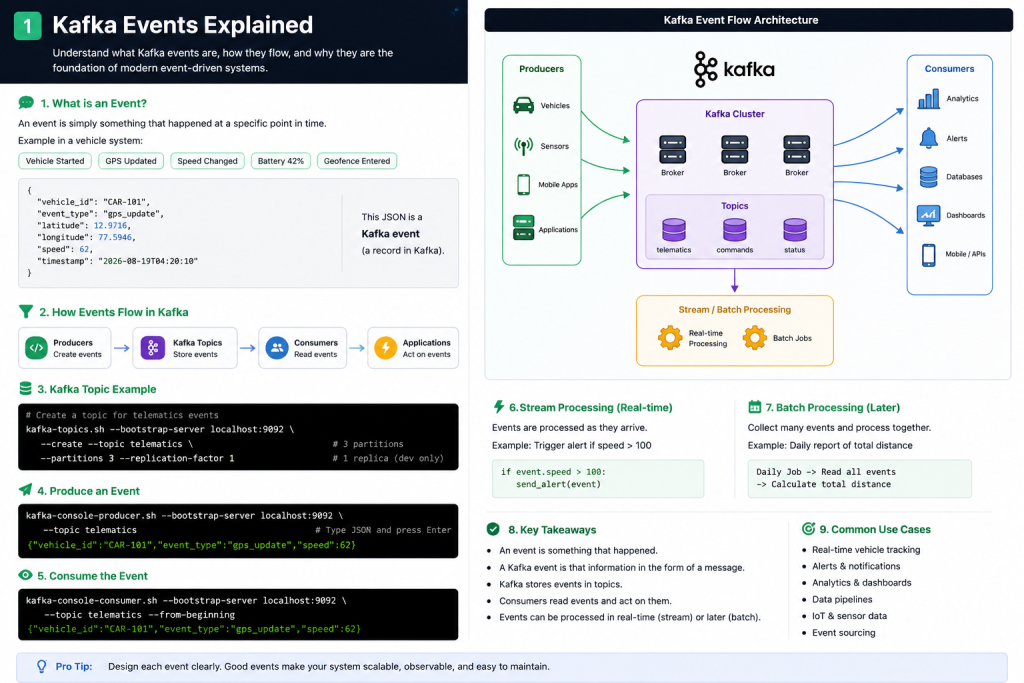
- What Apache Kafka is
- What an event means in Kafka
- Why Kafka is called an event streaming platform
- How data moves through Kafka
- What producers, topics, brokers, and consumers do at a high level
- How Kafka is different from a database or a traditional message queue
- Where Kafka fits in a real production system
1. Start With a Simple Problem
Imagine that we have a vehicle application.
Every few seconds, thousands of vehicles send information such as:
Vehicle location
Vehicle speed
Battery percentage
Charging status
Engine status
Trip started
Trip completed
One vehicle may produce data like this:
{
  "vehicle_id": "CAR-101",
  "speed": 72,
  "battery": 64,
  "latitude": 12.9716,
  "longitude": 77.5946
}
Now imagine:
10 vehicles
100 vehicles
10,000 vehicles
1,000,000 vehicles
And many systems want this data:
Analytics
Alerts
Databases
Mobile applications
Billing
Machine learning
Monitoring
Trip processing
Connecting every application directly to every other application quickly becomes difficult.
Kafka helps solve this kind of problem.
2. What Is Apache Kafka?
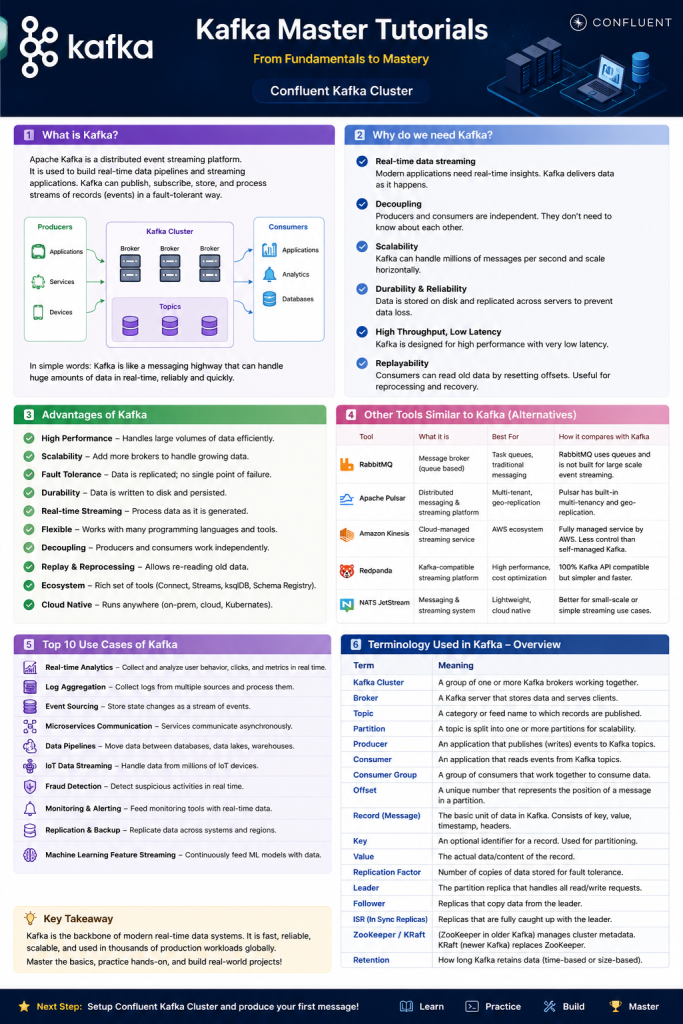
Apache Kafka is a distributed event streaming platform.
That definition contains three important ideas:
Distributed
Event
Streaming
We will understand each one.
3. What Is an Event?
An event means:
Something happened.
Examples:
Customer placed an order
Vehicle changed location
Payment completed
User logged in
Sensor temperature changed
Trip started
Charging started
Suppose a vehicle changes its location.
The event could look like:
{
  "vehicle_id": "CAR-101",
  "event_type": "gps_updated",
  "latitude": 12.9716,
  "longitude": 77.5946,
  "timestamp": "2026-08-19T10:30:20Z"
}
This Kafka record describes something that happened.
In everyday Kafka discussions, you may hear people call this a:
Event
Message
Record
Kafka message
Kafka event
There are small technical differences in terminology, but beginners can initially think of them as pieces of data being sent through Kafka.
4. What Does Streaming Mean?
Streaming means data keeps arriving continuously.
For example:
10:00:01 → Vehicle A location
10:00:02 → Vehicle B location
10:00:02 → Vehicle C speed
10:00:03 → Vehicle A battery status
10:00:04 → Vehicle D location
10:00:05 → Vehicle B charging status
The system does not need to wait until the end of the day.
Events can be processed as they arrive.
That is why Kafka is heavily used for real-time and near-real-time systems.
5. What Does Distributed Mean?
Kafka normally does not run as one single server.
A production Kafka system can contain multiple Kafka servers.
These servers are called:
Brokers
For example:
Kafka Cluster
│
├── Broker 1
├── Broker 2
└── Broker 3
Together, these brokers form a:
Kafka Cluster
Using multiple brokers allows Kafka systems to handle:
- large amounts of data
- many applications
- machine failures
- increasing traffic
- high availability
Later in this series, we will study brokers, partitions, replication, leaders, followers, and fault tolerance in detail.
6. The Simplest Kafka Architecture
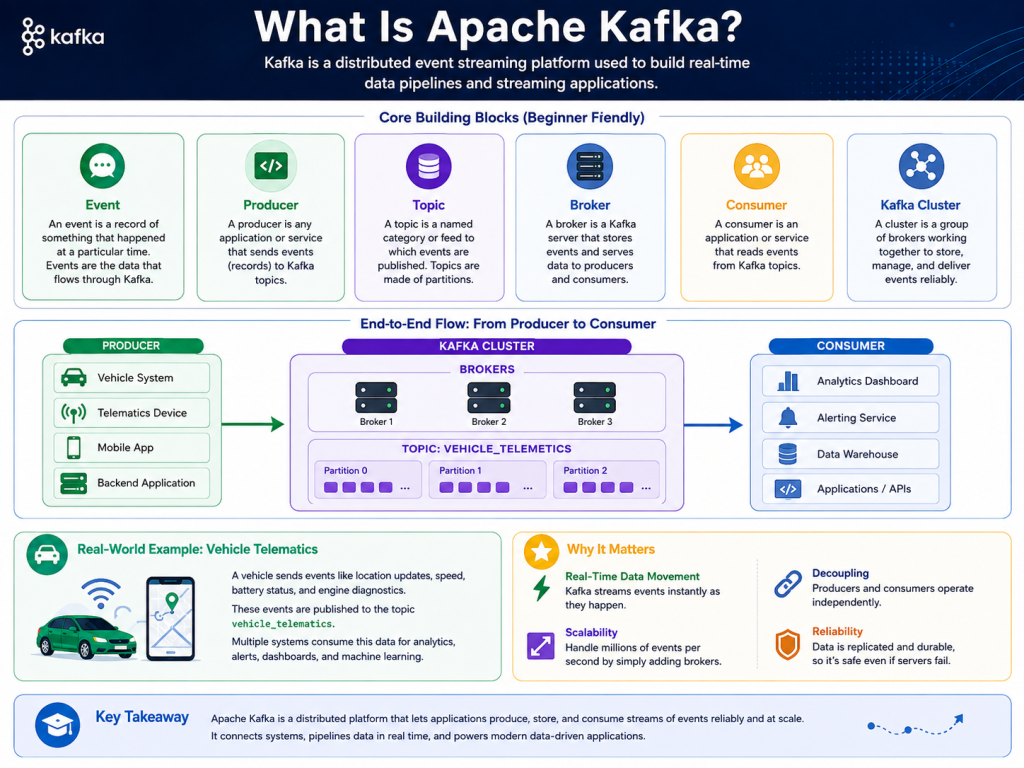
The easiest Kafka architecture to remember is:
Producer
   ↓
 Kafka
   ↓
Consumer
More accurately:
Producer
   ↓
Kafka Topic
   ↓
Consumer
Example:
Vehicle Service
      ↓
   PRODUCER
      ↓
vehicle-events
  Kafka Topic
      ↓
   CONSUMER
      ↓
Analytics Service
7. What Is a Producer?
A producer sends events to Kafka.
Examples of producers:
Vehicle application
Website
Payment service
Mobile application
IoT sensor
Order service
Backend application
Example:
Vehicle
   ↓
Telematics Service
   ↓
Kafka Producer
   ↓
Kafka
The producer might send:
{
  "vehicle_id": "CAR-101",
  "speed": 95
}
8. What Is a Topic?
Kafka stores events inside topics.
A topic is similar to a named stream or category of events.
Examples:
vehicle-events
payments
orders
customer-events
gps-updates
charging-events
system-events
For example:
Kafka Cluster

Topic: vehicle-events
---------------------
Event 1
Event 2
Event 3
Event 4
Event 5
Applications know where to send or read data based on the topic name.
9. What Is a Consumer?
A consumer reads events from Kafka.
Example:
Vehicle
   ↓
Kafka Producer
   ↓
vehicle-events
   ↓
Kafka Consumer
   ↓
Analytics Service
But Kafka becomes much more powerful when multiple applications consume the same event stream.
                    → Analytics
                    → Alerts
Vehicles → Kafka    → Database
                    → Billing
                    → Machine Learning
                    → Monitoring
The vehicle system sends the event once.
Kafka can make that stream available to many independent consumers.
10. A Real Example
Suppose:
CAR-101 speed = 125 km/h
The vehicle sends:
{
  "vehicle_id": "CAR-101",
  "event_type": "speed_updated",
  "speed": 125
}
The flow could be:
CAR-101
   ↓
Telematics API
   ↓
Kafka Producer
   ↓
Topic: vehicle-events
   ↓
+--------------------------+
|         Kafka            |
+--------------------------+
   ↓        ↓        ↓
Alerts   Database  Analytics
The alert service sees:
speed = 125
and may generate:
Overspeed Alert
Meanwhile another consumer stores the event.
Another consumer updates an analytics dashboard.
The producer does not need to directly call all three systems.
This is one of Kafka’s most important architectural benefits.
11. Kafka Is an Event Streaming Platform
Now the definition should make more sense:
Event
Something happened.
Vehicle changed speed.
Streaming
Events continuously arrive.
Event
Event
Event
Event
Event
→ continuously
Distributed
Kafka can run across multiple servers.
Broker 1
Broker 2
Broker 3
Therefore:
Apache Kafka
=
Distributed
+
Event
+
Streaming Platform
12. Kafka Is More Than Just Sending Messages
A common beginner misunderstanding is:
Kafka simply sends a message from Application A to Application B.
Kafka can do much more.
Kafka can:
Receive events
Store events
Organize events
Distribute events
Replicate events
Allow multiple consumers
Allow consumers to replay events
Handle very large event streams
Scale across multiple servers
A better mental model is:
Applications
     ↓
     ↓
  PRODUCERS
     ↓
+-------------------+
|       KAFKA       |
|                   |
| Stores event      |
| streams           |
+-------------------+
     ↓
  CONSUMERS
     ↓
Applications
13. Kafka Stores Events
Traditional messaging systems are often explained mainly as:
Send message
     ↓
Receive message
Kafka also keeps events for a configured amount of time.
Imagine:
Topic: vehicle-events

Offset 0 → Event A
Offset 1 → Event B
Offset 2 → Event C
Offset 3 → Event D
Offset 4 → Event E
A consumer could read:
A → B → C → D → E
Later, depending on configuration and retained data, a consumer can read those events again.
This is called replaying events.
Replay is extremely important in real production systems.
We will study offsets and retention deeply later.
14. Kafka Is Not a Normal Database
Kafka stores data, but Kafka should not automatically be treated as a replacement for systems such as:
PostgreSQL
MySQL
Oracle
MongoDB
A database is usually designed for questions like:
Give me customer 101.

Find all orders where amount > 1000.

Update this customer's address.
Kafka is designed around streams of ordered events.
For example:
OrderCreated
OrderPaid
OrderPacked
OrderShipped
OrderDelivered
Many production architectures use both:
Application
     ↓
   Kafka
     ↓
Database
Kafka and databases solve different problems.
15. Kafka Is Not Simply a REST API Replacement
Suppose Service A needs an immediate response from Service B.
REST may be appropriate:
Service A
    ↓
HTTP Request
    ↓
Service B
    ↓
HTTP Response
Kafka is excellent when the architecture is event-driven:
Service A
    ↓
Event
    ↓
Kafka
    ↓
Service B
Service C
Service D
Real production systems commonly use:
REST + Kafka + Databases + Caches
They complement each other.
16. Kafka in a Real Production Architecture
A simplified production architecture could look like:
                    PRODUCERS

Vehicles     Mobile Apps     Backend Services
    \             |               /
     \            |              /
      +-----------+-------------+
                  |
                  v
        +--------------------+
        |   Kafka Cluster    |
        |                    |
        | Broker 1           |
        | Broker 2           |
        | Broker 3           |
        +--------------------+
                  |
        +---------+---------+---------+
        |         |         |         |
        v         v         v         v

   Analytics   Alerts   Database   Data Lake
Notice an important design principle:
Producers do not need to know every consumer.
That reduces coupling between applications.
17. Our Training Environment
Throughout this Kafka Master Tutorials series, our practical learning environment will use a Confluent Kafka cluster.
Conceptually:
Our Application
      ↓
Kafka Producer
      ↓
Confluent Kafka Cluster
      ↓
Kafka Consumer
      ↓
Our Application
We will gradually learn how to:
Create topics
Produce events
Consume events
Use keys
Understand partitions
Understand offsets
Configure consumer groups
Configure reliability
Implement security
Monitor Kafka
Troubleshoot Kafka
Design production architectures
We will not jump directly into advanced configuration without first understanding why each feature exists.
18. Real-World Industries Using Kafka
Kafka-style event streaming is useful in many industries.
Examples include:
Banking
Transaction
    ↓
Kafka
    ↓
Fraud detection
Analytics
Notifications
Audit systems
E-commerce
Order
   ↓
Kafka
   ↓
Inventory
Payment
Shipping
Analytics
Telematics
Vehicle
   ↓
Kafka
   ↓
Tracking
Alerts
Trips
Analytics
IoT
Sensors
   ↓
Kafka
   ↓
Monitoring
Storage
Analytics
Websites
User clicks
    ↓
Kafka
    ↓
Analytics
Recommendations
Data warehouse
19. A Beginner Mental Model
For now, remember Kafka using this picture:
Someone creates data
        ↓
     PRODUCER
        ↓
      TOPIC
        ↓
      KAFKA
        ↓
     CONSUMER
        ↓
Someone uses the data
Example:
Vehicle
   ↓
Producer
   ↓
vehicle-events
   ↓
Kafka
   ↓
Consumer
   ↓
Analytics
20. Production-Level Mental Model
As you become more advanced, your mental model will grow into:
                         Kafka Cluster

Producer
   |
   v
+------------------------------------------------+
| Topic                                          |
|                                                |
| Partition 0 → Broker 1 → replicated elsewhere |
| Partition 1 → Broker 2 → replicated elsewhere |
| Partition 2 → Broker 3 → replicated elsewhere |
+------------------------------------------------+
        |                  |
        |                  |
        v                  v

Consumer Group A      Consumer Group B
Analytics             Monitoring
Eventually we will understand every component in this diagram.
That is how this series will take you from:
"What is Kafka?"
to:
"I can design and operate production-grade Kafka systems."
21. Common Beginner Mistakes
Mistake 1
Thinking Kafka is only a queue.
Kafka has queue-like capabilities, but the event log, retention, replay, partitioning, and multiple independent consumers make its model broader.
Mistake 2
Thinking Kafka processes everything itself.
Kafka primarily stores and distributes event streams.
Applications or stream-processing systems perform business logic.
Mistake 3
Thinking Kafka replaces every database.
It does not.
Mistake 4
Thinking every application should use Kafka.
Kafka is powerful, but simple applications may not need event streaming.
Architecture should match the problem.
22. Interview-Level Question
Question
What is Apache Kafka?
Beginner Answer
Apache Kafka is a system used to send and receive large amounts of data between applications.
Better Answer
Apache Kafka is a distributed event streaming platform that allows producers to publish events to topics and consumers to read those events.
Production-Level Answer
Apache Kafka is a distributed event streaming platform built around a durable, partitioned log. It enables scalable event ingestion, storage, distribution, replay, and asynchronous communication between independently scalable producers and consumers.
You do not need to memorize the production-level answer yet.
By the end of this series, you should understand every word in it.
23. Knowledge Check
Try answering these without looking above:
- What is an event?
- What is event streaming?
- What does a Kafka producer do?
- What does a consumer do?
- Where does Kafka store events?
- What is a Kafka broker?
- Can more than one application consume Kafka events?
- Is Kafka the same as a relational database?
- Why might replaying events be useful?
- Why do production Kafka clusters normally contain multiple brokers?
24. Key Takeaways
Remember these six points:
1. An EVENT represents something that happened.

2. A PRODUCER sends events to Kafka.

3. Kafka stores events in TOPICS.

4. A CONSUMER reads events from Kafka.

5. Multiple Kafka BROKERS can form a CLUSTER.

6. Kafka enables scalable EVENT-DRIVEN systems.
The most important architecture to remember from this first lesson is:
Producer
   ↓
Kafka Topic
   ↓
Consumer
Everything we learn later will build upon this simple model.
Next Tutorial
Kafka Master Tutorials — 02: Why Do We Need Kafka?
In that tutorial, we will start with a system without Kafka, identify the problems, and then introduce Kafka step by step so that you understand why Kafka exists instead of simply memorizing its features.

