
Step 1 – Check mysql version supported by artiafactory 7.x
Artifactory supports MySQL v5.5, 5.6, 5.7 and 8.x with InnoDB engine which is the default provided.
Step 2 – Take a full import of System
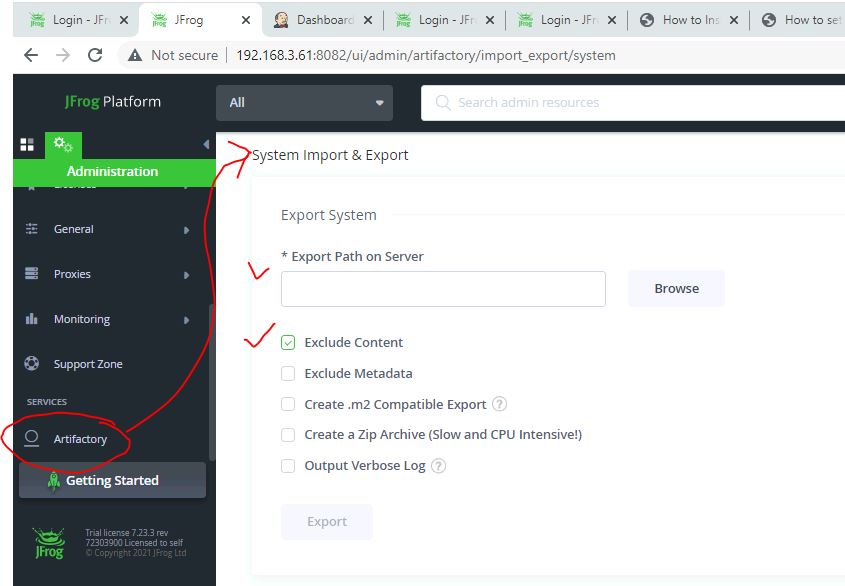
System Export from the currently running instance by opening from Artifactory UI -> Admin -> Import & Export -> System. Select the Exclude Content checkbox. By selecting this, we export only the configurations from Artifactory but not the binary data.
Step 3 – Setup a mysql server, database and permission
$ docker run --name mysql8 -v /tmp/database:/var/lib/mysql -e MYSQL_ROOT_PASSWORD=my-secret-pw -e MYSQL_DATABASE=artifactory -e MYSQL_USER=artifactory -e MYSQL_PASSWORD=artifact123 -d mysqlCode language: JavaScript (javascript)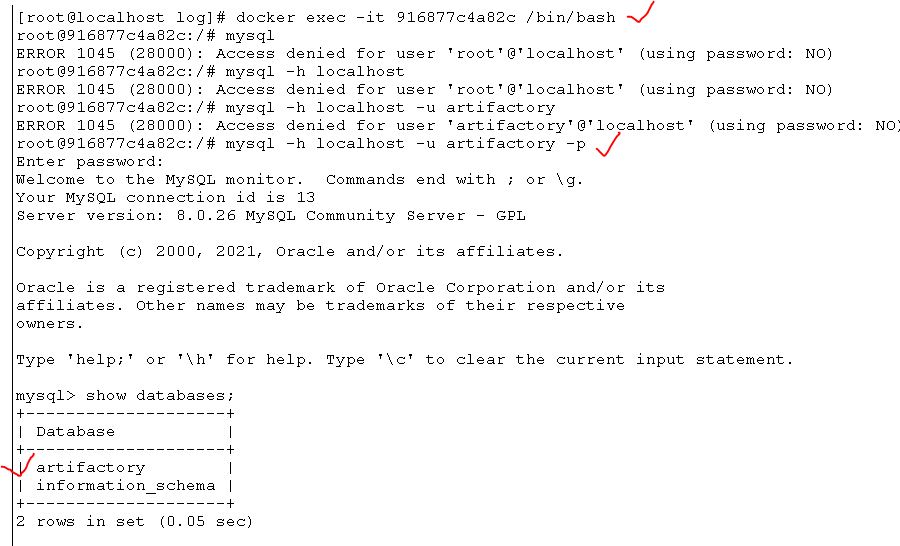
Step 4 – Stop artiafactory server
$ cd /opt/artifactory-pro-7.23.3/app/bin
$ ./artifactory.sh stop
Step 5 – Make databases changes in property file of artiafactory
- Copy a following section of mysql from system.full-template.yaml
$ more /opt/artifactory-pro-7.23.3/var/etc/system.full-template.yaml

    ## Example for mysql
    ## uncomment below to use database type
    ##type: mysql
    ##driver: com.mysql.jdbc.Driver
    ##url: "jdbc:mysql://<your db url, for example: localhost:3306>/artdb?characterEncoding=UTF-8&elideSetAutoCommits=true&useSSL=false"
    ##username: artifactory
##password: passwordCode language: PHP (php)- Make a changes in /opt/artifactory-pro-7.23.3/var/etc/system.yaml with following content
   ## Example for mysql
    ## uncomment below to use database type
    type: mysql
    driver: com.mysql.jdbc.Driver
    url: "jdbc:mysql://172.17.0.2:3306/artifactory?characterEncoding=UTF-8&elideSetAutoCommits=true&useSSL=false"
    username: artifactory
    password: artifact123Code language: PHP (php)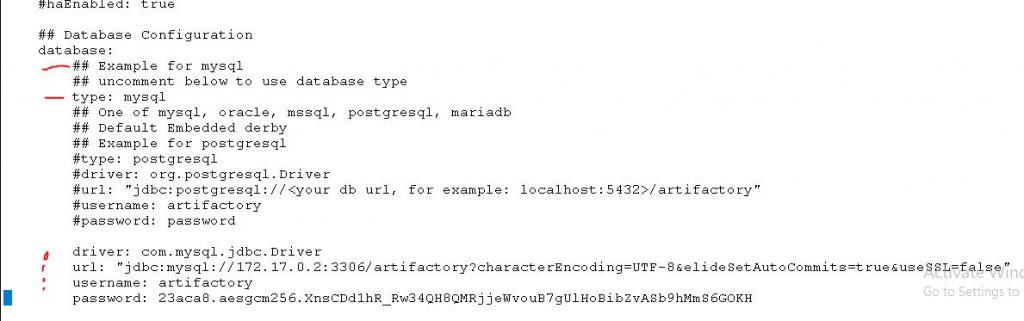
shared:
  database:
    type: mysql
    driver: com.mysql.jdbc.Driver
    url: jdbc:mysql://<your db url, for example: localhost:3306>/artdb?characterEncoding=UTF-8&elideSetAutoCommits=true&useSSL=false
    username: artifactory
    password: passwordCode language: JavaScript (javascript)
Step 6 – Copy a mysql database driver to required location
- Download the MySQL JDBC driver (available from the MySQL website) and copy the mysql-connector-java-.jar file into $JFROG_HOME/artifactory/var/bootstrap/artifactory/tomcat/lib directory.
$ cd /tmp
$ wget https://cdn.mysql.com//Downloads/Connector-J/mysql-connector-java-8.0.26.tar.gz
$ tar -zxvf mysql-connector-java-8.0.26.tar.gz
$ cp mysql-connector-java-8.0.26.jar /opt/artifactory-pro-7.23.3/var/bootstrap/artifactory/tomcat/lib/Code language: JavaScript (javascript)
Step 7 – Clean all logs so if errors are there – can be troubleshoot easily
$ cd /opt/artifactory-pro-7.23.3/var/log
$ rm -rf *Code language: JavaScript (javascript)
Step 8 – Start a artiafactory
$ cd /opt/artifactory-pro-7.23.3/app/bin
$ ./artifactory.sh start

$ ./artifactory.sh status
Using default router's certificate and private key
router is running (PID: 28404)
metadata is running (PID: 28550)
event is running (PID: 28662)
frontend is running (PID: 28778)
Artifactory is running, on pid=28856Code language: PHP (php)
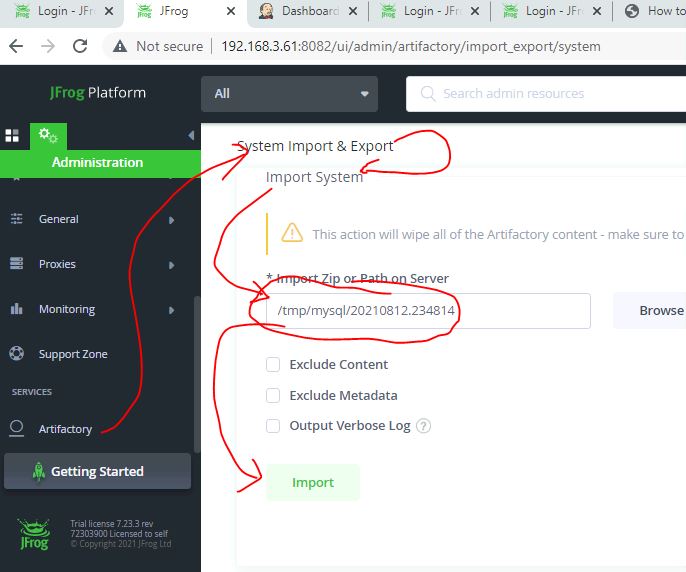
Step 9 – Import all the files which we got as part of Step2.
To migrate your existing database:
Import the metadata using Full Import and Export (optional for migration, not required for a new installation). Changing the database does not automatically transfer your data to the new database.
Verify the Migration from Derby to Mysql
Check Artifactory running or not
$ ./artifactory.sh status
Chec a Browsers if its Functioning well or not. Wait 2-3 mins.
Come inside a container
$ docker exec -it 916877c4a82c /bin/bash
Login to mysql using root
$ mysql -h localhost -u root -p
Validate Tables of Artifcatory Migration
show databases;
use artdb;
show tables;
exit
How to troubleshoot?
$ ./artifactory.sh status
$ cd /opt/artifactory-pro-7.23.3/var/log
Check a log for errors.
Reference

I’m Rajesh Kumar, a DevOps, SRE, DevSecOps, Cloud, and Platform Engineering expert passionate about sharing practical knowledge, real-world experiences, and industry best practices. I have worked at Cotocus and regularly write about technology, travel, investing, health, product reviews, and digital marketing through my various platforms.
I publish technical articles at DevOps School, travel stories at Holiday Landmark, stock market insights at Stocks Mantra, health and fitness guidance at My Medic Plus, product reviews at TrueReviewNow, and SEO and digital marketing strategies at Wizbrand.
Find Trusted Cardiac Hospitals
Compare heart hospitals by city and services — all in one place.
Explore Hospitals