
An email API for templates lets applications create, edit, and export HTML email content programmatically instead of coding every message manually. It separates template design and generation from email delivery, so product teams can automate customer communications while keeping control of their sending infrastructure.
For SaaS products that need a visual editing experience, Stripo Plugin can be embedded directly into the application, allowing users to build emails without switching platforms. This is different from connecting a sending service: an editor creates the message, while an email service provider (ESP) delivers it.

Author: cottonbro studio
Two APIs, Two Different Jobs
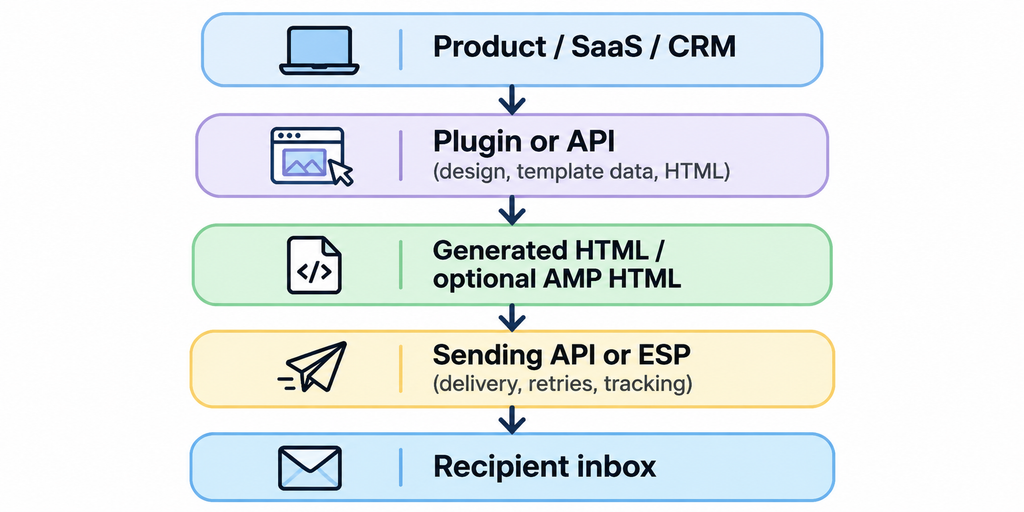
An email template generation API creates the content: layout, text, images, dynamic fields, and final HTML. Stripo provides both an embeddable editor and a REST API for managing and generating templates.
An email sending API delivers the finished message. Services such as transactional email providers manage queues, authentication, retries, bounces, and delivery events. They do not have to provide a visual editor.
A typical architecture looks like this:
Stripo Plugin as an Embeddable Email Editor
Stripo Plugin is a white-label drag-and-drop email editor that SaaS, CRM, and marketing platforms embed in their products for their own users. Stripo’s product page states that 225 companies already use the editor in their products.
Integration options: React, Vue, Angular, and vanilla JavaScript. The Plugin is a JavaScript component, so framework applications initialize it within their own UI and lifecycle. Teams using Vue can also refer to DevOpsSchool’s overview of Vue.js and its use cases.
The white-label configuration lets a product team adapt the editor to its own experience. It can apply custom UI styles, remove Stripo branding where the plan allows, choose which drag-and-drop blocks users can see, and add custom blocks or controls through extensions. Merge tags can connect template content to application data, such as a customer’s name, order number, or account details.
Authentication and Output
The Plugin requires an authentication token. The safe flow is server-side: the frontend asks the product backend for a token; the backend uses the Plugin ID and Secret Key to request it from Stripo, then returns the token to the browser. The Secret Key must never be placed in frontend code. For backend-to-backend Plugin API calls, Stripo documents a separate API role.
Stripo does not document its output engine as a named third-party renderer such as MJML. Its Plugin works with HTML and CSS, while its backend document-state API represents email content and styles as JSON. The editor can return editable HTML/CSS; the compilation endpoint inlines CSS into HTML and can return compiled AMP HTML when the template uses AMP. In a comparison table, describe this as a native document model with HTML/CSS compilation, not as an MJML engine.
Programmatic Template Work with Stripo API
Stripo’s REST API supports template workflows that do not require opening the visual editor. The main operations include:
- POST /emailgeneration/v1/email — generate an email from a saved template using external dataSources; optional transformers and composers can filter or arrange the supplied content.
- GET /emailgeneration/v1/templates and GET /emailgeneration/v1/templates/{id} — list templates and retrieve a selected template, including its HTML and CSS.
- GET /emailgeneration/v1/raw-template/{id} — retrieve raw HTML and CSS.
- GET /emailgeneration/v1/export/html/templates/{id} — export a template as HTML; the asAmp option can request AMPHTML.
- POST /emailgeneration/v1/templates — create or overwrite a template from existing HTML and CSS.
This supports workflows such as generating product emails from catalog data, creating personalized notifications, or exporting approved templates for a separate sending provider.
The Plugin Backend API adds another option: create an email model from HTML/CSS, read or update its JSON document state, and retrieve the schema used to validate that state. This is useful when a backend must modify content without launching the editor. Because the schema evolves with the editor, fetch the current schema rather than relying on a hard-coded copy.
Reusable Modules, AMP, and HTML Import
Stripo supports reusable modules for elements such as headers, footers, product cards, and promotional sections. Synchronized Modules can update across all templates where synchronization is enabled. When a shared module changes, the host application can identify affected templates and recompile them, keeping repeated content consistent without manual edits.
The Plugin also includes AMP for Email blocks, including carousels, forms, and accordions. This is a native Stripo capability, not a feature exclusive to another email platform. AMP must be treated as an additional format: not every inbox supports it, so the standard HTML version remains important as a fallback.
Existing email code can be imported as well. The REST API can create an editable template from supplied HTML and CSS, while the Plugin JavaScript API includes updateHtmlAndCss to load external markup into the open editor. Imported legacy templates should be checked for structure and rendering before users start editing them.
Deployment, Security, and Pricing
Stripo offers two deployment models. In cloud mode, the editor’s server components run on Stripo infrastructure, hosted on AWS in Ireland. In extended/self-hosted mode, the infrastructure can be deployed on the customer’s servers; Stripo lists this option for Enterprise customers. Self-hosting gives the organization more control over its infrastructure, but its DevOps team must manage setup and maintenance.
For B2B evaluation, Stripo’s security materials list ISO/IEC 27001 and SOC 2 Type II. Stripo also states that it follows GDPR requirements. GDPR is a regulation, not a certification, so buyers should review the current certificates, audit scope, data-processing terms, and deployment details during procurement.
Plugin pricing is based in part on the number of unique emails created or modified per month, rather than the number of end users. The published limits are 100 for Free, 400 for Startup, 15,000 for Business, and unlimited for Enterprise. Teams should estimate monthly template activity before selecting a plan.
Email Rendering Still Needs Testing
Valid HTML does not guarantee identical results in Gmail, Outlook, Apple Mail, and other clients. Email clients support different subsets of HTML and CSS, so layouts should be built and tested for the actual inboxes used by the audience. Can I email is a useful reference for checking feature support.
Use email-friendly layouts, inline critical CSS, add alt text to images, and keep essential information visible when images are blocked. Test desktop and mobile views, links, merge tags, and any AMP fallback. A rendering test should be part of release validation, not an optional final check.
Email Builder SDK Comparison
| Provider | Best For | Output Engine | Key Advantage |
| Stripo Plugin | SaaS products needing a branded editor, reusable modules, and AMP options | Native document model (JSON); compiled HTML/CSS and AMP HTML | White-label controls and cloud or Enterprise self-hosting |
| Beefree SDK | Products that need to store designs and export them through a server-side API | Beefree JSON converted to HTML by Content Services API | Flexible export for email, pages, and other content |
| Unlayer | Applications embedding a broad drag-and-drop content builder | Design JSON exported to HTML | Builder APIs and server-side export options |
| Easy Email Pro | React teams that prefer an editor built around MJML | MJML-based responsive HTML | React-oriented integration and customizable blocks |
Build vs Buy
Building an email editor internally means owning more than the drag-and-drop interface. The team must maintain a document model, HTML/CSS generation, responsive behavior, image handling, template storage, and compatibility fixes for clients such as Outlook and Gmail. It must also test rendering after changes to the editor or email-client behavior.
Buying an embeddable email editor shifts much of that editor maintenance to a specialist provider. The product team still owns authentication, permissions, data mapping, storage decisions, sending integration, and release testing, but it does not need to recreate every editing control and email-specific rendering behavior. Build internally when the editor itself is a core differentiator; buy when email creation is a supporting feature of a larger SaaS product.
CI/CD for Email Templates
DevOps teams can manage templates like other deployable assets:
- Version the source. Store editable document state or HTML/CSS, template IDs, module references, and metadata in Git.
- Update through APIs. Use Stripo API to create or update templates, or the Plugin Backend API to apply controlled document-state changes.
- Validate before release. Check HTML structure, links, images, merge tags, unsubscribe content, and AMP validity where relevant.
- Test rendering. Generate previews for target email clients and compare them with the approved baseline.
- Promote and monitor. Publish the approved template, record the template ID and release version, and monitor generation errors and sending-provider events.
[IMAGE PLACEHOLDER — Stock photo of DevOps engineers reviewing an automated deployment pipeline. Pexels search query: “DevOps engineers team working on deployment pipeline computers office”]
This workflow makes email changes reviewable and repeatable. It also creates a rollback path: if a new template breaks a layout or personalization rule, the team can restore the previous approved version instead of rebuilding it manually.
Conclusion
An email API architecture works best when template generation and message delivery remain separate. Stripo Plugin provides an embeddable, white-label editing experience, while Stripo API supports programmatic template creation, generation, and export. A sending API or ESP then handles delivery.
For product and DevOps teams, the key is to combine reusable templates with secure backend authentication, version control, automated validation, and cross-client rendering tests. That approach makes it easier to scale email production without turning every design change into a custom development project.

Find Trusted Cardiac Hospitals
Compare heart hospitals by city and services — all in one place.
Explore Hospitals