
Practical tutorial | API publishing, scheduled workflows, multi-blog management and XML theme deployment | November 2026
Featured image (1200 × 630 px): Blogger automation with API and browser workflows.
Google Blogger is a hosted publishing platform, but you do not need to open its dashboard every time you publish an article. Its REST API allows authorized applications to manage content. AI coding agents can build and operate those applications, while browser automation can assist with tasks that the public API does not expose.
The central lesson is to separate content management from site administration. Use the official API for supported operations. For XML themes, layout and settings, use the dashboard or carefully supervised Playwright automation. Do not rely on undocumented private endpoints.
What you will learn
Set up OAuth, discover blog IDs, create drafts, edit and schedule posts, manage pages and comments, use AI coding agents and MCP, upload XML themes with backups, and operate a reliable multi-blog publishing system.
1. What Blogger API v3 can and cannot do
Blogger API v3 is a REST interface for interacting with content and selected blog metadata. It is not a full hosting or site-administration API. The following matrix reflects the documented resource surface; browser actions depend on the dashboard, account permissions and interface changes.
Capability | Official API | Dashboard / browser |
|---|---|---|
Discover blogs and read metadata | Yes | Yes |
Create, edit, delete posts | Yes | Yes |
Draft, publish, schedule, revert | Yes | Yes |
HTML, labels, linked images | Yes | Yes |
Create, edit, delete static pages | Yes | Yes |
Read / moderate comments | Yes | Yes |
Create comments / replies | No public method | Yes, where enabled |
Read user and pageview data | Yes, limited | Yes |
Create / delete blogs | No | Yes, subject to limits |
Upload XML theme, edit theme HTML | No | Yes |
Layout, gadgets, CSS, favicon | No | Yes |
Upload image binaries | No public upload API | Yes, supported UI |
Custom domains, HTTPS, permissions | No | Yes, plus DNS where needed |
Post SEO description, custom slug | Not exposed as dedicated write fields | Yes, where available |
Which approach should you choose?
Approach | Best use |
|---|---|
REST API / Python / Node.js / PHP | Repeatable content operations |
Claude Code / Codex | Build, test and operate automation |
Playwright / Selenium | UI-only administration, supervised |
Apps Script / n8n / CI | Recurring workflow orchestration |
Custom MCP server | Reusable controlled tools for agents |
The Blogger API does not give the AI agent special permissions. It acts with the permissions of the consenting Google user. See the API reference in the resource section.
2. Architecture: API-first, browser second
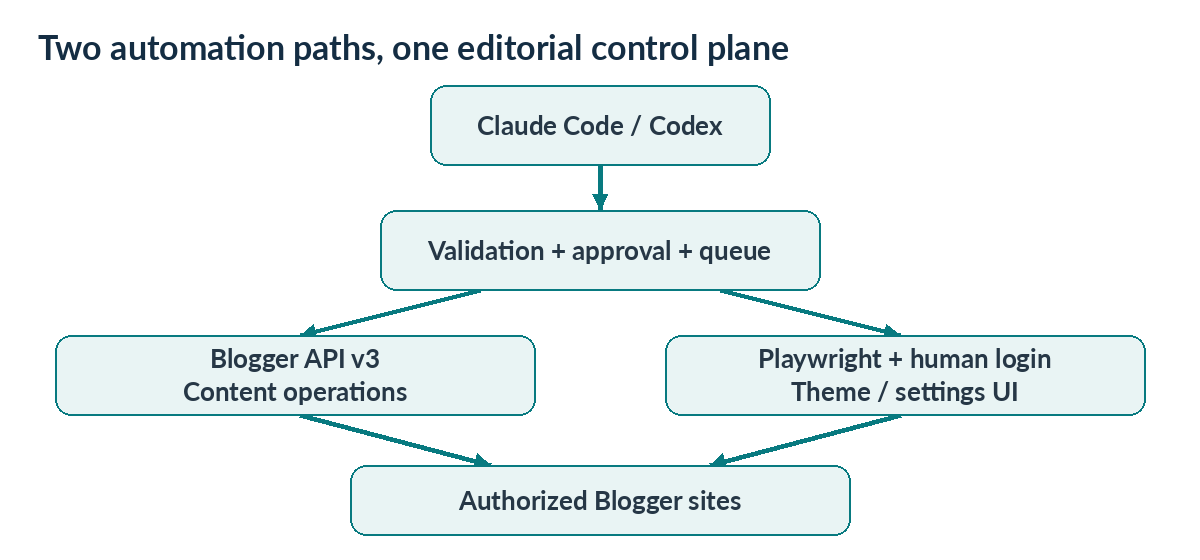
Figure 1. Recommended separation between supported API operations and dashboard-only workflows.
Use a single content pipeline with an allowlist of blog IDs, a per-account credential store, approved content, and audit records. Keep the theme worker isolated from the publishing service because it requires more privileged browser access.
Suggested project structure
blogger-automation/
  blogger_cli.py        # API client and CLI
  blogger_mcp.py        # optional controlled MCP tools
  theme_session.py      # local authenticated browser
  content/             # reviewed HTML articles
  themes/              # version-controlled XML
  backups/             # protected theme snapshots
  jobs.csv             # approved editorial jobs
  .gitignore           # exclude credentials and stateCode language: PHP (php)
Prerequisites
A Google account with author or administrator access to a test Blogger site; a Google Cloud project; Python 3.10+; an installed Claude Code or Codex CLI if desired; and a local browser for interactive consent and theme work. Create a disposable test blog manually at blogger.com before production use.
3. Enable Blogger API and configure OAuth
1. Open Google Cloud Console and create or select a project.
2. In APIs & Services → Library, search for Blogger API v3 and enable it.
3. Open Google Auth Platform (or OAuth consent screen). Set Branding, Audience and Data Access as applicable. Choose External for ordinary consumer Google accounts, or Internal only if eligible in your Workspace organization.
4. If using Testing mode, add your own Google account as a test user.
5. Under Clients or Credentials, create an OAuth client of type Desktop app. Download the JSON client configuration and save it locally as credentials.json.
6. Request the Blogger scope below. For read-only reporting, request blogger.readonly instead. Authorize from a normal local browser and consent only to the required scopes.
https://www.googleapis.com/auth/blogger
https://www.googleapis.com/auth/blogger.readonlyCode language: JavaScript (javascript)
Install local dependencies
mkdir -p blogger-automation && cd blogger-automation
python3 -m venv .venv
source .venv/bin/activate
python -m pip install google-api-python-client \
  google-auth-oauthlib google-auth-httplib2 requests
umask 077
On Windows use .venv\Scripts\activate (Command Prompt) or .venv\Scripts\Activate.ps1 (PowerShell). Save the downloaded credentials.json in the project directory. Do not commit it or the resulting token.json.
OAuth lifecycle and limitations
An API key can identify a project for public reads, but publishing requires user OAuth authorization. A refresh token may enable subsequent runs without interactive login. External applications in Testing generally receive refresh tokens that expire after seven days for Blogger scopes. For ongoing use, review production publishing status and any verification requirements; tokens can still be revoked or expire for other reasons. Do not assume a service account has access to a personal Blogger blog.
4. Build the Python Blogger CLI: authentication
Create blogger_cli.py. The next two sections form one file: copy these blocks in order. This local example stores an OAuth token with restricted file permissions; production should use a managed secret store.
import argparse
import json
import os
from pathlib import Path
from google.auth.transport.requests import Request
from google.oauth2.credentials import Credentials
from google_auth_oauthlib.flow import InstalledAppFlow
from googleapiclient.discovery import build

BASE = Path(__file__).resolve().parent
SCOPE = ["https://www.googleapis.com/auth/blogger"]
TOKEN = BASE / "token.json"
CLIENT = BASE / "credentials.json"

def service(interactive=False):
    creds = None
    if TOKEN.exists():
        creds = Credentials.from_authorized_user_file(
            str(TOKEN), SCOPE)
    if creds and creds.expired and creds.refresh_token:
        creds.refresh(Request())
    if not creds or not creds.valid:
        if not interactive:
            raise RuntimeError("Run auth locally first")
        flow = InstalledAppFlow.from_client_secrets_file(
            str(CLIENT), SCOPE)
        creds = flow.run_local_server(port=0)
    os.umask(0o077)
    TOKEN.write_text(creds.to_json(), encoding="utf-8")
    TOKEN.chmod(0o600)
    return build("blogger", "v3", credentials=creds,
                 cache_discovery=False)

def show(data):
    print(json.dumps(data, indent=2, ensure_ascii=False))Code language: JavaScript (javascript)
Security note
For multiple accounts, use separate credential directories or a secret-store lookup per account. Never send refresh tokens, browser cookies or Google passwords to an AI chat. If a refresh fails with invalid_grant, investigate revocation or expiration and authorize again through the legitimate consent flow.
5. Build the Python Blogger CLI: content commands
def main():
    ap = argparse.ArgumentParser()
    ap.add_argument("action", choices=["auth", "blogs", "list",
        "draft", "get", "publish", "revert", "patch"])
    ap.add_argument("--blog")
    ap.add_argument("--post")
    ap.add_argument("--title")
    ap.add_argument("--html", type=Path)
    ap.add_argument("--labels", default="")
    ap.add_argument("--date")
    ap.add_argument("--confirm", action="store_true")
    a = ap.parse_args()
    if a.action == "auth":
        service(interactive=True)
        print("OAuth ready")
        return
    api = service()
    if a.action == "blogs":
        show(api.blogs().listByUser(userId="self").execute())
        return
    if not a.blog:
        ap.error("--blog is required")
    posts = api.posts()
    ids = {"blogId": a.blog}
    if a.action in {"get", "publish", "revert", "patch"}:
        if not a.post:
            ap.error("--post is required")
        ids["postId"] = a.post
    if a.action == "list":
        show(posts.list(**ids, fetchBodies=False,
                        view="ADMIN").execute())
    elif a.action == "draft":
        if not a.title or not a.html:
            ap.error("--title and --html are required")
        body = {"title": a.title, "content": a.html.read_text(),
                "labels": [x.strip() for x in a.labels.split(",")
                           if x.strip()]}
        show(posts.insert(**ids, body=body, isDraft=True).execute())
    elif a.action == "get":
        show(posts.get(**ids, view="ADMIN").execute())
    else:
        if not a.confirm:
            ap.error("Review target and supply --confirm")
        if a.action == "publish":
            if a.date: ids["publishDate"] = a.date
            show(posts.publish(**ids).execute())
        elif a.action == "revert":
            show(posts.revert(**ids).execute())
        elif a.action == "patch":
            if not a.html: ap.error("--html is required")
            show(posts.patch(**ids, body={
                "content": a.html.read_text()}).execute())

if __name__ == "__main__":
    main()Code language: PHP (php)
This starter deliberately omits delete and bulk publishing. The list command returns one page; production reporting must follow nextPageToken until exhausted. The confirmation flag is a local CLI safeguard, not a substitute for an actual approval system.
6. First working exercise: draft, publish and verify
Use a test blog rather than a production property. The commands below are for macOS/Linux. Copy actual IDs from API responses; IDs should be handled as strings.
python blogger_cli.py auth
python blogger_cli.py blogs
export BLOG_ID='YOUR_TEST_BLOG_ID'
mkdir -p content
cat > content/hello.html <<'EOF'
<h2>Hello Blogger API</h2>
<p>This is a test article created through the API.</p>
<p>It demonstrates a draft-first publishing workflow.</p>
EOF
python blogger_cli.py draft --blog "$BLOG_ID" \
  --title "Hello Blogger API" --html content/hello.html \
  --labels "Automation, Tutorial"Code language: PHP (php)
Expected result: JSON containing a post id, title and draft status. In Blogger, open Posts and confirm the draft exists. Copy its ID to the variable below.
export POST_ID='RETURNED_POST_ID'
python blogger_cli.py get --blog "$BLOG_ID" --post "$POST_ID"
python blogger_cli.py publish --blog "$BLOG_ID" \
  --post "$POST_ID" --confirm
python blogger_cli.py get --blog "$BLOG_ID" --post "$POST_ID"Code language: PHP (php)
Expected result: the post is published and its API response includes a URL. Open that URL in a private browser tab and verify the title and article. A private blog may require login; do not assume public access. To undo the public publication without deleting the article:
python blogger_cli.py revert --blog "$BLOG_ID" \
  --post "$POST_ID" --confirmCode language: JavaScript (javascript)
Schedule a draft and update an existing article
# Set an RFC 3339 timestamp in the future before running.
export PUBLISH_AT='2027-01-10T09:00:00+09:00'
python blogger_cli.py publish --blog "$BLOG_ID" \
  --post "$POST_ID" --date "$PUBLISH_AT" --confirm
# Edit the HTML file first, then patch content.
python blogger_cli.py patch --blog "$BLOG_ID" \
  --post "$POST_ID" --html content/hello.html --confirmCode language: PHP (php)
A publish date is supplied to the publish endpoint. Inspect the returned status and verify the scheduled date in the dashboard. Use a future time appropriate to your test.
7. REST API reference and direct cURL usage
Base URL: https://www.googleapis.com/blogger/v3. In the table, B = blog ID, P = post ID, C = comment ID, A = page ID, U = user ID (self for the current user). Use OAuth for protected operations.
Method | Relative path | Purpose |
|---|---|---|
GET | /users/U/blogs | Discover blogs |
GET | /blogs/B | Blog metadata |
GET | /blogs/byurl?url=… | Resolve blog by URL |
GET / POST | /blogs/B/posts | List / insert |
GET / PATCH / PUT / DELETE | /blogs/B/posts/P | Read / edit / remove |
GET | /blogs/B/posts/search?q=… | Search posts |
GET | /blogs/B/posts/bypath?path=… | Find by path |
POST | /blogs/B/posts/P/publish | Publish / schedule |
POST | /blogs/B/posts/P/revert | Return to draft |
GET / POST | /blogs/B/pages | List / insert pages |
GET / PATCH / PUT / DELETE | /blogs/B/pages/A | Manage page |
GET | /blogs/B/comments | Comments across blog |
GET | /blogs/B/posts/P/comments | Comments on post |
GET / DELETE | /blogs/B/posts/P/comments/C | Read / remove comment |
POST | /blogs/B/posts/P/comments/C/approve | Approve comment |
POST | /blogs/B/posts/P/comments/C/spam | Mark as spam |
POST | /blogs/B/posts/P/comments/C/removecontent | Remove content |
GET | /blogs/B/pageviews | Pageview stats |
GET | /users/U | User info |
Create a draft with cURL
# ACCESS_TOKEN must be a valid OAuth access token.
curl --fail-with-body -X POST \
  "https://www.googleapis.com/blogger/v3/blogs/$BLOG_ID/posts?isDraft=true" \
  -H "Authorization: Bearer $ACCESS_TOKEN" \
  -H 'Content-Type: application/json' \
  -d '{"title":"REST example","content":"<p>Hello</p>"}' Code language: PHP (php)
Use PATCH when only selected fields need changes. PUT can replace more of a resource. Deletion is destructive: export and verify the target before using it.
8. Pages, comments, images and HTML content
The following examples run in a Python shell or a separate script alongside blogger_cli.py. Replace identifiers with your test IDs. Page creation may make the page visible, so use a test blog. Comments should be moderated rather than automatically erased.
from blogger_cli import service
api = service()
B = "YOUR_TEST_BLOG_ID"
P = "YOUR_POST_ID"
# Static page
page = api.pages().insert(blogId=B, body={
    "title": "About this blog",
    "content": "<p>Independent tutorials and examples.</p>"
}).execute()
print(page["id"])
# Inspect comments; repeat with pageToken as needed.
comments = api.comments().list(blogId=B, postId=P).execute()
for c in comments.get("items", []):
    print(c["id"], c.get("status"))
# Only after review: approve the chosen comment.
# api.comments().approve(blogId=B, postId=P,
#     commentId="REVIEWED_COMMENT_ID").execute()Code language: PHP (php)
How to add images, links, tables and code
<h2>Architecture</h2>
<p>Read the <a href="https://developers.google.com/blogger/">
Blogger API documentation</a>.</p>
<img src="https://your-image-host.example/diagram.png"
     alt="Blogger content automation architecture">
<pre><code>python blogger_cli.py blogs</code></pre>
<table><tr><th>Method</th><th>Purpose</th></tr>
<tr><td>GET</td><td>Read content</td></tr></table>Code language: HTML, XML (xml)
Replace the illustrative image URL with a real, public HTTPS image hosted on a service you control or are authorized to use. Blogger API does not expose binary image uploads. The dashboard can upload images, or use object storage/CDN with stable links. Sanitize HTML and avoid arbitrary scripts, hidden links and unsafe embeds. Preview mobile and desktop rendering.
SEO fields and URL limitations
The API exposes core post data such as title, content and labels, but does not provide a documented dedicated write field for every Blogger editor SEO option. Set custom permalink or search description in the dashboard when required; verify canonical URLs rather than assuming the generated slug. A blog theme controls much of the presentation.
9. Automate using Claude Code and OpenAI Codex
Claude Code and Codex are coding agents, not Blogger APIs. They can write scripts, inspect a repository, execute allowed commands, and assist with error handling. Run locally for this workflow because consent and browser session data should remain under your control.
# From the project root, after installing and signing in
claude --version
codex --version
# Start whichever agent you use
claude
# or
codexCode language: PHP (php)
Copy-ready implementation prompt for either agent
Study this repository and the official Blogger API v3 docs.
Implement a Python CLI to list authorized blogs, create drafts,
read and patch posts, schedule approved drafts and revert posts.
Use OAuth, an explicit blog allowlist and secret-safe logging.
Add unit tests using mocked Google API responses, pagination,
retry logic for transient errors and duplicate-job protection.
Do not read or print credential files or browser cookies.
Never publish, delete or modify a theme without human approval.
Provide a dry-run mode and demonstrate against a test blog.
Use Playwright only for UI operations missing from the API.
Record selectors on the real UI and stop on login challenges.
Document how to back up, deploy, verify and roll back themes.
Do not use private Blogger endpoints or bypass security controls.Code language: JavaScript (javascript)
Working with repository instructions
Save durable constraints in CLAUDE.md and AGENTS.md as appropriate to your agent. Give the agent a test environment, not unrestricted production credentials. Inspect proposed changes and test output. Treat blog HTML and third-party content as untrusted data, not instructions for the agent.
Example tasks
List the authorized blogs and summarize IDs and URLs; make no changes.
Generate an original tutorial as local HTML and create one draft in the test blog.
Review this XML theme for broken markup, insecure scripts and missing layout elements; do not deploy.
Run tests and report which jobs failed without blindly retrying writes.
10. Optional: expose Blogger tools through MCP
Model Context Protocol (MCP) lets an AI client call narrowly scoped tools rather than assembling arbitrary shell commands. Start with blog discovery and draft creation. The example uses the v1 Python MCP SDK API, pinned below because the v2 SDK has a different interface.
python -m pip install 'mcp>=1,<2'
# Create blogger_mcp.py alongside blogger_cli.py.Code language: PHP (php)
from mcp.server.fastmcp import FastMCP
from blogger_cli import service
mcp = FastMCP("blogger-local")
ALLOWED = {"REPLACE_WITH_TEST_BLOG_ID"}
@mcp.tool()
def list_blogs() -> dict:
"""List blogs available to the authorized account."""
return service().blogs().listByUser(userId="self").execute()
@mcp.tool()
def create_draft(blog_id: str, title: str, html: str) -> dict:
"""Create a draft only in an explicitly allowed blog."""
if blog_id not in ALLOWED:
raise ValueError("Blog not approved")
if not title.strip() or not html.strip():
raise ValueError("Title and HTML are required")
result = service().posts().insert(blogId=blog_id,
isDraft=True, body={"title": title,
"content": html}).execute()
return {"id": result["id"], "title": result.get("title")}
if __name__ == "__main__":
mcp.run(transport="stdio")Code language: JavaScript (javascript)Register the local server
# Replace the absolute path with your project location.
claude mcp add --transport stdio blogger -- \
  /absolute/project/.venv/bin/python /absolute/project/blogger_mcp.py
codex mcp add blogger -- \
  /absolute/project/.venv/bin/python /absolute/project/blogger_mcp.py
claude mcp list
codex mcp listCode language: PHP (php)
Authorize the CLI first, update the allowlist, then ask the agent to list blogs or create one reviewed test draft. For production, add schema validation, HTML sanitization, job deduplication, audit logging and a trusted approval service before adding publish tools. Do not expose raw tokens or generic command execution over MCP.
11. Upload a Blogger XML theme: manual method
There is no theme upload endpoint in Blogger API v3. Theme XML is distinct from the blog content export. The supported administration surface is the dashboard; uploading a compatible template through Restore is a commonly used workflow. Third-party templates may need editing or vendor support.
Step-by-step theme deployment
1. Sign in at blogger.com using the authorized administrator account and choose the test blog.
2. Open Theme. Use the dropdown or more-options control near Customize / My theme. Choose Backup and download the current XML.
3. Store the backup securely with blog ID, date and theme version. Also back up content separately if the change is important.
4. Select Restore from the theme dropdown, choose Upload, and select the compatible XML file. If your interface differs, use the available Theme controls or Edit HTML for a reviewed template.
5. Check the dashboard for success or XML parsing errors. Open the public homepage and at least one article, page and label archive on desktop and mobile.
6. If validation fails, stop rollout and restore the previously downloaded XML using the same workflow. Review widgets and settings separately if needed.
Theme validation and maintenance
Use trusted Blogger-compatible XML, not a WordPress theme ZIP. Test all XML changes in a disposable blog.
Check XML well-formedness, escaped ampersands, namespaces, widgets, responsive CSS, template expressions and external JavaScript.
Compare title tags, canonical URLs, robots directives, navigation, schema markup, fonts and accessibility.
Preserve site verification tags, analytics and important widgets. Remove unknown or suspicious scripts.
# Basic well-formedness check; not a Blogger schema validator.
python -c 'import xml.etree.ElementTree as E; E.parse("themes/theme.xml"); print("XML parsed")' Code language: PHP (php)
Parsing XML does not prove Blogger compatibility or security. Theme changes can affect SEO and user experience, even when the API content remains untouched. Keep a known-good backup and test before each rollout.
12. Playwright automation for XML theme uploads
Playwright can interact with the same dashboard controls as an administrator. It is not an official Blogger theme API. Use a dedicated local browser profile, let the user authenticate manually, and stop if Google blocks the session or requests additional verification. Never bypass CAPTCHA or MFA.
python -m pip install playwright
python -m playwright install chromium
mkdir -p backups themes
# Record the actual dashboard selectors in an interactive session.
python -m playwright codegen https://www.blogger.com/Code language: PHP (php)
Create a dedicated local browser session
# theme_session.py
from pathlib import Path
from playwright.sync_api import sync_playwright

root = Path(__file__).resolve().parent
with sync_playwright() as pw:
    ctx = pw.chromium.launch_persistent_context(
        str(root / ".browser-profile"), headless=False,
        accept_downloads=True)
    try:
        page = ctx.pages[0] if ctx.pages else ctx.new_page()
        page.goto("https://www.blogger.com/")
        input("Sign in manually and select test blog; press Enter: ")
        # Inspect / record actual selectors, then automate.
        page.pause()
    finally:
        ctx.close()Code language: PHP (php)
python theme_session.pyCode language: CSS (css)Use Playwright Inspector or codegen to record selection of the correct blog, Theme, backup and restore. The browser profile contains sensitive session data. Do not use your primary everyday Chrome profile, and never commit this directory. If the controlled browser cannot sign in, use the ordinary dashboard manually rather than evading Google restrictions.
Why not hardcode selectors?
Blogger dashboard markup, locale, menus and accessibility labels can change. No authenticated dashboard was available for this guide, so the next section is a selector-dependent pattern, not a verified one-click deployment script. First record the controls for your account and locale.
13. Automate theme backup, upload and rollback
After recording the dashboard actions, insert this function into theme_session.py (above the session block). Pass locators discovered in your UI. Select the correct blog and open the Theme menu before calling it. The example intentionally requires local confirmation before replacing a theme.
def deploy_theme(page, theme, backup, backup_menu,
                 download_button, reopen_menu, restore_menu,
                 upload_button):
    from pathlib import Path
    from xml.etree.ElementTree import parse
    theme, backup = Path(theme), Path(backup)
    parse(theme)  # Basic XML check
    if backup.exists():
        raise FileExistsError("Use a unique backup filename")
    backup.parent.mkdir(parents=True, exist_ok=True)
    backup_menu.click()
    with page.expect_download() as event:
        download_button.click()
    event.value.save_as(str(backup))
    parse(backup)
    if input("Backup saved. Type DEPLOY to continue: ") != "DEPLOY":
        return
    reopen_menu.click()
    restore_menu.click()
    with page.expect_file_chooser() as event:
        upload_button.click()
    event.value.set_files(str(theme.resolve()))
    input("Check upload result in Blogger, then press Enter: ")Code language: PHP (php)
Locator parameters are Playwright Locator objects (for example, page.get_by_role(“button”, name=”Upload”) only if that matches your actual UI). If the dashboard instead exposes an input element, use the alternative below after opening the correct upload dialog.
# Use only if inspection confirms the actual file input.
page.locator('input[type="file"]').set_input_files(str(theme))Code language: PHP (php)
Production rollout controls
Record the exact blog ID and theme SHA-256, backup location, operator, approval and timestamp. Start with one canary blog, inspect actual page output and only then authorize a small batch. Do not automatically repeat an upload if the outcome is unknown. To roll back, restore the saved XML, recheck widgets and settings, and rerun the same smoke tests. A theme backup does not guarantee recovery of every setting or external asset.
14. Bulk management and recurring workflows
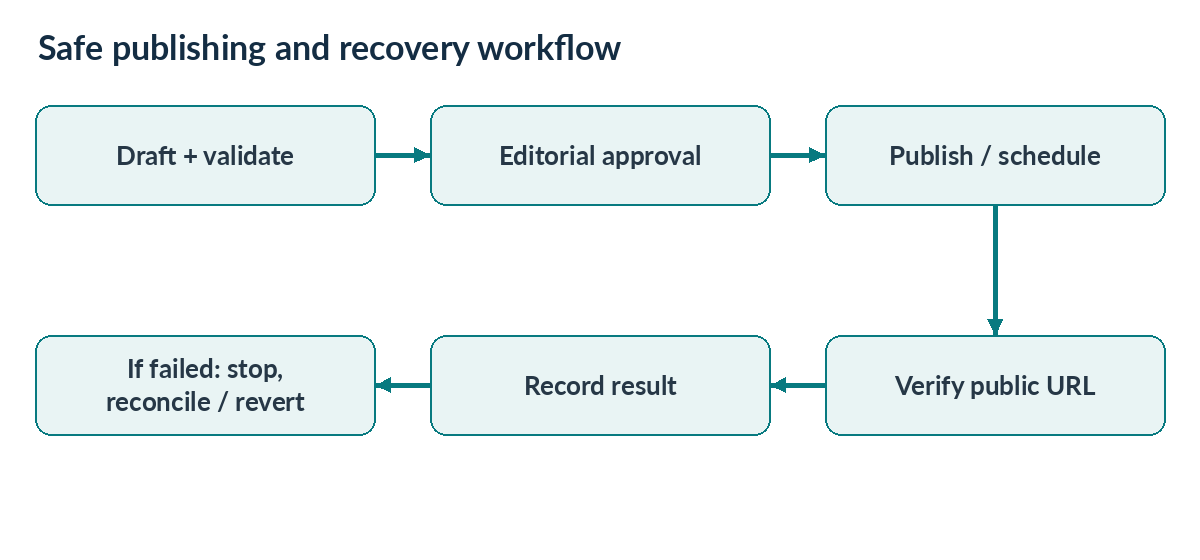
Figure 2. Draft-first publication lifecycle and reconciliation.
CSV job manifest
job_id,blog_id,title,html_path,approved,publish_at
j001,TEST_BLOG_ID,API introduction,content/intro.html,false,
j002,TEST_BLOG_ID,Theme guide,content/theme.html,false,Code language: JavaScript (javascript)
The scheduler should read the manifest, reject unknown blog IDs, validate HTML, compute a content hash and create drafts. Store each returned post ID in a durable database. An approved job can then publish or schedule that exact ID; a retry should reconcile the existing post instead of inserting a duplicate.
Alternative automation options
Option | How to use it |
|---|---|
Apps Script | Call REST API with UrlFetchApp and ScriptApp.getOAuthToken(); configure scopes, enable API and use time triggers. |
n8n / Make | Use an HTTP request step with Google OAuth and a separate human approval step. |
GitHub Actions / cron | Run approved API jobs using protected secrets and a worker; no interactive OAuth during scheduled execution. |
Node.js / PHP | Use Google client libraries or HTTP with OAuth token refresh; same REST endpoints. |
Selenium | UI automation alternative; maintain selectors and handle sessions manually. |
Keep browser theme work on a controlled workstation rather than putting a persistent Google profile into a cloud CI runner. Run one worker per browser profile and isolate each Google account.
15. Apps Script, scheduler and operational reliability
For Google-native scheduling, create an Apps Script project and associate the relevant Google Cloud project with Blogger API enabled. Set the manifest scopes explicitly, run once manually to authorize, and configure a time-driven trigger for an approved job function if needed.
Apps Script manifest fragment (appsscript.json)
{
  "timeZone": "Asia/Tokyo",
  "runtimeVersion": "V8",
  "oauthScopes": [
    "https://www.googleapis.com/auth/blogger",
    "https://www.googleapis.com/auth/script.external_request"
  ]
}Code language: JSON / JSON with Comments (json)
Draft-only Apps Script example
function createTestDraft() {
  const blogId = 'YOUR_TEST_BLOG_ID';
  const url = 'https://www.googleapis.com/blogger/v3/blogs/' +
              encodeURIComponent(blogId) + '/posts?isDraft=true';
  const response = UrlFetchApp.fetch(url, {
    method: 'post',
    contentType: 'application/json',
    headers: {Authorization: 'Bearer ' + ScriptApp.getOAuthToken()},
    payload: JSON.stringify({title: 'Apps Script test',
                            content: '<p>Hello Blogger</p>'}),
    muteHttpExceptions: true
  });
  if (response.getResponseCode() >= 300) {
    throw new Error('Blogger status ' + response.getResponseCode());
  }
  console.log(JSON.parse(response.getContentText()).id);
}Code language: JavaScript (javascript)
Run manually once against the test blog. Do not schedule this sample unchanged: every invocation creates a new draft. Add a persistent job ledger, locking and approvals first.
Reliability checklist
Inspect project-specific API quotas in Cloud Console; do not assume a universal daily limit. Handle quota errors and keep requests paced.
Use exponential backoff with jitter for transient reads and verified retryable operations; reconcile uncertain write outcomes before retrying.
Keep structured logs: job ID, blog ID, post ID, status, attempt count, timestamp and public URL; never log tokens.
Use an allowlist, least privilege, protected backups, content validation, per-account rate limits and manual approvals for production changes.
16. Troubleshooting and production security
Symptom | Likely cause / action |
|---|---|
401 Unauthorized | Access token expired or invalid. Refresh or reauthorize. |
403 Forbidden | API disabled, missing scope, role, quota or policy issue. Inspect error reason. |
404 Not Found | Incorrect ID, missing resource or unavailable access. Re-list authorized blogs. |
400 Bad Request | Invalid data, date or parameter. Inspect response details. |
429 / 5xx | Throttle or transient server failure. Backoff and reconcile writes. |
invalid_grant | Revoked/expired refresh token or testing-mode lifetime. Re-consent. |
Theme XML rejected | Invalid or incompatible template. Validate XML; restore backup if changed. |
Playwright timeout | Changed selector, modal or account session. Stop and inspect UI. |
Public URL not found | Draft, scheduled status, private blog or changed path. Inspect post status. |
Image missing | Bad or private URL, hotlink restriction or markup. Test HTTPS URL. |
Recommended .gitignore
credentials.json
token.json
.browser-profile/
playwright/.auth/
.env
backups/
.venv/
__pycache__/
Production test strategy
Mock API calls for unit tests. Exercise authentication and draft creation in a separate account or test blog. Run integration tests for pagination, duplicate-job detection, invalid HTML, expired token, rate limits and interrupted writes. Keep human approval for publication, deletion, theme rollout and account settings. Monitor unexpected changes and revoke credentials when an operator leaves.
17. SEO, editorial quality and responsible automation
Automation saves repetitive effort, but it is not a ranking shortcut. Google Search evaluates content and links according to its search policies. A Blogger site or backlink does not guarantee higher domain authority, indexing or search placement. Build useful blogs with distinct purposes rather than networks of near-identical pages designed to manufacture links.
Editorial rules for a multi-blog network
Write original, useful content with factual checks, source links and a clear audience. Avoid duplicate or thin AI-generated posts.
Use descriptive titles, sensible headings, relevant links, meaningful image alt text, mobile-friendly layouts and accessible navigation.
Qualify paid or sponsored links with rel=”sponsored” or rel=”nofollow” where appropriate. Use rel=”ugc” for user-generated links when relevant. Do not automate comment spam or link schemes.
Check public URLs, search indexing, canonical tags and site health through Search Console. Track readership, engagement and quality rather than link counts alone.
Follow Blogger content policies and Google Search spam policies. Respect copyright and privacy, and do not bypass platform access or rate restrictions.
Production readiness acceptance checklist
Check | Pass criteria |
|---|---|
OAuth | Authorized test account; token stored securely |
API smoke test | Draft created, ID recorded, approved publish verified |
Editorial controls | Original content reviewed; correct destination |
Duplicate prevention | Same job does not create another post |
Theme deployment | Backup saved, test blog verified, rollback rehearsed |
Observability | Logs contain IDs and results without credentials |
Recovery | Unknown outcomes reconciled; operator can revert |
Governance | Least privilege, approvals, platform policy compliance |
For the first release, implement content management only. Add theme operations as a separate, supervised service after the draft and publication pipeline is stable. This limits the blast radius of mistakes.
18. Frequently asked questions
Can Claude Code or Codex publish to Blogger directly?
They can run an authorized API client or call your MCP tools. They do not gain Blogger permissions merely by being installed.
Can I create a new Blogspot blog using the API?
No documented blog creation endpoint exists in v3. Create it through the dashboard; account and platform limits apply.
Can I upload a theme XML through the API?
No. Use Theme controls in the dashboard or a supervised browser workflow. Record selectors and back up first.
Can I use one API project for many blogs?
Yes, provided the authorized user has access to the blogs. Different accounts require their own consent and credentials.
Can I upload images through Blogger API?
Not as binary media through a documented v3 upload endpoint. Embed accessible image URLs or use the dashboard upload.
Can I schedule content?
Yes. Create a draft, then use the publish endpoint with a future publishDate. Verify the scheduled result.
Does Blogger support custom domains?
Yes through its dashboard and DNS setup, not the public Blogger API. The exact domain records depend on Blogger’s instructions.
Can Blogger run a dynamic PHP or database-backed website?
Not as an arbitrary server-side hosting platform. You can add supported templates, HTML, CSS and client-side scripts, and integrate external services where appropriate.
Can I use a service account?
Do not assume a service account has a Blogger author identity or access. The supported starting point here is delegated user OAuth.
Is the API free and unlimited?
Blogger is a hosted service, but API and account quotas still apply. Check your Cloud project quotas and current product policies; external hosting and automation may incur costs.
Conclusion
The most maintainable approach combines Blogger REST API v3 for content, a small Python CLI or MCP service for controlled AI workflows, and Playwright only where the dashboard is necessary. Start with a test blog, make drafts the default, require approval for public changes and preserve a verified rollback path.
Official documentation and further reading
Google Blogger API v3 reference
Post insertion and draft parameter
Google OAuth 2.0 and refresh token expiration
Blogger community: theme restore workflow
Playwright downloads and uploads
Google Apps Script advanced services
Publication notes and verification scope
Documentation checked November 28, 2026. The API examples were written against the documented interfaces; the core Python snippets were syntax-checked, not executed against an authenticated Blogger account. Browser locators require recording and validation in the reader’s dashboard. The examples are a starting point, not a complete production platform.

I’m Rajesh Kumar, a DevOps, SRE, DevSecOps, Cloud, and Platform Engineering expert passionate about sharing practical knowledge, real-world experiences, and industry best practices. I have worked at Cotocus and regularly write about technology, travel, investing, health, product reviews, and digital marketing through my various platforms.
I publish technical articles at DevOps School, travel stories at Holiday Landmark, stock market insights at Stocks Mantra, health and fitness guidance at My Medic Plus, product reviews at TrueReviewNow, and SEO and digital marketing strategies at Wizbrand.
Find Trusted Cardiac Hospitals
Compare heart hospitals by city and services — all in one place.
Explore Hospitals