
PowerShellGet is a PowerShell module with commands for discovering, installing, updating and publishing the PowerShell artifacts like Modules, Scripts, and DSC Resources. PowerShellGet require PowerShell 5.0 or higher.
PowerShellGet is the module that provides the ability to install, update, and locate modules and scripts in repositories like the PowerShell Gallery. The previous version of this module includes cmdlets like Install-Module, Find-Module and Save-Module.
PowerShell 6.0 shipped with version 1.6.0 of PowerShellGet. PowerShell 7.0 shipped with version 2.2.3 of PowerShellGet. The current supported version of PowerShellGet is 2.2.5.
If you are running PowerShell 6 or higher, you have a usable version of PowerShellGet. If you are running Windows PowerShell 5.1, you must install a newer version.
Official Documents – https://github.com/PowerShell/PowerShellGet
What’s new in PowerShellGet v3?
PowerShellGet v3 is a completely rewritten implementation of the module. It provides more generic PSResource cmdlets rather than Install-Module or Save-Script. The new version is intended to improve the maintainability of the codebase which in turn should help address issues with the previous version of the module.
Managing Resources with PowerShellGet v3
The cmdlet names have changed in PowerShellGet v3. Instead of Install-Module, you will use Install-PSResource. It’s actually the same cmdlet for all resources such as scripts and DSC resources.
$ Install-PSResource -Name Universal
The Install-PSResource cmdlet supports similar parameters to Install-Module but have slightly different names and meanings.
For example, -AllowClobber was optional in Install-Module but is now the default for Install-PSResource. You can use -NoClobber to change this behavior.
$ Install-PSResource -Name dbatools -Version ‘1.1.41’ -NoClobber
How to install PowerShellGet?
Copy and Paste the following command to install PowerShellGet using Powershell with admin mode.

$ Install-Module -Name PowerShellGet -Force
$ Get-Command Install-Module

Update the PowerShellGet module to the latest version by running the following command:
$ Update-Module PowerShellGet -Force
$ Get-Command Install-Module

Close Powershell command line and open again with following commands...
$ Get-Command Install-Module
Code language: JavaScript (javascript)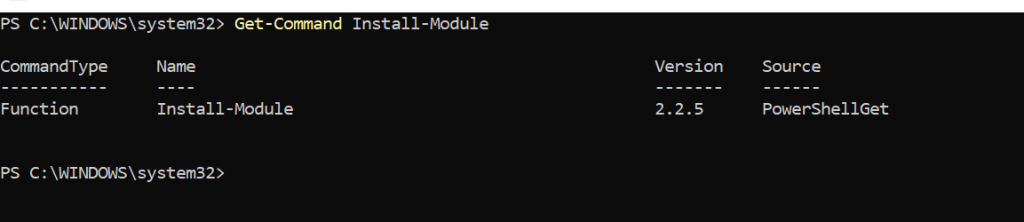
To install this preview release side-by-side with your existing PowerShellGet version, open any PowerShell console and run:
$ Install-Module PowerShellGet -Force -AllowPrerelease
To register the PSGallery run the command:
$ Register-PSResourceRepository -PSGallery
If you run the command Get-Command -Module PowerShellGet you will get a good picture of the side-by-side cmdlet interfaces.
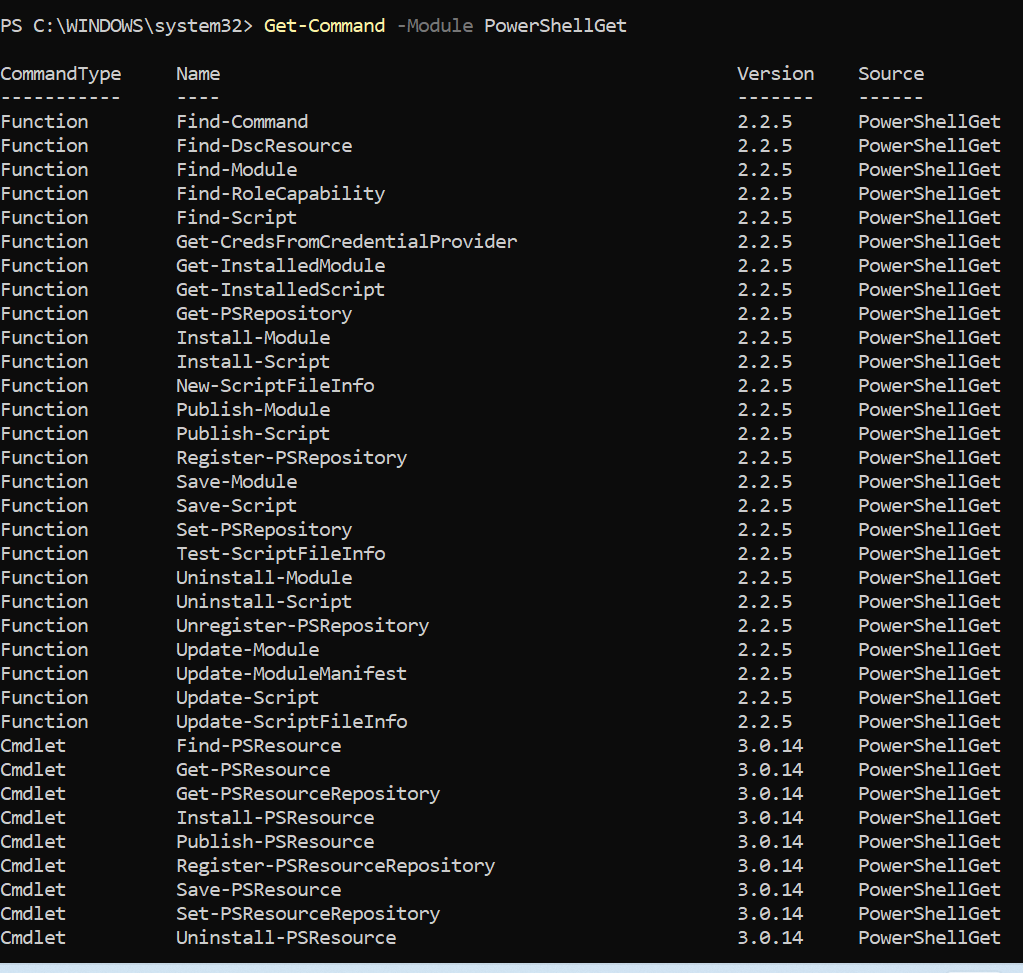
After installing PowerShellGet
After you have installed the new version of PowerShellGet, you should open a new PowerShell session. PowerShell automatically loads the newest version of the module when you use a PowerShellGet cmdlet.

We also recommend that you register the PowerShell Gallery as a trusted repository. Use the following command:

$ Set-PSRepository -Name PSGallery -InstallationPolicy Trusted


PowerShellGet is the module that provides the ability to install, update, and locate modules and scripts in repositories like the PowerShell Gallery. The previous version of this module includes cmdlets like Install-Module, Find-Module and Save-Module.
Code language: JavaScript (javascript)
Table of Implemented Parameters in this Release
| Cmdlet | Implemented parameters | Not implemented |
| Install-PSResource | -Name-Version-Prerelease-Repository-Credential-Scope-Reinstall | -InputObject-DestinationPath [partially implemented]-NoClobber-IgnoreDifferentPublisher-TrustRepository-Force [there hasn’t been a need for force yet since the things you would force aren’t implemented]-Quiet-AcceptLicense-PassThru |
| Update-PSResource | -Name-Version-Prerelease-Credential-Repository [Update should be discovering the repository from the xml metadata instead of from user input, this will be fixed in future releases] | -InputObject-UpdateTo-Force-Quiet-AcceptLicense-PassThru |
| Find-PSResource | -Name-Type-Version– Prerelease-ModuleName-Tags-Repository-Credential-IncludeDependencies | [Nothing] |
| Uninstall-PSResource | -Name-Version-PrereleaseOnly | [Nothing] |
| Save-PSResource | -Name-Version-Prerelease-Repository-Credential-AsNupkg-Path | -AcceptLicense |
| Get-PSResource | -Name-Version | -Prerelease |
| Register-PSResourceRepository | -Name-URL-PSGallery-Credential [credential persistence has not been implemented yet so this parameter is not currently being passed to anything]-Trusted-Priority | -Repositories-Proxy[for any proxies other than the default proxy]-ProxyCredential[see above regarding -Proxy] |
| Unregister-PSResourceRepository | -Name | [Nothing] |
| Get-PSResourceRepository | -Name-URL-Credential-Trusted-Priority | -Repositories-Proxy [for any proxies other than the default proxy]-ProxyCredential [see above regarding -Proxy] |

I’m Rajesh Kumar, a DevOps, SRE, DevSecOps, Cloud, and Platform Engineering expert passionate about sharing practical knowledge, real-world experiences, and industry best practices. I have worked at Cotocus and regularly write about technology, travel, investing, health, product reviews, and digital marketing through my various platforms.
I publish technical articles at DevOps School, travel stories at Holiday Landmark, stock market insights at Stocks Mantra, health and fitness guidance at My Medic Plus, product reviews at TrueReviewNow, and SEO and digital marketing strategies at Wizbrand.
Find Trusted Cardiac Hospitals
Compare heart hospitals by city and services — all in one place.
Explore Hospitals
A consideration worth adding is that upgrading to PowerShellGet 3.0 is often less about installing a new module and more about managing a package-management migration across automation estates. Many CI/CD pipelines, build scripts, and bootstrap processes still assume
Install-Modulesemantics, trusted PSGallery settings, and PackageManagement behaviors. Before adoptingInstall-PSResourcebroadly, teams should validate backward compatibility, repository authentication mechanisms, proxy support, and artifact caching strategies for ephemeral runners. In larger environments, it’s also common to treat public galleries as upstream feeds behind an internal repository manager, which improves reproducibility and reduces supply-chain exposure. Without a phased migration plan and compatibility testing, organizations may discover that the operational cost of supporting mixed PowerShellGet versions exceeds the technical effort of the upgrade itself.