
The helm pull command is used to download a chart from a Helm repository and save it to your local machine. Here is the basic syntax of the helm pull command:
helm pull [flags] [chart]
Code language: CSS (css)
Here’s an example of how to use the helm pull command:
$ helm repo add stable https://charts.helm.sh/stable
$ helm pull stable/mysql --version 1.6.1
$ helm env
$ ls /root/.cache/helm
$ ls /root/.cache/helm/repository/Code language: JavaScript (javascript)
In the above example, the command pulls the latest version of the mysql chart from the default repository (assuming it’s configured) and saves it to the current directory. The chart will be downloaded as a compressed archive file (e.g., mysql-<version>.tgz).
You can also provide additional flags to customize the behavior of the helm pull command. Here are some common flags:
--version: Specify a specific version of the chart to download.--untar: Extract the chart archive after downloading.--untardir: Specify a directory to extract the chart into.--repo: Specify the URL of a repository to download the chart from.--usernameand--password: Provide credentials for accessing a private repository.
Helm Pull Commands Example
Pull a specific chart version from a remote repository:
$ helm repo add stable https://charts.helm.sh/stable
$ helm pull stable/mysql --version 1.6.1
$ helm env
$ ls /root/.cache/helm
$ ls /root/.cache/helm/repository/

Pull a chart and save it with a specific name and version:
$ helm pull stable/nginx-ingress --version 1.2.3 --untar --untardir ./nginx-ingress

Pull a chart and save it without extracting the archive:
$ helm pull stable/redis --version 7.2.1 --untar=false

Pull a chart from a specific repository using a custom configuration file:
$ helm --kubeconfig=/path/to/kubeconfig.yaml --repository-config=/path/to/repo.yaml pull stable/mariadb

Pull a private chart from a repository using credentials:
$ helm pull private-chart --repo https://example.com/charts --username myuser --password mypasswordCode language: JavaScript (javascript)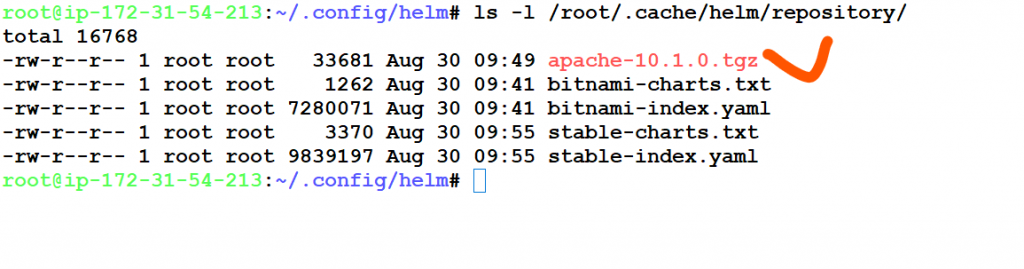

I’m Rajesh Kumar, a DevOps, SRE, DevSecOps, Cloud, and Platform Engineering expert passionate about sharing practical knowledge, real-world experiences, and industry best practices. I have worked at Cotocus and regularly write about technology, travel, investing, health, product reviews, and digital marketing through my various platforms.
I publish technical articles at DevOps School, travel stories at Holiday Landmark, stock market insights at Stocks Mantra, health and fitness guidance at My Medic Plus, product reviews at TrueReviewNow, and SEO and digital marketing strategies at Wizbrand.
Find Trusted Cardiac Hospitals
Compare heart hospitals by city and services — all in one place.
Explore Hospitals