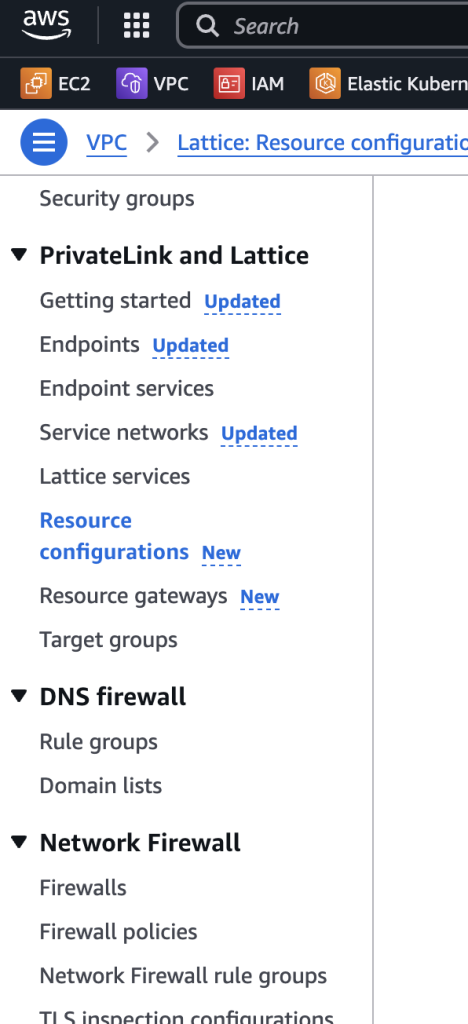
Let’s start from the basics and build up a clear understanding step-by-step.
🔹 Step 1: Understanding the Core Networking Concepts
1. VPC Network (Virtual Private Cloud)
A VPC is a logically isolated network in AWS where you can launch and manage AWS resources (EC2, RDS, etc.).
Think of it like your own private data center in the cloud.
🔹 Example: You create a VPC with two subnets (one public and one private) to host a web app and a database.
2. AWS Network
This refers to AWS’s global cloud infrastructure, which includes services like S3, DynamoDB, Lambda, etc., hosted and maintained by AWS.
AWS services are available across Regions and Availability Zones.
🔹 Example: S3 is an AWS-managed service hosted outside your VPC, but you can access it via the internet or a VPC Endpoint.
3. Public Internet Network
The Internet connects devices globally, including cloud services.
Accessing AWS services like S3 without a VPC endpoint requires routing traffic over the public internet.
🔹 Example: Without a VPC endpoint, your EC2 in a private subnet will require a NAT gateway to access S3 over the internet.
🔹 Now, Let’s Simplify Each VPC-related AWS Networking Service
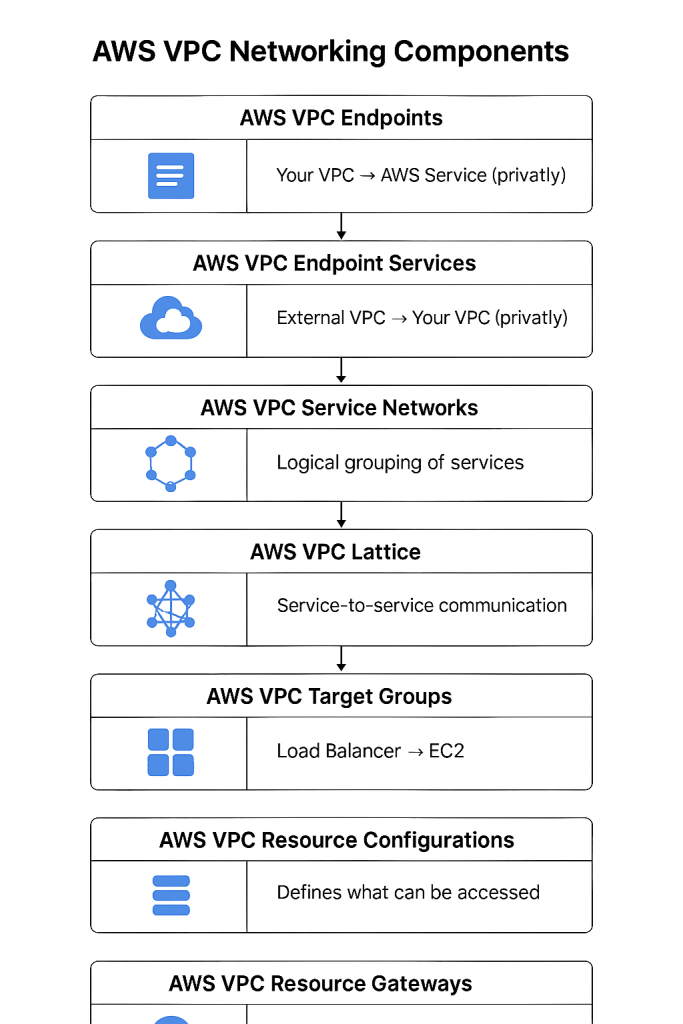
✅ 1. AWS VPC Endpoints
Definition
Privately connects your VPC to AWS services like S3 or DynamoDB without using the public internet.
Example
Your EC2 in a private subnet accesses an S3 bucket using a VPC endpoint instead of the internet.
✅ 2. AWS VPC Endpoint Services (PrivateLink)
Definition
Expose your own application as a service that other VPCs can privately access.
Example
Your team builds a billing API and exposes it as a PrivateLink service to customer VPCs.
✅ 3. AWS VPC Service Networks (Lattice Feature)
Definition
Logical grouping of services exposed via VPC Lattice; allows centralized control and access.
Example
You manage all your microservices and access policies across VPCs using a single service network.
✅ 4. AWS VPC Lattice Services
Definition
Managed service mesh for service-to-service communication across VPCs/accounts.
Example
A frontend service in VPC-A communicates securely with an order service in VPC-B using Lattice.
✅ 5. AWS VPC Target Groups
Definition
A group of compute targets (like EC2, Lambda) used by a load balancer to route traffic.
Example
A load balancer distributes traffic to EC2 instances in a target group running your app.
✅ 6. AWS VPC Resource Configurations
Definition
A resource or group of resources in a VPC that you want to expose/share securely.
Example
You define a resource configuration for a database cluster that can be shared with another account.
✅ 7. AWS VPC Resource Gateways
Definition
Entry points into your VPC that route traffic to the resources defined in resource configurations.
Example
You create a gateway for partners to access only the analytics dashboard inside your VPC.
🔹 Use Case Table (Minimum 5 per service)
Service
Use Cases
VPC Endpoints
1. EC2 accessing S3 privately 2. Lambda accessing DynamoDB without internet 3. Secure data sync between services 4. Accessing AWS API Gateway privately 5. Cost-effective internal service access
Endpoint Services
1. Expose internal database as service 2. Share microservices across VPCs 3. Build SaaS with customer-specific access 4. ISV exposing ML inference APIs 5. Analytics team providing a private BI tool
Service Networks
1. Group all services in a dev environment 2. Group backend services in prod 3. Apply access policy to multiple services 4. Control audit and access at group level 5. Multi-VPC observability via Lattice
Lattice Services
1. Service mesh across multiple accounts 2. Secure microservice calls with auth 3. Fine-grained service-to-service policies 4. Route requests from UI → API → DB 5. Simplified network for container apps
Target Groups
1. Load balance between EC2 instances 2. Route based on path (e.g., /api vs /web) 3. Blue/Green deployments 4. Fargate service traffic routing 5. Auto scaling backend services
Resource Configurations
1. Share one RDS database only 2. Expose app to internal departments 3. Grant partner VPC access to dashboard 4. Share reporting tools without full VPC access 5. Central resource config management
Resource Gateways
1. Controlled access for partner accounts 2. Entry point for federated services 3. Centralized ingress for a region 4. Apply fine-grained policies per gateway 5. Reduce blast radius of access
🔄 Interdependencies & Connections Between Services
Service
Connected/Dependent On
VPC Endpoints
AWS-managed services like S3, DynamoDB
VPC Endpoint Services
PrivateLink, used by clients with Interface Endpoints
VPC Service Networks
Used with VPC Lattice Services
VPC Lattice Services
Uses Service Networks, integrates with IAM, Route tables
VPC Target Groups
Used by Load Balancers, sometimes with Lattice
Resource Configurations
Requires Resource Gateways to expose resources
Resource Gateways
Depends on Resource Configurations
✅ Key Relationships:
VPC Endpoint Services ⇄ VPC Endpoints
VPC Lattice Services ⇄ Service Networks
Resource Gateways ⇄ Resource Configurations
Target Groups are used by Load Balancers or Lattice Services
Lattice is a superset involving Service Networks, Target Groups, and Resource Routing
🧠 TL;DR Summary
Use VPC Endpoints to access AWS services privately.
Use Endpoint Services to share your services with others securely.
Use Lattice Services + Service Networks to build secure, scalable service-to-service comms.
Use Target Groups for load balancing traffic.
Use Resource Configurations + Gateways to expose selected VPC resources securely across accounts.
Here’s a detailed comparison of AWS VPC networking components, covering definitions, use cases, benefits, and practical scenarios to help you clearly understand when and why to use each.
🔹 1. AWS VPC Endpoints
Definition: Allows private connectivity between your VPC and supported AWS services (like S3, DynamoDB) without internet.
Use Case: Secure communication with AWS services from private subnets.
Benefits:
No need for NAT Gateway/Internet Gateway.
Reduces data transfer costs.
Improves security by keeping traffic inside AWS.
Practical Scenario:
Your EC2 instance in a private subnet needs to access S3 to read/write files without going over the internet.
🔹 2. AWS VPC Endpoint Services (PrivateLink)
Definition: Allows you to expose your VPC-hosted services (e.g., APIs, applications) to other VPCs securely via PrivateLink.
Use Case: Share internal services (like a custom database) securely with customers or partners.
Benefits:
No need to expose services publicly.
Controls access using IAM and Security Groups.
Practical Scenario:
A SaaS provider exposes a service (e.g., managed DB) privately to multiple clients using VPC Endpoint Services.
🔹 3. AWS VPC Service Networks (Lattice)
Definition: Logical grouping of services across accounts or VPCs managed centrally through AWS VPC Lattice.
Use Case: Service discovery and access control across environments.
Benefits:
Unified policy and observability for microservices.
Easier management at scale.
Practical Scenario:
Your dev, staging, and prod VPCs each have microservices that should talk only to specific services across environments.
🔹 4. AWS VPC Lattice Services
Definition: Application-layer networking that enables secure, scalable service-to-service communication across VPCs and accounts.
Use Case: Microservices mesh without managing your own service discovery, networking, or traffic routing.
Benefits:
Integrated authentication/authorization.
Built-in observability.
No need for custom networking or service mesh.
Practical Scenario:
Your backend API in VPC-A securely communicates with payment and inventory services in VPC-B and C across accounts using VPC Lattice.
🔹 5. AWS VPC Target Groups
Definition: Groups of resources (like EC2 instances or IPs) that receive traffic routed from Load Balancers.
Use Case: Load balancing based on path, host, or port across services or containers.
Benefits:
Flexible routing logic.
Supports weighted load balancing.
Practical Scenario:
You use an Application Load Balancer to direct traffic to multiple EC2 instances running your web app based on the URL path.
🔹 6. AWS VPC Resource Configurations
Definition: Defines a resource (or group of resources) in your VPC that you want to expose or share with others.
Use Case: Granular sharing of VPC-hosted services (like specific IPs, endpoints, or DNS names).
Benefits:
Fine-grained control.
Enables multi-tenant architectures with access boundaries.
Practical Scenario:
You want to share a specific internal app (on a private IP) with another team in a different AWS account.
🔹 7. AWS VPC Resource Gateways
Definition: Gateways that act as the access point into a VPC for clients accessing resource configurations.
Use Case: Controlled entry into the VPC for accessing shared or exposed resources.
Benefits:
Centralized ingress control.
Decouples service exposure from infrastructure.
Practical Scenario:
You set up a Resource Gateway that allows only specific accounts to access your internal analytics service.
I’m Rajesh Kumar, a DevOps, SRE, DevSecOps, Cloud, and Platform Engineering expert passionate about sharing practical knowledge, real-world experiences, and industry best practices. I have worked at Cotocus and regularly write about technology, travel, investing, health, product reviews, and digital marketing through my various platforms.
I publish technical articles at DevOps School, travel stories at Holiday Landmark, stock market insights at Stocks Mantra, health and fitness guidance at My Medic Plus, product reviews at TrueReviewNow, and SEO and digital marketing strategies at Wizbrand.
Find Trusted Cardiac Hospitals
Compare heart hospitals by city and services — all in one place.
I'm Rajesh Kumar, a DevOps, SRE, DevSecOps, Cloud, and Platform Engineering expert passionate about sharing practical knowledge, real-world experiences, and industry best practices. I have worked at Cotocus and regularly write about technology, travel, investing, health, product reviews, and digital marketing through my various platforms.
I publish technical articles at DevOps School, travel stories at Holiday Landmark, stock market insights at Stocks Mantra, health and fitness guidance at My Medic Plus, product reviews at TrueReviewNow, and SEO and digital marketing strategies at Wizbrand.
Introduction In 2026, AI influencer marketing tools have become indispensable for brands navigating the dynamic world of social media marketing. These platforms leverage artificial intelligence to streamline…
Introduction In 2026, managing digital assets has become more important than ever. As organizations continue to create, store, and manage vast quantities of digital content—whether images, videos,…
The news about tech giants investing in metaverse development ignited a lot of discussions about its potential use cases. GameDev has turned up at the forefront of…
Introduction In 2026, AI data integration tools are pivotal for businesses navigating the complexities of modern data ecosystems. These tools combine artificial intelligence with data integration processes…
Introduction In 2026, creating engaging and impactful presentations is more than just slides with bullet points—it’s about telling a story, conveying ideas visually, and keeping your audience…
Introduction In 2026, AI ad copy tools have become indispensable for marketers, businesses, and content creators aiming to craft compelling, high-converting advertisements at scale. These tools leverage…