
Introduction
AI CFD Acceleration Toolkits use artificial intelligence, machine learning, and scientific computing techniques to speed up Computational Fluid Dynamics (CFD) simulations. Traditional CFD simulations can require significant computational resources and long processing times, especially when solving complex fluid flow, turbulence, heat transfer, aerodynamics, and multiphysics problems.
AI-powered CFD acceleration approaches help engineers and researchers create faster approximations, optimize simulations, improve design exploration, and reduce computational workloads. These toolkits combine machine learning models, physics-informed methods, neural operators, surrogate modeling, and advanced computing techniques to accelerate fluid simulation workflows.
As industries increasingly adopt digital twins, simulation-driven engineering, and AI-assisted design, CFD acceleration has become valuable for aerospace, automotive, energy, manufacturing, climate research, and engineering organizations.
Common use cases include:
- Aerospace aerodynamic optimization
- Automotive vehicle design simulation
- Turbomachinery and energy system analysis
- Industrial fluid flow optimization
- Weather and environmental modeling
- Digital twin simulation acceleration
When evaluating AI CFD Acceleration Toolkits, organizations should consider simulation compatibility, physics accuracy, AI model flexibility, GPU acceleration, scalability, workflow integration, validation capabilities, deployment options, computational efficiency, security controls, and support for existing engineering environments.
Best for: Aerospace companies, automotive manufacturers, energy organizations, engineering teams, research institutions, manufacturing companies, universities, and organizations that rely on simulation-heavy workflows.
Not ideal for: Teams without CFD expertise, projects requiring only basic analytics, or organizations that do not have simulation data or computational modeling requirements.
What’s Changed in AI CFD Acceleration Toolkits in 2026+
AI-powered CFD acceleration is evolving as organizations demand faster simulations, improved engineering productivity, and more intelligent design workflows.
Key trends include:
- AI-powered simulation acceleration: Organizations are increasingly using machine learning models to reduce simulation time and explore more design possibilities.
- Physics-informed machine learning integration: AI models are increasingly combined with physical equations and constraints to improve reliability.
- Neural operators for fluid simulation: New AI approaches are helping models learn complex fluid behaviors and approximate simulation results faster.
- Digital twin integration: CFD acceleration tools are becoming important components of digital twins for real-time monitoring and prediction.
- Real-time CFD prediction: AI-based approximations are enabling faster decision-making in applications where traditional CFD simulations are too slow.
- AI-assisted mesh optimization: Machine learning techniques are being explored to improve mesh generation and simulation efficiency.
- Automated simulation workflows: AI is helping automate repetitive simulation tasks, parameter exploration, and optimization processes.
- Multiphysics AI acceleration: Modern workflows increasingly combine fluid dynamics with thermal, structural, and other physical models.
- GPU and accelerated computing optimization: Organizations are using advanced computing resources to improve simulation performance.
- Scientific AI validation and governance: Engineering teams are focusing more on model accuracy, reproducibility, validation, and responsible AI usage.
Quick Buyer Checklist (Scan-Friendly)
Before selecting an AI CFD Acceleration Toolkit, evaluate:
- Support for CFD simulation workflows
- Physics-informed AI capabilities
- Fluid dynamics modeling support
- Neural operator capabilities
- Surrogate modeling features
- Simulation acceleration performance
- GPU computing support
- High-performance computing compatibility
- Multiphysics integration
- Mesh optimization capabilities
- Model validation methods
- Accuracy comparison against CFD simulations
- Uncertainty estimation
- Explainability features
- Data preprocessing support
- Integration with engineering software
- API availability
- Cloud deployment options
- Self-hosted deployment support
- Security controls
- Collaboration capabilities
- Computational cost management
- Long-term ecosystem support
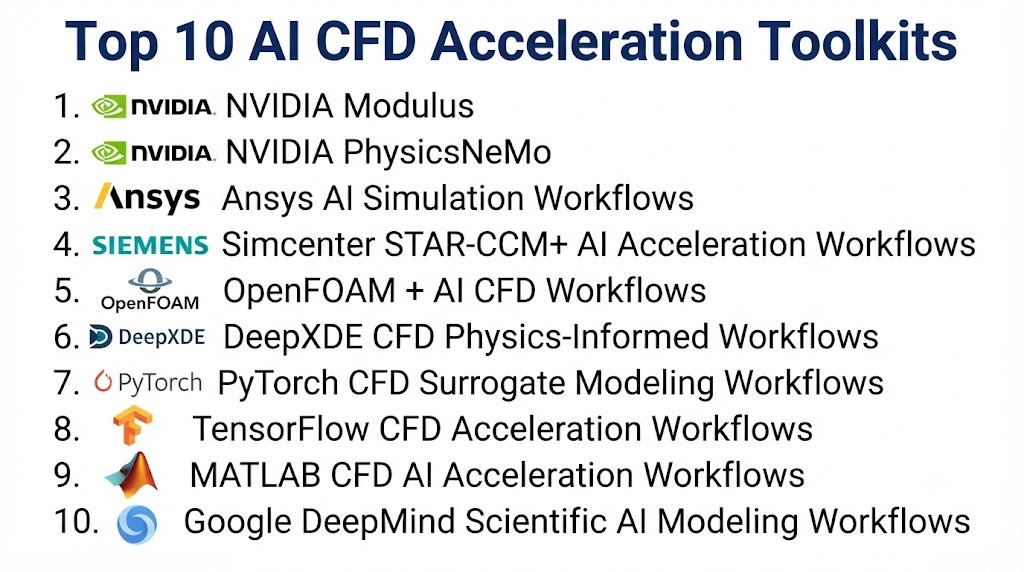
Top 10 AI CFD Acceleration Toolkits
#1 — NVIDIA Modulus
One-line verdict: Best for physics-informed AI acceleration of scientific simulations and CFD workflows.
Short description (2–3 lines):
NVIDIA Modulus is a physics-informed machine learning framework designed to help engineers and researchers develop AI models for scientific computing and simulation acceleration.
It supports applications where neural networks learn physical behavior and approximate complex simulation processes.
Standout Capabilities
- Physics-informed neural networks
- Scientific machine learning
- CFD acceleration workflows
- Neural operator approaches
- Simulation approximation
- Engineering AI applications
- GPU-accelerated computing
AI-Specific Depth (Must Include)
- Model support: Supports physics-informed AI models and scientific machine learning approaches.
- RAG / knowledge integration: Not typically applicable for CFD acceleration workflows.
- Evaluation: Requires comparison against traditional CFD simulations or experimental results.
- Guardrails: Physics constraints and validation workflows improve reliability.
- Observability: Depends on experiment tracking and simulation monitoring workflows.
Pros
- Designed for scientific AI applications.
- Supports physics-aware simulation acceleration.
- Useful for complex engineering problems.
Cons
- Requires advanced CFD and AI knowledge.
- Not designed for non-technical users.
- Implementation requires specialized expertise.
Security & Compliance
Not publicly stated.
Deployment & Platforms
- Platforms: Scientific computing environments.
- Deployment: Cloud, self-managed, and high-performance computing environments vary.
Integrations & Ecosystem
Supports:
- Scientific computing workflows
- Machine learning frameworks
- Simulation environments
- Engineering applications
- Research platforms
Pricing Model
Open-source availability with infrastructure costs varying.
Best-Fit Scenarios
- CFD simulation acceleration
- Physics-informed engineering AI
- Scientific research
#2 — NVIDIA PhysicsNeMo
One-line verdict: Best for advanced scientific AI workflows involving complex physics simulations.
Short description (2–3 lines):
NVIDIA PhysicsNeMo is a scientific machine learning framework designed for building AI models that understand and accelerate physics-based simulations.
It supports researchers and engineers working on computational science problems, including fluid simulation applications.
Standout Capabilities
- Physics-aware AI modeling
- Scientific machine learning
- Neural operators
- CFD acceleration workflows
- Simulation learning
- Engineering optimization
- Large-scale AI computing
AI-Specific Depth (Must Include)
- Model support: Supports physics-based AI models and scientific machine learning architectures.
- RAG / knowledge integration: Not typically applicable for CFD workflows.
- Evaluation: Requires validation against CFD simulations and physical measurements.
- Guardrails: Physics equations and simulation constraints guide model behavior.
- Observability: Depends on connected monitoring and experiment tracking systems.
Pros
- Designed for advanced scientific AI.
- Supports complex physics simulations.
- Useful for large-scale engineering applications.
Cons
- Requires specialized expertise.
- High computational requirements may apply.
- More suitable for advanced teams.
Security & Compliance
Not publicly stated.
Deployment & Platforms
- Platforms: High-performance computing environments.
- Deployment: Cloud and self-managed infrastructure.
Integrations & Ecosystem
Supports:
- CFD workflows
- Scientific simulations
- AI frameworks
- GPU computing environments
- Engineering applications
Pricing Model
Open-source availability with infrastructure costs varying.
Best-Fit Scenarios
- Advanced CFD research
- Scientific AI projects
- Engineering simulation acceleration
#3 — Ansys AI Simulation Workflows
One-line verdict: Best for engineering teams combining CFD simulation expertise with AI optimization.
Short description (2–3 lines):
Ansys provides engineering simulation solutions that can integrate AI-driven approaches for design optimization, simulation acceleration, and engineering analysis.
It is widely used in industries where accurate physics-based modeling is important.
Standout Capabilities
- CFD simulation workflows
- Engineering optimization
- Multiphysics modeling
- Simulation automation
- Design exploration
- Virtual testing
- Engineering analysis
AI-Specific Depth (Must Include)
- Model support: AI capabilities depend on selected simulation and optimization workflows.
- RAG / knowledge integration: Depends on connected engineering data systems.
- Evaluation: Requires comparison with simulation and experimental results.
- Guardrails: Physics-based simulation provides validation mechanisms.
- Observability: Depends on workflow monitoring capabilities.
Pros
- Strong engineering simulation ecosystem.
- Suitable for industrial applications.
- Supports complex physical modeling.
Cons
- Requires engineering expertise.
- AI workflows may require additional configuration.
- Enterprise implementation can be complex.
Security & Compliance
Not publicly stated.
Deployment & Platforms
- Platforms: Engineering software environments.
- Deployment: Desktop, cloud, and enterprise options vary.
Integrations & Ecosystem
Supports:
- CFD workflows
- CAD systems
- Engineering applications
- Simulation environments
- Optimization tools
Pricing Model
Not publicly stated.
Best-Fit Scenarios
- Aerospace CFD
- Automotive simulation
- Industrial engineering design
#4 — Simcenter STAR-CCM+ AI Acceleration Workflows
One-line verdict: Best for engineering teams accelerating complex CFD simulations with AI-assisted workflows.
Short description (2–3 lines):
Simcenter STAR-CCM+ is a multiphysics simulation platform used for computational fluid dynamics and engineering analysis.
AI-assisted workflows can help improve simulation efficiency, design exploration, and optimization processes.
Standout Capabilities
- Computational fluid dynamics simulation
- Multiphysics modeling
- Engineering optimization
- Automated simulation workflows
- Virtual testing
- Design exploration
- Simulation data generation
AI-Specific Depth (Must Include)
- Model support: AI capabilities depend on connected optimization and machine learning workflows.
- RAG / knowledge integration: Depends on connected engineering knowledge systems.
- Evaluation: Requires comparison with CFD simulation results and physical measurements.
- Guardrails: Physics-based simulation provides validation controls.
- Observability: Depends on simulation monitoring and workflow tracking systems.
Pros
- Strong CFD simulation capabilities.
- Useful for industrial engineering workflows.
- Supports complex physical modeling.
Cons
- Requires CFD expertise.
- AI acceleration workflows may require customization.
- Computational requirements can be significant.
Security & Compliance
Not publicly stated.
Deployment & Platforms
- Platforms: Engineering computing environments.
- Deployment: Desktop, cloud, and enterprise options vary.
Integrations & Ecosystem
Supports:
- CFD simulation environments
- CAD workflows
- Engineering design systems
- Optimization platforms
- Research applications
Pricing Model
Not publicly stated.
Best-Fit Scenarios
- Automotive CFD simulation
- Aerospace engineering
- Industrial design optimization
#5 — OpenFOAM + AI CFD Workflows
One-line verdict: Best for researchers building flexible open-source CFD acceleration pipelines.
Short description (2–3 lines):
OpenFOAM is an open-source computational fluid dynamics platform that can be combined with machine learning approaches for simulation acceleration.
Researchers use AI-enhanced OpenFOAM workflows to create custom CFD prediction and optimization systems.
Standout Capabilities
- Open-source CFD simulation
- Fluid dynamics modeling
- Custom AI integration
- Simulation data generation
- Numerical analysis
- Engineering research
- Workflow customization
AI-Specific Depth (Must Include)
- Model support: AI capabilities depend on connected machine learning frameworks.
- RAG / knowledge integration: Not typically applicable.
- Evaluation: Requires validation against CFD simulations or experiments.
- Guardrails: Physical simulation constraints support reliability.
- Observability: Depends on external monitoring tools.
Pros
- Highly customizable.
- Open-source ecosystem.
- Suitable for research projects.
Cons
- Requires technical expertise.
- AI integration requires development effort.
- Setup and maintenance can be complex.
Security & Compliance
Not publicly stated.
Deployment & Platforms
- Platforms: Scientific computing environments.
- Deployment: Self-managed and cloud environments.
Integrations & Ecosystem
Supports:
- CFD workflows
- Scientific computing libraries
- Machine learning pipelines
- Research environments
- Engineering applications
Pricing Model
Open-source.
Best-Fit Scenarios
- CFD research
- Academic projects
- Custom AI simulation workflows
#6 — DeepXDE CFD Physics-Informed Workflows
One-line verdict: Best for researchers applying physics-informed machine learning to CFD problems.
Short description (2–3 lines):
DeepXDE is an open-source scientific machine learning framework focused on physics-informed neural networks.
Researchers can use it to create AI models that approximate solutions for fluid dynamics and differential equation problems.
Standout Capabilities
- Physics-informed neural networks
- Differential equation modeling
- Fluid simulation approximation
- Scientific machine learning
- Boundary condition modeling
- Research experimentation
- Neural network customization
AI-Specific Depth (Must Include)
- Model support: Supports neural network-based scientific modeling.
- RAG / knowledge integration: Not applicable for CFD workflows.
- Evaluation: Requires comparison against CFD simulations or analytical solutions.
- Guardrails: Physics equations act as modeling constraints.
- Observability: Depends on external research tracking tools.
Pros
- Open-source and flexible.
- Suitable for scientific experimentation.
- Supports physics-based learning.
Cons
- Requires mathematical expertise.
- Not a complete CFD platform.
- Requires custom development.
Security & Compliance
Not publicly stated.
Deployment & Platforms
- Platforms: Python development environments.
- Deployment: Self-managed and cloud environments.
Integrations & Ecosystem
Supports:
- Scientific Python workflows
- Machine learning frameworks
- CFD research
- Simulation pipelines
- Academic projects
Pricing Model
Open-source.
Best-Fit Scenarios
- CFD research
- Physics-informed modeling
- Academic experimentation
#7 — PyTorch CFD Surrogate Modeling Workflows
One-line verdict: Best for developers creating customized AI models to accelerate CFD simulations.
Short description (2–3 lines):
PyTorch provides a flexible machine learning framework used by researchers to build custom neural networks for CFD acceleration.
Teams combine PyTorch with simulation data and scientific methods to create surrogate CFD models.
Standout Capabilities
- Custom neural networks
- Deep learning workflows
- Surrogate modeling
- GPU acceleration
- Scientific AI research
- Custom architectures
- Simulation prediction
AI-Specific Depth (Must Include)
- Model support: Supports custom deep learning models and scientific AI architectures.
- RAG / knowledge integration: Not typically applicable.
- Evaluation: Requires CFD benchmark comparison.
- Guardrails: Physics constraints must be implemented manually.
- Observability: Requires additional experiment tracking tools.
Pros
- Maximum flexibility.
- Large developer ecosystem.
- Suitable for advanced AI research.
Cons
- Requires programming expertise.
- CFD workflows require custom implementation.
- No built-in CFD acceleration system.
Security & Compliance
Not publicly stated.
Deployment & Platforms
- Platforms: Development environments.
- Deployment: Cloud, edge, and self-managed options.
Integrations & Ecosystem
Supports:
- Machine learning libraries
- CFD datasets
- Simulation workflows
- Scientific computing tools
- Custom applications
Pricing Model
Open-source.
Best-Fit Scenarios
- Custom CFD AI models
- Research projects
- AI engineering teams
#8 — TensorFlow CFD Acceleration Workflows
One-line verdict: Best for organizations building scalable AI-powered CFD prediction systems.
Short description (2–3 lines):
TensorFlow is a machine learning framework that can be used to develop AI models for CFD acceleration and scientific simulation workflows.
It provides tools for creating, training, and deploying custom neural network models.
Standout Capabilities
- Deep learning models
- Neural network development
- Simulation prediction
- AI model deployment
- Data processing
- Optimization workflows
- Large-scale training
AI-Specific Depth (Must Include)
- Model support: Supports custom AI models and scientific machine learning workflows.
- RAG / knowledge integration: Not applicable for CFD acceleration.
- Evaluation: Requires simulation-based validation.
- Guardrails: Physics constraints must be designed into workflows.
- Observability: Requires external monitoring solutions.
Pros
- Mature AI ecosystem.
- Supports scalable deployment.
- Flexible model development.
Cons
- Requires AI engineering knowledge.
- CFD workflows require customization.
- Not designed specifically for fluid simulation.
Security & Compliance
Not publicly stated.
Deployment & Platforms
- Platforms: AI development environments.
- Deployment: Cloud, edge, and self-managed options.
Integrations & Ecosystem
Supports:
- AI frameworks
- Scientific computing
- Simulation pipelines
- Cloud infrastructure
- Research workflows
Pricing Model
Open-source.
Best-Fit Scenarios
- AI CFD research
- Production AI systems
- Custom simulation acceleration
#9 — MATLAB CFD AI Acceleration Workflows
One-line verdict: Best for engineers developing CFD optimization and AI-assisted simulation models.
Short description (2–3 lines):
MATLAB provides mathematical modeling, machine learning, and engineering analysis capabilities that can support CFD acceleration workflows.
Engineers use MATLAB-based approaches for simulation analysis, optimization, and predictive modeling.
Standout Capabilities
- Mathematical modeling
- Engineering simulation analysis
- Machine learning integration
- Optimization algorithms
- Data processing
- System modeling
- Research workflows
AI-Specific Depth (Must Include)
- Model support: Supports custom machine learning models.
- RAG / knowledge integration: Requires external implementation.
- Evaluation: Supports comparison between predictions and simulation outputs.
- Guardrails: Engineering validation workflows provide reliability.
- Observability: Depends on configured monitoring workflows.
Pros
- Strong engineering ecosystem.
- Useful for technical teams.
- Supports mathematical modeling.
Cons
- Requires engineering knowledge.
- Advanced CFD AI workflows require customization.
- Licensing costs vary.
Security & Compliance
Not publicly stated.
Deployment & Platforms
- Platforms: Engineering environments.
- Deployment: Desktop, cloud, and enterprise options vary.
Integrations & Ecosystem
Supports:
- Engineering tools
- Simulation workflows
- Machine learning libraries
- Data analysis systems
- Research environments
Pricing Model
Varies.
Best-Fit Scenarios
- Engineering research
- CFD optimization
- Simulation analysis
#10 — Google DeepMind Scientific AI Modeling Workflows
One-line verdict: Best for advanced scientific AI research involving complex physical simulation problems.
Short description (2–3 lines):
Scientific AI modeling approaches demonstrate how advanced machine learning can approximate complex physical systems.
These methods are influencing future CFD acceleration research through AI-based simulation approaches.
Standout Capabilities
- Scientific AI modeling
- Advanced neural networks
- Physical system prediction
- Large-scale AI research
- Simulation approximation
- Research acceleration
- Complex pattern learning
AI-Specific Depth (Must Include)
- Model support: Uses specialized AI models depending on research applications.
- RAG / knowledge integration: Depends on implementation.
- Evaluation: Requires scientific validation.
- Guardrails: Scientific verification processes are required.
- Observability: Depends on research infrastructure.
Pros
- Demonstrates advanced scientific AI capabilities.
- Useful for research exploration.
- Supports future simulation approaches.
Cons
- Not a general CFD toolkit.
- Requires specialized expertise.
- Limited direct operational use.
Security & Compliance
Not publicly stated.
Deployment & Platforms
- Platforms: Research computing environments.
- Deployment: Varies.
Integrations & Ecosystem
Supports:
- Scientific AI research
- Simulation studies
- Machine learning environments
- Computational science projects
Pricing Model
Not publicly stated.
Best-Fit Scenarios
- Scientific AI research
- Advanced simulation studies
- Future CFD acceleration exploration
Comparison Table
| Tool Name | Best For | Deployment (Cloud/Self-hosted/Hybrid) | Model Flexibility (Hosted / BYO / Multi-model / Open-source) | Strength | Watch-Out | Public Rating |
|---|---|---|---|---|---|---|
| NVIDIA Modulus | Physics-informed CFD acceleration | Cloud/Self-managed | Open-source AI framework | Physics-based simulation acceleration | Requires advanced expertise | N/A |
| NVIDIA PhysicsNeMo | Advanced scientific AI workflows | Cloud/HPC/Self-managed | Open-source scientific AI | Large-scale physics modeling | High technical complexity | N/A |
| Ansys AI Simulation Workflows | Industrial CFD simulation | Desktop/Cloud/Enterprise | Enterprise simulation integrations | Engineering accuracy | Complex implementation | N/A |
| Simcenter STAR-CCM+ AI Workflows | Enterprise CFD engineering | Desktop/Cloud | Engineering simulation workflows | Multiphysics CFD | Requires CFD expertise | N/A |
| OpenFOAM + AI Workflows | Open-source CFD research | Self-managed/Cloud | Open-source/BYO models | Customization flexibility | Setup complexity | N/A |
| DeepXDE CFD Workflows | Physics-informed CFD research | Self-managed/Cloud | Open-source | PINN-based modeling | Research-focused | N/A |
| PyTorch CFD Workflows | Custom AI CFD development | Cloud/Self-managed | Open-source/BYO models | Maximum flexibility | Requires coding | N/A |
| TensorFlow CFD Workflows | Scalable AI simulation systems | Cloud/Edge/Self-managed | Open-source/BYO models | AI ecosystem maturity | Requires customization | N/A |
| MATLAB CFD AI Workflows | Engineering modeling | Desktop/Cloud | Custom ML models | Engineering integration | Licensing varies | N/A |
| Scientific AI Modeling Workflows | Advanced research | Research environments | Specialized AI models | Future scientific applications | Limited production use | N/A |
Scoring & Evaluation (Transparent Rubric)
The following scoring compares AI CFD Acceleration Toolkits based on simulation capabilities, AI reliability, physics integration, ecosystem support, usability, performance, security, and community maturity.
The evaluation is comparative rather than absolute. Different organizations may prioritize CFD accuracy, simulation speed, customization, deployment control, or engineering integration depending on their requirements.
| Tool | Core | Reliability/Eval | Guardrails | Integrations | Ease | Perf/Cost | Security/Admin | Support | Weighted Total |
|---|---|---|---|---|---|---|---|---|---|
| NVIDIA Modulus | 9 | 9 | 9 | 8 | 6 | 9 | 8 | 9 | 8.5 |
| NVIDIA PhysicsNeMo | 10 | 9 | 9 | 9 | 6 | 10 | 8 | 9 | 8.9 |
| Ansys AI Simulation Workflows | 10 | 10 | 10 | 10 | 7 | 8 | 9 | 9 | 9.3 |
| Simcenter STAR-CCM+ AI Workflows | 10 | 9 | 10 | 9 | 7 | 8 | 9 | 9 | 8.9 |
| OpenFOAM + AI Workflows | 9 | 9 | 9 | 9 | 6 | 9 | 7 | 9 | 8.5 |
| DeepXDE CFD Workflows | 8 | 9 | 9 | 8 | 7 | 8 | 7 | 8 | 8.0 |
| PyTorch CFD Workflows | 9 | 9 | 8 | 10 | 6 | 10 | 8 | 10 | 8.9 |
| TensorFlow CFD Workflows | 9 | 9 | 8 | 10 | 7 | 9 | 8 | 10 | 8.8 |
| MATLAB CFD AI Workflows | 9 | 9 | 9 | 9 | 8 | 8 | 8 | 9 | 8.8 |
| Scientific AI Modeling Workflows | 8 | 9 | 8 | 8 | 6 | 9 | 7 | 8 | 8.0 |
Top 3 for Enterprise
1. Ansys AI Simulation Workflows
Best suited for organizations requiring accurate engineering simulation, CFD workflows, and AI-assisted design optimization.
2. NVIDIA PhysicsNeMo
A strong option for enterprises exploring large-scale scientific AI and accelerated simulation workflows.
3. Simcenter STAR-CCM+ AI Workflows
Useful for industrial organizations working with complex CFD and multiphysics engineering problems.
Top 3 for SMB
1. MATLAB CFD AI Workflows
Best for engineering teams needing flexible modeling and simulation capabilities.
2. OpenFOAM + AI Workflows
Suitable for organizations seeking open-source CFD flexibility.
3. DeepXDE CFD Workflows
Useful for smaller research teams experimenting with physics-informed CFD approaches.
Top 3 for Developers
1. PyTorch CFD Workflows
Best for developers building customized AI-based CFD acceleration systems.
2. TensorFlow CFD Workflows
Useful for teams creating scalable machine learning simulation applications.
3. NVIDIA Modulus
Suitable for developers working on physics-informed scientific AI.
Which AI CFD Acceleration Toolkit Is Right for You?
Solo / Freelancer
Individual researchers, students, and developers should focus on:
- Open-source availability
- Flexible experimentation
- Low infrastructure requirements
- Learning resources
Recommended options:
- OpenFOAM + AI Workflows
- DeepXDE CFD Workflows
- PyTorch CFD Workflows
Solo users should select tools that allow experimentation without requiring expensive engineering platforms.
Important considerations:
- CFD knowledge
- Programming skills
- Available computing resources
- Research objectives
SMB
Small and medium organizations should prioritize:
- Engineering productivity
- Simulation efficiency
- Manageable complexity
- Cost control
Recommended options:
- MATLAB CFD AI Workflows
- OpenFOAM + AI Workflows
- NVIDIA Modulus
SMBs should evaluate:
- Existing simulation environment
- Team expertise
- Required accuracy
- Infrastructure requirements
The right solution should improve CFD workflows without creating unnecessary operational overhead.
Mid-Market
Growing engineering organizations require better scalability and workflow integration.
Recommended options:
- NVIDIA Modulus
- MATLAB CFD AI Workflows
- PyTorch CFD Workflows
Important requirements:
- Simulation integration
- Model validation
- Collaboration
- Deployment flexibility
- Workflow automation
Mid-market companies should establish repeatable AI CFD processes before expanding across engineering teams.
Enterprise
Large organizations require validated simulation acceleration with strong engineering governance.
Recommended options:
- Ansys AI Simulation Workflows
- NVIDIA PhysicsNeMo
- Simcenter STAR-CCM+ AI Workflows
Enterprise buyers should prioritize:
- CFD accuracy
- Simulation compatibility
- High-performance computing
- Security controls
- Engineering collaboration
For enterprise environments, AI acceleration should enhance existing simulation workflows rather than replace validated engineering methods.
Regulated Industries (Finance / Healthcare / Public Sector)
Organizations handling sensitive research, infrastructure, or scientific data should focus on:
- Data governance
- Model transparency
- Validation processes
- Reproducibility
- Controlled access
Recommended approach:
- Maintain original simulation records.
- Validate AI predictions.
- Track model versions.
- Document engineering decisions.
AI CFD workflows should support trustworthy engineering outcomes.
Budget vs Premium
Budget Approach
Suitable for:
- Researchers
- Universities
- Small engineering teams
Consider:
- Open-source CFD platforms
- AI research frameworks
- Developer libraries
Advantages:
- Lower software cost
- High customization
- Research flexibility
Challenges:
- More development effort
- Limited enterprise support
- Requires technical expertise
Premium Enterprise Approach
Suitable for:
- Aerospace companies
- Automotive manufacturers
- Energy organizations
- Industrial enterprises
Advantages:
- Professional engineering workflows
- Better scalability
- Enterprise integration
- Advanced simulation capabilities
Challenges:
- Higher investment
- More complex deployment
Build vs Buy (When to DIY)
Build a custom AI CFD acceleration solution when:
- The simulation problem is highly specialized.
- Existing platforms cannot meet requirements.
- Internal AI and CFD expertise exists.
- Full model control is required.
Choose existing platforms when:
- Standard CFD acceleration workflows are sufficient.
- Faster implementation is important.
- Engineering validation support is needed.
A hybrid approach is often effective by combining commercial CFD platforms with custom AI models for specialized simulation challenges.
Implementation Playbook (30 / 60 / 90 Days)
First 30 Days: Pilot + Success Metrics
The first phase should focus on identifying suitable CFD acceleration opportunities.
Key activities:
- Select a computationally expensive CFD workflow.
- Collect simulation datasets.
- Define acceleration goals.
- Build initial AI models.
- Establish evaluation metrics.
AI-specific tasks:
- Compare AI predictions with CFD results.
- Measure accuracy.
- Evaluate simulation speed improvement.
- Identify optimization opportunities.
Success metrics:
- Reduced simulation time
- Prediction accuracy
- Lower computational cost
- Faster design exploration
First 60 Days: Security + Evaluation
The second phase focuses on reliability and engineering validation.
Key activities:
- Improve model performance.
- Establish validation workflows.
- Document simulation results.
- Train engineering teams.
AI-specific tasks:
- Evaluate prediction errors.
- Test different AI architectures.
- Monitor model limitations.
- Compare AI outputs with simulations.
Security improvements:
- Data access management
- Model version tracking
- Research data protection
- Workflow documentation
First 90 Days: Optimization + Governance
The final phase focuses on scaling AI CFD adoption.
Key activities:
- Integrate AI models into engineering workflows.
- Automate simulation processes.
- Improve deployment.
- Establish governance standards.
AI-specific improvements:
- Continuous model evaluation
- Automated retraining
- Performance optimization
- Cost management
- Model lifecycle tracking
Organizations should create a structured AI CFD acceleration framework where artificial intelligence improves simulation speed while maintaining engineering accuracy and validation standards.
Common Mistakes & How to Avoid Them
AI CFD Acceleration Toolkits can significantly improve simulation speed, design exploration, and engineering productivity. However, incorrect implementation can result in inaccurate predictions, unreliable models, and inefficient workflows.
Below are common mistakes organizations should avoid:
- Using AI CFD acceleration without sufficient simulation data AI models require high-quality CFD simulation data or experimental information to learn accurate fluid behavior patterns.
- Replacing traditional CFD simulations completely AI acceleration should support and enhance traditional CFD workflows. Critical engineering decisions often require validation using established simulation methods.
- Ignoring physics constraints Purely data-driven models may produce unrealistic results. Physics-informed approaches help maintain scientific consistency.
- Skipping validation against CFD results AI-generated predictions should always be compared with numerical simulations or experimental measurements before production usage.
- Using low-quality simulation datasets Incorrect boundary conditions, inaccurate meshes, or inconsistent simulation parameters can reduce AI model performance.
- Ignoring mesh quality and optimization CFD accuracy depends heavily on mesh quality. AI acceleration does not remove the need for proper simulation setup.
- Selecting AI models without understanding the CFD problem Different problems such as turbulence modeling, heat transfer, fluid flow, and multiphysics simulations require different approaches.
- Overlooking computational requirements Advanced AI CFD workflows may require GPUs, high-performance computing resources, and efficient infrastructure planning.
- Ignoring uncertainty estimation Engineering teams should understand where AI predictions are reliable and where additional validation is needed.
- Not monitoring model performance after deployment Changes in operating conditions, designs, or simulation requirements may require model updates.
- Building unnecessary custom AI systems Developing custom CFD AI pipelines can increase complexity when existing frameworks already support required workflows.
- Ignoring integration with engineering tools AI CFD acceleration provides more value when connected with CAD systems, simulation platforms, optimization tools, and digital twins.
- Lack of reproducibility Engineering teams should maintain records of datasets, model versions, simulation configurations, and evaluation results.
- Using AI predictions without engineering review AI-generated results should support engineers rather than replace expert judgment in important decisions.
FAQs
What are AI CFD Acceleration Toolkits?
AI CFD Acceleration Toolkits are software frameworks that use artificial intelligence and machine learning to speed up Computational Fluid Dynamics simulations.
They help engineers reduce simulation time and explore more design possibilities.
Why is CFD acceleration important?
Traditional CFD simulations can require significant computational resources and processing time.
AI acceleration helps organizations perform faster analysis, optimization, and design exploration.
How does AI accelerate CFD simulations?
AI models learn patterns from existing simulation data and create faster prediction methods.
These approaches can reduce the need for repeated expensive simulations.
What industries use AI CFD Acceleration Toolkits?
Common industries include:
- Aerospace
- Automotive
- Energy
- Manufacturing
- Robotics
- Marine engineering
- Climate research
- Industrial design
Are AI CFD tools replacing traditional CFD software?
No. AI CFD acceleration tools usually complement traditional CFD platforms.
They help speed up simulations while maintaining validation through established engineering methods.
What data is required for AI CFD acceleration?
Common data sources include:
- CFD simulation outputs
- Experimental measurements
- Boundary conditions
- Geometry information
- Physical parameters
- Historical engineering datasets
The quality of training data affects model accuracy.
Can AI CFD acceleration work with existing simulation workflows?
Many AI approaches can be integrated with existing simulation environments.
The level of integration depends on the selected toolkit and engineering workflow.
What is physics-informed AI in CFD?
Physics-informed AI combines machine learning with physical equations and constraints.
This helps models generate predictions that better follow scientific principles.
Can AI CFD acceleration support real-time simulation?
Yes. AI surrogate models and learned simulation approaches can provide faster predictions compared with some traditional CFD calculations.
They are useful for digital twins and real-time decision systems.
How accurate are AI CFD acceleration models?
Accuracy depends on:
- Quality of simulation data
- Model architecture
- Physics constraints
- Validation methods
- Complexity of the fluid system
Proper testing is required before operational use.
Are AI CFD acceleration tools suitable for small companies?
Yes. Small companies can use open-source frameworks or engineering-focused tools depending on their technical requirements.
The right choice depends on available expertise and simulation needs.
Do AI CFD toolkits support GPU acceleration?
Many modern scientific AI workflows support GPU-based computing.
Actual capabilities depend on the selected framework and deployment environment.
What is the difference between CFD simulation and AI CFD acceleration?
Traditional CFD solves physical equations numerically.
AI CFD acceleration learns from simulations or physical data to provide faster approximations or optimization support.
Are AI CFD acceleration tools secure?
Security depends on the platform, deployment method, and organizational controls.
Organizations should evaluate data protection, access controls, and model governance.
How much do AI CFD Acceleration Toolkits cost?
Pricing varies depending on the platform, deployment model, infrastructure requirements, and enterprise features.
Exact pricing details are not publicly stated for many tools.
Should organizations build or buy AI CFD acceleration solutions?
Organizations should build custom solutions when they have specialized CFD requirements and strong AI engineering capabilities.
Buying existing platforms is usually better when faster deployment, support, and validated workflows are priorities.
Conclusion
AI CFD Acceleration Toolkits are becoming important technologies for organizations that rely on simulation-driven engineering and computational fluid dynamics. By combining artificial intelligence with traditional simulation methods, these tools help reduce computational workloads, improve design exploration, and accelerate innovation.The best AI CFD acceleration solution depends on the organization’s engineering requirements, simulation environment, technical expertise, and accuracy expectations. Research teams may prefer flexible open-source frameworks, while enterprises often require integrated simulation platforms with strong validation workflows.AI should be viewed as an acceleration layer that enhances engineering simulation rather than replacing scientific methods completely. The strongest implementations combine AI prediction, physics-based validation, expert review, and continuous model improvement.Organizations adopting AI CFD technologies should focus on data quality, simulation accuracy, computational efficiency, integration capabilities, and long-term scalability.

Find Trusted Cardiac Hospitals
Compare heart hospitals by city and services — all in one place.
Explore Hospitals