
Featured image — GitHub Pages dynamic website tutorial.
A practical guide for developers, DevOps engineers, technical bloggers and open-source maintainers who want interactive websites and automated publishing without operating a frontend server.
What you will learn
Publish a static site, then add browser-side interactivity and a live API.
Connect an externally hosted Laravel backend and generate crawlable HTML from structured data.
Automate builds and deployment using GitHub Actions; verify links, SEO metadata and security.
GitHub Pages serves static files. It cannot run PHP, Laravel, a Node.js server or a database at request time. Dynamic behavior is possible in the browser, through an external API, or during a build that produces static HTML.
Prerequisites: GitHub account, basic HTML and Git, Python 3 for the generator, and optionally an existing HTTPS Laravel API. A public repository is sufficient for the free-hosting labs.
Verification key: TESTED LOCALLY = executed in the authoring environment; DOCUMENTED = reviewed against official references but not executed against a live service. The GitHub and Laravel deployments require your own account/server.
1. How dynamic GitHub Pages websites work
Static does not mean noninteractive. The origin serves a fixed HTML file; browser JavaScript can render data, handle clicks and send requests to a separate backend. A build pipeline may also fetch content before deployment, making the initial HTML complete.
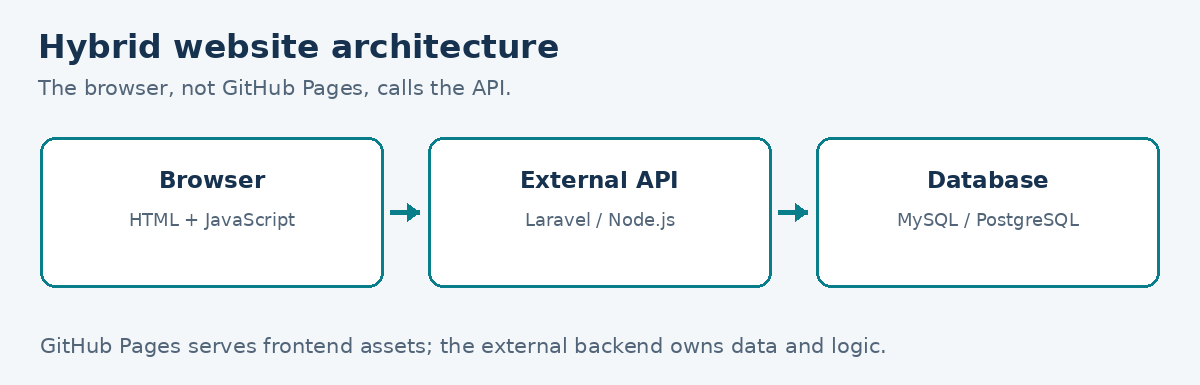
Figure 1. Runtime API architecture.
Technology | GitHub Pages support |
|---|---|
HTML, CSS, JS, React, Vue, Angular | Yes — static assets and client-side execution. |
Next.js, Astro, Hugo, Jekyll | Yes — when built into static files. |
PHP, Laravel, Django, Node.js server | External runtime only. |
MySQL, PostgreSQL, MongoDB | External backend only; never expose credentials. |
Firebase, Supabase, serverless APIs | External service integration; enforce access rules. |
WordPress | External CMS or static export; not native PHP hosting. |
Choosing the right model
Use client rendering for search, filters and interactive dashboards; use pre-generated HTML for evergreen articles, documentation and resource pages. Combine the two when useful. For commercial SaaS or e-commerce, choose application hosting instead of GitHub Pages.
2. Lab 1 — Publish a static website
DOCUMENTED — GitHub portal steps and Git commands below were not run against a live repository.
Step 1. Create a repository
In GitHub, create a public repository named dynamic-website, initialize it with a README and use the main branch. Replace YOUR-USERNAME throughout with your actual username.
Step 2. Create index.html in the repository root
<!doctype html>
<html lang="en">
<head>
  <meta charset="utf-8">
  <meta name="viewport" content="width=device-width, initial-scale=1">
  <title>My GitHub Pages Website</title>
</head>
<body>
  <h1>Hello, GitHub Pages!</h1>
  <p>This is a static website.</p>
  <button id="show">Show current time</button>
  <p id="output" aria-live="polite"></p>
  <script>
    document.querySelector('#show').addEventListener('click', () => {
      document.querySelector('#output').textContent =
        new Date().toLocaleString();
    });
  </script>
</body>
</html>Code language: HTML, XML (xml)
Step 3. Enable Pages
Open the repository Settings → Pages → Build and deployment. Select Deploy from a branch, choose main and / (root), then Save. Wait for the deployment to finish under Actions.
Step 4. Verify the website
curl -I https://YOUR-USERNAME.github.io/dynamic-website/Code language: PHP (php)Open the same URL in your browser. Expected: a visible Hello, GitHub Pages! heading, HTTP 200 once published, and a button that displays the current local time. This interaction runs in the browser, not on GitHub’s server.
3. Lab 2 — Fetch live data from a REST API
DOCUMENTED — example uses the public GitHub REST API. It is not a live deployment test. Replace index.html with the following standalone application. It shows public repositories and handles errors without embedding credentials.
<!doctype html>
<html lang="en">
<head>
  <meta charset="utf-8">
  <meta name="viewport" content="width=device-width, initial-scale=1">
  <title>Repository Explorer</title>
</head>
<body>
  <h1>GitHub Repository Explorer</h1>
  <label for="user">GitHub username</label>
  <input id="user" value="kubernetes">
  <button id="search">Search</button>
  <p id="status" role="status"></p>
  <ul id="results"></ul>
  <script>
    const $ = id => document.getElementById(id);
    $('search').onclick = async () => {
      const user = $('user').value.trim();
      $('results').replaceChildren();
      if (!user) { $('status').textContent = 'Enter a username'; return; }
      $('status').textContent = 'Loading...';
      $('search').disabled = true;
      try {
        const endpoint = 'https://api.github.com/users/' +
          encodeURIComponent(user) + '/repos?per_page=10&sort=updated';
        const response = await fetch(endpoint);
        if (!response.ok) throw new Error('HTTP ' + response.status);
        const repos = await response.json();
        for (const repo of repos) {
          const li = document.createElement('li');
          const a = document.createElement('a');
          a.href = repo.html_url;
          a.textContent = repo.name + ' — stars: ' + repo.stargazers_count;
          li.append(a); $('results').append(li);
        }
        $('status').textContent = repos.length + ' repositories loaded';
      } catch (err) {
        $('status').textContent = 'Request failed: ' + err.message;
      } finally { $('search').disabled = false; }
    };
  </script>
</body>
</html>Code language: HTML, XML (xml)
Commit, open the deployed URL, enter kubernetes or hashicorp and click Search. The list should populate if the API is reachable and its unauthenticated rate limit permits the request. A nonexistent account should display an HTTP error.
4. Lab 3 — Connect Laravel and MySQL
DOCUMENTED — requires an externally deployed Laravel application. On installations without API routing, enable it using the procedure for your Laravel version. Add a public read-only route to routes/api.php. The example uses fixed approved data before introducing a database.
<?php
use Illuminate\Support\Facades\Route;
Route::get('/articles', function () {
    return response()->json([
        [
            'slug' => 'kubernetes-guide',
            'title' => 'Kubernetes Fundamentals',
            'description' => 'Learn the core Kubernetes concepts.',
            'url' => 'https://kubernetes.io/docs/'
        ]
    ]);
});Code language: HTML, XML (xml)
Step 1. Validate your endpoint
curl --fail https://api.example.com/api/articlesCode language: JavaScript (javascript)Replace api.example.com with your server. Confirm the response is JSON containing slug, title, description and url. For a real database, query published articles only and select these public fields; do not serialize private model attributes.
Step 2. Permit browser requests with CORS
In Laravel CORS configuration, allow the exact frontend origin (for example, https://YOUR-USERNAME.github.io) and GET for the public API. For a custom domain, use that origin instead. CORS is not authentication.
Step 3. Read the public API in the browser
<ul id="articles"></ul>
<script>
fetch('https://api.example.com/api/articles')
  .then(r => { if (!r.ok) throw Error(r.status); return r.json(); })
  .then(items => {
    for (const item of items) {
      const u = new URL(item.url);
      if (u.protocol !== 'https:') continue;
      const li = document.createElement('li');
      const a = document.createElement('a');
      a.href = u.href; a.textContent = item.title;
      li.append(a); document.querySelector('#articles').append(li);
    }
  })
  .catch(() => { document.querySelector('#articles').textContent =
    'Unable to load articles'; });
</script>Code language: HTML, XML (xml)
Place this snippet within the body of an HTML page. For write operations, authenticate users, validate input, authorize each operation, and handle CSRF where applicable. Never expose database or private API secrets in JavaScript.
5. Lab 4 — Build SEO-friendly static pages automatically
TESTED LOCALLY — the Python generator and local fixture checks were executed. GitHub Actions deployment itself is DOCUMENTED.
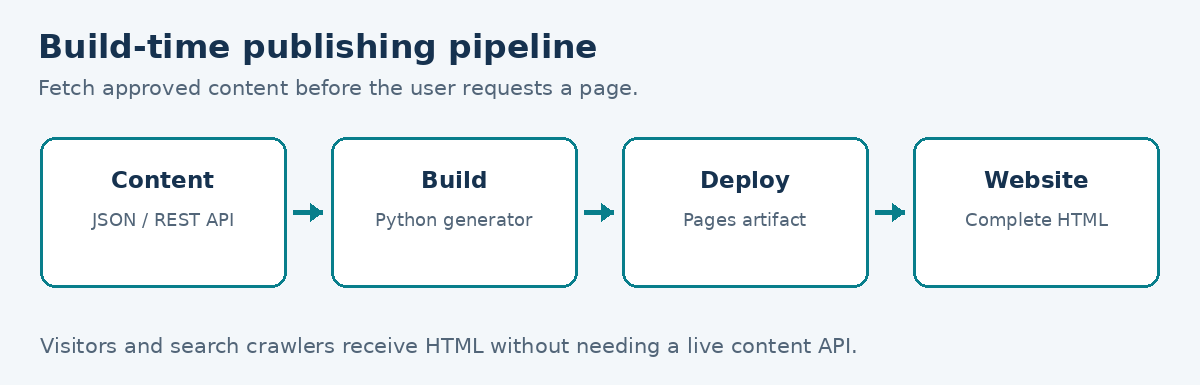
Figure 2. Automated static publishing pipeline.
Step 1. Create a separate repository
Create a public repository called automated-website, default branch main. This keeps the earlier branch-based lab separate from the custom workflow.
automated-website/
  data/articles.json
  scripts/generate.py
  .github/workflows/deploy.yml
Step 2. Create data/articles.json
[
  {
    "slug": "kubernetes-guide",
    "title": "Kubernetes Fundamentals",
    "description": "Pods run containers; Deployments manage replicas.",
    "url": "https://kubernetes.io/docs/"
  },
  {
    "slug": "terraform-guide",
    "title": "Terraform Fundamentals",
    "description": "A plan previews changes before an apply.",
    "url": "https://developer.hashicorp.com/terraform"
  },
  {
    "slug": "docker-guide",
    "title": "Docker Fundamentals",
    "description": "Images package software; containers run it.",
    "url": "https://docs.docker.com/"
  }
]Code language: JSON / JSON with Comments (json)
These short entries are test fixtures, not publication-ready articles. Replace them with substantive, original educational content before seeking search visibility.
6. Implement the Python static-site generator
File: scripts/generate.py. The generator validates slugs, rejects duplicate URLs at the path level, escapes HTML, writes a homepage and builds a sitemap. Set SITE_URL to the published project URL when testing locally.
import json, os, re, shutil
from pathlib import Path
from html import escape
from urllib.parse import urlparse
from urllib.request import urlopen
from xml.sax.saxutils import escape as xml_escape
base = os.environ['SITE_URL'].rstrip('/')
assert urlparse(base).scheme == 'https', 'HTTPS SITE_URL required'
api = os.getenv('CONTENT_API_URL')
if api:
    with urlopen(api, timeout=30) as response:
        articles = json.load(response)
else:
    articles = json.loads(Path('data/articles.json').read_text())
out = Path('public')
if out.exists():
    shutil.rmtree(out)
out.mkdir()
links, urls, seen = [], [base + '/'], set()
def page(title, description, canonical, body):
    return ('<!doctype html><html lang="en"><head>'
            '<meta charset="utf-8"><meta name="viewport" '
            'content="width=device-width, initial-scale=1">'
            f'<title>{escape(title)}</title>'
            f'<meta name="description" content="{escape(description)}">'
            f'<link rel="canonical" href="{escape(canonical)}">'
            f'</head><body>{body}</body></html>')
for item in articles:
    slug = item['slug']
    if not re.fullmatch(r'[a-z0-9-]+', slug) or slug in seen:
        raise ValueError('Invalid or duplicate slug: ' + slug)
    seen.add(slug)
    url = item['url']
    if urlparse(url).scheme != 'https' or not urlparse(url).netloc:
        raise ValueError('Invalid HTTPS resource URL')
    title, desc = item['title'], item['description']
    canonical = f'{base}/{slug}/'
    folder = out / slug
    folder.mkdir()
    body = (f'<h1>{escape(title)}</h1><p>{escape(desc)}</p>'
            f'<p><a href="{escape(url)}">Official documentation</a></p>'
            '<p><a href="../">Home</a></p>')
    (folder / 'index.html').write_text(
        page(title, desc, canonical, body), encoding='utf-8')
    links.append(f'<li><a href="{slug}/">{escape(title)}</a></li>')
    urls.append(canonical)
body = '<h1>Learning Resources</h1><ul>' + ''.join(links) + '</ul>'
(out / 'index.html').write_text(page('Learning Resources',
    'Practical technical learning resources.', base + '/', body),
    encoding='utf-8')
sitemap = '<urlset xmlns="http://www.sitemaps.org/schemas/sitemap/0.9">'
sitemap += ''.join(f'<url><loc>{xml_escape(u)}</loc></url>' for u in urls)
(out / 'sitemap.xml').write_text(sitemap + '</urlset>', encoding='utf-8')
print(f'Generated {len(articles)} article pages')Code language: HTML, XML (xml)
7. Test the build and configure GitHub Actions
Step 3. Run the generator locally
export SITE_URL=https://YOUR-USERNAME.github.io/automated-website
python3 scripts/generate.py
python3 -m http.server 8000 --directory publicCode language: PHP (php)
TESTED LOCALLY: equivalent commands ran with a fixture URL; the generator created three article pages, a homepage and an XML sitemap. Stop the local server with Ctrl+C. Open http://localhost:8000/ and follow each internal link. The canonical URLs intentionally reference the production site, not localhost.
Step 4. Set the publishing source
DOCUMENTED: in Settings → Pages, select GitHub Actions under Build and deployment. Create .github/workflows/deploy.yml. The workflow obtains the actual site URL from configure-pages and uses it to generate canonical URLs.
name: Build and Deploy Website
on:
  push:
    branches: [main]
  workflow_dispatch:
  schedule:
    - cron: '15 0 * * *'
permissions:
  contents: read
concurrency:
  group: github-pages
  cancel-in-progress: false
jobs:
  build:
    runs-on: ubuntu-latest
    steps:
      - uses: actions/checkout@v6
      - uses: actions/configure-pages@v5
        id: pages
      - name: Generate website
        env:
          SITE_URL: ${{ steps.pages.outputs.base_url }}
        run: python3 scripts/generate.py
      - uses: actions/upload-pages-artifact@v4
        with:
          path: public
  deploy:
    needs: build
    runs-on: ubuntu-latest
    permissions:
      pages: write
      id-token: write
    environment:
      name: github-pages
      url: ${{ steps.deployment.outputs.page_url }}
    steps:
      - uses: actions/deploy-pages@v4
        id: deploymentCode language: PHP (php)
The action major versions match GitHub’s documented custom-workflow example. Production teams should pin reviewed actions to full commit SHAs. Scheduled runs can be delayed; a daily build of unchanged local JSON will not create new content.
8. Deploy, verify and connect a content API
Step 5. Commit and deploy
DOCUMENTED — use the GitHub web editor or run the following from a cloned repository. The source must already be configured for GitHub Actions.
git add data/articles.json scripts/generate.py .github/workflows/deploy.yml
git commit -m "Add static website generation and Pages deployment"
git push origin mainCode language: JavaScript (javascript)
Open Actions → Build and Deploy Website. Verify both build and deploy jobs succeed. Open the deployment URL shown by the github-pages environment. If the repository is public, anyone can visit the resulting site.
Step 6. Verify the published pages
BASE=https://YOUR-USERNAME.github.io/automated-website
curl --fail "$BASE/"
curl --fail "$BASE/kubernetes-guide/"
curl --fail "$BASE/sitemap.xml"Code language: PHP (php)
Expected: homepage and article return HTML containing headings and real anchor links; sitemap contains full production URLs. Use View Page Source, not just the browser DOM, to confirm article text is present without JavaScript.
Step 7. Replace fixture JSON with Laravel API data
The generator already supports CONTENT_API_URL. In the workflow’s Generate website step, add the environment variable below alongside SITE_URL. Ensure that the API is reachable from GitHub-hosted runners and returns the same JSON shape.
env:
  SITE_URL: ${{ steps.pages.outputs.base_url }}
  CONTENT_API_URL: https://api.example.com/api/articlesCode language: JavaScript (javascript)
For an authenticated API, modify the generator to use an HTTPS request with an authorization header populated from GitHub Actions Secrets. The sample generator is deliberately public-read-only. Do not expose API tokens, private database records or personal information in public artifacts.
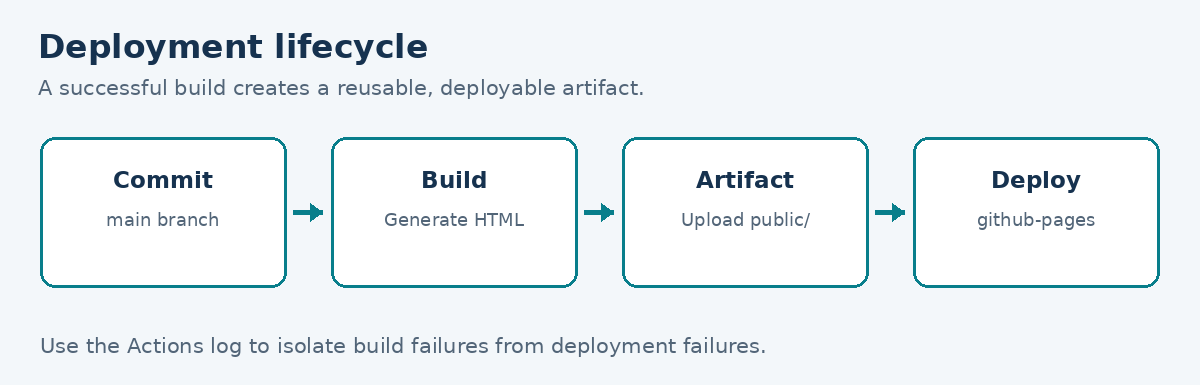
Figure 3. CI/CD workflow and deployment verification.
9. GitHub Pages SEO and link building
Search engines can discover public GitHub Pages URLs and follow normal HTML links. Google can render JavaScript, but pre-rendered pages reduce dependency on rendering and API availability. Indexing and ranking are never guaranteed. GitHub’s reputation does not automatically pass to every hosted site.
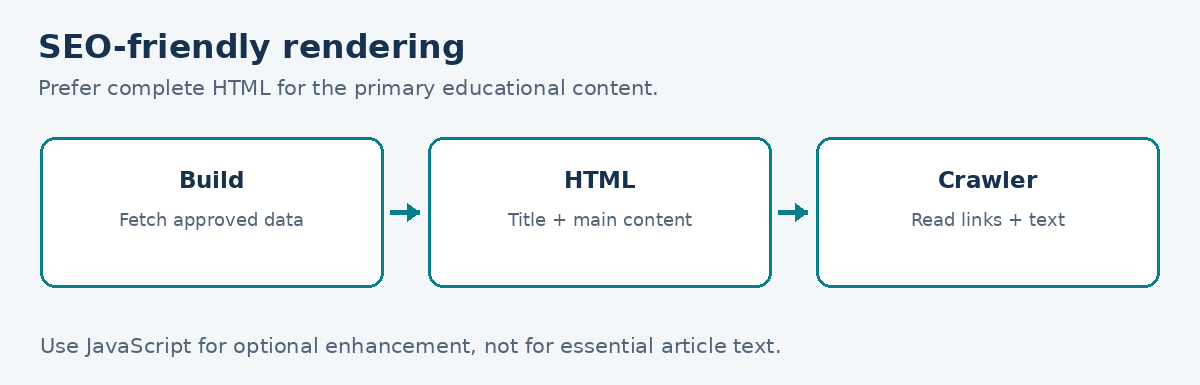
Figure 4. Static generation and search crawler access.
SEO element | Recommended implementation |
|---|---|
Title / description | Unique title and meta description for each page. |
Canonical | Use absolute production URL; self-canonical for original pages. |
Sitemap | Generate absolute URLs; submit in Search Console. |
Crawlable links | Use anchor elements with href and descriptive text. |
robots.txt | Host at hostname root, not a project subdirectory. |
Content | Publish original tutorials, tested examples and useful resources. |
Structured data | Only where accurate and eligible; validate markup. |
Performance | Optimize images and minimize unnecessary JavaScript. |
Link-building practices
Useful open-source projects, cheat sheets, configuration examples, documentation and free learning tools can earn references organically. Link to primary sources or your own relevant full tutorial when readers benefit. Avoid mass-produced thin sites, link exchanges intended to manipulate search rankings and paid links without appropriate qualification.
A normal anchor without nofollow is not a promise of ranking credit. Google may ignore self-created links. Track referral traffic, Search Console impressions and earned independent links, not merely the number of backlinks.
10. Framework choices, limits and security
Generator | Typical use case |
|---|---|
Hugo (Go) | Large technical blogs and resource libraries. |
Astro (JavaScript) | Content-rich static sites with interactive components. |
Jekyll (Ruby) | Simple blogs and project websites. |
Docusaurus / MkDocs | Developer documentation and learning portals. |
Next.js static export | React sites that do not need request-time server features. |
Eleventy / VitePress | Lightweight sites and technical documentation. |
GitHub Pages platform limits
Limit | Documented constraint |
|---|---|
Published site | Maximum 1 GB. |
Repository size | Recommended maximum 1 GB. |
Bandwidth | Soft limit of 100 GB per month. |
Deployment | Timeout after 10 minutes. |
Build frequency | Soft limit of 10 per hour; custom Actions builds exempt from this specific limit. |
Commercial use | Not intended as free hosting for online businesses, e-commerce or commercial SaaS. |
Security and operations
Never put private API tokens, database passwords or sensitive information in browser assets or public repositories.
Use HTTPS, explicit authorization, rate limits, validated content and scoped CORS. CORS alone does not protect an API.
Restrict deployment privileges, review workflow changes, pin actions in production and check generated artifacts for leaked secrets.
Avoid untrusted HTML; escape text and validate URLs. Review third-party dependencies and resource licensing.
For a commercial web application, use a managed application platform or VPS; evaluate service terms before deployment.
Alternatives
Cloudflare Pages/Workers, Vercel, Netlify, Firebase Hosting, Azure Static Web Apps and AWS Amplify offer different backend integrations. Render or a VPS can host server-side applications. Check each provider’s current quotas and commercial terms.
11. Troubleshooting and practical exercises
Symptom | What to check |
|---|---|
404 at project URL | Correct username/repository path; Pages source; index.html at artifact root. |
CSS or JavaScript missing | Use relative URLs or configure the project base path. |
API returns 403 or 429 | Check authentication and rate limit; back off; do not add secret tokens to frontend. |
CORS error in browser | Allow exact frontend origin on API; inspect browser network panel. |
Workflow fails at build | Inspect generator exception, JSON fields, SITE_URL and API availability. |
Deploy cannot find artifact | Ensure deploy needs build and upload path is public. |
Deploy permission failure | Check Pages source, pages: write, id-token: write and environment rules. |
Pages not indexed | Check public access, canonical URLs, sitemap, crawlability and content value. |
Hands-on exercises
Add a new original resource to articles.json, run the generator again and verify that the homepage and sitemap contain its URL.
Introduce a duplicate slug and confirm the build fails, then correct it. Add HTML special characters to a title and inspect the escaped output.
Change a resource URL to http:// and confirm validation rejects it. Restore a valid HTTPS link.
Add a client-side filter to the resource homepage without removing its original HTML links.
Publish a unique, substantive technical guide; inspect its production source and submit its sitemap through Search Console.
Quick acceptance test
A successful implementation has a green deployment, reachable homepage and article URLs, a valid sitemap, correct canonical URLs, readable source HTML and no credentials in the public artifact. For interactive features, verify success and error paths in the browser.
Test evidence
The static generator was executed locally with the three JSON fixtures; HTML headings, links, canonical URLs, XML sitemap, local HTTP responses and input-validation failure cases were checked. GitHub Actions YAML was parsed structurally. Live Pages deployment, browser API requests, Laravel runtime, Search Console indexing and WordPress import were not independently executed.
12. Frequently asked questions
Can GitHub Pages run PHP or Laravel?
No. Host those runtimes on a separate server and expose selected data through an API.
Can I connect to a database?
Yes, indirectly. Let a backend query the database, or export public data at build time. Do not connect browser JavaScript to a private database.
Can I use WordPress?
Use WordPress as an externally hosted headless CMS, or export static HTML. GitHub Pages cannot execute WordPress PHP.
Can I publish automatically every day?
Yes. A scheduled workflow can fetch content and rebuild the site; execution may be delayed and inactive public repositories can have schedules disabled.
Will backlinks improve my domain authority?
Possibly, but no guaranteed effect. A link you create yourself can be discounted. Focus on helpful resources and independent earned links.
Do I need a custom domain?
No. A github.io project URL works; custom domains are optional and can simplify root paths and branding.
Can AI coding tools help?
Yes. They can draft code, tests and workflows. Review changes, grant minimal permissions, and avoid exposing secrets.
How many pages can I create?
There is no useful universal page-count target. Stay within site size, deployment and bandwidth limits; prioritize original and valuable pages.
Conclusion
Use GitHub Pages as a static delivery layer, not a server runtime. A small build pipeline can turn reviewed data into complete HTML, while JavaScript adds interactivity when needed. For documentation and open-source educational resources, this architecture is inexpensive and maintainable. For SEO, the most durable outcome comes from resources that deserve to be referenced.
13. Official references
Official documentation reviewed for the tutorial. Follow the current instructions for your own GitHub plan and framework version.
GitHub — Creating a Pages site
GitHub — Configure publishing source
GitHub — Custom Pages workflows
GitHub — REST API documentation
Google — JavaScript SEO basics
Mammoth — WordPress converter plugin
Mammoth.js — Embedded style maps
14. WordPress SEO publishing metadata
Field | Suggested value |
|---|---|
SEO title | GitHub Pages Dynamic Website Tutorial: APIs and CI/CD |
Meta description | Build dynamic GitHub Pages sites using JavaScript, Laravel REST APIs and GitHub Actions. Learn static generation, deployment and SEO best practices. |
Focus keyword | GitHub Pages dynamic website |
Secondary keywords | GitHub Pages SEO, GitHub Actions deployment, Laravel REST API, static site generation, GitHub Pages link building |
URL slug | github-pages-dynamic-website-tutorial |
Categories | DevOps, GitHub, Web Development |
Tags | GitHub Pages, GitHub Actions, JavaScript, REST API, Laravel, Static Site, SEO, CI/CD |
Publisher notes (remove this section after import)
Upload this single DOCX through Mammoth in the WordPress post editor. Preview before inserting, then confirm images appear in Media Library and code is preformatted. Set the embedded featured image as the post’s Featured Image; Mammoth does not normally set that field automatically. Enter SEO fields in your SEO plugin and remove this metadata/publisher section from the public article if desired. If the theme outputs the title as H1, move the article H1 to the post title and remove the duplicate body heading.
The embedded Mammoth style map maps Code Block paragraphs to pre/code with newline separators, and Caption paragraphs to caption-styled HTML. Theme styling and actual WordPress upload behavior may vary; review the final preview before publication.

I’m Rajesh Kumar, a DevOps, SRE, DevSecOps, Cloud, and Platform Engineering expert passionate about sharing practical knowledge, real-world experiences, and industry best practices. I have worked at Cotocus and regularly write about technology, travel, investing, health, product reviews, and digital marketing through my various platforms.
I publish technical articles at DevOps School, travel stories at Holiday Landmark, stock market insights at Stocks Mantra, health and fitness guidance at My Medic Plus, product reviews at TrueReviewNow, and SEO and digital marketing strategies at Wizbrand.
Find Trusted Cardiac Hospitals
Compare heart hospitals by city and services — all in one place.
Explore Hospitals