
This page gives a reusable section layout for any technical training program, from the tool introduction through to the day-wise agenda, lab setup, trainers and FAQ. Below the original list you will find a recommended section order, a fill-in agenda template that search engines can read, a worked example, a lab setup specification and a checklist for reviewing a course page before it is published.
Here are the basic template sections of any training program:
- What is <XXXX>: This section should explain the Basic introduction of Tools used in course.
- Why XXXX is important: This section should explain why this tool is important to learn.
- Course Feature: This section feature about this Course / Training Program.
- Training objectives: This section should clearly state the goals of the training program. What skills or knowledge do you want the participants to learn?
- Target audience: This section should identify the specific group of people who will be attending the training program. What are their job roles, experience levels, and educational backgrounds?
- Training methodology: This section should describe how the training program will be delivered. Will it be a lecture, a workshop, or a combination of both? Will there be any hands-on exercises?
- Training materials: This section should list the materials that will be used in the training program, such as handouts, presentations, and videos.
- Evaluation: This section should describe how the effectiveness of the training program will be evaluated. Will there be a pre-test and post-test? Will participants be asked to complete a survey?
- Continuing education: This section should provide information about how participants can continue their education after the training program. Are there any online resources or professional development opportunities available?
- Certifications Program: This section should be discussed about which certifications can be addressed after this training.
- Agenda Daywise: This section should have daywise agenda
- Lab Setup: This section should lab setup for each training
- Trainers: This section should have list of Trainers who is going to cover this course/training.
- FAQ: This section should have at least 10 FAQ questions in terms of Tools used, Course or Certifications related.
Training methodology
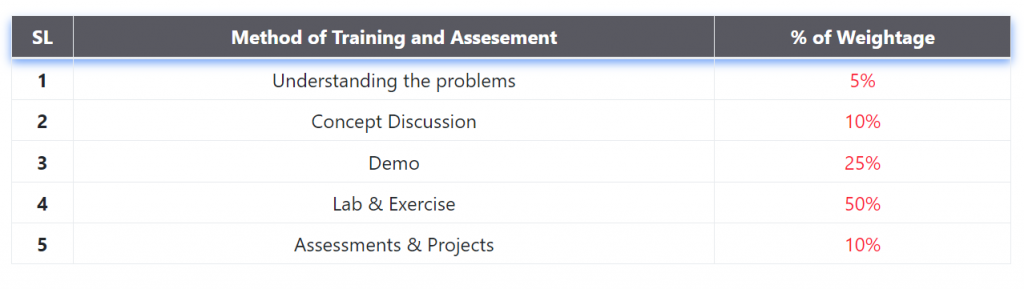
Reference 1
Recommended order and purpose of each section
The list above names the sections but does not put them in order. A course page reads best when it moves from the general to the specific: what the tool is, who the course is for, what learners will be able to do, how it is delivered, and only then the detailed agenda and logistics. The table below adds a Prerequisites section. The original list leaves it out, but it is one of the first things a prospective learner checks.
| Order | Section | Question it answers | Keep it to |
|---|---|---|---|
| 1 | What is XXXX | What does the tool do and where does it fit in the delivery pipeline? | 1–2 paragraphs |
| 2 | Why XXXX is important | What problem does it solve, and why would a team adopt it? | 3–5 bullets |
| 3 | Target audience | Which job roles and experience levels is this for? | Bulleted roles |
| 4 | Prerequisites | What must a learner already know or have installed? | Short bullet list |
| 5 | Training objectives | What will a learner be able to do afterwards? | 5–8 measurable objectives |
| 6 | Course features | Duration, format, labs, recordings, support after the course | Bullets or small table |
| 7 | Training methodology | Lecture, demo, hands-on, project: in what ratio? | 1 paragraph plus diagram |
| 8 | Agenda day-wise | What is covered in each session, and in what order? | Template below |
| 9 | Lab setup | What environment is needed, and how is it verified? | Spec plus verify commands |
| 10 | Training materials | What slides, guides, repositories and videos are provided? | Bullets |
| 11 | Evaluation | How are learning and course quality measured? | Short table |
| 12 | Certifications | Which exams does the course prepare for? | Exam name and vendor |
| 13 | Continuing education | Where should a learner go next? | 3–5 links |
| 14 | Trainers | Who delivers the course and what is their experience? | Short profiles |
| 15 | FAQ | Common questions about tools, course and certification | 10 or more Q&As |
Note: Only name a certification exam in section 12 if the agenda covers that exam's published objectives. Check the vendor's current exam guide each time you revise the course, because exam codes and objectives change.
Writing measurable training objectives
The Training objectives section is the one most often written vaguely. An objective should describe something a participant can be seen doing by the end of the course. That tells you what the labs and the evaluation have to cover. Start each objective with an action verb (install, configure, write, deploy, troubleshoot, compare). Avoid verbs you cannot test, such as "understand" or "know about".
| Weak objective | Measurable objective |
|---|---|
| Understand Docker | Build a container image from a Dockerfile and run it with port mapping and a mounted volume |
| Learn Kubernetes basics | Deploy an application with a Deployment and a Service, then scale it to three replicas |
| Know Terraform | Write a Terraform configuration that provisions a virtual network and a VM, and destroy it cleanly |
| Get familiar with CI/CD | Create a pipeline that builds, tests and publishes an artifact on every push to the main branch |
Each objective should map to at least one agenda session and one lab. If an objective has no lab, either add one or remove the objective.
Day-wise agenda template (readable version)
The Reference 1 template above loads through a GitHub gist script, so search engines, feed readers and text-only browsers cannot see it. Here is the same structure as plain text, with three additions: an environment check at the start of Day 1, explicit breaks, and a lab outcome for each session so trainers know when a learner has finished an exercise.
**Training Agenda: [Training Title]**
Duration: [N days x N hours]   Mode: [Online / Classroom / Hybrid]   Time zone: [TZ]

**Day [N]: [Date] - [Theme or Focus of the Day]**

- **Session [N]: [Start Time] - [End Time]**
  - **Session Title:** [Session Title]
  - **Learning Objectives:** (measurable, start with a verb)
    - [Objective 1]
    - [Objective 2]
  - **Agenda:**
    - [Topic 1]
    - [Topic 2]
  - **Activities:** [Demo / Lab / Quiz / Group exercise]
  - **Lab Outcome:** [What the learner must have working at the end]
  - **Materials:** [Slides, lab guide, repository link]
  - **Q&A and Discussion:** [Minutes]

- **Break: [Start Time] - [End Time]**

- ...

**Wrap-up and Q&A ([End Time] - [Final End Time])**
  - **Recap:** Key takeaways from the training
  - **Open Forum:** Questions and discussion
  - **Next Steps:** Resources for continued learning
  - **Feedback:** Participant feedback form

[Additional Notes or Special Instructions for Participants]

*Note: This agenda is subject to change. Please refer to any updates provided during the training.*Code language: CSS (css)
Worked example: one day of a container course
A filled-in example shows how much detail each session needs. This is Day 1 of a made-up two-day Docker and Kubernetes fundamentals course.
**Day 1: [Date] - Containers with Docker**

- **Session 1: 09:30 - 11:00**
  - **Session Title:** Container fundamentals and environment check
  - **Learning Objectives:**
    - Explain the difference between a container and a virtual machine
    - Verify a working Docker installation
  - **Agenda:** Images vs containers, registries, Docker architecture
  - **Activities:** Each participant runs the lab verification commands
  - **Lab Outcome:** `docker run hello-world` succeeds on every machine
  - **Q&A and Discussion:** 15 minutes

- **Break: 11:00 - 11:15**

- **Session 2: 11:15 - 13:00**
  - **Session Title:** Building images
  - **Learning Objectives:**
    - Write a Dockerfile for a small web application
    - Tag and push an image to a registry
  - **Agenda:** Dockerfile instructions, layer caching, multi-stage builds, .dockerignore
  - **Activities:** Guided lab: containerise a sample app
  - **Lab Outcome:** Image builds, runs on port 8080 and is pushed to the registry
  - **Q&A and Discussion:** 15 minutes

- **Lunch: 13:00 - 14:00**

- **Session 3: 14:00 - 16:30**
  - **Session Title:** Volumes, networks and Docker Compose
  - **Learning Objectives:**
    - Persist data with a named volume
    - Run a two-container application with Docker Compose
  - **Activities:** Lab: web app plus database using compose.yaml
  - **Lab Outcome:** `docker compose up -d` starts both services and data survives a restart
  - **Q&A and Discussion:** 20 minutesCode language: CSS (css)
Note: In a technical course, plan roughly as much time for hands-on work as for explanation, and leave some slack. Labs usually take longer than planned, especially in the first session, when environment problems tend to appear.
Lab setup section template
The original line "This section should lab setup for each training" does not say what to include. A useful lab setup section lets a participant prepare before Day 1 and confirm that the environment works. It should list the hardware, operating system, software, accounts and network access needed, then give commands that prove each piece works.
## Lab Setup

**Option A - Cloud lab (provided):** Access details are emailed before Day 1.
**Option B - Own machine:**
- OS: Linux, macOS, or Windows with WSL 2
- CPU / RAM / Disk: [e.g. 4 cores, 8 GB RAM, 30 GB free]
- Software: Git, Docker Engine or Docker Desktop, kubectl, a code editor
- Accounts: GitHub account, container registry account
- Network: outbound HTTPS allowed; corporate proxy details if applicable
- Permissions: local admin or sudo rights to install software

**Verify before Day 1:** run the commands below and share the output.Code language: PHP (php)
git --version
docker --version
docker run --rm hello-world
kubectl version --clientAsk participants to send a screenshot of this output, or run a short pre-course call. If proxy, permission and virtualisation problems are fixed before the course, the first session can be spent teaching.
Evaluating the training
The Evaluation section is clearer when it follows a known framework. The Kirkpatrick model, which is widely used in corporate training, measures four levels. Most public courses cover the first two. Corporate engagements often ask for evidence at levels three and four.
| Level | Measures | Typical method |
|---|---|---|
| 1. Reaction | Did participants find the training relevant and well delivered? | End-of-day and end-of-course feedback form |
| 2. Learning | Did they gain the knowledge and skills in the objectives? | Pre-test and post-test, graded labs, final project |
| 3. Behaviour | Do they apply the skills at work? | Follow-up survey or manager check-in after a few weeks |
| 4. Results | Did the team or organisation improve? | Metrics agreed with the client, such as deployment frequency or incident counts |
Corrections to the original template
The list above gets the intent across, but several entries are incomplete or ungrammatical. If you copy it into a course document, use these corrected descriptions:
- Course features: "This section lists the features of the course, such as duration, delivery mode, number of labs, recordings and post-training support."
- Lab setup: "This section describes the lab environment for the training, including hardware, software, accounts and verification steps."
- Trainers: "This section lists the trainers who deliver the course, with a short profile of each."
- Certifications program: "This section names the certifications that this training helps participants prepare for."
- Prerequisites (missing): add a section listing the knowledge, skills and software a participant needs before joining.
- Training methodology image: add descriptive alt text, for example "Training methodology: concept, demo, hands-on lab and project", so screen reader users can follow the diagram.
Review checklist before publishing a course page
- Every section in the order table is present, or has been left out on purpose.
- Each objective starts with an action verb and maps to at least one session and one lab.
- The agenda times add up to the stated course duration, including breaks.
- Tool versions in the lab setup match the versions used in the lab guide.
- Named certification exams are current and match the vendor's published objectives.
- Trainer profiles are accurate and approved by the trainers.
- The FAQ answers real questions from past participants, not filler.
- Templates and agendas are in the page HTML, not only inside embedded scripts.
Frequently asked questions
What sections should a training program outline include?
At minimum: an introduction to the tool, target audience, prerequisites, measurable objectives, delivery methodology, a day-wise agenda, lab setup, evaluation method and trainer details. Certification mapping, continuing education and an FAQ complete the outline.
What is the difference between training objectives and the agenda?
Objectives state what a participant will be able to do after the course. The agenda states when and in what order each topic is taught. Every objective should be covered by at least one agenda session.
How many hours per day should a technical training run?
There is no fixed rule. Many instructor-led technical courses run a full working day with regular breaks, while online courses often use shorter sessions to reduce screen fatigue. Whatever the length, keep a large share of the time for hands-on labs.
What should the lab setup section of a course contain?
It should list the hardware, operating system, software, accounts and network access required. It should also give verification commands that participants run before the course to confirm their environment works.
How do you measure whether a training program was effective?
A common approach is the Kirkpatrick model, which looks at participant reaction, learning (through tests and graded labs), on-the-job behaviour and business results. Most courses measure at least the first two levels.
Related tutorials
- RHCSA EX200 Self-Study Curriculum and Hands-On Lab Manual
- Red Hat EX342 Complete Home-Study Curriculum
- Dynatrace Associate Certification Master Guide
- More Training & Certifications tutorials

I’m Rajesh Kumar, a DevOps, SRE, DevSecOps, Cloud, and Platform Engineering expert passionate about sharing practical knowledge, real-world experiences, and industry best practices. I have worked at Cotocus and regularly write about technology, travel, investing, health, product reviews, and digital marketing through my various platforms.
I publish technical articles at DevOps School, travel stories at Holiday Landmark, stock market insights at Stocks Mantra, health and fitness guidance at My Medic Plus, product reviews at TrueReviewNow, and SEO and digital marketing strategies at Wizbrand.
Find Trusted Cardiac Hospitals
Compare heart hospitals by city and services — all in one place.
Explore Hospitals
FAQ Question for ChatGPT and BARD can be – List of is FAQ for Git Training, Courses and Certification