
GitOps vs DevOps: Understanding the Differences
Are you confused about the differences between GitOps and DevOps? You’re not alone! Many people think that GitOps and DevOps are the same thing, but they’re actually quite different. In this article, we’ll explore the key differences between these two approaches to software development.
What is DevOps?
Let’s start with DevOps. DevOps is a methodology that combines software development (Dev) and IT operations (Ops) to create a continuous delivery pipeline. The goal of DevOps is to improve collaboration between development and operations teams, automate the software delivery process, and increase the speed and reliability of software releases.
What is GitOps?
Now let’s talk about GitOps. GitOps is an approach to software delivery that uses Git as the single source of truth for infrastructure and application deployments. In GitOps, all changes to infrastructure and application code are made through pull requests in Git. This allows for version control, code reviews, and easy rollbacks. GitOps also emphasizes declarative infrastructure, where the desired state of the infrastructure is defined in code, rather than manually configuring individual servers.
Key Differences Between GitOps and DevOps
So what are the key differences between GitOps and DevOps?
Approach to Infrastructure Management
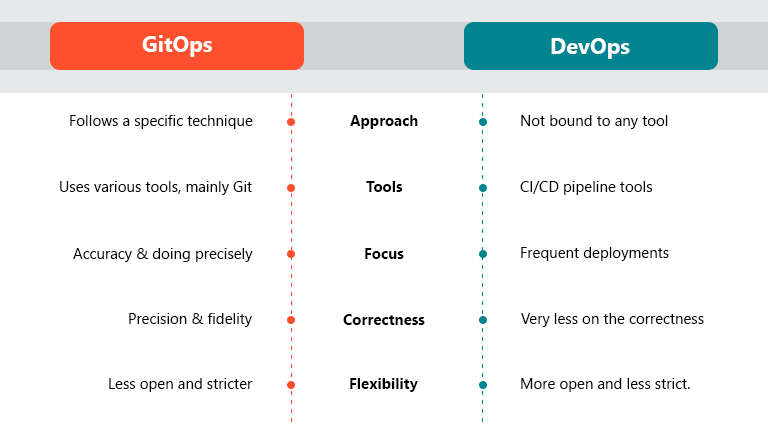
One of the biggest differences between GitOps and DevOps is their approach to infrastructure management. DevOps typically relies on manual configuration of servers, which can be time-consuming and error-prone. GitOps, on the other hand, emphasizes declarative infrastructure, where the desired state of the infrastructure is defined in code. This allows for easier management of infrastructure at scale.
Use of Git as a Single Source of Truth
Another key difference between GitOps and DevOps is their use of Git as a single source of truth. In DevOps, changes to infrastructure and application code may be made through a variety of tools and processes, which can lead to inconsistencies and errors. In GitOps, all changes to infrastructure and application code are made through pull requests in Git. This allows for version control, code reviews, and easy rollbacks.
Automation and Continuous Delivery
Both GitOps and DevOps emphasize automation and continuous delivery. However, GitOps takes this a step further by using Git as the source of truth for all changes to infrastructure and application code. This allows for easier automation of the software delivery process, as well as easier rollbacks in case of errors.
Which Approach is Right for You?
So which approach is right for your organization? The answer depends on your specific needs and goals. If your organization values manual server configuration and a variety of tools for managing infrastructure, DevOps may be the way to go. However, if you value declarative infrastructure and a single source of truth for all changes, GitOps may be a better fit.
Conclusion
In conclusion, GitOps and DevOps are two different approaches to software delivery. While both emphasize automation and continuous delivery, they differ in their approach to infrastructure management and their use of Git as a single source of truth. Understanding the differences between GitOps and DevOps can help you choose the approach that’s right for your organization.

👤 About the Author
Ashwani is passionate about DevOps, DevSecOps, SRE, MLOps, and AiOps, with a strong drive to simplify and scale modern IT operations. Through continuous learning and sharing, Ashwani helps organizations and engineers adopt best practices for automation, security, reliability, and AI-driven operations.
🌐 Connect & Follow:
Website: WizBrand.com
Facebook: facebook.com/DevOpsSchool
X (Twitter): x.com/DevOpsSchools
LinkedIn: linkedin.com/company/devopsschool
YouTube: youtube.com/@TheDevOpsSchool
Instagram: instagram.com/devopsschool
Quora: devopsschool.quora.com
Email– contact@devopsschool.com
Find Trusted Cardiac Hospitals
Compare heart hospitals by city and services — all in one place.
Explore Hospitals
A key point that is often missed in discussions about GitOps vs DevOps is that they are not direct alternatives but operate at different levels of the software delivery ecosystem. DevOps is primarily a broader cultural and operational approach that emphasizes collaboration, automation, and end-to-end efficiency across development and operations, whereas GitOps is a specific implementation pattern focused on managing infrastructure and application state through Git-based declarative workflows. In practice, GitOps depends heavily on the foundations established by DevOps practices such as CI/CD pipelines, automated testing, monitoring, and strong release engineering, rather than replacing them. A common misunderstanding is that adopting GitOps eliminates the need for DevOps, when in reality it introduces additional structure and control around deployments, including stricter change management, continuous reconciliation, and Git-driven governance. While this improves consistency and traceability, it can also introduce additional operational overhead if not aligned with existing workflows. Ultimately, the real value comes from integrating GitOps into a mature DevOps environment in a way that enhances reliability and standardization without slowing down delivery or complicating incident response.