
AI agents are evolving beyond chat interfaces. As we swap prompted AI assistants for autonomous AI agents, it could be time to update your team’s workflow.
In 2026, AI no longer assists your team’s email operations, but can replace them with fully autonomous mailboxes.
But just like human employees, AI agents need more than an email address. They need a professional identity that customers recognize and trust.
With this in mind, we’ve put together a guide on how to set up email for AI agents using an agentic mailbox, how it works, and why branding and trust still matter in the era of automation.
What is Email for AI Agents?
Email for AI agents is a dedicated email inbox for autonomous AI agents, rather than an actual member of your team.
Agent email platforms not only give your AI agent an identity, but can also understand requests and send replies on behalf of your brand.
An email agent is essentially another participant in business communication that can think and act without human interaction.
How Do AI Agents Use Email?
AI agents use a dedicated email account to complete full customer communication workflows.
Email for AI agents is not just a platform for drafting messages; it also enables AI agents to triage and route inbox messages, schedule messages autonomously, document inbox data, and verify accounts, all while crafting and sending personalized emails.
But for the purpose of this, let’s take a closer look at how an AI agent would approach a direct customer request:
If a lead emails an agentic email address with the request, “I’d like to reschedule my appointment,” an AI agent would approach it in this order:
- AI would automatically scan the email
- Intent would be understood immediately
- The AI agent would then autonomously check for the schedule availability
- If slots are available, the agent would reschedule the appointment
- A confirmation email would be sent to the customer
- AI would automatically update the CRM
- Staff members would only be notified if the date was unavailable or a complex request was made
This is just one example of an agentic workflow, but email for AI agents allows teams to fully automate lead qualification through email, FAQ replies, meeting follow-ups, invoice processing, and more, all from one AI-powered account.
Why Do AI Agents Need an Email Identity?
Like any other member of your team, your AI agent needs a persistent identity, like any other member of your team.
A consistent identity is not only crucial for brand-to-consumer communication, but with a dedicated email account and address, your team’s AI agent can sign up for third-party services, receive OTP (One-Time Password) codes, and confirm registrations without human intervention.
Is Professional Email Identity Important for AI Agents?
First impressions matter, even if a customer is interacting with an AI agent. If you’re automating your most traffic-heavy inboxes, such as support@company.com or sales@company.com, it’s important to remember customers will judge AI-powered communication the same way they judge emails written by employees.
Opening up a dedicated email for AI agents can help build trust and credibility within the inbox.
Think about it this way. Recipients are much more likely to engage with support@company.com than with smartbot3856@gmail.com.
Maintaining a professional company identity within all communication is crucial.
What Should an Email for AI Agents Include?
Email for AI agents should be consistent with your human-based email accounts and communication.
This means including:
- Branded sender name
- Company logo
- Consistent email signature
- Contact details
- Website
- Social links
- Legal information where required
Once an AI agent has a professional identity, it can begin handling real business conversations.
How To Set Up an AI Agent Email with Hostinger
If you’ve decided that your AI agent needs its own mailbox, the next natural step is to set one up.
For the purpose of this guide, we’re going to show you how to set up an AI agent email using Hostinger Agentic Mail.
Step One: Create a Professional Email Account
This is where your knowledge of the company branding needs to come in. Before you can begin crafting an email for AI agents, you need to decide on a winning email domain.
We’d recommend going for something professional and connected directly to a recognizable company domain.
For example, for a customer service agent, support@yourcompany.com could build trust in the inbox for customers who have already interacted with your brand.
At this point, you can also edit your mailbox’s display name and add a branded email signature to help ensure that every AI-powered message remains consistent with your company’s messaging style, logo, and colors.
Step 2: Connect the Mailbox to Your AI Agent
This is where Hostinger’s agentic email tool comes in handy.
Next, connect the email account to your AI application using Hostinger Agentic Mail. This allows your AI agent to securely access its inbox and use email in its decision-making process.
Designed for no-code beginners, Hostinger’s AI Email application is quick to set up and immediately starts automating your email strategy.
Once connected, Hostinger’s agentic mail box can monitor all emails coming through in real-time and draft and send any responses automatically without the need for your team to intervene.
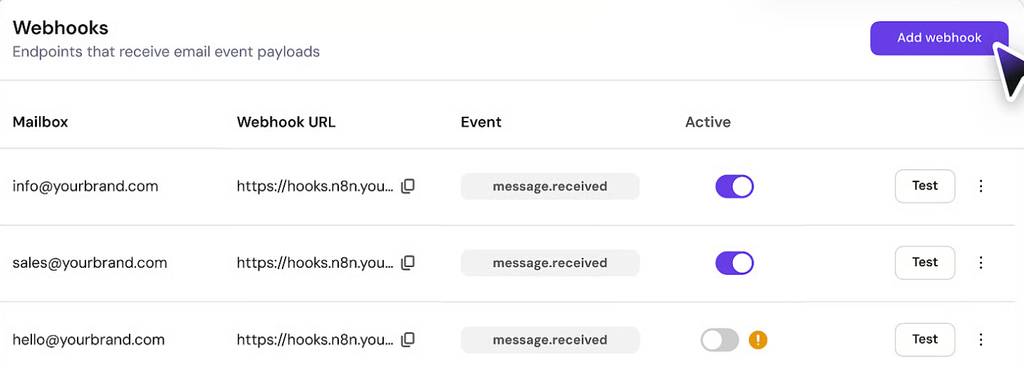
Essentially, Hostinger’s mailbox becomes another channel that your AI agent can use to streamline your workflow.
Step 3: Test Your Workflows
Before you deploy your email for AI agents, it’s important to test your workflows to ensure that your mailbox is functioning accurately.
To do this, create a single-use scenario, such as scheduling an appointment or answering a support request and run the workflow through your agent’s dedicated email.
Moving forward, ensure that you monitor agentic email interactions closely, fine-tune prompts based on changing customer attitudes and define clear escalation paths to help make sure results that require human input are not left unanswered.
Wrapping Up
Creating a dedicated email for AI agents is a no-brainer if you’re looking to scale your communications in 2026.
Leaning on AI agents to automate repetitive FAQ conversations, scheduling and support is a great way to ensure that your customers can connect with your brand 24/7.
The key to creating a successful agentic mailbox is to give your AI agent a professional identity that customers recognize and trust.
This includes creating a professional email address, fine-tuning responses to adhere to the brand’s tone of voice and including a branded email signature that matches the sign-off of your other team members.
Email for AI agents is just the start of smarter business communication. Those who continue to automate will not only speed up company-customer interactions but also strengthen their brand with every email.

I’m Rajesh Kumar, a DevOps, SRE, DevSecOps, Cloud, and Platform Engineering expert passionate about sharing practical knowledge, real-world experiences, and industry best practices. I have worked at Cotocus and regularly write about technology, travel, investing, health, product reviews, and digital marketing through my various platforms.
I publish technical articles at DevOps School, travel stories at Holiday Landmark, stock market insights at Stocks Mantra, health and fitness guidance at My Medic Plus, product reviews at TrueReviewNow, and SEO and digital marketing strategies at Wizbrand.
Find Trusted Cardiac Hospitals
Compare heart hospitals by city and services — all in one place.
Explore Hospitals