
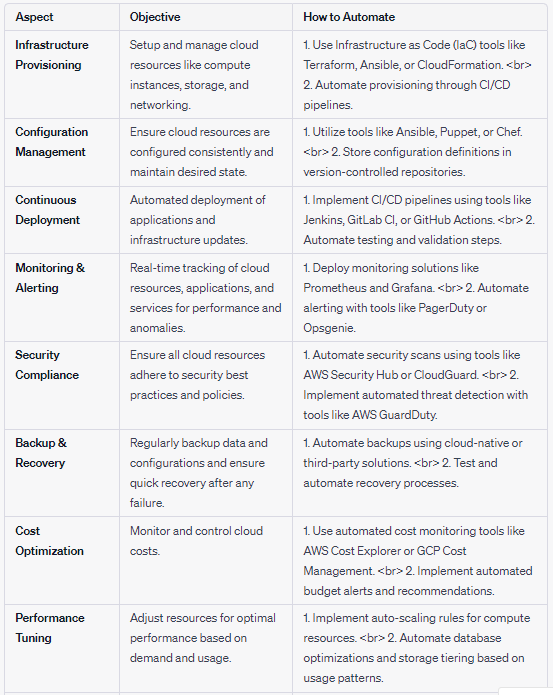
Are you tired of manually configuring your cloud infrastructure? Do you want to streamline your operations and increase efficiency? Look no further than CloudOps automation. In this article, we’ll explore the ins and outs of CloudOps automation, including what it is, why it’s important, and how to implement it in your organization.
What is CloudOps Automation?
CloudOps automation is the process of automating the management and deployment of cloud-based applications and infrastructure. It involves using tools and scripts to automate tasks that would otherwise be performed manually, such as provisioning resources, configuring servers, and deploying applications. By automating these tasks, you can reduce the risk of human error, increase efficiency, and improve the overall reliability of your cloud operations.
Why is CloudOps Automation Important?
CloudOps automation is becoming increasingly important as more organizations move their operations to the cloud. With the rise of DevOps and agile methodologies, there is a growing need for automation tools that can help teams to deploy applications quickly and reliably. In addition, as cloud infrastructure becomes more complex, it can be difficult to manage and scale without automation.
How to Implement CloudOps Automation
Implementing CloudOps automation requires careful planning and consideration. Here are some steps to help you get started:
Step 1: Identify the Tasks to Automate
The first step in implementing CloudOps automation is to identify the tasks that can be automated. This may include tasks such as provisioning resources, configuring servers, deploying applications, and monitoring performance. Once you have identified these tasks, you can begin to look for tools and scripts that can help automate them.
Step 2: Choose the Right Tools
Choosing the right tools is crucial for successful CloudOps automation. There are many tools available that can help you automate different aspects of your cloud operations, such as Ansible, Puppet, and Chef. When choosing tools, consider factors such as ease of use, scalability, and compatibility with your existing infrastructure.
Step 3: Create Scripts and Templates
Once you have identified the tasks to automate and chosen the right tools, you can begin to create scripts and templates that will automate these tasks. This may involve writing code in languages such as Python or YAML, or using visual tools such as AWS CloudFormation.
Step 4: Test and Refine
Testing and refinement are crucial for ensuring the success of your CloudOps automation efforts. Be sure to test your scripts and templates thoroughly to ensure that they work as intended. You may also need to refine your scripts over time as your infrastructure and applications change.
Conclusion
CloudOps automation is a powerful tool for streamlining your cloud operations and increasing efficiency. By automating tasks such as provisioning resources, configuring servers, and deploying applications, you can reduce the risk of human error and improve the overall reliability of your operations. With careful planning and the right tools, you can implement CloudOps automation in your organization and take your cloud operations to the next level.

👤 About the Author
Ashwani is passionate about DevOps, DevSecOps, SRE, MLOps, and AiOps, with a strong drive to simplify and scale modern IT operations. Through continuous learning and sharing, Ashwani helps organizations and engineers adopt best practices for automation, security, reliability, and AI-driven operations.
🌐 Connect & Follow:
Website: WizBrand.com
Facebook: facebook.com/DevOpsSchool
X (Twitter): x.com/DevOpsSchools
LinkedIn: linkedin.com/company/devopsschool
YouTube: youtube.com/@TheDevOpsSchool
Instagram: instagram.com/devopsschool
Quora: devopsschool.quora.com
Email– contact@devopsschool.com
Find Trusted Cardiac Hospitals
Compare heart hospitals by city and services — all in one place.
Explore Hospitals