

SecOps automation is the process of utilizing automation tools to enhance security operations (SecOps) and reduce manual intervention in security tasks. Automation helps reduce the workload of security teams and increases the speed and efficiency of security operations. In this article, we will discuss the steps you can take to implement SecOps automation in your organization.
Step 1: Identify Security Tasks for Automation

The first step in implementing SecOps automation is to identify the security tasks that can be automated. These tasks may include:
- Vulnerability scanning
- Network mapping
- Threat intelligence gathering
- Log analysis
- Incident response
- Patch management
Step 2: Evaluate Automation Tools
Once you have identified the security tasks that can be automated, the next step is to evaluate automation tools that can perform these tasks. There are several automation tools available in the market, such as:
- Ansible
- Puppet
- Chef
- SaltStack
- Jenkins
- GitLab
Step 3: Define Automation Workflows
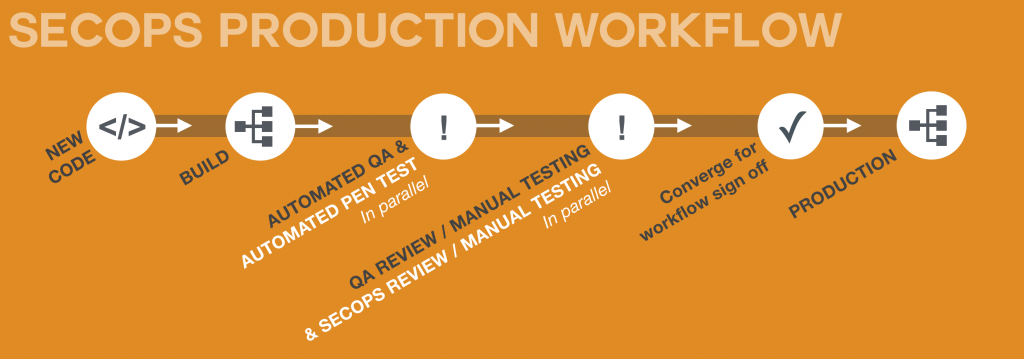
After selecting the automation tools, the next step is to define the automation workflows. Automation workflows are a series of steps that automate the security tasks. For example, an automation workflow for vulnerability scanning may include the following steps:
- Start the vulnerability scanning tool.
- Specify the target IP addresses.
- Set the scanning parameters.
- Scan the target IP addresses.
- Generate a vulnerability report.
- Send the report to the security team for analysis.
Step 4: Test the Automation Workflows
Before implementing the automation workflows in a production environment, it is essential to test them in a test environment. Testing helps identify any issues or errors in the automation workflows and ensures that they are working as expected.
Step 5: Implement the Automation Workflows
Once the automation workflows are tested and verified, the next step is to implement them in a production environment. During the implementation phase, it is essential to monitor the automation workflows and ensure that they are working correctly.
Step 6: Monitor and Maintain the Automation Workflows
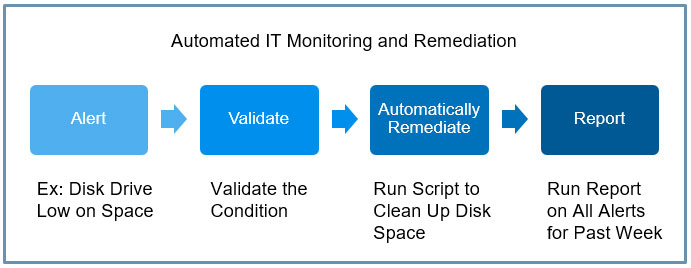
After implementing the automation workflows, it is crucial to monitor and maintain them regularly. This includes monitoring the workflows for any errors or issues and ensuring that they are updated with the latest security patches and updates.
Conclusion
SecOps automation is an essential process for enhancing security operations and reducing the workload of security teams. By following the steps discussed in this article, you can implement SecOps automation in your organization and improve the efficiency of your security operations. Remember to evaluate the automation tools, define the automation workflows, test them in a test environment, implement them in a production environment, and monitor and maintain them regularly.

👤 About the Author
Ashwani is passionate about DevOps, DevSecOps, SRE, MLOps, and AiOps, with a strong drive to simplify and scale modern IT operations. Through continuous learning and sharing, Ashwani helps organizations and engineers adopt best practices for automation, security, reliability, and AI-driven operations.
🌐 Connect & Follow:
Website: WizBrand.com
Facebook: facebook.com/DevOpsSchool
X (Twitter): x.com/DevOpsSchools
LinkedIn: linkedin.com/company/devopsschool
YouTube: youtube.com/@TheDevOpsSchool
Instagram: instagram.com/devopsschool
Quora: devopsschool.quora.com
Email– contact@devopsschool.com
Find Trusted Cardiac Hospitals
Compare heart hospitals by city and services — all in one place.
Explore Hospitals




