
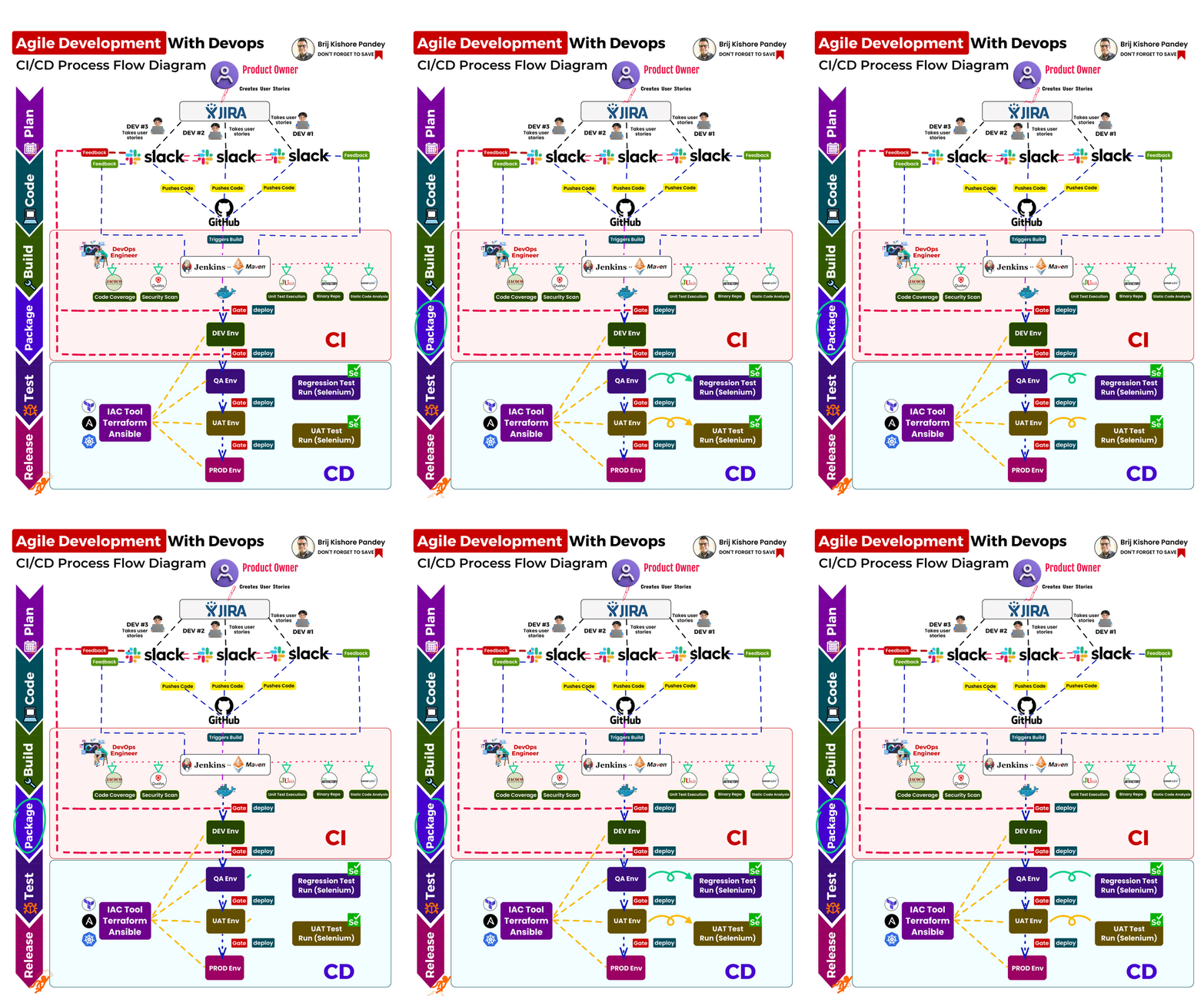
Often, I see confusion surrounding the integration of Agile Development with a CI/CD pipeline.
To clear the fog, I’ve put together a straightforward, step-by-step guide that encapsulates the entire process in one easy-to-understand format.
Remember, this isn’t merely a CI/CD workflow, but an agile development process harmoniously intertwined with CI/CD flow.
Also, bear in mind that this is just a baseline diagram and the tools/technology used here are examples – feel free to replace them with equivalent tools or technology that suits your team’s preferences and requirements.
👉 Let the Product Owner kick-off by crafting engaging user stories.
👉 Have your development team spring into action, bringing these stories to life with tools like Jira/Rally.
Utilize Slack/Team, GitHub/Bitbucket/ Integration to:
• Promote transparency and collaboration.
• Enable continuous integration.
• Catch bugs early.
• Support frequent releases and continuous testing.
Harness the power of SonarQube and DevOps to:
• Conduct static code analysis.
• Trigger builds.
• Provide insightful feedback.
Implement Unit Tests and Code Coverage with JaCoCo and JUnit:
• Use Jenkins and Maven for build and deployment.
• Strive for 100% unit test execution success.
• Maintain at least 80% code coverage.
• Eliminate critical defects/vulnerabilities.
Master Testing and Quality Assurance by:
• Using Selenium for regression and UAT tests.
• Relying on Nexus/Artifactory for Binary Repo.
Enhance Security and Infrastructure Management:
Conduct routine security scans with Qualys.
Employ Terraform and Ansible for infrastructure management.
If you’re looking for ways to improve your software development process, CI/CD is definitely worth considering.
Here are some additional tips for implementing CI/CD:
Start small. Don’t try to implement CI/CD for your entire codebase all at once.
Start with a small project and then gradually expand your CI/CD pipeline as your needs grow.
Get buy-in from your team. CI/CD can be a big change for your team, so it’s important to get buy-in from everyone involved.
Make sure that your team understands the benefits of CI/CD and is willing to put in the effort to make it work.
Automate as much as possible. The more you can automate, the more efficient your CI/CD pipeline will be. Look for opportunities to automate manual tasks, such as building, testing, and deploying code.
Strive to reach these key milestones of automation:
🧪 Unit Test Execution Automation
🛠️ Build Automation
📈 Code Coverage Check Automation
📊 Code Quality Check Automation
🔒 Security Scanning Automation
🚀 Automated Deployments with Gating
💬 Feedback Automation to Production Teams
💾 Binary Storage Automation into Repo Manager
🏗️ Infrastructure Setup Automation
Implementing Continuous Integration/Continuous Deployment (CI/CD) in your Agile team involves integrating automation, collaboration, and iterative practices into your software development process. CI/CD enables teams to deliver code changes more frequently, reliably, and with reduced manual intervention. Here’s a step-by-step guide to implementing CI/CD in your Agile team:
- Understand Agile Principles: Ensure that your team has a good understanding of Agile principles and practices. Agile emphasizes iterative development, frequent customer feedback, and delivering working software in short cycles. CI/CD aligns well with Agile as it encourages rapid and incremental changes.
- Automate Your Build Process: Start by automating the build process. Set up a version control system (e.g., Git) to manage your codebase. Use build automation tools (e.g., Jenkins, GitLab CI/CD, Travis CI) to automatically compile, test, and package your application whenever new code is committed to the repository.
- Automate Testing: Implement automated testing as a crucial part of your CI/CD pipeline. Write unit tests, integration tests, and even end-to-end tests to ensure code quality and functionality. Automated tests help catch bugs early and provide confidence in the codebase.
- Code Review and Collaboration: Encourage a strong code review process within your Agile team. Peer review helps identify potential issues, promotes knowledge sharing, and improves code quality. Code review tools can aid in automating this process.
- Continuous Integration (CI): Configure your CI server to run automated builds and tests on every code commit. This ensures that the changes are integrated frequently, and the team gets immediate feedback on any build or test failures.
- Continuous Deployment (CD): Once you have a stable CI process, introduce Continuous Deployment. Automate the deployment process so that the application is automatically deployed to a staging environment after successful CI. Automated deployments reduce the risk of human errors and streamline the release process.
- Automated Monitoring and Feedback Loop: Set up monitoring tools to keep track of application performance and user behavior. Automated monitoring helps identify and fix issues proactively. Additionally, gather feedback from users and stakeholders regularly to understand their needs and concerns.
- Incremental Releases: Adopt feature flagging or toggles to enable you to release features incrementally to a subset of users. This way, you can test new functionality with a smaller audience before a full release, reducing the impact of potential issues.
- Automate Rollback and Recovery: Plan for the worst-case scenario. Have an automated rollback strategy in place to revert to the previous version if the new release causes critical issues. This ensures a smooth recovery from any deployment mishaps.
- Continuous Improvement: CI/CD is an iterative process. Continuously collect data, measure key performance indicators (KPIs), and analyze the results. Use this feedback to optimize and improve your CI/CD pipeline over time.
- Communication and Collaboration: Promote a culture of collaboration within your Agile team. Encourage open communication, knowledge sharing, and transparency. This fosters a supportive environment where everyone is aligned with the CI/CD goals.
- Training and Skill Development: Invest in training your team members to learn and improve their skills in CI/CD practices, tools, and automation. Continuous learning is vital to stay updated with the evolving technology landscape.
By following these steps and maintaining a focus on Agile principles, your team can successfully implement CI/CD practices to deliver high-quality software efficiently and consistently.

I’m Rajesh Kumar, a DevOps, SRE, DevSecOps, Cloud, and Platform Engineering expert passionate about sharing practical knowledge, real-world experiences, and industry best practices. I have worked at Cotocus and regularly write about technology, travel, investing, health, product reviews, and digital marketing through my various platforms.
I publish technical articles at DevOps School, travel stories at Holiday Landmark, stock market insights at Stocks Mantra, health and fitness guidance at My Medic Plus, product reviews at TrueReviewNow, and SEO and digital marketing strategies at Wizbrand.
Find Trusted Cardiac Hospitals
Compare heart hospitals by city and services — all in one place.
Explore Hospitals





which tool u use to creat this digram.It WOW