Are you tired of constantly worrying about deploying your applications? Do you wish there was an easier and more efficient way to manage your deployments? Look no further than GitOps!
GitOps is a modern approach to managing infrastructure and application deployments. It allows you to manage your deployments using Git, which means you can version control your deployments, review changes before they go live, and easily roll back changes if necessary.
In this article, we will explore what GitOps is, how it works, and how you can implement it for your application deployments.
What is GitOps?
GitOps is a methodology for managing infrastructure and application deployments using Git as the single source of truth. It was first introduced by Weaveworks in 2017 and has since gained popularity in the DevOps community.
The basic idea behind GitOps is that all changes to your infrastructure and application deployments are made through Git. This means that your entire deployment process is version controlled, allowing you to easily review changes, track who made them, and roll back changes if necessary.
How does GitOps work?
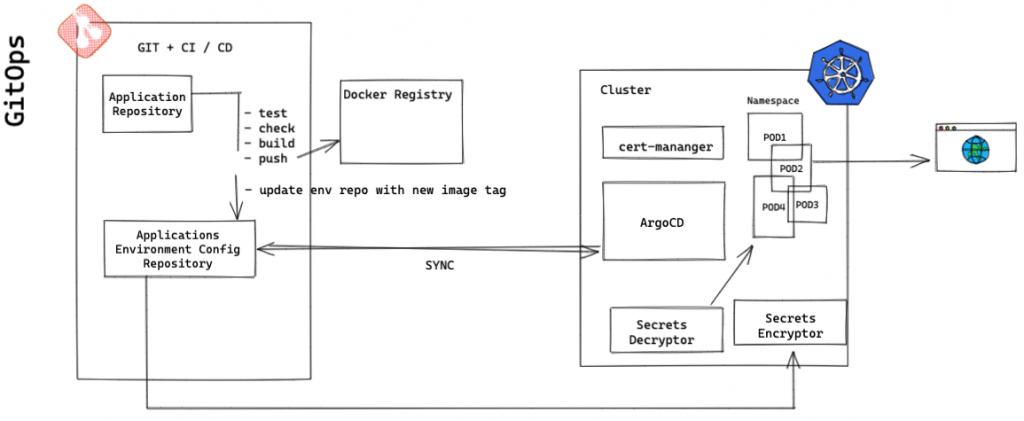
GitOps works by using Git as the source of truth for your deployments. This means that all changes to your infrastructure and application deployments are made through Git, either by manually editing YAML files or by using a tool like Flux.
When a change is made in Git, Flux (or another GitOps tool) detects the change and automatically deploys the new configuration to your infrastructure. This ensures that your deployments are always up-to-date and consistent with the current state of your Git repository.
How to implement GitOps for application deployment
Implementing GitOps for your application deployment is a straightforward process. Here are the steps you need to follow:
Step 1: Set up your Git repository
The first step is to set up your Git repository that will hold all the configuration files for your application deployment. You can use any Git repository, such as GitHub, GitLab, or Bitbucket.
Step 2: Configure your deployment scripts
Next, you need to configure your deployment scripts to use Git as the source of truth. This can be done by writing YAML files that describe your infrastructure and application deployments.
Step 3: Set up a GitOps tool
To automate your deployment process, you need to set up a GitOps tool like Flux. Flux is a popular choice for GitOps because it integrates well with Kubernetes and other cloud-native technologies.
Step 4: Deploy your application
Once you have set up your Git repository, configured your deployment scripts, and set up your GitOps tool, you can deploy your application. All you need to do is push your changes to Git, and your GitOps tool will automatically detect the changes and deploy the new configuration to your infrastructure.
Conclusion
GitOps is a powerful methodology for managing infrastructure and application deployments. It allows you to version control your deployments, review changes before they go live, and easily roll back changes if necessary. By following the steps outlined in this article, you can implement GitOps for your application deployment and enjoy a more efficient and streamlined deployment process.

👤 About the Author
Ashwani is passionate about DevOps, DevSecOps, SRE, MLOps, and AiOps, with a strong drive to simplify and scale modern IT operations. Through continuous learning and sharing, Ashwani helps organizations and engineers adopt best practices for automation, security, reliability, and AI-driven operations.
🌐 Connect & Follow:
Website: WizBrand.com
Facebook: facebook.com/DevOpsSchool
X (Twitter): x.com/DevOpsSchools
LinkedIn: linkedin.com/company/devopsschool
YouTube: youtube.com/@TheDevOpsSchool
Instagram: instagram.com/devopsschool
Quora: devopsschool.quora.com
Email– contact@devopsschool.com
Find Trusted Cardiac Hospitals
Compare heart hospitals by city and services — all in one place.
Explore Hospitals