
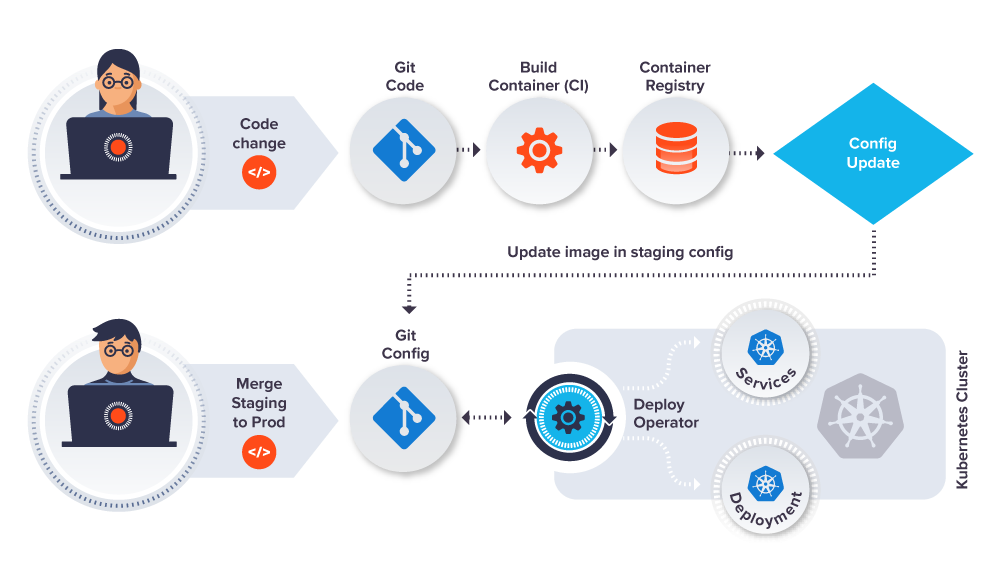
Are you tired of managing multiple configuration files across various environments? Do you want to streamline your configuration management process and ensure consistency across your systems? Look no further than GitOps!
GitOps is an innovative approach to configuration management that uses Git as the source of truth for all configuration changes. This means that any changes made to your configuration files are automatically tracked, versioned, and audited through Git.
In this article, we will discuss the basics of GitOps and how to implement it for your configuration management needs.
What is GitOps?
GitOps is a methodology for managing infrastructure and applications using Git as a single source of truth. This means that all configuration changes are made through Git, and any changes made outside of Git are automatically reverted.
The key benefits of GitOps include:
- Consistency: With GitOps, all configuration changes are tracked, versioned, and audited in Git. This ensures that all environments are consistent and up-to-date.
- Collaboration: GitOps allows for collaboration between teams by providing a centralized location for configuration changes.
- Automation: GitOps enables automation of configuration changes through the use of Git hooks and pipelines.
How to Implement GitOps for Configuration Management
Implementing GitOps for configuration management involves the following steps:
Step 1: Create a Git Repository for Configuration Files
The first step in implementing GitOps for configuration management is to create a Git repository for your configuration files. This repository will serve as the single source of truth for all configuration changes.
Step 2: Define Your Configuration File Structure
Once you have created your Git repository, you need to define the structure of your configuration files. This includes defining the file type, naming conventions, and directory structure.
Step 3: Integrate Your Configuration Management Tools with Git
To fully implement GitOps for configuration management, you need to integrate your configuration management tools with Git. This includes automating your configuration changes through Git hooks and pipelines.
Step 4: Implement Access Controls and Auditing
Finally, you need to implement access controls and auditing to ensure that all configuration changes are tracked and audited. This includes defining user roles and permissions, as well as implementing auditing and reporting tools.
Conclusion
GitOps is a powerful methodology for configuration management that provides consistency, collaboration, and automation. By implementing GitOps for your configuration management needs, you can streamline your processes and ensure that all environments are up-to-date and consistent. So why wait? Start implementing GitOps today and see the benefits for yourself!

👤 About the Author
Ashwani is passionate about DevOps, DevSecOps, SRE, MLOps, and AiOps, with a strong drive to simplify and scale modern IT operations. Through continuous learning and sharing, Ashwani helps organizations and engineers adopt best practices for automation, security, reliability, and AI-driven operations.
🌐 Connect & Follow:
Website: WizBrand.com
Facebook: facebook.com/DevOpsSchool
X (Twitter): x.com/DevOpsSchools
LinkedIn: linkedin.com/company/devopsschool
YouTube: youtube.com/@TheDevOpsSchool
Instagram: instagram.com/devopsschool
Quora: devopsschool.quora.com
Email– contact@devopsschool.com
Find Trusted Cardiac Hospitals
Compare heart hospitals by city and services — all in one place.
Explore Hospitals