
Are you looking to improve your organization’s security posture? Implementing a SecOps strategy can help you achieve this goal. In this blog post, we will discuss what SecOps is, why it is important, and how you can implement it in your organization.
What is SecOps?
SecOps is short for Security Operations. It is a methodology that combines security and operations to improve an organization’s security posture. This approach involves integrating security practices into the development, deployment, and maintenance of applications and systems. The goal of SecOps is to identify and mitigate security risks early in the development process and prevent security incidents from occurring.
Why is SecOps Important?
In today’s digital age, cyber threats are becoming increasingly sophisticated and prevalent. Organizations need to take proactive measures to protect themselves from these threats. SecOps can help organizations achieve this by providing a framework for integrating security into their operations. This approach can help organizations identify and mitigate security risks early, before they become major incidents. Additionally, SecOps can help organizations achieve compliance with regulatory requirements such as HIPAA, PCI DSS, and GDPR.
How to Implement SecOps in Your Organization?
Implementing a SecOps strategy in your organization requires a structured approach. Here are the steps you can follow to implement SecOps:
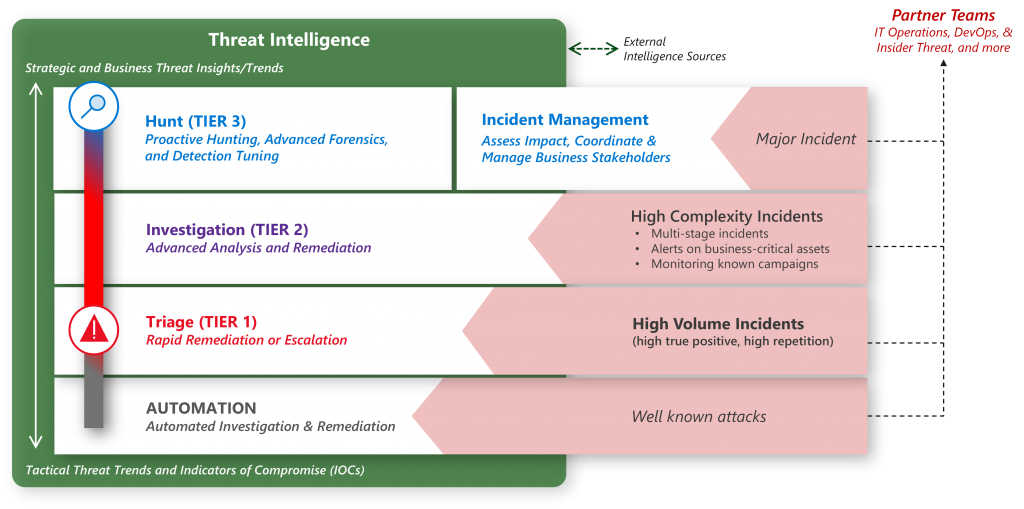
Step 1: Assess Your Current Security Posture
The first step in implementing SecOps is to assess your organization’s current security posture. This involves identifying your organization’s assets, the threats it faces, and the vulnerabilities that exist. You can use tools such as vulnerability scanners and penetration testing to identify vulnerabilities in your systems.
Step 2: Define Your Security Policies and Procedures
Once you have assessed your organization’s security posture, the next step is to define your security policies and procedures. This involves defining the rules and guidelines that your organization will follow to ensure security. Your security policies and procedures should be aligned with industry best practices and regulatory requirements.
Step 3: Integrate Security into Your Operations
The next step is to integrate security into your operations. This involves incorporating security practices into the development, deployment, and maintenance of applications and systems. Some of the practices you can implement include:
- Conducting security reviews during the development process
- Implementing security testing as part of your CI/CD pipeline
- Conducting regular vulnerability assessments and penetration testing
- Monitoring your systems for security incidents
Step 4: Provide Security Awareness Training
Another important aspect of implementing SecOps is providing security awareness training to your employees. This involves educating your employees on the importance of security and providing them with the knowledge and skills they need to identify and mitigate security risks.
Step 5: Continuously Monitor and Improve Your Security Posture
Finally, it is important to continuously monitor and improve your organization’s security posture. This involves regularly reviewing your security policies and procedures, conducting vulnerability assessments and penetration testing, and staying up-to-date with the latest security threats and best practices.
Conclusion
Implementing a SecOps strategy can help organizations improve their security posture and protect themselves from cyber threats. By following the steps outlined in this blog post, you can create a structured approach to implementing SecOps in your organization. Remember to assess your current security posture, define your security policies and procedures, integrate security into your operations, provide security awareness training, and continuously monitor and improve your security posture.

👤 About the Author
Ashwani is passionate about DevOps, DevSecOps, SRE, MLOps, and AiOps, with a strong drive to simplify and scale modern IT operations. Through continuous learning and sharing, Ashwani helps organizations and engineers adopt best practices for automation, security, reliability, and AI-driven operations.
🌐 Connect & Follow:
Website: WizBrand.com
Facebook: facebook.com/DevOpsSchool
X (Twitter): x.com/DevOpsSchools
LinkedIn: linkedin.com/company/devopsschool
YouTube: youtube.com/@TheDevOpsSchool
Instagram: instagram.com/devopsschool
Quora: devopsschool.quora.com
Email– contact@devopsschool.com
Find Trusted Cardiac Hospitals
Compare heart hospitals by city and services — all in one place.
Explore Hospitals