
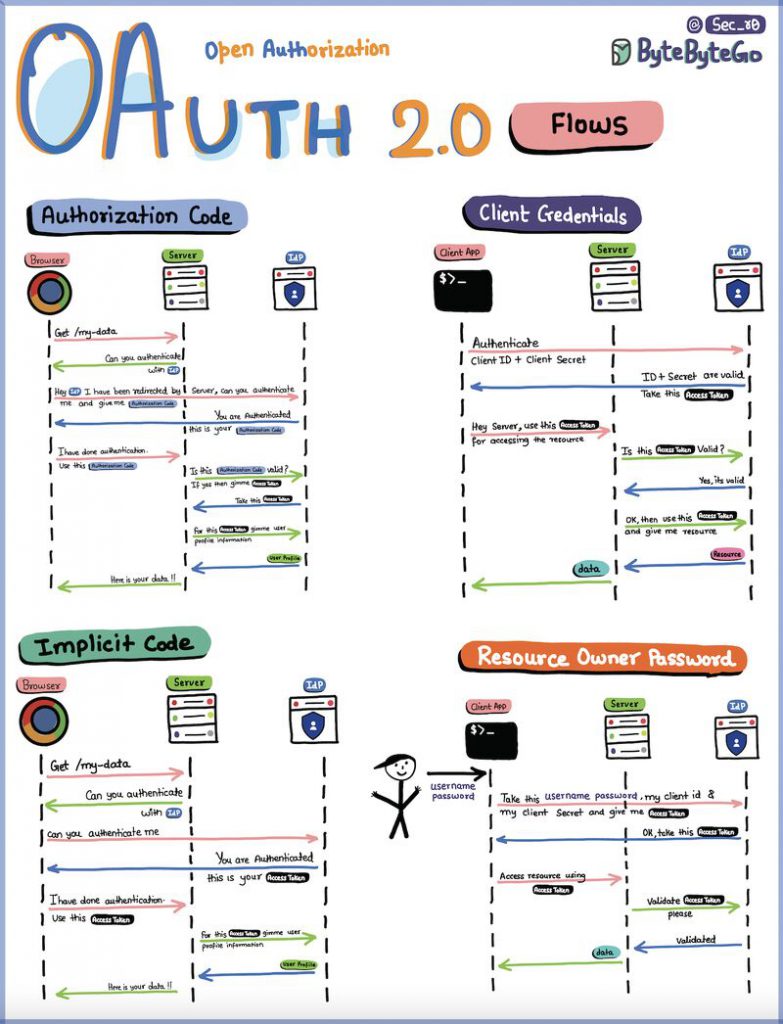
OAuth 2.0 is an open standard for authorization. It enables applications to obtain limited access to user accounts on HTTP services, such as Facebook, GitHub, and Google, without exposing the user’s password.
OAuth 2.0 is a four-legged authentication protocol that involves the following parties:
- Resource owner: The user who owns the account that the application is trying to access.
- Client: The application that is trying to access the user’s account.
- Authorization server: The server that hosts the user’s account and issues access tokens.
- Resource server: The server that hosts the protected resources that the application is trying to access.
The OAuth 2.0 flow works as follows:
- The user visits the client’s website and authorizes the client to access their account on the authorization server.
- The authorization server redirects the user back to the client’s website with an authorization code.
- The client exchanges the authorization code for an access token from the authorization server.
- The client uses the access token to access the user’s protected resources on the resource server.
OAuth 2.0 is a powerful tool that can be used to securely authorize applications to access user accounts. It is widely used by many popular websites and applications.
Here are some of the benefits of using OAuth 2.0:
- Improved security: OAuth 2.0 helps to improve security by eliminating the need for users to share their passwords with applications.
- Increased usability: OAuth 2.0 makes it easier for users to authorize applications to access their accounts.
- Improved privacy: OAuth 2.0 gives users more control over what information they share with applications.
Key Concepts of OAuth 2.0:
- Client: The client is the application or service that wants to access a user’s data or perform actions on their behalf. This could be a mobile app, a web application, or any software component that interacts with an OAuth 2.0 server.
- Resource Owner: The resource owner is the user who owns the data or resources that the client application wants to access. The resource owner authorizes or denies the client’s request for access.
- Resource Server: The resource server is the server that hosts the protected resources, such as user data or APIs. It verifies access tokens and provides the requested resources to authorized clients.
- Authorization Server: The authorization server is responsible for authenticating the user and issuing access tokens to the client after the user grants or denies consent. It also provides an endpoint for obtaining authorization codes.
- Access Token: An access token is a short-lived credential that represents the user’s authorization to access specific resources on the resource server. It is presented by the client to the resource server when making API requests.
- Authorization Code: An authorization code is a temporary code that the client obtains from the authorization server after the user grants consent. It is exchanged for an access token.
OAuth 2.0 Flow: OAuth 2.0 defines several authorization flows, each suited to specific use cases. The most common flows include:
- Authorization Code Flow: Used by web and mobile applications that can securely store a client secret. The client obtains an authorization code, which it exchanges for an access token.
- Implicit Flow: Designed for client applications that run in a web browser and cannot securely store a client secret. The access token is returned directly to the client after the user grants consent.
- Resource Owner Password Credentials Flow: Allows the client to directly exchange the user’s credentials for an access token. This flow is less secure and should be avoided when possible.
- Client Credentials Flow: Used by confidential clients to obtain an access token using their own credentials, typically for machine-to-machine communication.
Advantages of OAuth 2.0:
- Security: OAuth 2.0 provides a secure way to delegate access without exposing user credentials.
- User Consent: Users have control and must grant consent to authorize access to their data.
- Scalability: OAuth 2.0 is designed to handle a wide range of authorization scenarios, making it versatile for various use cases.
- Widely Adopted: OAuth 2.0 is an industry-standard protocol supported by many web services and APIs.
Use Cases:
OAuth 2.0 is used in a variety of scenarios, including:
- Single Sign-On (SSO): Allowing users to log in once and access multiple services without re-entering credentials.
- API Access: Authorizing third-party applications to access user data on platforms like social media, cloud storage, and email services.
- Mobile App Authorization: Granting mobile apps access to user data and services while maintaining security.

I’m Rajesh Kumar, a DevOps, SRE, DevSecOps, Cloud, and Platform Engineering expert passionate about sharing practical knowledge, real-world experiences, and industry best practices. I have worked at Cotocus and regularly write about technology, travel, investing, health, product reviews, and digital marketing through my various platforms.
I publish technical articles at DevOps School, travel stories at Holiday Landmark, stock market insights at Stocks Mantra, health and fitness guidance at My Medic Plus, product reviews at TrueReviewNow, and SEO and digital marketing strategies at Wizbrand.
Find Trusted Cardiac Hospitals
Compare heart hospitals by city and services — all in one place.
Explore Hospitals






Great introduction to OAuth 2.0! The way you explained the core concepts and flow is easy to understand, even for beginners. I especially liked how the roles like client, resource server, and tokens were simplified. Thanks for the clear and useful explanation!