
Bash (the Bourne Again Shell) is the command interpreter most Linux systems give you at login. It is also the language behind countless scripts that install packages, rotate logs, run backups and connect CI/CD steps. Learning it means learning variables, conditionals, loops, functions and exit codes, and how to chain commands with pipes and redirection.
The 128 posts here start with a beginner explainer and a training roadmap that runs from a first script to full automation. There are also small worked examples, such as a script that prints the date, time, username and current directory. Numbered assignments give hands-on practice. Multi-part interview question sets and a DevOps technical interview guide help with job preparation. Comparisons of command line tools and of programming languages for DevOps show where Bash fits next to Zsh, tmux, Python and Go.
Role blueprints for junior and senior Linux administrators and systems engineers show how scripting skills connect to daily work and career growth. The tag suits Linux beginners, sysadmins automating routine tasks and DevOps engineers preparing for interviews. It sits under the broader Shell Scripting section.
Start here
- What is Bash and use cases of Bash? – Plain introduction to what Bash is, where it is used and how to set up your first scripts.
- Shell Scripting (Bash) Training Roadmap: From First Script to Automation – A module-by-module learning path from writing a first script to building automation.
- Write Script to see current date, time, username, and current directory – A short working script showing variables and command substitution in practice.
- Shell Bash Scripting: Assignment & Excercise – Numbered exercises to build scripting skills step by step through hands-on practice.
- Shell Bash Scripting Interview Questions and Answer – Part 4 – Interview questions on scripting basics and practical concepts used by Linux admins and developers.
- From Coding Beginner to DevOps Engineer: Which Programming Languages Actually Matter in 2026 – Shows where Bash fits alongside Python, Go and TypeScript in DevOps work.
- Technical Interview Questions for DevOps Engineers: Coding, Troubleshooting, and System Design – Coding and troubleshooting questions, such as full disks and pod restarts, where shell skills matter.
- Linux Administrator: Role Blueprint, Responsibilities, Skills, KPIs, and Career Path – Explains the Linux admin duties, skills and career path that rely on everyday scripting.
Latest Bash articles
Shell Bash Scripting: Assignment & Excercise – 7
This exercise uses Bash, rsync and SSH to copy a local file to a remote backup server, then sends an email when the copy finishes. Below the…
Shell Bash Scripting: Assignment & Excercise – 4
This exercise asks for a Bash script that checks CPU usage and sends an email when it goes over a threshold. The script above reads /proc/stat, but…
Shell Scripting Tutorials: Function
A Bash function is a named block of commands that takes arguments as $1, $2, … and $@, and hands results back through its output or its…
Shell Scripting Tutorials: Looping & Iteration statatement using for until
An until loop in shell scripting keeps running its body for as long as a test command fails (returns a non-zero exit status), and stops as soon…
Shell Bash Scripting: Assignment & Excercise – 3
The script above prints a quick health report for a Linux server: uptime, logged-in users, recent logins, disk and memory use, OOM killer events, the busiest processes,…
Linux Commands and Shell Scripting Reference for Linux Admins and DevOps Engineers
A structured Linux command and shell scripting reference for operations and DevOps work, rebuilt from the original link collection. It includes a practical learning workflow, command comparison tables, ready-to-use examples, and curated source links.
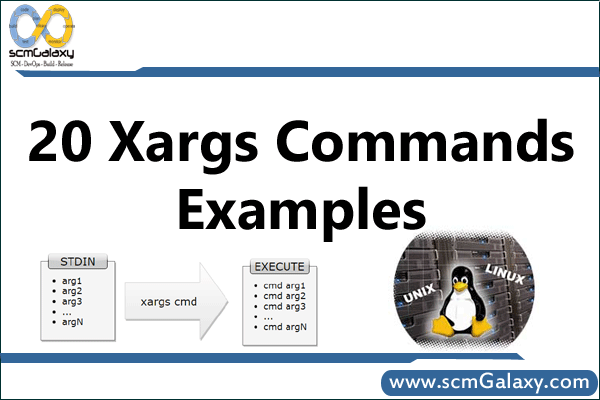
xargs in Linux: Practical Commands, Safe Patterns, and Pipeline Workflows
This guide explains how to use xargs effectively in Linux/Unix shells, from basic stdin handling to safe file operations and parallel execution. You’ll learn practical command patterns, portability caveats, and safer alternatives.
Shell Scripting (Bash) Training Roadmap: From First Script to Automation
This revised Bash training guide turns the original topic list into a practical learning roadmap. It shows what to study, how topics connect, and which commands to practice for real-world scripting.
Bash Git Aliases: A Practical Command Set for Faster Daily Git Work
Set up a clean, copy-paste-ready Bash alias collection for common Git commands, then learn when Bash aliases are better than Git’s built-in aliases. This guide also covers safe installation, workflow usage, and common mistakes to avoid.
Common UNIX Commands and Utilities: Practical Reference for DevOps and Sysadmin Work
A structured UNIX command reference organized by real operational tasks: discovery, files, processes, networking, text processing, and job control. Includes C-shell notes, comparison tables, and practical command examples.

Bash Shell Script Parameters: A Practical Reference for Positional and Special Variables
Learn how Bash passes arguments to scripts and how special parameters like $#, $@, $*, $$, and $? behave. This updated reference includes workflow diagrams, comparison tables, and production-friendly examples.

Reading XML in Shell Scripts: Safer Patterns with xmlstarlet and xmllint
Need to extract values from an XML file in a shell script? This revised guide explains the classic grep/sed approach, its limits, and safer XPath-based alternatives for production automation.

Shell Scripting Interview Questions, Explained: Bash Fundamentals, UNIX Processes, and Practical Commands
A modernized, interview-focused guide to shell scripting and core UNIX concepts for DevOps engineers. Learn command execution flow, redirection, permissions, process control, IPC, and safe scripting patterns with practical examples.

Shell and Bash Interview Questions: Practical Answers, Commands, and Script Patterns
A modernized, DevOps-focused reference for common shell and Bash interview questions. Includes command comparisons, scripting patterns, and production-safe examples.

How to Run Shell Scripts from Apache Ant (and Set Unix File Permissions Safely)
Learn practical patterns for combining Apache Ant with shell scripts in Unix-like build environments. This guide covers file permissions, script execution, and safer file-processing examples for legacy CI pipelines.
Technical Interview Questions for DevOps Engineers: Coding, Troubleshooting, and System Design
DevOps technical interviews have evolved significantly. Knowing how to configure a CI/CD pipeline or explain Kubernetes concepts is no longer enough for many engineering roles. Interviewers increasingly…
Senior Linux Systems Engineer: Role Blueprint, Responsibilities, Skills, KPIs, and Career Path
The **Senior Linux Systems Engineer** is a senior individual contributor responsible for the reliability, security, performance, and lifecycle management of Linux-based compute platforms that power production services, internal engineering systems, and core infrastructure. This role designs and operates scalable Linux environments across on-premises and cloud, automates system configuration and fleet operations, and hardens platforms to meet uptime and security requirements.
Linux Systems Engineer: Role Blueprint, Responsibilities, Skills, KPIs, and Career Path
A **Linux Systems Engineer** designs, builds, operates, and continuously improves Linux-based infrastructure that supports product engineering and internal business systems. The role focuses on **reliability, security hardening, performance, automation, and lifecycle management** of Linux servers and services across on-prem, cloud, and hybrid environments.
Lead Linux Systems Engineer: Role Blueprint, Responsibilities, Skills, KPIs, and Career Path
The **Lead Linux Systems Engineer** is the technical lead accountable for designing, operating, and continuously improving Linux-based infrastructure services that underpin production workloads across cloud and/or data center environments. This role ensures Linux platforms are secure, resilient, performant, and automatable—enabling product engineering teams to ship reliably while meeting availability, compliance, and cost objectives.
Junior Linux Systems Engineer: Role Blueprint, Responsibilities, Skills, KPIs, and Career Path
The **Junior Linux Systems Engineer** supports the reliability, security, and day-to-day operations of Linux-based infrastructure used to run customer-facing products, internal services, and engineering platforms. This role focuses on executing well-defined operational and engineering tasks—server provisioning, patching, monitoring, incident support, and automation—under guidance from more senior engineers.
Senior Linux Administrator: Role Blueprint, Responsibilities, Skills, KPIs, and Career Path
The **Senior Linux Administrator** is a senior individual contributor within **Enterprise IT** responsible for the reliability, security, and performance of Linux-based infrastructure that underpins internal services and business-critical production platforms. The role designs and operates standardized Linux environments, automates repeatable operations, and leads complex incident resolution while ensuring adherence to enterprise security and compliance controls.
Principal Linux Administrator: Role Blueprint, Responsibilities, Skills, KPIs, and Career Path
The Principal Linux Administrator is the enterprise technical authority for Linux platforms within Enterprise IT, accountable for the reliability, security, standardization, and automation of Linux-based infrastructure that underpins business-critical applications and services. This is a senior individual contributor (IC) role with broad decision influence, responsible for setting Linux engineering standards, guiding platform roadmaps, and solving high-severity or high-complexity problems that span teams and domains.
Linux Administrator: Role Blueprint, Responsibilities, Skills, KPIs, and Career Path
The Linux Administrator is responsible for the reliability, security, and day-to-day operational health of Linux-based infrastructure that supports enterprise applications, internal developer platforms, and shared IT services. This role ensures Linux systems are consistently configured, patched, monitored, backed up, and recoverable—while meeting organizational standards for availability, performance, and compliance.
Lead Linux Administrator: Role Blueprint, Responsibilities, Skills, KPIs, and Career Path
The **Lead Linux Administrator** owns the reliability, security, and operational excellence of an organization’s Linux server estate across on-premises and cloud environments. This role provides senior technical stewardship for core Linux platforms (compute, storage, identity integration, patching, monitoring, backups, and automation) while coordinating day-to-day operations, escalations, and continuous improvement across the Linux administration function.
Common Mistakes Beginners Make When Learning DevOps
DevOps looks exciting from the outside. New learners often picture fast deployments, cloud automation, containers, and smooth collaboration. In practice, the path is more layered. Beginners usually…
From Coding Beginner to DevOps Engineer: Which Programming Languages Actually Matter in 2026
The Path from Beginner to DevOps Engineer When you’re just starting out with code, the sheer number of programming languages feels ridiculous. Should you pick Python? Java?…
Ansible: Dynamic Ansible Inventory Script for AWS EC2 Public IPs
Below is a simple dynamic inventory Bash script for Ansible that queries all EC2 instances in your AWS account, gets their public IPs, and outputs a valid…
Top 10 Command Line Tools in 2026: Features, Pros, Cons & Comparison
Introduction In 2026, command line tools continue to be a core component of efficient development, system administration, and networking. Despite the rise of graphical user interfaces (GUIs),…
Rundeck Assignments 1 – Linux
Rundeck Student Assignments (Local Node Only) — Assignment 1: Hello World Job Objective: Learn to create and execute your first Rundeck job. Assignment 2: Disk Usage Check…
Bash: frequently asked questions
What is the difference between Bash and sh?
sh refers to the POSIX shell standard, and on many systems /bin/sh points to a minimal shell such as dash. Bash supports POSIX syntax and adds features like arrays, [[ ]] tests and brace expansion, so scripts that use those features need a Bash shebang.
How do I run a Bash script?
Start the file with a shebang such as #!/usr/bin/env bash, make it executable with chmod +x script.sh, then run ./script.sh. You can also run it directly with bash script.sh.
Is Bash the default shell on Linux and macOS?
Bash is the default interactive shell on most Linux distributions. Recent macOS versions use Zsh by default, although Bash is still installed and can run scripts.
Should a DevOps engineer learn Bash or Python?
Most engineers end up using both. Bash works well for gluing commands together, writing pipeline steps and server tasks. Python is easier to maintain when logic, data handling or API calls get more complex.