
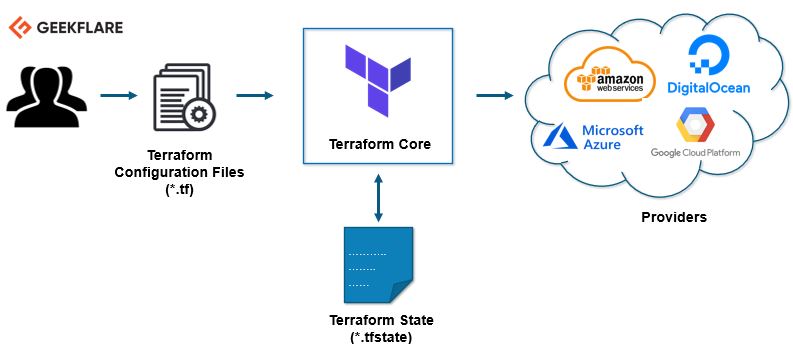
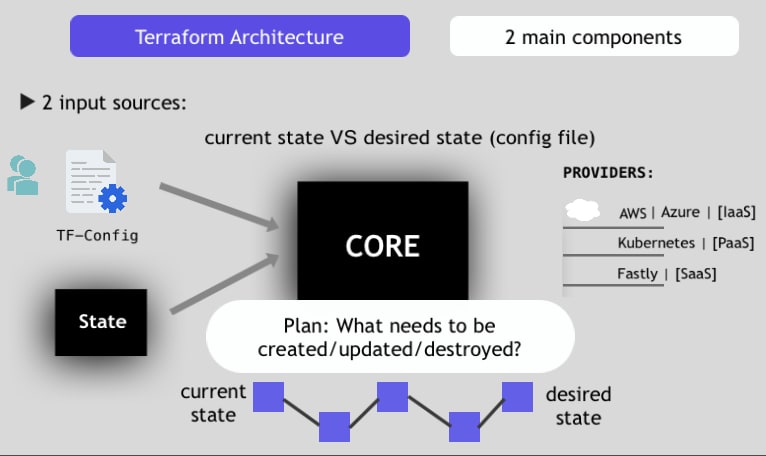
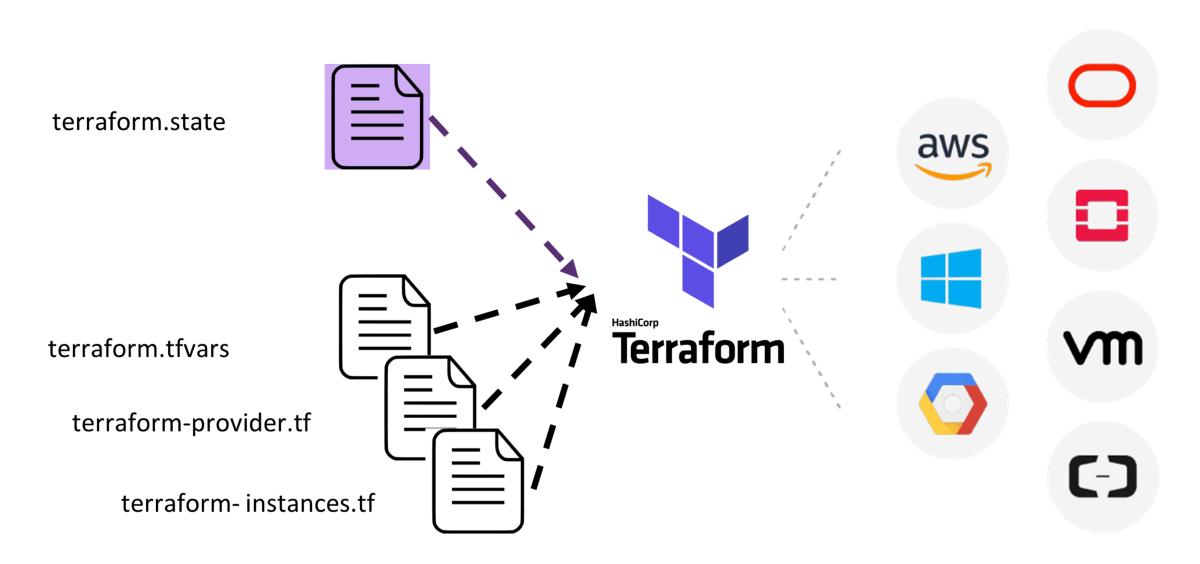
Terraform Architecture & End-to-End Workflow
This reference architecture covers the standard Terraform CLI workflow, including execution from a developer machine or CI/CD runner. It shows the relationship between Terraform configuration, Terraform Core, provider plugins, state management, execution plans, and actual cloud infrastructure.
1. Complete list of Terraform architecture components
| # | Component | Responsibility |
|---|---|---|
| 1 | Developer / DevOps Engineer | Writes infrastructure configuration and initiates changes |
| 2 | Git / Version Control | Stores and versions Terraform configuration |
| 3 | Execution Environment | Developer laptop, CI/CD runner, or HCP Terraform execution environment |
| 4 | Root Module | Main Terraform configuration (.tf files) |
| 5 | Child Modules | Reusable infrastructure configuration, from local paths, Git, or registries |
| 6 | Input Variables & Locals | Provide configurable and derived values |
| 7 | Resources & Data Sources | Declare infrastructure to manage and external information to read |
| 8 | Terraform Core / CLI | Evaluates configuration, constructs dependency graphs, plans and executes changes |
| 9 | Provider Configuration & Plugins | Connect Terraform Core to external platform APIs |
| 10 | Authentication & Authorization | Provide credentials and permissions to access platforms and state |
| 11 | Terraform Registry | Source for published providers and modules |
| 12 | Initialization Artifacts | .terraform/ cache and .terraform.lock.hcl provider dependency lock file |
| 13 | Backend | Defines where Terraform stores its state |
| 14 | Terraform State | Maps Terraform resource instances to real infrastructure objects |
| 15 | State Locking | Prevents concurrent conflicting state operations where supported |
| 16 | Dependency Graph | Determines resource dependencies and execution order |
| 17 | Execution Plan | Describes proposed create, update, replacement, or delete actions |
| 18 | Approval / Policy Checks | Optional human review and organizational governance |
| 19 | Terraform Apply | Executes the approved infrastructure changes |
| 20 | Cloud / SaaS APIs | Receive provider requests to inspect and modify external resources |
| 21 | Actual Infrastructure | AWS, Azure, GCP, Kubernetes, databases, SaaS resources, etc. |
| 22 | Output Values | Expose selected values from the resulting infrastructure |
| 23 | Drift Detection / Reconciliation | Subsequent plans identify differences between configuration, state, and actual resources |
This follows HashiCorp’s documented Core–Provider architecture, initialization workflow, plan/apply behavior, and state-management model.
2. Terraform workflow — high-level phases
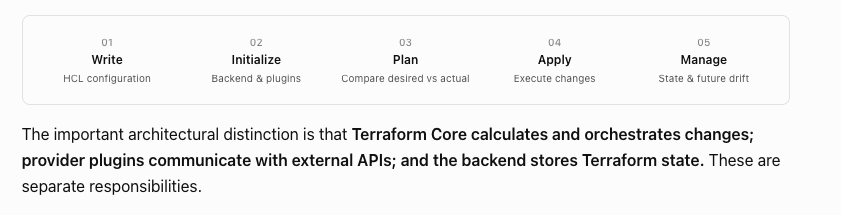
The important architectural distinction is that Terraform Core calculates and orchestrates changes; provider plugins communicate with external APIs; and the backend stores Terraform state. These are separate responsibilities.
3. Terraform Architecture Diagram — End-to-End
flowchart TB
    subgraph SOURCE["01 - CONFIGURATION & SOURCE CONTROL"]
        direction LR
        DEV["Developer / Git / CI Pipeline"]
        ROOT["Root Module - HCL<br/>Providers, Resources, Data Sources<br/>Variables, Outputs, Backend"]
        MOD["Child Modules<br/>Local / Git / Registry"]
        VARS["Input Values<br/>tfvars / TF_VAR / Workspace"]
        AUTH["Credentials & Identity<br/>IAM / OIDC / Environment"]
        DEV --> ROOT
        ROOT -.->|References| MOD
    end

    subgraph CORE["02 - TERRAFORM CORE & EXECUTION WORKFLOW"]
        direction LR
        INIT["1. terraform init<br/>Initialize Backend<br/>Install Modules & Providers"]
        VALID["2. terraform validate<br/>Check Configuration<br/>Optional: terraform fmt -check"]
        PLAN["3. terraform plan -out=tfplan<br/>Refresh Actual Resources<br/>Build Dependency Graph<br/>Calculate Changes"]
        GATE{"4. Review<br/>Approved?"}
        APPLY["5. terraform apply tfplan<br/>Execute Saved Plan"]
        DONE(["6. Complete<br/>Outputs Available"])

        INIT --> VALID --> PLAN --> GATE
        GATE -->|Yes| APPLY --> DONE
    end

    subgraph RUNTIME["03 - STATE & PROVIDER INTEGRATION"]
        direction LR
        STATE[("Terraform State Backend<br/>Local / S3 / HCP Terraform<br/>State Locking If Supported")]
        PROVIDER["Provider Plugins<br/>AWS / Azure / Google<br/>Kubernetes / SaaS"]
        API["Cloud & Service APIs"]
        INFRA["Actual Infrastructure<br/>VPC / EC2 / EKS / Databases<br/>DNS / Kubernetes / SaaS"]

        PROVIDER <-->|API Requests & Responses| API
        API <-->|Read & Modify| INFRA
    end

    ROOT --> INIT
    MOD -.->|Resolved During Init| INIT
    VARS -.->|Runtime Input Values| PLAN
    AUTH -.->|Provider Authentication| PROVIDER
    AUTH -.->|Backend Authentication| STATE

    INIT -.->|Configure Backend| STATE
    INIT -.->|Install Plugins| PROVIDER

    PLAN <-->|Read State; Lock If Supported| STATE
    PLAN <-->|Refresh & Read Data| PROVIDER

    APPLY <-->|Read & Update State| STATE
    APPLY -->|Create / Update / Delete| PROVIDER

    GATE -.->|No: Revise & Replan| ROOT

    classDef source fill:#E8F2FF,stroke:#2864C5,color:#14396E,stroke-width:2px
    classDef step fill:#F0EAFE,stroke:#8056C8,color:#402070,stroke-width:2px
    classDef decision fill:#FFF0C4,stroke:#DB9200,color:#704A00,stroke-width:3px
    classDef state fill:#FFF0DC,stroke:#D48827,color:#794609,stroke-width:2px
    classDef provider fill:#DEF7F5,stroke:#15948C,color:#095E58,stroke-width:2px
    classDef resource fill:#E3F5E9,stroke:#2E9954,color:#135B32,stroke-width:2px
    classDef success fill:#D7F5DF,stroke:#26994D,color:#145C30,stroke-width:3px

    class DEV,ROOT,MOD,VARS,AUTH source
    class INIT,VALID,PLAN,APPLY step
    class GATE decision
    class STATE state
    class PROVIDER,API provider
    class INFRA resource
    class DONE success

    style SOURCE fill:#F5F9FF,stroke:#A7C6F1,stroke-width:2px
    style CORE fill:#FBF8FF,stroke:#C4ADEA,stroke-width:2px
    style RUNTIME fill:#F5FBFA,stroke:#A4D9D0,stroke-width:2px
4. How to explain this architecture during training
- Configuration: The engineer defines desired infrastructure using HCL, optionally using reusable modules.
- Initialization: Terraform prepares the backend and downloads required modules and provider plugins.
- Validation: Terraform checks whether the configuration is valid. Formatting checks are optional.
- Planning: Terraform reads the existing state, normally refreshes managed resources through providers, constructs a dependency graph, and calculates the required changes.
- Approval: The engineer or CI/CD process reviews the execution plan. This is an external workflow gate, not a mandatory Terraform component.
- Applying: Terraform instructs provider plugins to execute the planned changes through platform APIs and persists updated state.
- Continuous management: Future plans compare the desired configuration with current infrastructure to identify drift and new changes.
5. Important architectural accuracy notes
- Plan vs. Apply: A normal
terraform plandoesn’t modify managed infrastructure.terraform apply tfplanexecutes a previously saved plan without another interactive approval prompt. Protect saved plan files because they can contain sensitive data.HashiCorp Developer+2
- State vs. Infrastructure: Terraform state stores resource mappings and metadata; it is not the actual infrastructure. A backend manages state storage and locking where supported.
- Provider vs. Backend: A provider communicates with target service APIs; a backend handles Terraform state. The two serve different purposes.
- HCP Terraform: For remotely executed HCP workspaces, the same logical responsibilities apply, but the plan/apply process runs on HCP-managed infrastructure or a configured agent. VCS-driven workflows use their own run and approval process rather than necessarily applying a local
tfplanfile.
The central concept for students: Terraform configuration describes the desired infrastructure, Terraform Core determines the changes, providers interact with the actual platforms, and Terraform state tracks the resources being managed.

I’m Rajesh Kumar, a DevOps, SRE, DevSecOps, Cloud, and Platform Engineering expert passionate about sharing practical knowledge, real-world experiences, and industry best practices. I have worked at Cotocus and regularly write about technology, travel, investing, health, product reviews, and digital marketing through my various platforms.
I publish technical articles at DevOps School, travel stories at Holiday Landmark, stock market insights at Stocks Mantra, health and fitness guidance at My Medic Plus, product reviews at TrueReviewNow, and SEO and digital marketing strategies at Wizbrand.
Find Trusted Cardiac Hospitals
Compare heart hospitals by city and services — all in one place.
Explore Hospitals
