
Top 10 NoOps Examples and Use Cases: A Mind-Boggling Guide
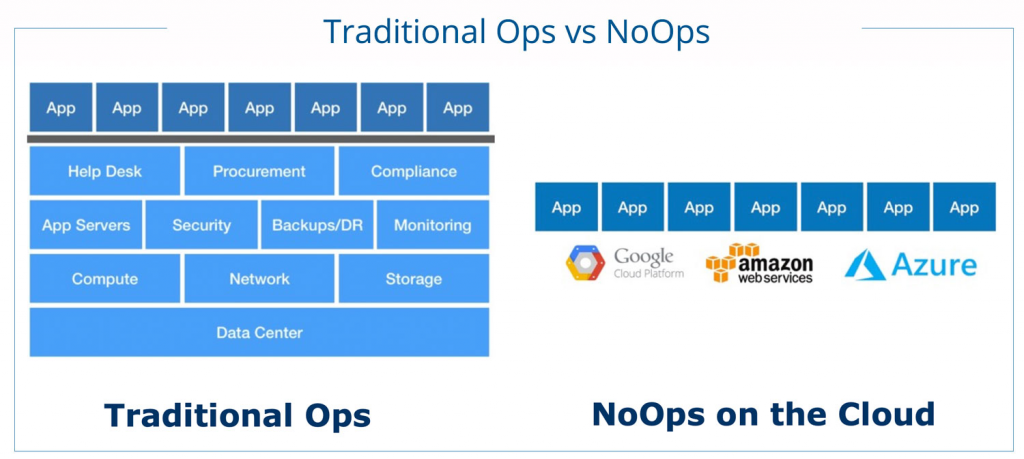
Are you tired of the mundane operations of managing and maintaining your systems? Do you feel like a hamster on a wheel, constantly running but going nowhere? Fear not, my friend! Enter NoOps, the future of operations.
NoOps, short for “No Operations,” is a next-generation approach to software development that eliminates the need for traditional operations. It’s all about automating everything, from code deployment to monitoring and scaling. With NoOps, you can focus on what really matters: writing code and delivering value to your customers.
In this mind-boggling guide, we’ll explore the top 10 NoOps examples and use cases and how they can revolutionize your business. Get ready to be amazed!
1. Continuous Deployment
Continuous Deployment is the process of automatically deploying code changes to production as soon as they are ready. NoOps makes this a breeze by automating the entire process, from testing to deployment. With Continuous Deployment, you can deliver new features and bug fixes to your customers faster than ever before.
2. Auto-Scaling
Auto-Scaling is the process of automatically adjusting the number of resources (e.g., servers) in response to changes in demand. NoOps makes this possible by leveraging cloud infrastructure and automation. With Auto-Scaling, you can ensure that your systems are always running at optimal capacity, without any manual intervention.
3. Self-Healing
Self-Healing is the process of automatically detecting and fixing issues in your systems. NoOps makes this possible by leveraging monitoring and automation. With Self-Healing, you can ensure that your systems are always up and running, even in the face of unexpected failures.
4. Infrastructure as Code
Infrastructure as Code is the practice of managing infrastructure (e.g., servers, databases) using code. NoOps makes this possible by providing tools for automating infrastructure management. With Infrastructure as Code, you can ensure that your infrastructure is always consistent and reproducible, without any manual intervention.
5. ChatOps
ChatOps is the practice of using chat tools (e.g., Slack, Microsoft Teams) to facilitate collaboration and automation. NoOps makes this possible by providing integrations with chat tools and automation frameworks. With ChatOps, you can streamline communication and automate routine tasks, all from within your chat tool.
6. Serverless Computing
Serverless Computing is the practice of running code without managing servers. NoOps makes this possible by providing serverless platforms (e.g., AWS Lambda, Azure Functions). With Serverless Computing, you can focus on writing code and let the platform handle the rest.
7. Microservices
Microservices is the practice of breaking down monolithic applications into smaller, independent services. NoOps makes this possible by providing tools for managing microservices (e.g., Kubernetes, Docker). With Microservices, you can increase agility and scalability, while reducing complexity.
8. Observability
Observability is the practice of monitoring and understanding the behavior of complex systems. NoOps makes this possible by providing tools for collecting and analyzing data (e.g., Prometheus, Grafana). With Observability, you can gain insights into your systems and make data-driven decisions.
9. Chaos Engineering
Chaos Engineering is the practice of intentionally introducing failures into your systems to test their resilience. NoOps makes this possible by providing tools for automating chaos experiments (e.g., Chaos Monkey). With Chaos Engineering, you can ensure that your systems are resilient and can handle unexpected failures.
10. Compliance and Security
Compliance and Security are critical considerations for any business. NoOps makes this possible by providing tools for automating compliance and security checks (e.g., AWS Config, Azure Security Center). With Compliance and Security, you can ensure that your systems are secure and compliant, without any manual intervention.
In conclusion, NoOps is not just a buzzword; it’s a game-changer. By automating everything, NoOps frees you up to focus on what really matters: delivering value to your customers. With the top 10 NoOps examples and use cases, you can transform your business and stay ahead of the competition. So, what are you waiting for? Embrace NoOps and unleash the power of automation!

👤 About the Author
Ashwani is passionate about DevOps, DevSecOps, SRE, MLOps, and AiOps, with a strong drive to simplify and scale modern IT operations. Through continuous learning and sharing, Ashwani helps organizations and engineers adopt best practices for automation, security, reliability, and AI-driven operations.
🌐 Connect & Follow:
Website: WizBrand.com
Facebook: facebook.com/DevOpsSchool
X (Twitter): x.com/DevOpsSchools
LinkedIn: linkedin.com/company/devopsschool
YouTube: youtube.com/@TheDevOpsSchool
Instagram: instagram.com/devopsschool
Quora: devopsschool.quora.com
Email– contact@devopsschool.com
Find Trusted Cardiac Hospitals
Compare heart hospitals by city and services — all in one place.
Explore Hospitals