
What are Intelligent Agents?

Intelligent Agents are autonomous software entities that can perceive their environment, make decisions based on their observations, and take actions to achieve specific goals. These agents use artificial intelligence, machine learning, and other technologies to interact with their surroundings and adapt their behavior over time.
Top 10 use cases of Intelligent Agents:
- Autonomous Vehicles: Intelligent agents control self-driving cars to navigate roads and make real-time driving decisions.
- Personal Assistants: AI-powered agents like Siri, Google Assistant, and Alexa provide personalized assistance to users.
- Recommender Systems: Agents recommend products, movies, music, and content based on user preferences.
- Robotic Process Automation (RPA): Agents automate repetitive tasks in business processes, such as data entry and report generation.
- Online Customer Support: Chatbots act as intelligent agents to handle customer queries and provide instant responses.
- Gaming: Agents in video games act as opponents or allies, demonstrating adaptive behavior.
- Virtual Agents in Virtual Reality (VR): Virtual agents interact with users in virtual environments.
- Cybersecurity: Intelligent agents detect and respond to cybersecurity threats and attacks.
- Internet of Things (IoT): Smart devices use agents to interact with the environment and perform tasks.
- Medical Diagnosis: AI agents assist healthcare professionals in diagnosing diseases and recommending treatments.
What are the feature of Intelligent Agents?
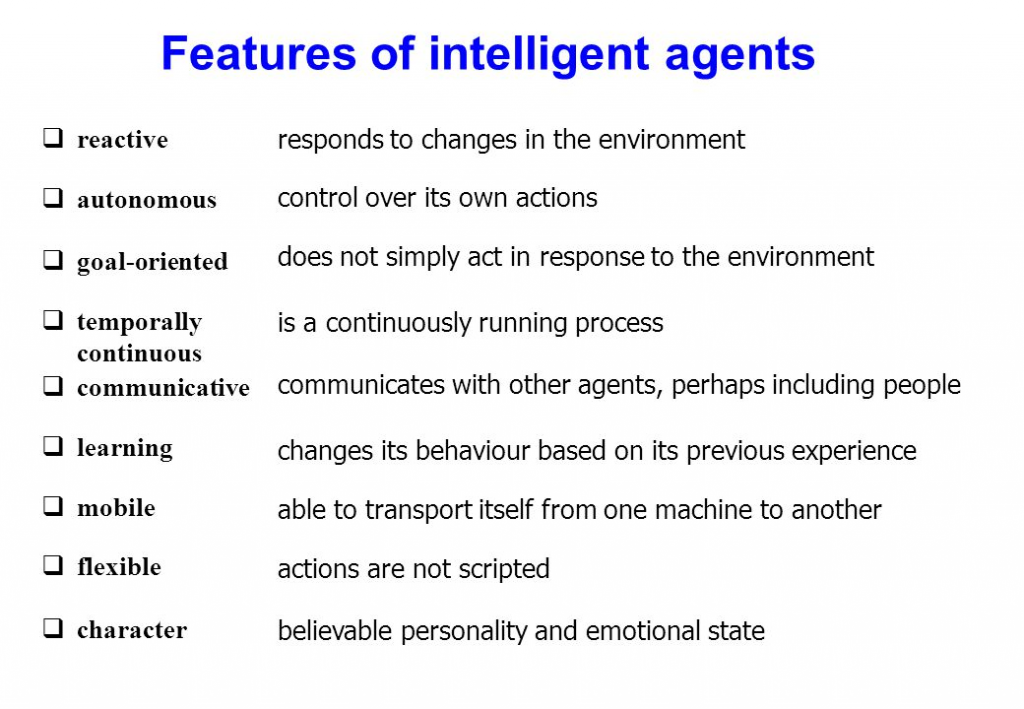
- Autonomy: Intelligent agents can operate independently and make decisions without direct human intervention.
- Learning Capability: Many agents incorporate machine learning to improve performance over time.
- Perception: Agents perceive their environment through sensors or data sources.
- Goal-Driven Behavior: Agents work towards achieving specific goals or objectives.
How Intelligent Agents Work and Architecture?
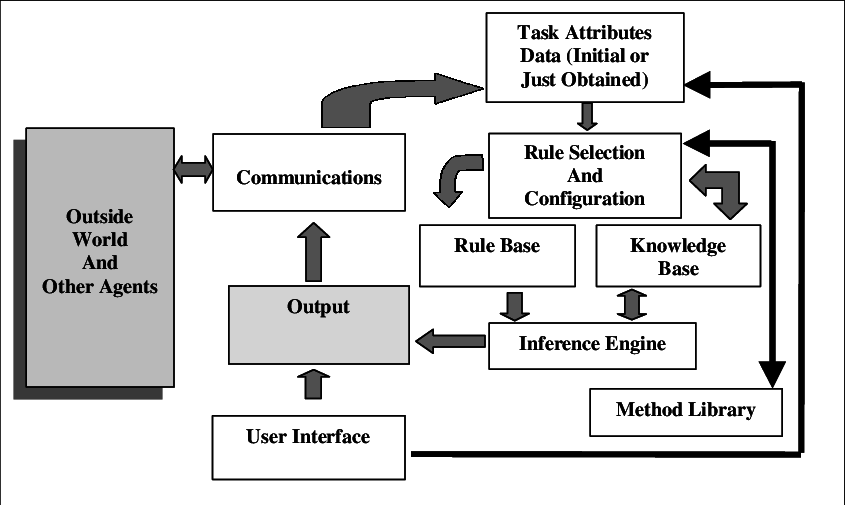
The architecture of Intelligent Agents typically involves the following components:
- Perception: The agent observes the environment using sensors or data sources.
- Knowledge Base: The agent stores its knowledge, including past experiences and learning.
- Decision-Making: The agent processes the information from its perception and knowledge base to make decisions.
- Actuation: Based on its decisions, the agent takes actions to interact with the environment.
How to Install Intelligent Agents?
The installation process for intelligent agents depends on the specific type of agent and the technology used. Some agents, like personal assistants (Siri, Google Assistant), come pre-installed on devices. For other types of agents, the installation process might involve the following steps:
- Select an Agent Framework: Choose a specific agent framework or platform that aligns with your requirements.
- Install Required Libraries: Install any necessary libraries or software dependencies for the agent framework.
- Develop the Agent: Build the intelligent agent using the chosen framework and programming language (e.g., Python, Java).
- Integrate with Environment: Integrate the agent with the environment it needs to interact with (e.g., virtual environment, IoT devices).
- Test and Validate: Thoroughly test the agent to ensure it behaves as expected and achieves its intended goals.
Remember that the installation and setup of intelligent agents can vary significantly depending on the use case and the technology involved. Always refer to the official documentation and tutorials provided by the specific agent framework or platform you choose for detailed installation instructions and best practices.
Basic Tutorials of Intelligent Agents: Getting Started
Creating a step-by-step tutorial for building intelligent agents from scratch can be quite extensive, as it depends on the specific type of agent and the technology used. Instead, I’ll provide a high-level guide for creating a basic text-based conversational agent using Python and the ChatterBot library.
Step-by-Step Basic Tutorial for Building a Text-Based Conversational Agent using ChatterBot:
- Install Python:
- Download and install the latest version of Python from the official Python website (python.org) if you haven’t already.
- Install ChatterBot:
- Open a terminal or command prompt and install the ChatterBot library using pip:
pip install chatterbot
- Create a New Python Script:
- Create a new Python file (e.g.,
chatbot.py) to write your conversational agent code.
- Import ChatterBot Modules:
- Import the necessary modules from ChatterBot to create and train the chatbot:
python from chatterbot import ChatBot from chatterbot.trainers import ChatterBotCorpusTrainer
- Create and Train the ChatBot:
- Create a new ChatBot instance and initialize the ChatterBotCorpusTrainer:
chatbot = ChatBot('MyChatBot') trainer = ChatterBotCorpusTrainer(chatbot) - Train the chatbot on the ChatterBot corpus data:
python trainer.train('chatterbot.corpus.english')
- Interact with the ChatBot:
- Use a loop to continuously interact with the chatbot and get responses:
python while True: user_input = input('You: ') response = chatbot.get_response(user_input) print('ChatBot:', response)
- Test the Conversational Agent:
- Run the Python script and start interacting with your text-based chatbot.
- Expand and Customize:
- Customize the chatbot’s responses and train it on additional data to improve its accuracy and relevance.
Please note that this tutorial provides a basic introduction to building a text-based conversational agent using ChatterBot. For more sophisticated conversational agents with speech recognition or integration with external APIs, consider exploring other libraries and frameworks, such as NLTK, TensorFlow, or using cloud-based natural language processing services.
Building intelligent agents for complex tasks, such as autonomous vehicles or robotic systems, requires advanced knowledge of AI and robotics, and it often involves specialized hardware and software integration. Always refer to the official documentation and tutorials of the chosen library or framework for detailed instructions and best practices for building intelligent agents tailored to your specific use cases.

👤 About the Author
Ashwani is passionate about DevOps, DevSecOps, SRE, MLOps, and AiOps, with a strong drive to simplify and scale modern IT operations. Through continuous learning and sharing, Ashwani helps organizations and engineers adopt best practices for automation, security, reliability, and AI-driven operations.
🌐 Connect & Follow:
Website: WizBrand.com
Facebook: facebook.com/DevOpsSchool
X (Twitter): x.com/DevOpsSchools
LinkedIn: linkedin.com/company/devopsschool
YouTube: youtube.com/@TheDevOpsSchool
Instagram: instagram.com/devopsschool
Quora: devopsschool.quora.com
Email– contact@devopsschool.com
Find Trusted Cardiac Hospitals
Compare heart hospitals by city and services — all in one place.
Explore Hospitals