
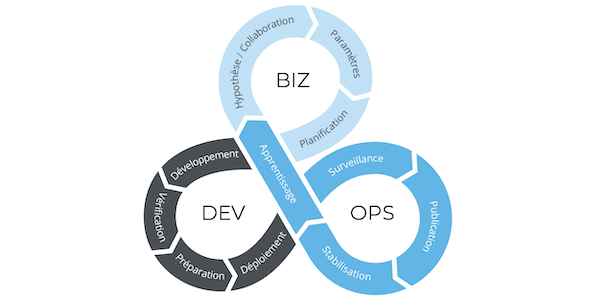
Are you tired of using outdated tools for your business development and operations? Do you want to streamline your processes and maximize efficiency? Look no further than BizDevOps tools! In this article, we will explore the top tools for BizDevOps and how they can benefit your organization.
What is BizDevOps?
Before diving into the tools, let’s first define what BizDevOps is. BizDevOps is the combination of Business, Development, and Operations. It is a collaborative approach to software delivery that integrates business stakeholders, developers, and operations teams to streamline the software development process. The goal of BizDevOps is to increase speed, efficiency, and quality of software delivery while reducing costs and risks.
Top BizDevOps Tools
- Jenkins: Jenkins is an open-source automation server that helps automate software development processes. It integrates with various tools and technologies and allows for continuous integration and delivery. Jenkins is highly customizable and has a vast community of users and contributors.
- GitLab: GitLab is a web-based Git repository manager that provides continuous integration and continuous deployment (CI/CD) pipelines. It offers features such as code review, issue tracking, and project management. GitLab is easy to use and has an intuitive user interface.
- Selenium: Selenium is an open-source test automation tool for web applications. It supports various programming languages and browsers and allows for parallel testing. Selenium is highly scalable and can be integrated with other testing tools.
- Docker: Docker is a containerization platform that allows for easy deployment and management of applications. It provides a standardized environment for developers and operations teams and allows for portability across different environments. Docker is highly efficient and can reduce infrastructure costs.
- Splunk: Splunk is a log management and analysis tool that helps organizations monitor and analyze their data. It provides real-time insights and alerts and can help identify issues before they become problems. Splunk is highly scalable and can be integrated with various data sources.
Benefits of BizDevOps Tools
Using BizDevOps tools can provide numerous benefits to your organization, including:
- Increased speed and efficiency of software delivery
- Improved collaboration and communication between teams
- Reduced costs and risks
- Standardized processes and environments
- Real-time insights and alerts
Conclusion
BizDevOps tools are essential for any organization looking to streamline their software development processes and maximize efficiency. Jenkins, GitLab, Selenium, Docker, and Splunk are just a few of the many tools available for BizDevOps. By using these tools, you can increase speed, improve collaboration, reduce costs, and gain real-time insights into your data. So why wait? Start using BizDevOps tools today and take your organization to the next level!

👤 About the Author
Ashwani is passionate about DevOps, DevSecOps, SRE, MLOps, and AiOps, with a strong drive to simplify and scale modern IT operations. Through continuous learning and sharing, Ashwani helps organizations and engineers adopt best practices for automation, security, reliability, and AI-driven operations.
🌐 Connect & Follow:
Website: WizBrand.com
Facebook: facebook.com/DevOpsSchool
X (Twitter): x.com/DevOpsSchools
LinkedIn: linkedin.com/company/devopsschool
YouTube: youtube.com/@TheDevOpsSchool
Instagram: instagram.com/devopsschool
Quora: devopsschool.quora.com
Email– contact@devopsschool.com
Find Trusted Cardiac Hospitals
Compare heart hospitals by city and services — all in one place.
Explore Hospitals