
Friends, Today I come with a new topic that is Azure Visual Studio App Center. But first of all, I let you about App Center Azure. You can quickly build high-quality apps for Android, iOS, macOS, and Windows. Automate your manufacturing, testing, and delivery pipelines. and can continuously monitor real-time performance, all in one place. A single, integrated tool for managing, build, testing, and distribution pipelines.
What is Azure Visual Studio App Center?
Now, let’s know about Azure Visual Studio App Center. Lets you can automate and manage the lifecycle of your iOS, Android, Windows, and macOS apps. You can connect your repo and within minutes automate your builds, test on real devices in the cloud, distribute apps to beta testers, and monitor real-world usage with crash and analytics data.
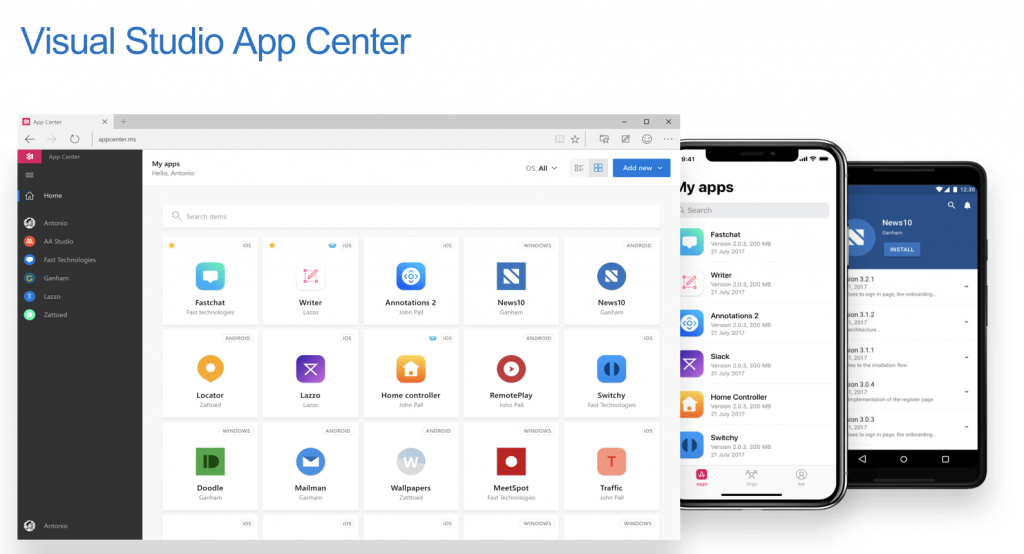
Benefits of Azure Visual Studio App Center:-
- Quickly create and deploy mission-critical web apps at scale.
- Enterprise-scale search for app development.
- Build rich communication experiences with the same secure platform capabilities used by Microsoft Teams.
- Automatically build your app, test it on real devices, and distribute it to beta testers.
- Collect crash reports and user analytics, including custom events.
- Add push notifications to your app in minutes.
Conclusion:-
Visual Studio App Center brings together common services into a single DevOps cloud solution. It helps developers to build, test, and distribute their applications and once these apps have been deployed, developers can use it to monitor the status usage of their application using the analytics and diagnostic services.

I’m Rajesh Kumar, a DevOps, SRE, DevSecOps, Cloud, and Platform Engineering expert passionate about sharing practical knowledge, real-world experiences, and industry best practices. I have worked at Cotocus and regularly write about technology, travel, investing, health, product reviews, and digital marketing through my various platforms.
I publish technical articles at DevOps School, travel stories at Holiday Landmark, stock market insights at Stocks Mantra, health and fitness guidance at My Medic Plus, product reviews at TrueReviewNow, and SEO and digital marketing strategies at Wizbrand.
Find Trusted Cardiac Hospitals
Compare heart hospitals by city and services — all in one place.
Explore Hospitals