
What is C++?
C++ is a high-level programming language that was developed by Bjarne Stroustrup in 1983 at Bell Labs. It is an extension of the C programming language with added features such as classes, objects, and templates. C++ is widely used for system software, embedded systems, game development, and high-performance computing.
What are the features of C++?
C++ has many features that make it a popular programming language. Some of its key features are:
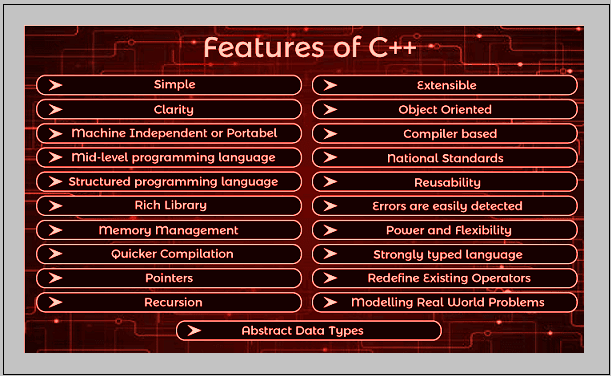
- Object-oriented programming (OOP) support
- High-level abstraction
- Memory management using pointers
- Templates for generic programming
- Exception handling
- Multiple inheritance
- Operator overloading
- Polymorphism
What is the top use case of C++?
C++ is used in a wide range of applications, but its top use cases include:
- Operating systems
- Game engines
- Graphics and multimedia applications
- High-performance computing
- Robotics and embedded systems
- Financial applications
- Networking and telecommunications
What is the workflow of C++?
The workflow of C++ involves the following steps:
- Writing the code in a text editor or an integrated development environment (IDE).
- Compiling the code using a compiler to generate object files.
- Linking the object files to create an executable file.
- Running the executable file.
How C++ Works & Architecture?
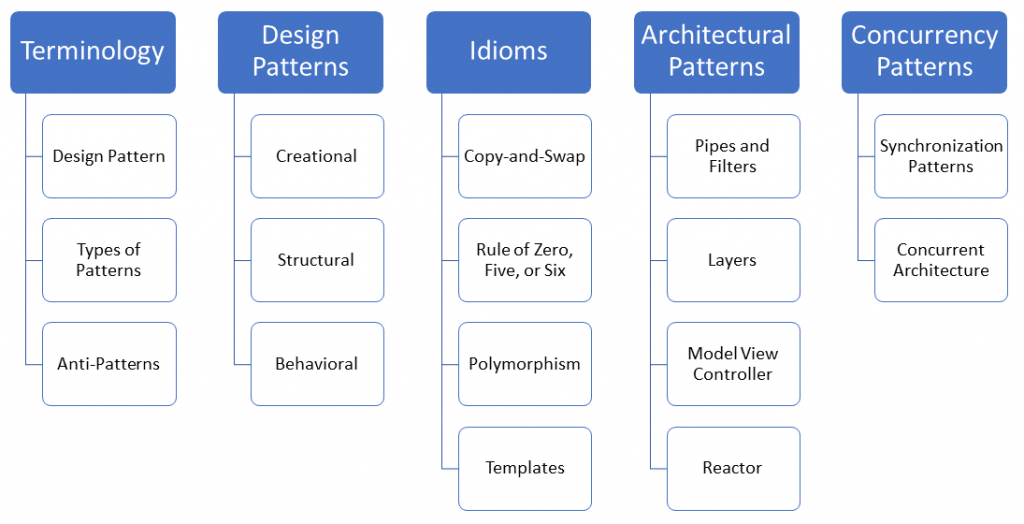
C++ works by compiling the source code into machine code that can be executed by the computer. The architecture of C++ is based on the concept of objects and classes. Objects are instances of classes that encapsulate data and behavior. Classes are blueprints for objects that define their properties and methods.
The C++ standard library provides a set of functions and classes that can be used to perform common tasks such as input/output, string manipulation, and memory management.
How to Install and Configure C++?
To install and configure C++, follow these steps:
- Download and install a C++ compiler such as GCC or Clang.
- Set the environment variables for the compiler.
- Install an IDE such as Visual Studio or Code::Blocks.
- Configure the IDE to use the compiler.
Fundamental Tutorials of C++: Getting Started Step by Step
To get started with C++, follow these steps:
Setting Up Your Environment
Before you can start programming in C++, you need to set up your development environment. This involves installing a compiler and an integrated development environment (IDE). There are many different options available, but some popular choices include Visual Studio, Eclipse, and Code::Blocks.
Understanding the Basics
Once you have your development environment set up, it’s time to start learning the basics of C++. This includes understanding fundamental concepts such as variables, data types, and operators. You’ll also need to learn how to use functions, control structures, and arrays.
Object-Oriented Programming
C++ is an object-oriented programming language, which means that it is based around the concept of objects. Objects are instances of a class, which is a blueprint for creating objects. When you create an object, you can call its methods and access its properties.
Templates and Standard Library
C++ also includes templates and a standard library, which are powerful tools for creating reusable code. Templates allow you to create generic functions and classes that can be used with any data type. The standard library includes a wide range of functions and classes that can be used for common programming tasks.
Advanced Topics
Once you have a solid understanding of the basics of C++, you can start exploring more advanced topics. This includes topics such as pointers, memory management, and multithreading. These topics can be challenging, but they are essential for creating high-performance applications.
Conclusion
Learning C++ can be a challenging but rewarding experience. With the right resources and a willingness to learn, you can master the fundamentals of C++ and start creating powerful applications. So why not start today?

👤 About the Author
Ashwani is passionate about DevOps, DevSecOps, SRE, MLOps, and AiOps, with a strong drive to simplify and scale modern IT operations. Through continuous learning and sharing, Ashwani helps organizations and engineers adopt best practices for automation, security, reliability, and AI-driven operations.
🌐 Connect & Follow:
Website: WizBrand.com
Facebook: facebook.com/DevOpsSchool
X (Twitter): x.com/DevOpsSchools
LinkedIn: linkedin.com/company/devopsschool
YouTube: youtube.com/@TheDevOpsSchool
Instagram: instagram.com/devopsschool
Quora: devopsschool.quora.com
Email– contact@devopsschool.com
Find Trusted Cardiac Hospitals
Compare heart hospitals by city and services — all in one place.
Explore Hospitals