
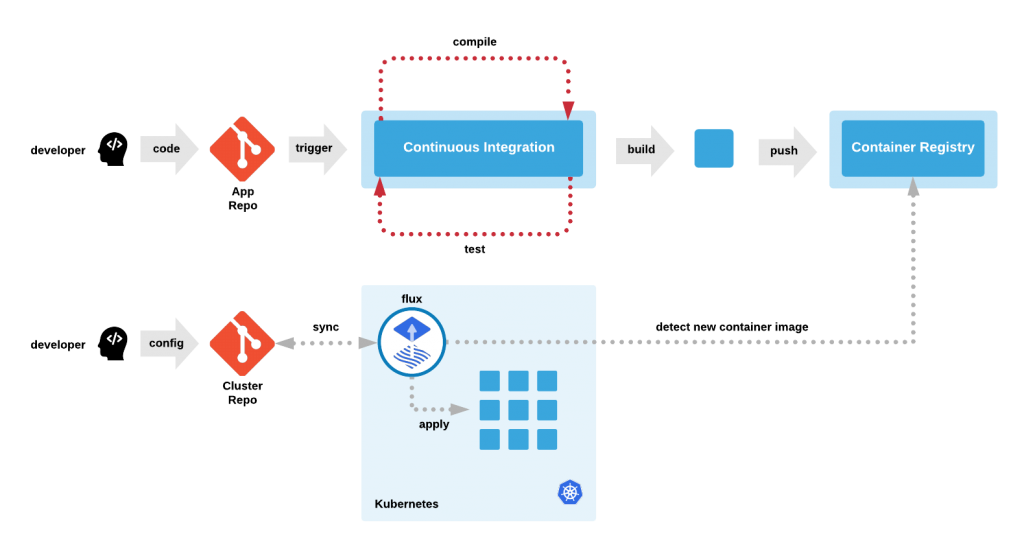
Hey there! Are you curious about what GitOps architecture is? Well, you’ve come to the right place! In this blog post, we’ll take a deep dive into GitOps architecture and explore all the ins and outs of this fascinating topic.
Introduction
GitOps architecture is a new and innovative way of managing software applications. It’s based on the principles of DevOps and uses Git as the central source of truth for all application configurations and changes.
In this approach, the entire application infrastructure is managed using Git repositories. Changes made to the application are pushed to the Git repository, and the changes are automatically reflected in the production environment.
How GitOps architecture works
GitOps architecture works by creating a declarative model of the desired state of the application. This model is stored in a Git repository and is used to manage the entire application infrastructure.
The desired state of the application is defined using tools like Kubernetes, Helm, and Terraform. These tools are used to create a YAML file that describes the desired state of the application.
Once the YAML file is created, it’s committed to the Git repository. The Git repository is then configured to automatically deploy the changes to the production environment.
Benefits of GitOps architecture
GitOps architecture offers several benefits over traditional approaches to application development and deployment. Here are some of the key benefits:
Increased consistency
By using Git as the central source of truth, GitOps architecture ensures that all changes are consistent across all environments. This reduces the risk of configuration drift and makes it easier to maintain the application over time.
Improved collaboration
GitOps architecture encourages collaboration between developers, operations teams, and other stakeholders. By using Git as the central source of truth, everyone has access to the same information, which leads to better communication and collaboration.
Increased visibility
GitOps architecture provides real-time visibility into the state of the application. This makes it easier to identify and resolve issues before they become critical.
Improved security
GitOps architecture provides a secure way to manage application configurations and changes. By using Git as the central source of truth, it’s possible to implement access controls and audit trails to ensure that only authorized users can make changes to the application.
Conclusion
In conclusion, GitOps architecture is a new and innovative way of managing software applications. It’s based on the principles of DevOps and uses Git as the central source of truth for all application configurations and changes.
By using GitOps architecture, organizations can increase consistency, improve collaboration, increase visibility, and improve security. So if you’re looking for a new approach to application development and deployment, GitOps architecture may be just what you need!
Thanks for reading, and happy coding!

👤 About the Author
Ashwani is passionate about DevOps, DevSecOps, SRE, MLOps, and AiOps, with a strong drive to simplify and scale modern IT operations. Through continuous learning and sharing, Ashwani helps organizations and engineers adopt best practices for automation, security, reliability, and AI-driven operations.
🌐 Connect & Follow:
Website: WizBrand.com
Facebook: facebook.com/DevOpsSchool
X (Twitter): x.com/DevOpsSchools
LinkedIn: linkedin.com/company/devopsschool
YouTube: youtube.com/@TheDevOpsSchool
Instagram: instagram.com/devopsschool
Quora: devopsschool.quora.com
Email– contact@devopsschool.com
Find Trusted Cardiac Hospitals
Compare heart hospitals by city and services — all in one place.
Explore Hospitals
A practical point that is often missed in GitOps architecture discussions is that it goes far beyond a simple model of Git as the source of truth and controllers syncing state into clusters—in reality, it becomes a distributed operational system with multiple interconnected components. In production environments, the architecture typically expands to include CI/CD pipelines, policy enforcement layers, secrets management solutions, and multi-cluster reconciliation controllers, each introducing its own dependencies and potential failure points. One of the main challenges is maintaining architectural consistency as the system scales, especially in multi-team setups where different services may follow different repository structures or deployment patterns, which can lead to conflicting reconciliation behavior. Another critical concern is controlling the blast radius of changes, since shared configurations or poorly isolated repositories can unintentionally impact multiple environments without proper promotion controls or environment segregation. Observability is also a key architectural requirement, as teams need visibility across Git state, controller actions, and actual cluster runtime behavior to properly diagnose issues. Ultimately, GitOps architecture success depends less on the tooling itself and more on designing a well-governed, failure-aware operational model that ensures safe and predictable state convergence across distributed systems.