
What is Joomla?
It is an open source platform on which websites and applications are built. It is a content management system (CMS) for publishing web content on websites. It helps you build powerful dynamic websites and applications. It helps you build powerful dynamic websites and applications. It is used to build, organize, manage and publish content for small businesses, governments, non-profits and large organizations worldwide. Joomla is developed by a community of volunteers supported with the legal, organizational and financial resources of Open Source Matters, Inc. Joomla has a web template system using a template processor. Its architecture is a front controller, routing all requests for non-static URIs via PHP which parses the URI and identifies the target page.
History of Joomla
Joomla was the outcome of a fork of Mambo on 17 August 2005. At that time, the Mambo name was a trademark of Miro International Pvt. Ltd, who formed a non-profit foundation with the stated purpose of funding the project and protecting it from lawsuits.
Feature
- User Management: It supports the creation of multiple user accounts. These accounts have multiple user levels so that only an Admin can drastically change the site. Joomla supports OpenID, Gmail, and LDAP.
- Management of Content: It supports WYSIWYG type of content creation where you can see what it will look like before actually going online. It helps in creating and publishing content on the web browser. Posted articles can be arranged in any way the user wishes.
- Media Manager: The Media Manager in Joomla allows users to omit the use of FTP for uploading media to the site. Folders can be created to better categorize the contents of the media. This media can be embedded into pages for easy viewing by visitors without downloading them.
- Templates: Templates in Joomla play a vital role in defining how your site will look. You may also obtain templates from third parties, and once added to the Site; You can apply a template to a site or to only part of a site.
- Banner Management: Joomla supports designing banners and other ads. Once configured, you can perform multiple clicks, impressions, and set a specific URL if necessary.
- RSS: RSS(Rich Site Summary) allows a visitor to subscribe to your website and see if there is any new content on the site from an RSS reader. It has full support for users to integrate feeds and post similar content on the website.
Advantages of Joomla
- It’s Support PHP Scripting.
- Fast, safe, and easy editing.
- Powerful and easy menu creation tool.
- Open source infrastructure.
- Infrastructure versatility.
- Built-in caching.
- Built-in basic SEO functionality.
- Vibrant and friendly community.
- Security updates.
- Huge library of extensions.
- Vast collection of templates.
- Access control lists (ACLs).
- An enormous number of Joomla websites.
- Frontend editing.
- Free to download, to use, free to upgrade.
- Scalable engine.
- Compatible with nearly all browsers.
- Support PHP Scripting.
- Ability to Use Multiple Joomla Templates.
- Support Multiple Languages.
- Built-in SEO Functionality.
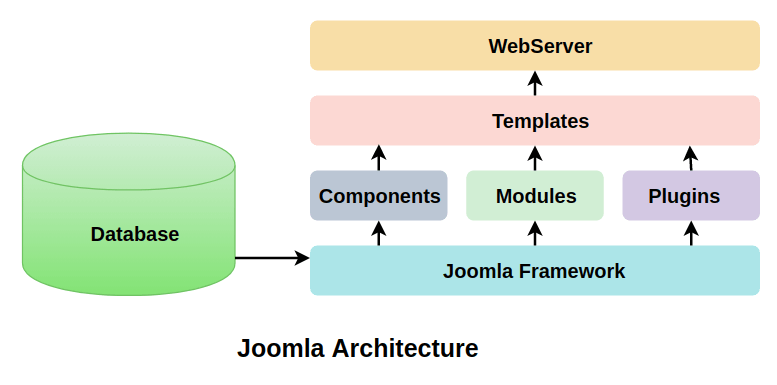
Architecture of Joomla
Alternative of Joomla
- CMS Hub
- WordPress
- Drupal
- Shopify
- Magento Commerce
- Squarespace
- Wix
- Weebly
- TYPO3
- Contentful
Interview Question Answer for Joomla
Best Resources, Tutorials and Guide for Joomla
Best Courses and Insitute for learning
If you want certification course for such top course. So please visit “Devopsschool.com”. You will find more certification courses here.


I’m Rajesh Kumar, a DevOps, SRE, DevSecOps, Cloud, and Platform Engineering expert passionate about sharing practical knowledge, real-world experiences, and industry best practices. I have worked at Cotocus and regularly write about technology, travel, investing, health, product reviews, and digital marketing through my various platforms.
I publish technical articles at DevOps School, travel stories at Holiday Landmark, stock market insights at Stocks Mantra, health and fitness guidance at My Medic Plus, product reviews at TrueReviewNow, and SEO and digital marketing strategies at Wizbrand.
Find Trusted Cardiac Hospitals
Compare heart hospitals by city and services — all in one place.
Explore Hospitals





