
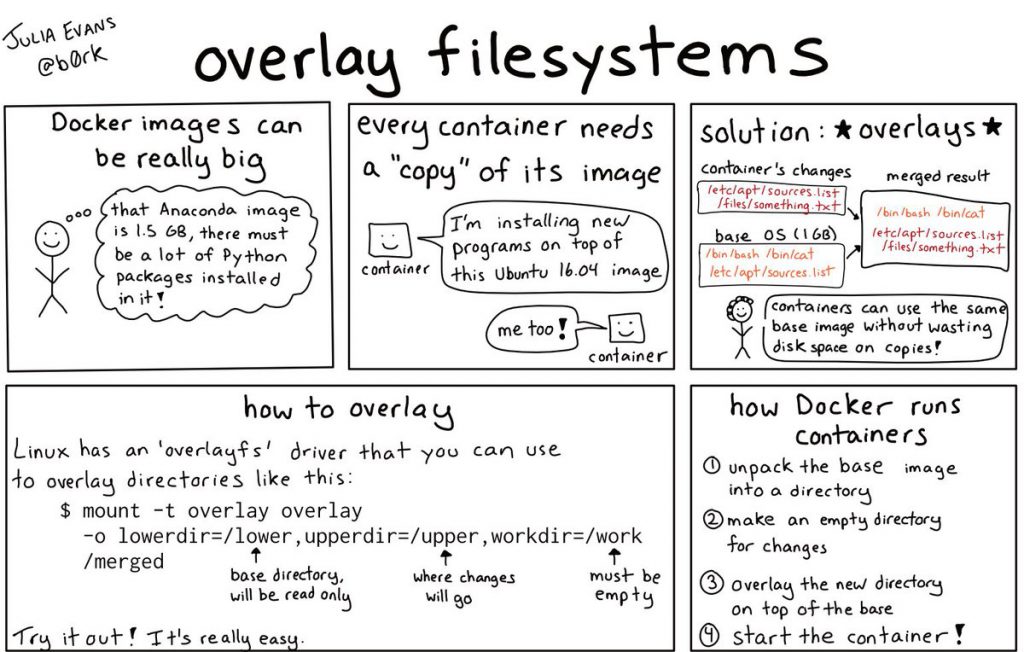
An overlay filesystem is a type of filesystem that is used to combine multiple filesystems into a single, unified filesystem. The main use case for overlay filesystems is to provide a way to package and distribute applications as containers.
In an overlay filesystem, a base filesystem, which contains the host system’s files, is combined with a read-write filesystem that contains the files for the application and its dependencies. When the overlay filesystem is mounted, the application and its dependencies appear as if they are installed directly on the host system, while the host system’s files remain separate and unaffected.
The advantage of using an overlay filesystem is that it provides a clean, isolated environment for the application to run in, without modifying the host system. This makes it easier to package, distribute, and run applications, as well as to manage the dependencies for the application.
Examples of overlay filesystems include OverlayFS and AUFS. These filesystems are used by container runtimes, such as Docker and rkt, to provide the isolated environment for containers.
In summary, an overlay filesystem is a type of filesystem that combines multiple filesystems into a single, unified filesystem. It is used to provide a clean, isolated environment for applications to run in, making it easier to package, distribute, and run applications.
Use cases of overlay filesystems
There are several use cases for overlay filesystems, including:
- Containerization: Overlay filesystems are primarily used for containerization, providing the isolated environment for applications to run in containers. By combining a base filesystem with a read-write filesystem, the overlay filesystem provides a clean, isolated environment for the application to run in, without modifying the host system.
- Application Development: Overlay filesystems can be used to package and distribute development environments, making it easier to set up and manage the dependencies for an application. Developers can use an overlay filesystem to create a custom environment that includes all the necessary tools and dependencies for their application, and then distribute this environment as a container image.
- Continuous Integration/Continuous Deployment (CI/CD): Overlay filesystems can be used in CI/CD pipelines to build and test applications in isolated environments. This can help ensure that the application and its dependencies are packaged and deployed consistently, regardless of the underlying host system.
- Updating Applications: Overlay filesystems can be used to update applications without affecting the host system. For example, a new version of an application can be packaged and distributed as a new container image, and then launched as a new container, without modifying the host system.
In summary, overlay filesystems have several use cases, including containerization, application development, CI/CD, and updating applications. They provide a clean, isolated environment for applications to run in, making it easier to package, distribute, and run applications.

I’m Rajesh Kumar, a DevOps, SRE, DevSecOps, Cloud, and Platform Engineering expert passionate about sharing practical knowledge, real-world experiences, and industry best practices. I have worked at Cotocus and regularly write about technology, travel, investing, health, product reviews, and digital marketing through my various platforms.
I publish technical articles at DevOps School, travel stories at Holiday Landmark, stock market insights at Stocks Mantra, health and fitness guidance at My Medic Plus, product reviews at TrueReviewNow, and SEO and digital marketing strategies at Wizbrand.
Find Trusted Cardiac Hospitals
Compare heart hospitals by city and services — all in one place.
Explore Hospitals