
What is rancher?
Rancher is an open source software platform that enables organizations to run containers in production. It makes simple to create clusters, manage multiple Kubernetes clusters and gives a nice user interface for monitoring and managing them. With Rancher, organizations no longer have to build a container services platform from scratch using a distinct set of open source technologies. Rancher supplies the entire software stack needed to manage containers in production.
Why to use Rancher?
If you have a lot of clusters to manage, Rancher is a great tool to use with users who are in multiple projects in the cluster. It allows you to manage users in one place and apply them to all projects. It also provides a “single pane of glass” for viewing groups and configurations.
Features
- It allow Cross-host networking. Rancher creates a private software defined network for each environment, allowing secure communication between containers across hosts and clouds.
- Rancher provides an integrated, elastic load balancing service to distribute traffic between containers or services. The load balancing service works across multiple clouds.
- Rancher supports orchestrating Persistent Storage Services for Docker, making it possible for developers to deploy storage reliably in conjunction with containerized applications
- Rancher implements a distributed DNS-based service discovery function with integrated health checking that allows containers to automatically register themselves as services
- Rancher makes it easy for users to upgrade existing container services, by allowing service cloning and redirection of service requests.
- Rancher supports the ability for users to select the default Cattle, Kubernetes, or Docker Swarm as their container orchestration engine of choice when creating environments.
- Rancher supports Docker Machine, a powerful tool for provisioning hosts directly from cloud providers.
- Rancher is designed for multiple users and allows organizations to collaborate throughout the application lifecycle.
Advantages
- Rancher unified the multi-cluster app management
- Support hybrid & multi-cloud
- Works well with DevOps toolsets like Jenkins, Gitlab, Travis, Prometheus, Grafana, Fluentd, Istio.
- It allows consistent security policy and compliance
- There’s only one version of Rancher; it’s 100% free and open-source software.
- If you want to switch from Rancher, you can remove it with minimal disruption to services.
- Rancher simplifies the installation and configuration of Service mesh with Istio
- It increases the productivity of developers, because after implementing Rancher they don’t need to worrying about the infrastructure that runs them.
- With the help of Rancher even new employees can launch applications and wire them together quickly at production level without even beng an expert of Kubernetes.
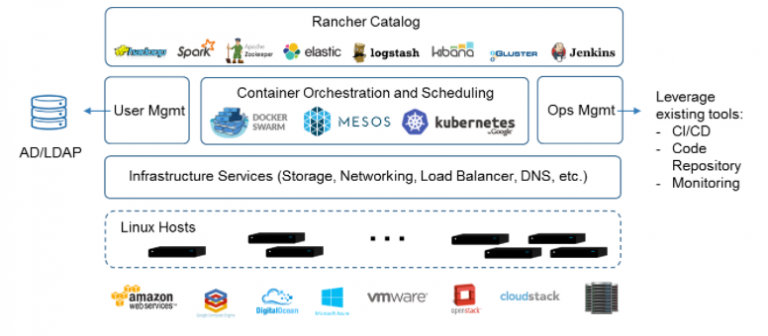
Major Components of Rancher
Alternatives to Rancher
- Azure Management Tools.
- CloudHealth.
- ServiceNow IT Operations Management.
- Apptio Cloudability.
- CloudBolt.
- Platform9 Managed Kubernetes.
- Workload Optimization Manager.
- Densify.
Interview Questions and Answers For Rancher
Best Courses and Insitute for learning
If you want certification course for such top course. So please visit “DevOpsSchool.com”. You will find more certification courses here.


I’m Rajesh Kumar, a DevOps, SRE, DevSecOps, Cloud, and Platform Engineering expert passionate about sharing practical knowledge, real-world experiences, and industry best practices. I have worked at Cotocus and regularly write about technology, travel, investing, health, product reviews, and digital marketing through my various platforms.
I publish technical articles at DevOps School, travel stories at Holiday Landmark, stock market insights at Stocks Mantra, health and fitness guidance at My Medic Plus, product reviews at TrueReviewNow, and SEO and digital marketing strategies at Wizbrand.
Find Trusted Cardiac Hospitals
Compare heart hospitals by city and services — all in one place.
Explore Hospitals





