
Use Test Kitchen to automatically test cookbooks across any combination of platforms and test suites:
- Test suites are defined in a kitchen.yml file.
- Supports cookbook testing across many cloud providers and virtualization technologies.
- Uses a comprehensive set of operating system base images from Chef’s Bento project.
Bento
Bento is a Chef Software project that produces base testing VirtualBox, Parallels, and VMware boxes for multiple operating systems for use with Test Kitchen. By default, Test Kitchen uses the base images provided by Bento although custom images may also be built using HashiCorp Packer.
The key concepts in Test Kitchen are:
- A platform is the operating system or target environment on which a cookbook is to be tested
- A suite is the Chef Infra Client configuration, a Policyfile or run-list, and (optionally) node attributes
- An instance is the combination of a specific platform and a specific suite, with each instance being assigned an auto-generated name
- A driver is the lifecycle that implements the actions associated with a specific instance—create the instance, do what is needed to converge on that instance (such as installing Chef Infra Client, uploading – cookbooks, starting a Chef Infra Client run, and so on), setup anything else needed for testing, verify one (or more) suites post-converge, and then destroy that instance
- A provisioner is the component on which the Chef Infra Client code will be run, either using chef-zero or chef-solo via the chef_zero and chef_solo provisioners, respectively
Test Kitchen driver
Test Kitchen uses a driver plugin architecture to enable Test Kitchen to test instances on cloud providers such as Amazon EC2, Google Compute Engine, and Microsoft Azure. You can also test on multiple local hypervisors, such as VMware, Hyper-V, or VirtualBox.
A Test Kitchen driver is what supports configuring the compute instance that is used for isolated testing. This is typically a local hypervisor (Hyper-V), hypervisor abstraction layer (Vagrant), or cloud service (AWS EC2).
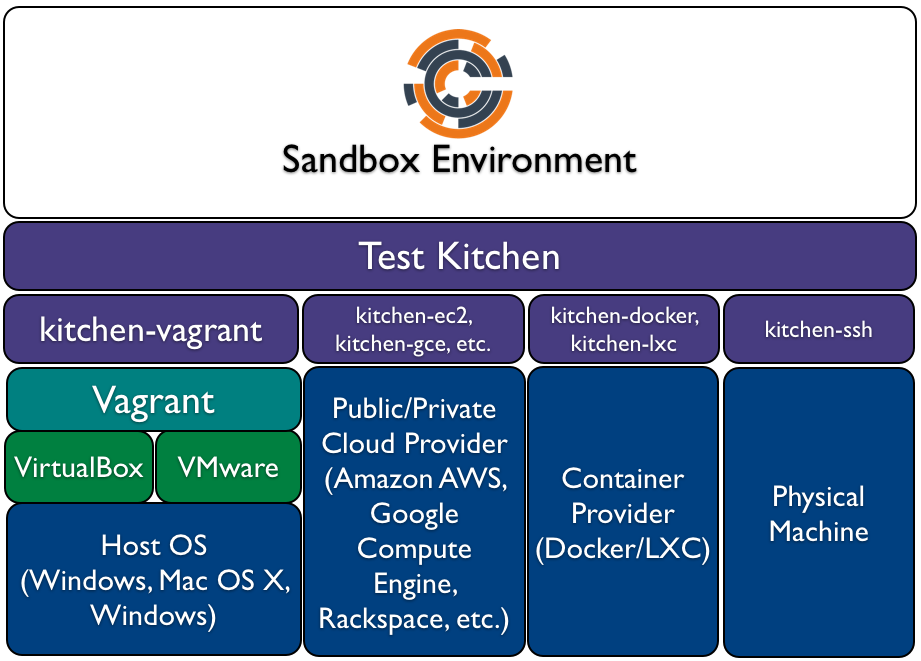
Chef Workstation includes Test Kitchen along with the following drivers:
- Amazon EC2 (AWS) via the kitchen-ec2 project
- DigitalOcean via the kitchen-digitalocean project
- Dokken (Chef Infra specific Docker driver) via the kitchen-dokken project
- Google Cloud Platform via the kitchen-google project
- HashiCorp Vagrant via the kitchen-vagrant project
- Microsoft Azure via the kitchen-azurerm project
- Microsoft Hyper-V via the kitchen-hyperv project
- Openstack via the kitchen-openstack project
- VMware vCenter via the kitchen-vcenter project
- VMware vRealize Automation via the kitchen-vra project
The Test Kitchen community also maintains several additional plugins not bundled directly in Chef Workstation:
- kitchen-docker
- kitchen-rackspace
- kitchen-terraform
- kitchen-vcair
- kitchen-vro
Driver Plugin Description
| Driver Plugin | Description |
|---|---|
| kitchen-azurerm | A driver for Microsoft Azure. |
| kitchen-cloudstack | A driver for CloudStack. |
| kitchen-digitalocean | A driver for DigitalOcean. This driver ships in Chef Workstation. |
| kitchen-dokken | A driver for Docker. This driver ships in Chef Workstation. |
| kitchen-dsc | A driver for Windows PowerShell Desired State Configuration (DSC). |
| kitchen-ec2 | A driver for Amazon EC2. This driver ships in Chef Workstation. |
| kitchen-google | A driver for Google Compute Engine. This driver ships in Chef Workstation |
| kitchen-hyperv | A driver for Microsoft Hyper-V Server. This driver ships in Chef Workstation. |
| kitchen-openstack | A driver for OpenStack. This driver ships in Chef Workstation. |
| kitchen-rackspace | A driver for Rackspace. |
| kitchen-vagrant | A driver for HashiCorp Vagrant. This driver ships in Chef Workstation. |
Validation with InSpec
Test Kitchen will create a VM or cloud instance, install Chef Infra Client to that system, and converge Chef Infra Client with your local cookbook. Once this is complete, you will want to perform automated validation against the infrastructure you have built to validate its configuration. Test Kitchen allows you to run InSpec tests against your converged cookbook for easy local validation of your infrastructure.
kitchen (executable)
kitchen is the command-line tool for Test Kitchen, an integration testing tool maintained by Chef Software. Test Kitchen runs tests against any combination of platforms using any combination of test suites.
kitchen.yml
Use a kitchen.yml file to define what is required to run Test Kitchen, including drivers, provisioners, platforms, and test suites.
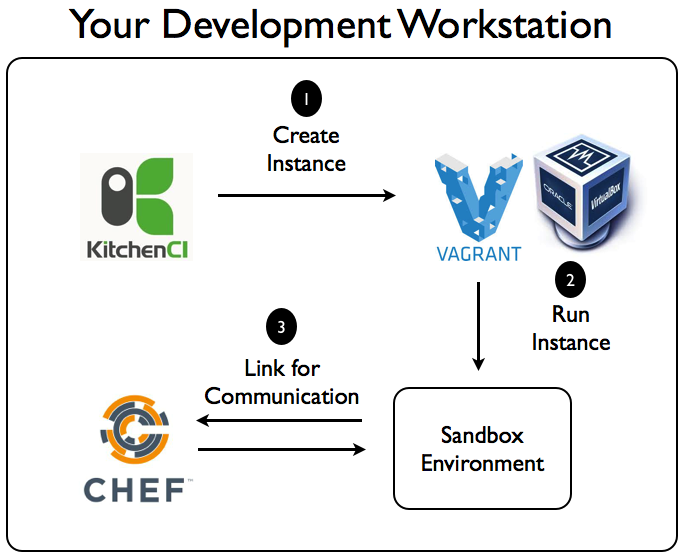
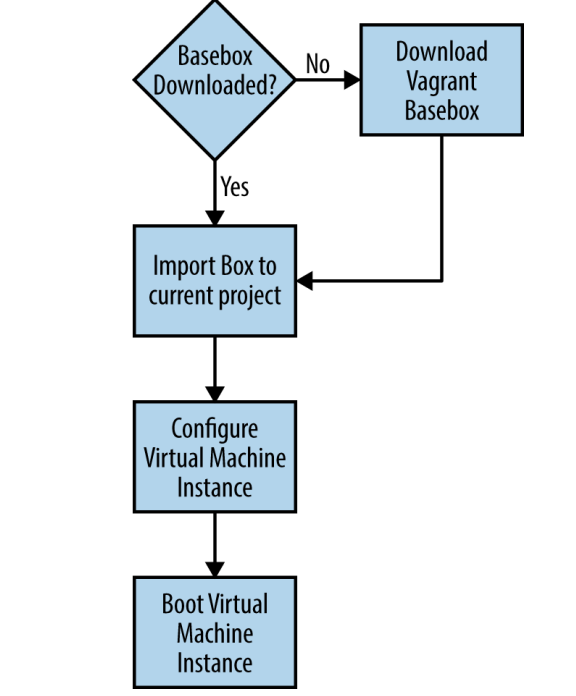
Test Kitchen with Vagrant & Virtualbox
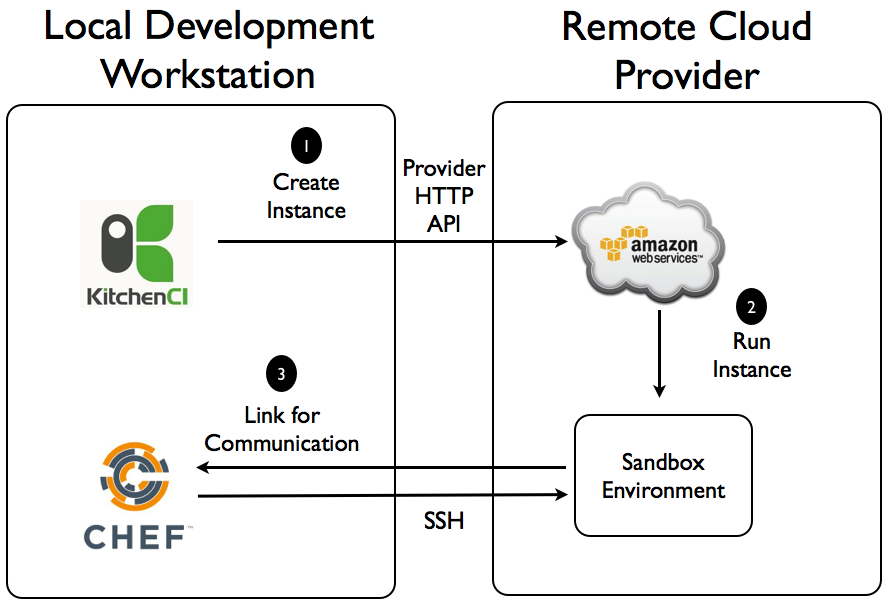
Test Kitchen with AWS
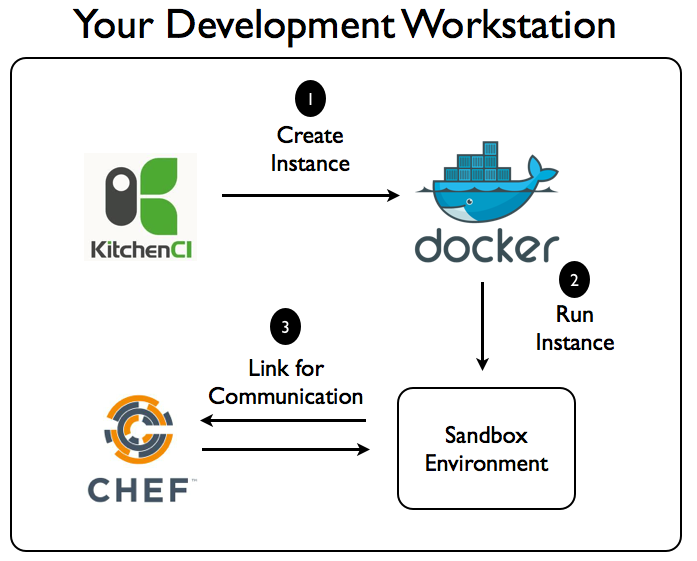
Test Kitchen with Docker

I’m Rajesh Kumar, a DevOps, SRE, DevSecOps, Cloud, and Platform Engineering expert passionate about sharing practical knowledge, real-world experiences, and industry best practices. I have worked at Cotocus and regularly write about technology, travel, investing, health, product reviews, and digital marketing through my various platforms.
I publish technical articles at DevOps School, travel stories at Holiday Landmark, stock market insights at Stocks Mantra, health and fitness guidance at My Medic Plus, product reviews at TrueReviewNow, and SEO and digital marketing strategies at Wizbrand.
Find Trusted Cardiac Hospitals
Compare heart hospitals by city and services — all in one place.
Explore Hospitals