
What is WordPress?
WordPress is a low cost and open-source content management system (“CMS” is an application used to create and manage digital content).CMS is the most widely used CMS framework of recent time. written in PHP and paired with a MySQL or MariaDB database. Features include a plugin architecture and a template system, referred to within WordPress as Themes. WordPress is an open-source content management system licensed under GPLv2, which means that anyone can use or modify the WordPress software for free.
WordPress is a content management system (WCM) i.e. it is a tool that organizes the whole process of creating, storing and showcasing web-content in an optimal way.
History
WordPress first appeared in 2003 as a joint effort between Matt Mullenweg and Mike Little to create a fork of b2. Christine Selleck Tremoulet, a friend of Mullenweg, suggested the name WordPress.
In 2004 the licensing terms for the competing Movable Type package were changed by Six Apart, resulting in many of its most influential users migrating to WordPress. By October 2009 the Open Source CMS Market Share Report concluded that WordPress enjoyed the greatest brand strength of any open-source content management system
Feature and advantage of WordPress
- Low cost: You only need to pay for a domain and web hosting. The WordPress core software and many themes and plugins are free.
- Easy installation and update process: Most web hosts offer instant WordPress installation tools.
- Simple to manage: If you have no programming skills. Users do not need programming knowledge to write and edit posts, upload and edit images, manage users, add custom menus, or install themes and plugins.
- Custom design: you can easily create a custom design with thousands of ready-to-use WordPress themes.
- Custom functionality: Make use of plugins to add features to WordPress. There’s likely a plugin for any task, from SEO to event booking.
- Helpful community: The WordPress community is global, and there are support forums with helpful WordPress experts. In case you encounter a problem, a Google search will help you find a solution quickly.
- Open-source software: WordPress is an open-source platform, meaning that its source code is open to the public. As a result, WordPress developers voluntarily work to improve the core code, and new plugins and themes are created to fulfill emerging needs.
Written in which language
WordPress is written in PHP[4] and paired with a MySQL or MariaDB database.
Use Case of WordPress
- WordPress originated as a blogging platform which later expanded into a massive content management system. Today, there are hundreds of millions of blogs using WordPress to publish and curate content.
- With enough knowledge of front-end technology functions, you can easily customize your WordPress installation to look like a professional business website
- The most popular eCommerce plugin for WordPress is WooCommerce (as shown in the snapshot), and not only is the WooCommerce plugin free – it’s highly customizable
Components of WordPress
- Widget Areas
- Theme Options
- Page Templates
- Error Handling/404 page
- Search Results Page
- Styling User Comments
- Blog Pagination
- BlockQuotes
- Multi-level Menu” and “Hamburger Menu
- Styling Visual Editor
Alternative of WordPress
- Zyro
- Wix
- Joomla
- Squarespace
- Weebly
- Shopify
- Drupal
- Blogger
- BigCommerce
- Site123
- Jimdo
- Ghost
- PrestaShop
- OpenCart
- Jekyll
- Adobe Commerce
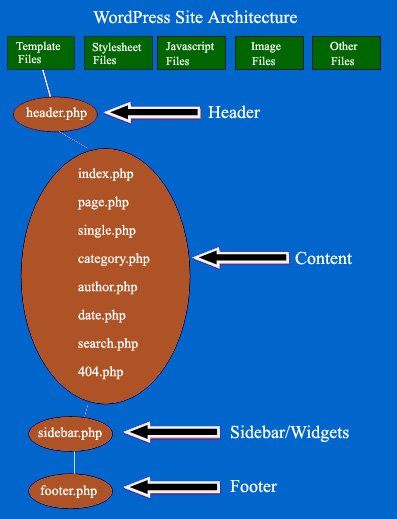
Architecture of WordPress
Interview Question and Answer
Best Resources, Tutorials and Guide for WordPress
Best Courses and Insitute for learning
If you want certification course for such top course. So please visit “Devopsschool.com”. You will find more certification courses here.


I’m Rajesh Kumar, a DevOps, SRE, DevSecOps, Cloud, and Platform Engineering expert passionate about sharing practical knowledge, real-world experiences, and industry best practices. I have worked at Cotocus and regularly write about technology, travel, investing, health, product reviews, and digital marketing through my various platforms.
I publish technical articles at DevOps School, travel stories at Holiday Landmark, stock market insights at Stocks Mantra, health and fitness guidance at My Medic Plus, product reviews at TrueReviewNow, and SEO and digital marketing strategies at Wizbrand.
Find Trusted Cardiac Hospitals
Compare heart hospitals by city and services — all in one place.
Explore Hospitals