
Find the Best Cosmetic Hospitals

Explore trusted cosmetic hospitals and make a confident choice for your transformation.

“Invest in yourself — your confidence is always worth it.”

Explore Cosmetic Hospitals

Start your journey today — compare options in one place.

Project sync windows (SyncWindow) in ArgoCD

  • Sync windows are configurable windows of time where syncs will either be blocked or allowed.
  • These are defined by a kind, which can be either allow or deny, a schedule in cron format and a duration along with one or more of either applications, namespaces and clusters.
  • Wildcards are supported.
  • These windows affect the running of both manual and automated syncs but allow an override for manual syncs which is useful if you are only interested in preventing automated syncs or if you need to temporarily override a window to perform a sync.

The windows work in the following way.

  • If there are no windows matching an application then all syncs are allowed.
  • If there are any allow windows matching an application then syncs will only be allowed when there is an active allow windows.
  • If there are any deny windows matching an application then all syncs will be denied when the deny windows are active.
  • If there is an active matching allow and an active matching deny then syncs will be denied as deny windows override allow windows.

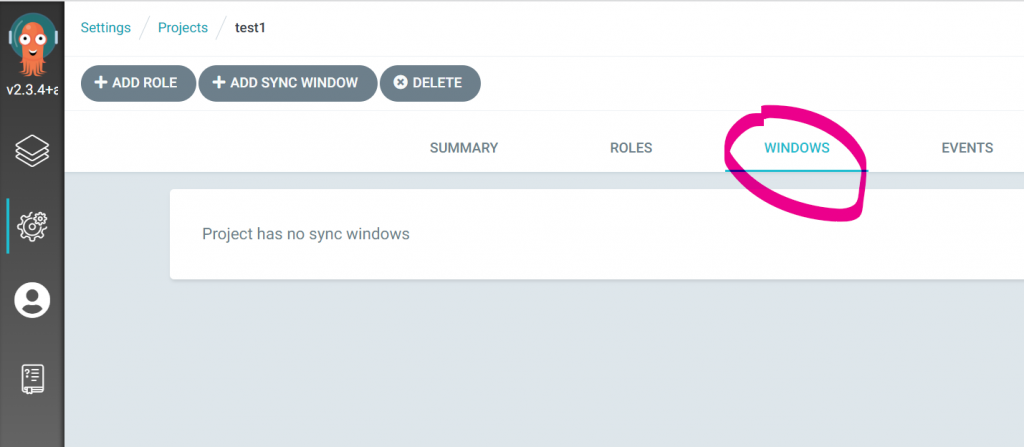
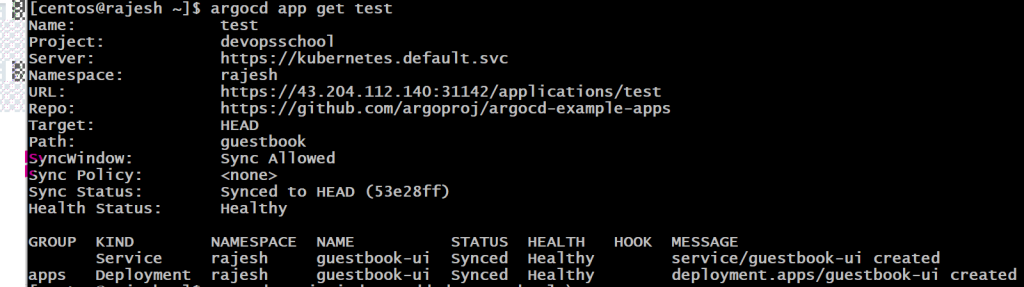
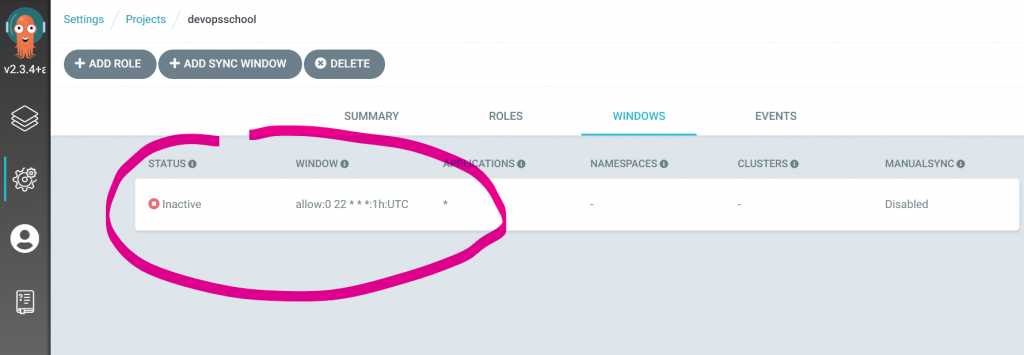
The UI and the CLI will both display the state of the sync windows. The UI has a panel which will display different colours depending on the state. The colours are as follows. Red: sync denied, Orange: manual allowed and Green: sync allowed.
How to apply Sync Windows

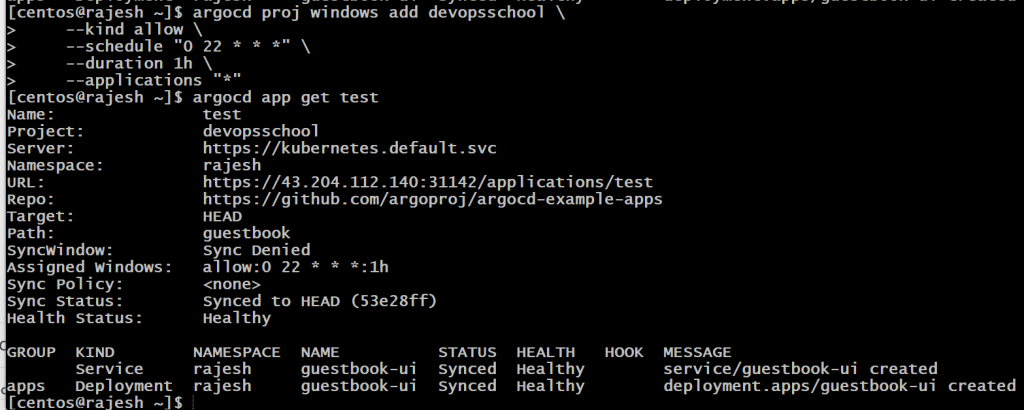
$ argocd proj windows add devopsschool \
    --kind allow \
    --schedule "0 22 * * *" \
    --duration 1h \
    --applications "*"Code language: JavaScript (javascript)
Alternatively, they can be created directly in the AppProject manifest:

apiVersion: argoproj.io/v1alpha1
kind: AppProject
metadata:
  name: default
spec:
  syncWindows:
  - kind: allow
    schedule: '10 1 * * *'
    duration: 1h
    applications:
    - '*-prod'
    manualSync: true
  - kind: deny
    schedule: '0 22 * * *'
    duration: 1h
    namespaces:
    - default
   - kind: allow
     schedule: '0 23 * * *'
     duration: 1h
     clusters:
     - in-cluster
     - cluster1Code language: JavaScript (javascript)

To allow manual syncs using the CLI, UI or directly in the AppProject manifest:
$ argocd proj windows enable-manual-sync PROJECT ID

To disable
$ argocd proj windows disable-manual-sync PROJECT ID

Windows can be listed using the CLI or viewed in the UI:
$ argocd proj windows list PROJECTCode language: PHP (php)

Find Trusted Cardiac Hospitals

Compare heart hospitals by city and services — all in one place.

Explore Hospitals
I’m a DevOps/SRE/DevSecOps/Cloud Expert passionate about sharing knowledge and experiences. I have worked at <a href="https://www.cotocus.com/">Cotocus</a>. I share tech blog at <a href="https://www.devopsschool.com/">DevOps School</a>, travel stories at <a href="https://www.holidaylandmark.com/">Holiday Landmark</a>, stock market tips at <a href="https://www.stocksmantra.in/">Stocks Mantra</a>, health and fitness guidance at <a href="https://www.mymedicplus.com/">My Medic Plus</a>, product reviews at <a href="https://www.truereviewnow.com/">TrueReviewNow</a> , and SEO strategies at <a href="https://www.wizbrand.com/">Wizbrand.</a> Do you want to learn <a href="https://www.quantumuting.com/">Quantum Computing</a>? <strong>Please find my social handles as below;</strong> <a href="https://www.rajeshkumar.xyz/">Rajesh Kumar Personal Website</a> <a href="https://www.youtube.com/TheDevOpsSchool">Rajesh Kumar at YOUTUBE</a> <a href="https://www.instagram.com/rajeshkumarin">Rajesh Kumar at INSTAGRAM</a> <a href="https://x.com/RajeshKumarIn">Rajesh Kumar at X</a> <a href="https://www.facebook.com/RajeshKumarLog">Rajesh Kumar at FACEBOOK</a> <a href="https://www.linkedin.com/in/rajeshkumarin/">Rajesh Kumar at LINKEDIN</a> <a href="https://www.wizbrand.com/rajeshkumar">Rajesh Kumar at WIZBRAND</a> <a href="https://www.rajeshkumar.xyz/dailylogs">Rajesh Kumar DailyLogs</a>

Related Posts

Top 10 AI Infographic Creators Tools in 2026: Features, Pros, Cons & Comparison

Introduction In 2026, AI infographic creators have become essential tools for businesses, marketers, educators, and content creators who need to transform complex data into visually compelling stories….

Read More

Top 11 AI Personalized Learning Tools in 2026: Features, Pros, Cons & Comparison

Introduction In 2026, AI personalized learning tools have transformed education and training, tailoring content to individual learner needs with unprecedented precision. These tools leverage machine learning, natural…

Read More

Top 10 Accounting Software Tools in 2026: Features, Pros, Cons & Comparison

Introduction In 2026, the importance of accounting software continues to grow, helping businesses of all sizes streamline financial management, improve accuracy, and stay compliant with ever-changing regulations….

Read More

Top 10 Endpoint Management Tools in 2026: Features, Pros, Cons & Comparison

Introduction In 2026, businesses of all sizes are increasingly reliant on a variety of devices—laptops, desktops, mobile devices, and other endpoints—that connect to their networks. With the…

Read More

Top 10 Order Management Systems Tools in 2026: Features, Pros, Cons & Comparison

Introduction In 2026, managing orders has become a sophisticated process, requiring advanced tools to handle large volumes, multiple sales channels, and intricate supply chains. Order Management Systems…

Read More

What is Veracode and use cases of Veracode?

What is Veracode? Veracode is a leading application security (AppSec) platform that helps organizations identify and remediate vulnerabilities in their software throughout the development lifecycle. By integrating…

Read More
Subscribe
Notify of
guest
0 Comments
Newest
Oldest Most Voted
Inline Feedbacks
View all comments
0
Would love your thoughts, please comment.x
()
x