
Finding qualified prospects shouldn’t feel like rolling dice. The right lead generation tools help you identify decision-makers, verify contact data, and start conversations that convert – without wasting hours on manual research or risking deliverability. Below, you’ll find a tested shortlist of lead generation software categories and the best options for cold email specifically. We’ll keep it practical: plain-English reviews, real pros and cons, pricing snapshots, and guidance on picking tools that fit your stack and compliance needs. If you’re ready to spend less time hunting and more time closing, this guide brings the market’s top sales lead generation tools into one place.

What is a lead generation tool?
A lead generation tool is software that helps you discover, qualify, and capture contact data for potential customers—then move those contacts into outreach or nurturing. Typical capabilities include email finding, verification, enrichment (firmographics, technographics, intent), and workflows (list building, CRM sync, sequences). Modern platforms also offer Chrome extensions to extract data from LinkedIn and websites, plus APIs and integrations for scalable online lead generation.
A quick example: a B2B team targeting EU fintech PMs might search by company size, tech stack, and region, surface verified emails, and push those contacts to a cadence. Tools like the Snov.io b2b lead finder consolidate discovery, verification, and outreach in one place—reducing list-building time and making lead gen software easier to manage end-to-end. At minimum, strong tools validate emails in real time, flag risky addresses, and integrate natively with CRMs (Salesforce, HubSpot, Pipedrive). Advanced suites add intent signals, AI research, and rules that keep your data fresh so SDRs spend time writing relevant messages—not fixing spreadsheets.
Why is lead generation important?
Without a consistent pipeline, even great products stall. Effective sales lead generation tools let you target ICPs precisely, keep lists clean (fewer bounces), and reach more prospects with fewer emails—protecting domain reputation and improving reply rates. They also create repeatable motion: once your filters, enrichment, and verification are set, your team can scale outreach without reinventing the process for each campaign. Finally, good data fuels better personalization, which tends to lift positive responses while lowering spam complaints.
| Tool (linked) | Key strength / unique feature | Pricing (from) | Best for… |
| Snov.io | All-in-one: email finder, verifier, and drip campaigns in one workflow | Tiered plans (credits & seats; see pricing page) | SMBs/teams needing finder+verification+outreach together |
| Hunter.io | Simple UI with domain search & verification credits | Starter often listed around $49/mo for 500 searches (check live page) | Quick email discovery for small teams |
| Mailchimp | Polished marketing emails & automations for consent-based lists | Free tier + paid seats; pricing varies by Hub/plan | Newsletters & nurture to permission-based audiences (not cold) |
| MailerLite | Affordable email marketing + landing pages | Low entry price; see current tiers | Budget-friendly inbound capture & email marketing (not cold) |
| HubSpot | Robust CRM + sequences and automation across Hubs | Free tools; paid seats/tiers (Starter → Enterprise) | Multi-Hub growth stack; not for true cold email sends |
Best tool for cold email
Cold email works when three pillars line up: accurate data, deliverability, and relevance. Your toolset should start with a reliable email finder plus real-time verification to keep bounces low and domain reputation healthy. Next, look for outreach features that respect inbox limits—think safe daily send caps, human-like scheduling, warm-up options, and reply detection—so sequences feel natural, not spammy. Finally, prioritize personalization powered by enrichment (role, industry, tech stack) and smooth CRM integrations to keep records clean and pipeline reporting trustworthy.
Equally important: know the difference between cold and permission-based emailing. Some platforms are built for opt-in audiences (great for newsletters and nurture), while others are designed for compliant prospecting workflows. If your use case is true outbound, pick tools that explicitly support cold outreach and list hygiene, then separate sending domains/addresses, ramp volume gradually, and prune non-engagers. In the reviews below, we’ll break down how each option approaches data quality, verification, sequencing, and compliance—so whether you’re a solo founder or leading an SDR team, you can choose lead gen software that accelerates pipeline without risking deliverability.
Snov.io

If you want one workflow from prospect discovery to first reply, Snov.io is hard to beat. The Snov.io b2b lead finder lets you search by company, domain, or profile and instantly pair results with real-time verification—so you build lists that actually deliver. Where many stacks stitch together separate finder, verifier, and sequencer tools, Snov.io bundles them, reducing setup time, data hops, and hidden failure points. SDRs get a fast Chrome extension for LinkedIn and websites; ops teams get clean exports, CRM sync, and API/webhook options. It’s especially effective for small teams that need accuracy and speed without enterprise complexity, as well as growing orgs that want predictable credit usage and simple governance. The result: fewer bounces, safer ramp-up, and more relevant outreach because enrichment lives next to your sequences. If your goal is to spin up targeted lists and launch deliverability-minded cadences the same day, Snov.io streamlines the lead gen software essentials.
Key features
- Email finder (domain, company, profile) + LinkedIn & website extension
- Real-time verification with risk flags to cut bounces
- Enrichment (titles, firmographics, tech stack signals)
- Drip campaigns with scheduling, reply detection, and tracking
- CRM integrations (e.g., HubSpot, Pipedrive), CSV export, API/webhooks
- List management: deduping, tagging, and saved searches
- Team collaboration with shared credits and permissions
Quick snapshot
| Aspect | Why it helps |
| Finder + verifier + outreach | One tool, fewer breaks in your workflow |
| Real-time checks | Protects domain health and improves deliverability |
| Chrome extension | Build lists directly from LinkedIn and websites |
| CRM & API | Keeps data synced without manual copy-paste |
Hunter.io

Hunter.io excels at fast, straightforward email discovery when you need to validate a few domains or spin up a targeted list quickly. Its Domain Search surfaces common address patterns and publicly available emails, while the Email Finder locates individual contacts by name + company—handy for 1:1 outreach prep. Crucially, Hunter pairs discovery with an embedded verifier, so you can prune risky addresses before they ever hit a sequence. The Chrome extension streamlines prospecting on company sites and LinkedIn, and bulk features make it easy to process CSVs at scale. Compared with all-in-one suites, Hunter stays focused: it’s a specialist that shines for small teams or solo operators who value speed, simplicity, and predictable credit usage. If your workflow already includes a dedicated sequencer, Hunter plugs in neatly as the email discovery and verification layer—keeping your data tight and your deliverability guarded without adding complexity.
Key features
- Domain Search, Email Finder, and Author Finder
- Built-in email verification (single and bulk)
- Chrome extension for on-page discovery
- Bulk CSV processing with enrichment fields
- Simple credit model; export to CSV or via API/Zapier
- Basic campaigns (optional) for lightweight sending
Quick snapshot
| Aspect | Why it helps |
| Finder + verifier | Faster list building with lower bounce risk |
| Domain patterns | Quickly predict addresses at scale |
| Bulk & extension | Prospect from pages/CSV without friction |
| Lightweight add-on | Fits cleanly into existing cold email stacks |
Mailchimp

Mailchimp is a polished email marketing platform designed for permission-based audiences—think newsletters, product updates, and lifecycle automations for subscribers who opted in. Its strength is creative speed: templates, branding controls, and visual journey builders let you ship campaigns quickly and measure engagement with clean analytics. As part of a lead generation stack, Mailchimp shines after cold outreach converts—when prospects subscribe, download assets, or request demos. You can segment by behavior, score leads, and nurture them with personalized paths that warm them toward sales. While it’s not built for true cold emailing, it complements your outbound motion by turning responses and inbound sign-ups into rich, ongoing relationships. If you want reliable design tools, automations, and a broad ecosystem of integrations (commerce, forms, landing pages), Mailchimp gives growth teams a scalable foundation for consent-driven nurture and retention.
Key features
- Drag-and-drop builder, brand kits, and templates
- Customer journeys with branching automation
- Segmentation, tags, and basic scoring
- Landing pages, forms, and simple CRM fields
- E-commerce & ads integrations; robust analytics
- API, webhooks, and extensive app marketplace
Quick snapshot
| Aspect | Why it helps |
| Permission-based ESP | Safeguards deliverability and compliance |
| Journeys & templates | Launch nurture fast with on-brand creative |
| Forms & pages | Convert site traffic into subscribers |
| Ecosystem | Connects to storefronts, ads, and data tools |
Linked Helper
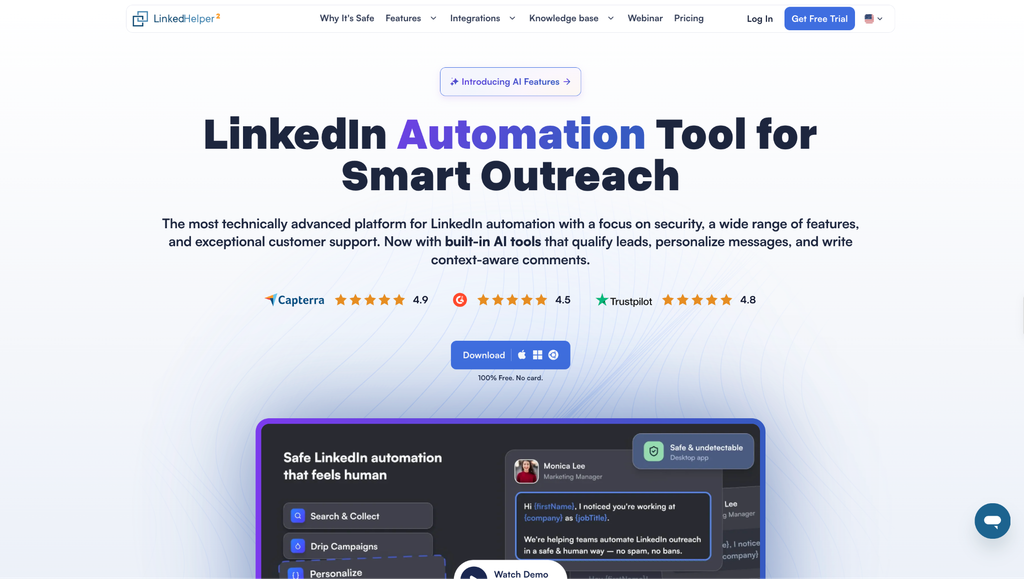
Most tools on this list handle email. Linked Helper covers the other half of your pipeline, giving you safe LinkedIn automation for the prospects you reach through LinkedIn rather than the inbox. It runs in a standalone app with its own built-in browser that acts like a real person on the page, typing and clicking as you would, so you can scale connection requests and follow-ups without putting your account at risk. From there, you build AI-driven campaigns that chain invites, messages, InMails, and timed follow-ups, with conditional branches that adapt to each prospect and lift acceptance rates. It validates your IP and proxy before launch, randomizes daily action limits, and gradually warms up accounts, keeping your activity within natural patterns. For B2B teams, founders, and agencies that treat LinkedIn as a primary channel, it slots in next to your email stack and keeps LinkedIn outreach safe and consistent.
Key features
- Standalone app with its own built-in anti-detect browser, using human-like typing and clicking
- AI-driven campaigns across invites, messages, InMails, and follow-ups with conditional branches
- Built-in IP and proxy validation before launch, randomized daily limits, and gradual warm-up
- Spam-proof messaging with unique AI text and Spintax, plus an automatic invite canceler
- Multi-account isolation with a unique proxy per account for agencies
- Native integrations with nine CRMs including HubSpot, Salesforce and Pipedrive, plus webhooks
- Local sessions and cookies that stay invisible to detection scanners
Quick snapshot
| Aspect | Why it helps |
| LinkedIn-first outreach | Reaches prospects your email tools cannot |
| Human-like automation | Protects your account while you scale |
| Campaign guardrails | IP and proxy checks, randomized limits, and warm-up |
| CRM sync | Keeps LinkedIn activity flowing into your pipeline |
HubSpot

HubSpot is a unified customer platform—CRM at the core, with Sales, Marketing, Service, and CMS Hubs on top. For lead generation, its power is orchestration: capture interest via forms/chat, enrich records, route to sales, and run permission-based sequences and workflows with full funnel visibility. Because everything lives inside the CRM, handoffs are cleaner: marketing qualifies leads, sales runs playbooks and sequences, and revenue teams analyze pipeline from a single source of truth. While HubSpot isn’t for true cold emailing, it’s exceptional once contacts are consented—you can enroll them in multistep nurtures, trigger tasks, and personalize content using firmographics, behavior, and deal context. If you want robust reporting, automation, and alignment across teams, HubSpot provides the governance and scale that point tools can’t match—especially for organizations growing beyond ad-hoc spreadsheets into a systematized, measurable go-to-market.
Key features
- Unified CRM with deals, activities, and custom objects
- Forms, live chat, chatbots, and meeting links
- Sequences/workflows for permission-based outreach
- Lead scoring, routing, and playbooks
- Powerful dashboards and revenue attribution
- Deep ecosystem: native integrations, API, webhooks
Quick snapshot
| Aspect | Why it helps |
| CRM + Hubs | One source of truth from lead to revenue |
| Forms & chat | Convert and qualify inbound efficiently |
| Sequences & workflows | Automate follow-up for opted-in contacts |
| Reporting & governance | Align sales/marketing with auditability |
How to choose the right lead generation tools for businesses
Picking lead generation software is easiest when you judge tools on a few practical dimensions: your use case (outbound, inbound, enrichment), data accuracy (freshness + real-time verification), deliverability (guardrails that prevent bounces/spam), integrations (clean CRM sync and automation), governance (roles, templates, logs), pricing/ROI (cost per verified contact), and compliance (cold vs. permission-based policies). Use the H3 checklists below like a SERP result you can skim fast—each bullet includes a one-line explanation so you can score tools 1–5 and decide what’s objectively better for your stack.
Use-case fit (Outbound vs. Inbound vs. Enrichment)
- Purpose-built for your motion: Outbound needs finder + real-time verifier; inbound needs forms/chat/journeys; enrichment needs bulk API.
- Time to first campaign: Can you build a 100-lead, verified list and launch in hours—not days?
- Learning curve: UI makes common tasks obvious; minimal training for new users.
- Coverage of essentials: No gaps that would force extra tools (e.g., missing verifier or forms).
Data coverage & accuracy
- ICP coverage: Strong titles, geos, industries relevant to your market.
- Freshness cadence: Vendor discloses update cycles so lists don’t go stale.
- Real-time verification: Live checks + risk flags (catch-all, disposable, role accounts).
- Observed bounce rate: Proven low bounces from similar customers or your trial.
Deliverability & verification safeguards
- Catch-all handling: Clear labeling and recommended sending policy to reduce risk.
- Sequence guardrails: Daily caps, throttling, and human-like scheduling protect domain health.
- Warm-up guidance/tools: Built-in or documented warm-up to ramp safely.
- Suppression hygiene: Global blocklists and easy exclusion of risky domains/roles.
Integrations & workflow
- CRM sync quality: Two-way, mapped fields, and dedupe to prevent duplicates.
- Automation surface: Webhooks, API, and Zapier/Make for hands-off flows.
- Extension reliability: Chrome extension works on LinkedIn/sites you use; minimal breakage.
- Reporting in one view: Replies, bounces, meetings/booked calls visible without exports.
Governance & scalability
- Roles & permissions: Granular access for admins, ops, and reps.
- Shared assets: Team templates, saved searches, and centralized sequences enforce best practices.
- Audit logs: Track who changed fields, lists, or send settings.
- Performance at volume: Stable at 10× users/leads without errors or slowdowns.
Pricing model & ROI
- Seats vs. credits clarity: Predictable costs for your mix of users and lookups.
- Fair overages: Rollovers or sensible top-ups avoid bill shock.
- Cost per verified contact: Easy to estimate from pricing; aligns with CAC targets.
- Time to value: You can reach first replies within the first week of adoption.
Compliance & consent posture
- Cold vs. permission-based policies: Vendor clearly states what’s allowed.
- Regional compliance: GDPR/CCPA support, DPAs, and data provenance are documented.
- Consent & suppression: Easy management of unsubscribes, do-not-contact, and opt-outs.
- Mailbox/domain separation: Supports separate sending domains/addresses for cold vs. warm.
Conclusion
After testing what matters – accurate discovery, real-time verification, and deliverability-safe outreach – Snov.io stands out as the best lead generation tool for most businesses. It streamlines the entire workflow (finder → verifier → sequencer) so you can build verified lists and launch thoughtful cadences in the same place, with fewer moving parts and fewer points of failure. That unified approach translates into lower bounce rates, faster time-to-campaign, and clearer reporting—advantages that specialists or disconnected stacks struggle to match.
If you need a complementary finder, Hunter.io remains a solid specialist. For permission-based nurture, Mailchimp and MailerLite excel. And when you need CRM-level orchestration across teams, HubSpot delivers. But for the core job most teams hire lead gen software to do—turn targeted research into real conversations – Snov.io is the most balanced, practical, and scalable choice. Your action plan: define your ICP, spin up a 100-lead test, track cost per verified contact, reply rate, and meetings booked, then scale what works. With Snov.io at the center, you’ll spend less time stitching tools together and more time creating pipeline.

Find Trusted Cardiac Hospitals
Compare heart hospitals by city and services — all in one place.
Explore Hospitals
Lead generation platforms sell the illusion of infinite pipeline, but their core pitfall is polluting CRMs with decaying contact data and burning sender reputation. Enterprise databases like ZoomInfo charge massive annual minimums for firmographic coverage that still yields high bounce rates on mobile direct dials. Low-cost scrapers and aggregators like Apollo democratize volume, yet flooding inboxes with automated cold sequences triggers domain blacklisting and spam filtering. The persistent operational drag is contact decay, where natural job turnover invalidates a quarter of any exported B2B list within months. Rigorous waterfall enrichment and strict manual lead qualification convert actual buyers far better than paying steep subscriptions to mass-blast unverified directories.
Choosing the right lead generation tools is only part of the process; the real impact comes from attracting relevant prospects and nurturing them with personalized communication. Integrating lead capture forms with a CRM and tracking conversion rates at each stage can help businesses identify their most effective channels and improve lead quality while reducing wasted marketing effort.
The best lead generation tool is one that attracts people who genuinely need your product or service. Before choosing a platform, teams should define their target audience and track lead quality, not just lead volume. Easy CRM integration can help keep follow-ups organized and prevent missed opportunities. It is also important to collect contact details transparently and respect privacy choices. Reviewing conversion rates regularly helps teams focus on tools that deliver real business value.
Lead generation tools help businesses find potential customers and build stronger sales opportunities. I think the best tool is one that not only collects leads but also helps identify people who are genuinely interested in the product or service. Features like email automation, lead tracking, and performance reports can save time and improve results. It’s also important to consider pricing, ease of use, and integration with other marketing tools. Choosing the right lead generation tool can help businesses attract quality leads and turn more prospects into customers.
Lead generation tools are most useful when they help teams find the right people, not just collect more contacts. A large list may look impressive, but poor-quality leads can waste time and sales effort. I would compare how each tool checks contact details, tracks buyer interest, and updates records when information changes. CRM integration is also important because sales teams need a clear view of every lead’s history. It helps to measure how many leads become real customers, rather than focusing only on form submissions. The best tool should improve lead quality, reduce manual work, and help teams spend more time on people who are likely to buy.
The best lead generation strategy combines finding the right prospects with understanding what makes them likely to engage. I’d evaluate tools based on lead data accuracy, targeting options, CRM integration, and the ability to track conversions rather than just the number of contacts collected. Automation can save time, but personalized outreach and regular data cleanup still make a big difference. The right tool should help businesses attract qualified leads and build relationships that turn into lasting customers.
A helpful guide that compares lead generation tools and explains how businesses can attract potential customers, automate outreach, improve lead quality, and choose the right platform for their sales and marketing goals.
This is a very insightful roundup — thanks for putting together such a clean, up‑to‑date list of lead generation tools. I especially appreciate how you highlight different use‑cases: whether someone needs a full‑fledged stack (email finder → verification → outreach), a lightweight email marketing setup, or a simple tool for inbound lead capture. It makes it much easier to match a tool to a team’s specific needs instead of blindly copying what others use. For anyone trying to scale lead-gen without overcomplicating the workflow, this guide is super helpful.