
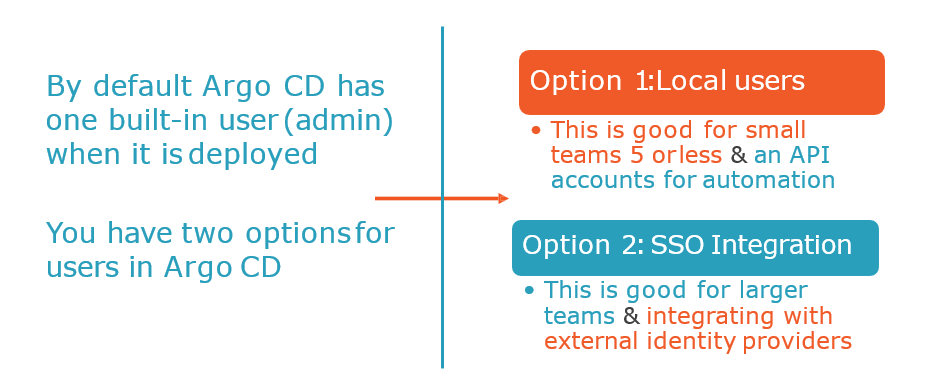
Once installed Argo CD has one built-in admin user that has full access to the system. It is recommended to use admin user only for initial configuration and then switch to local users or configure SSO integration.
Local users/accounts
- The maximum length of a local account’s username is 32.
- Each user might have two capabilities:
apiKey – allows generating authentication tokens for API access
login – allows to login using UI - New users should be defined in
argocd-cmConfigMap: - As soon as additional users are created it is recommended to disable
adminuser:
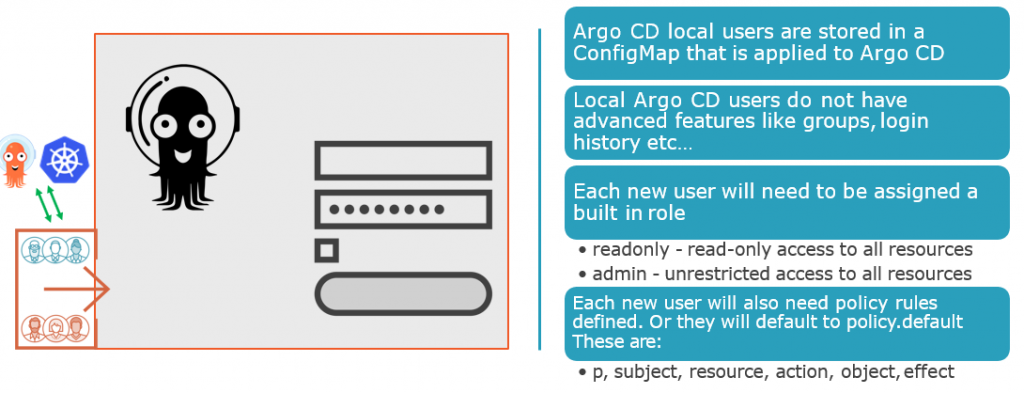
The local users/accounts feature serves two main use-cases:
- Auth tokens for Argo CD management automation. It is possible to configure an API account with limited permissions and generate an authentication token. Such token can be used to automatically create applications, projects etc.
- Additional users for a very small team where use of SSO integration might be considered an overkill. The local users don’t provide advanced features such as groups, login history etc. So if you need such features it is strongly recommended to use SSO.
Create new user
apiVersion: v1
kind: ConfigMap
metadata:
  name: argocd-cm
  namespace: argocd
  labels:
    app.kubernetes.io/name: argocd-cm
    app.kubernetes.io/part-of: argocd
data:
  # add an additional local user with apiKey and login capabilities
  #   apiKey - allows generating API keys
  #   login - allows to login using UI
  accounts.alice: apiKey, login
  # disables user. User is enabled by default
  accounts.alice.enabled: "false"
Disable admin user
apiVersion: v1
kind: ConfigMap
metadata:
  name: argocd-cm
  namespace: argocd
  labels:
    app.kubernetes.io/name: argocd-cm
    app.kubernetes.io/part-of: argocd
data:
  admin.enabled: "false"Code language: JavaScript (javascript)
ArgoCD Account CLI
Available Commands:
  can-i           Can I
  delete-token    Deletes account token
  generate-token  Generate account token
  get             Get account details
  get-user-info   Get user info
  list            List accounts
  update-password Update an account's password
Code language: JavaScript (javascript)
The Argo CD CLI provides set of commands to set user password and generate tokens.
Get full users list

$ argocd account list

Get specific user details

$ argocd account get --account <username>

Set user password

# if you are managing users as the admin user, <current-user-password> should be the current admin password.
$ argocd account update-password \
  --account <name> \
  --current-password <current-user-password> \
  --new-password <new-user-password>

Generate auth token

# if flag --account is omitted then Argo CD generates token for current user
$ argocd account generate-token --account <username>
Code language: PHP (php)
I’m Rajesh Kumar, a DevOps, SRE, DevSecOps, Cloud, and Platform Engineering expert passionate about sharing practical knowledge, real-world experiences, and industry best practices. I have worked at Cotocus and regularly write about technology, travel, investing, health, product reviews, and digital marketing through my various platforms.
I publish technical articles at DevOps School, travel stories at Holiday Landmark, stock market insights at Stocks Mantra, health and fitness guidance at My Medic Plus, product reviews at TrueReviewNow, and SEO and digital marketing strategies at Wizbrand.
Find Trusted Cardiac Hospitals
Compare heart hospitals by city and services — all in one place.
Explore Hospitals