
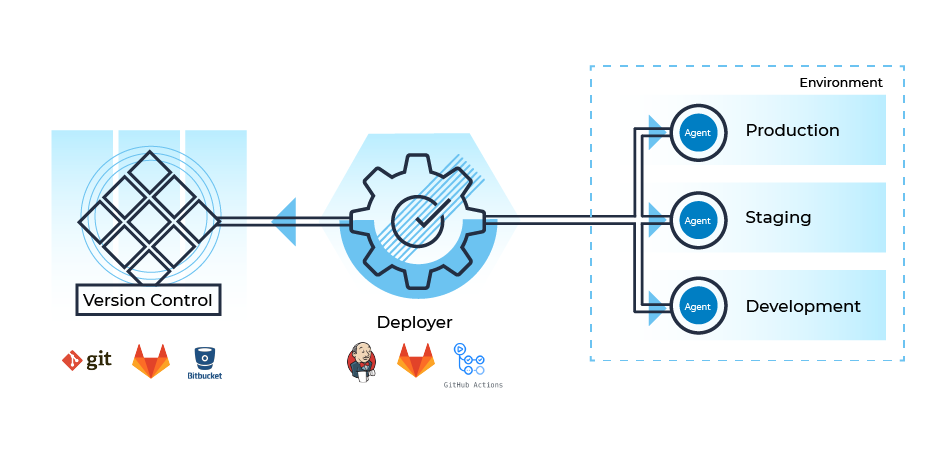
Are you tired of manually deploying your applications and constantly dealing with errors and inconsistencies? Look no further than GitOps for your continuous deployment needs. In this article, we’ll cover the basics of GitOps and how to use it to streamline your deployment process.
What is GitOps?
GitOps is a modern approach to continuous deployment that uses Git as the single source of truth for application deployment. It allows for declarative and automated deployment of applications, infrastructure, and configurations. This means that the desired state of your entire system is defined in Git and automatically applied to your environment, ensuring consistency and reducing the risk of human error.
Getting Started with GitOps
To get started with GitOps, you’ll need to set up a Git repository to serve as the source of truth for your deployment process. This repository will contain all the configuration files, scripts, and application code needed to deploy your application.
Next, you’ll need to set up a GitOps tool such as Argo CD, Flux, or Jenkins X. These tools handle the automation of the deployment process by monitoring the Git repository for changes and applying them to your environment.
The Benefits of GitOps
Using GitOps for continuous deployment offers a number of benefits, including:
- Increased productivity: By automating the deployment process, you can reduce the time and effort required to deploy your applications.
- Consistency: With Git as the single source of truth, you can ensure that your environment is always in the desired state, reducing the risk of human error and inconsistencies.
- Scalability: GitOps allows you to easily scale your deployment process to handle larger and more complex applications.
- Security: By using Git as the source of truth, you can ensure that all changes are auditable and traceable, improving security and compliance.
Best Practices for GitOps
To ensure a successful GitOps deployment process, it’s important to follow a few best practices:
- Version control: All configuration files, scripts, and application code should be version controlled in Git to ensure traceability and consistency.
- Code review: All changes to the Git repository should be reviewed by a peer to ensure quality and prevent errors.
- Testing: Automated testing should be included as part of the deployment process to catch errors before they make it to production.
- Rollback strategy: A rollback strategy should be in place in case of any issues during the deployment process.
Conclusion
In conclusion, GitOps is a powerful tool for continuous deployment that can streamline your deployment process and reduce the risk of human error and inconsistencies. By following the best practices outlined above, you can ensure a successful GitOps deployment process and enjoy the benefits of increased productivity, consistency, scalability, and security. So why wait? Start using GitOps for your continuous deployment needs today!

👤 About the Author
Ashwani is passionate about DevOps, DevSecOps, SRE, MLOps, and AiOps, with a strong drive to simplify and scale modern IT operations. Through continuous learning and sharing, Ashwani helps organizations and engineers adopt best practices for automation, security, reliability, and AI-driven operations.
🌐 Connect & Follow:
Website: WizBrand.com
Facebook: facebook.com/DevOpsSchool
X (Twitter): x.com/DevOpsSchools
LinkedIn: linkedin.com/company/devopsschool
YouTube: youtube.com/@TheDevOpsSchool
Instagram: instagram.com/devopsschool
Quora: devopsschool.quora.com
Email– contact@devopsschool.com
Find Trusted Cardiac Hospitals
Compare heart hospitals by city and services — all in one place.
Explore Hospitals