
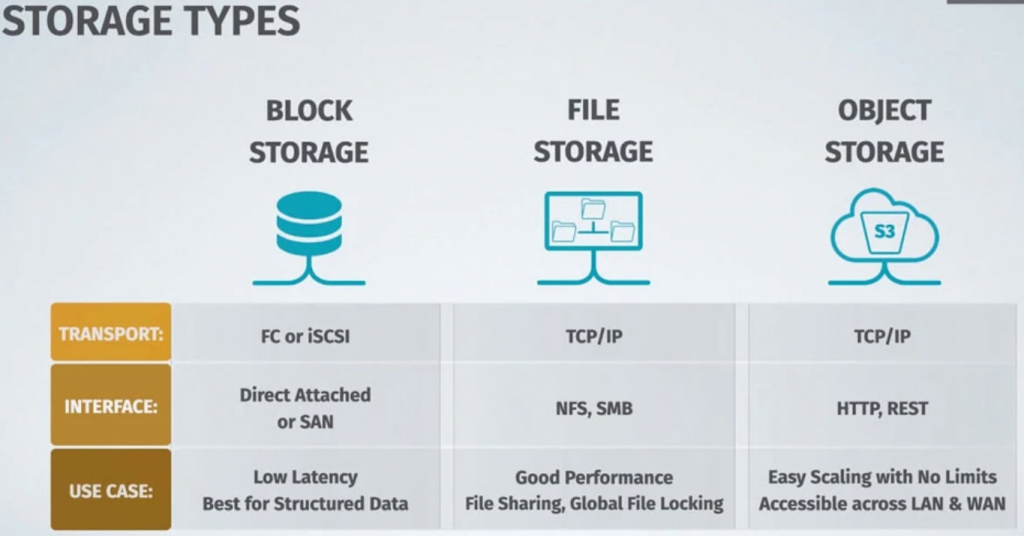
Here is a table that summarizes the key differences between block storage, file storage, and object storage:
| Feature | Block Storage | File Storage | Object Storage |
|---|---|---|---|
| Data organization | Blocks | Files | Objects |
| Performance | High | Medium | Low |
| Flexibility | Low | High | High |
| Scalability | Low | Medium | High |
| Typical use cases | Databases, virtual machines | Documents, images, videos | Backups, archives |
Block storage, file storage, and object storage are three different types of storage solutions used in computing environments. Each has its own characteristics and use cases. Let’s explore the differences between these storage types:
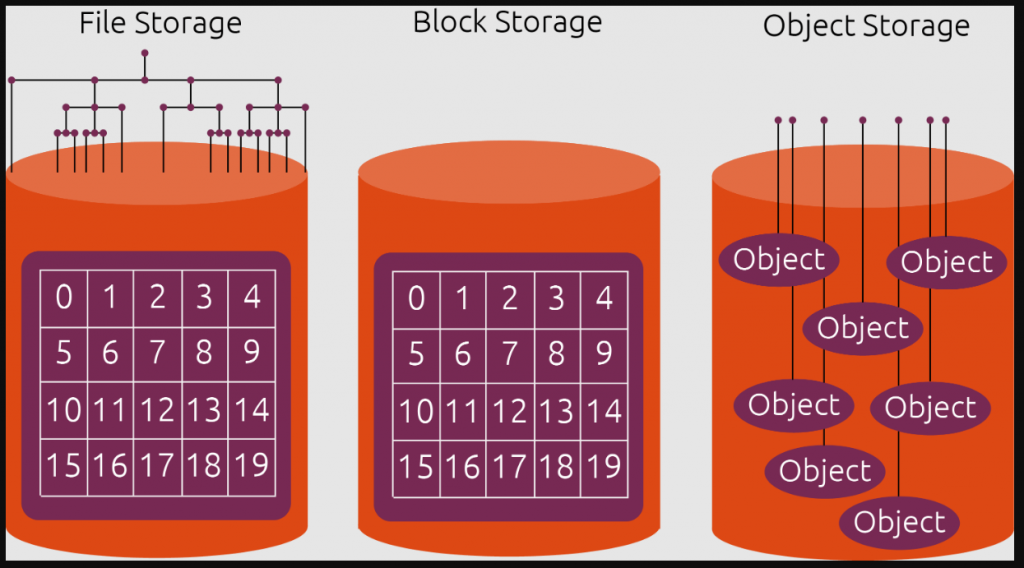
Block Storage:
Characteristics:
- Block storage operates at the lowest level and manages data as individual blocks.
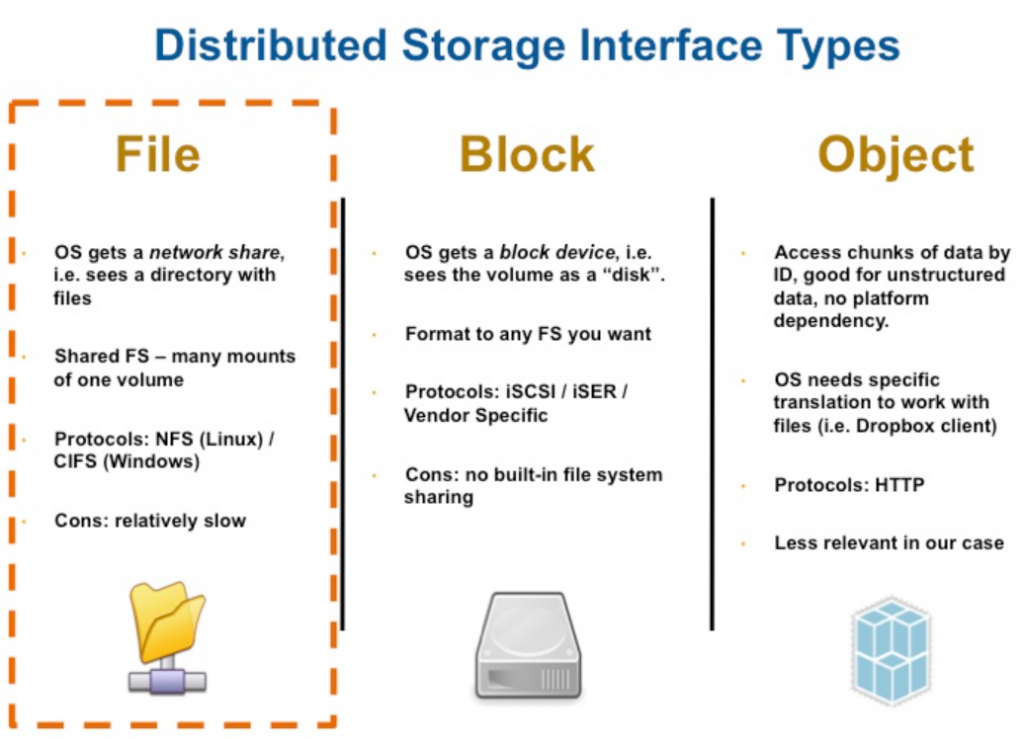
- Each block can be formatted with a file system of choice and treated as an independent hard drive.
- Block devices are typically accessed using protocols like iSCSI and Fibre Channel.
- Commonly used for databases, virtual machines, and applications that require direct access to storage.
Advantages:
- Offers high performance and low latency due to direct access to data blocks.
- Provides flexibility to format and manage file systems as needed.
- Suitable for applications that require precise control over storage.
Use Cases:
- Running databases (e.g., MySQL, PostgreSQL) that demand low latency.
- Virtual machine storage, where VMs require dedicated, high-performance storage.
File Storage:
Characteristics:
- File storage organizes data into a hierarchical structure of directories and files.
- Shared file systems are accessible from multiple machines, making them suitable for collaboration.
- Uses protocols like NFS (Network File System) and SMB (Server Message Block).
Advantages:
- Allows easy sharing and collaboration among users and applications.
- Provides a familiar file system interface for users and applications.
- Suitable for applications that require shared access to files, like file servers and content management systems.
Use Cases:
- Shared network drives for user home directories and group workspaces.
- Hosting web content and serving files to multiple users and applications.
Object Storage:
Characteristics:
- Object storage stores data as objects, each containing the data itself along with metadata and a unique identifier (object key).
- Objects are organized in a flat hierarchy, and each object has a unique URL.
- Scalable and suitable for handling large volumes of unstructured data.
- Accessed using RESTful APIs like Amazon S3, OpenStack Swift, and Azure Blob Storage.
Advantages:
- Highly scalable and can handle vast amounts of data.
- Built-in redundancy and data protection mechanisms.
- Suitable for storing files, images, videos, backups, and archival data.
Use Cases:
- Storing and serving multimedia files (images, videos, audio) for applications and websites.
- Backup and disaster recovery solutions.
- Long-term archival of data for compliance and regulatory purposes.
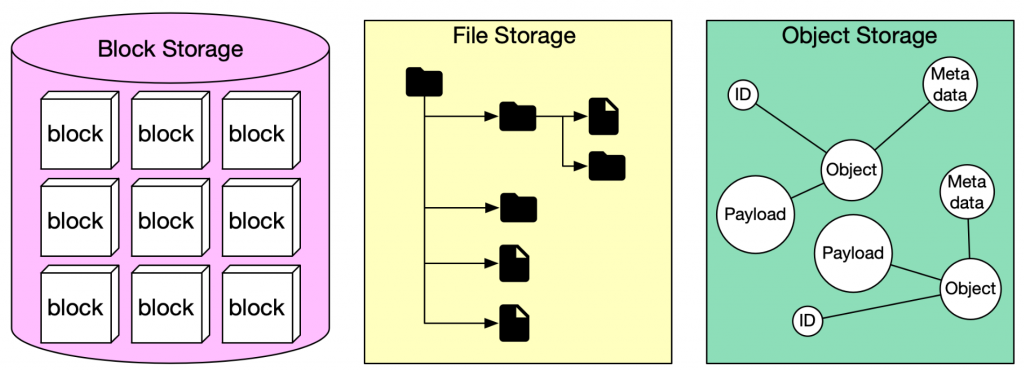
Block storage, file storage, and object storage are all different types of storage that can be used to store data. Each type of storage has its own advantages and disadvantages, and the best type of storage for a particular application will depend on the specific requirements of that application.
Block storage is the most traditional type of storage. It is organized into blocks, which are fixed-size units of data. Block storage is typically used for applications that require high performance, such as databases and virtual machines.
File storage is a more flexible type of storage than block storage. It is organized into files, which can be of any size. File storage is typically used for applications that need to store large amounts of unstructured data, such as documents, images, and videos.
Object storage is the most scalable type of storage. It is organized into objects, which are self-contained units of data that can be accessed independently. Object storage is typically used for applications that need to store large amounts of data that is accessed infrequently, such as backups and archives.
Here is a table that summarizes the key differences between block storage, file storage, and object storage:
| Feature | Block Storage | File Storage | Object Storage |
|---|---|---|---|
| Data organization | Blocks | Files | Objects |
| Performance | High | Medium | Low |
| Flexibility | Low | High | High |
| Scalability | Low | Medium | High |
| Typical use cases | Databases, virtual machines | Documents, images, videos | Backups, archives |
Here are some additional considerations when choosing between block storage, file storage, and object storage:
- The type of application: Some applications require high performance, such as databases and virtual machines. These applications are typically best served by block storage.
- The amount of data: Some applications need to store large amounts of data, such as documents, images, and videos. These applications are typically best served by file storage.
- The need for scalability: Some applications need to be able to scale to handle large amounts of data. These applications are typically best served by object storage.
- The budget: Block storage is typically the most expensive type of storage, followed by file storage and then object storage.

I’m Rajesh Kumar, a DevOps, SRE, DevSecOps, Cloud, and Platform Engineering expert passionate about sharing practical knowledge, real-world experiences, and industry best practices. I have worked at Cotocus and regularly write about technology, travel, investing, health, product reviews, and digital marketing through my various platforms.
I publish technical articles at DevOps School, travel stories at Holiday Landmark, stock market insights at Stocks Mantra, health and fitness guidance at My Medic Plus, product reviews at TrueReviewNow, and SEO and digital marketing strategies at Wizbrand.
Find Trusted Cardiac Hospitals
Compare heart hospitals by city and services — all in one place.
Explore Hospitals
Another consideration is what happens to stored data after it stops being actively used. Production environments often accumulate logs, backups, old media, and historical datasets that remain on expensive storage simply because nobody owns the cleanup process. Defining retention policies and automated lifecycle transitions early can prevent storage estates from growing unnecessarily and make long-term data management much easier.